因为当时为了确保实现脚本的解耦合,我做了一些放到Framework命名空间标明这是可以复用的脚本
这里所有脚本和上一篇中使用的一模一样
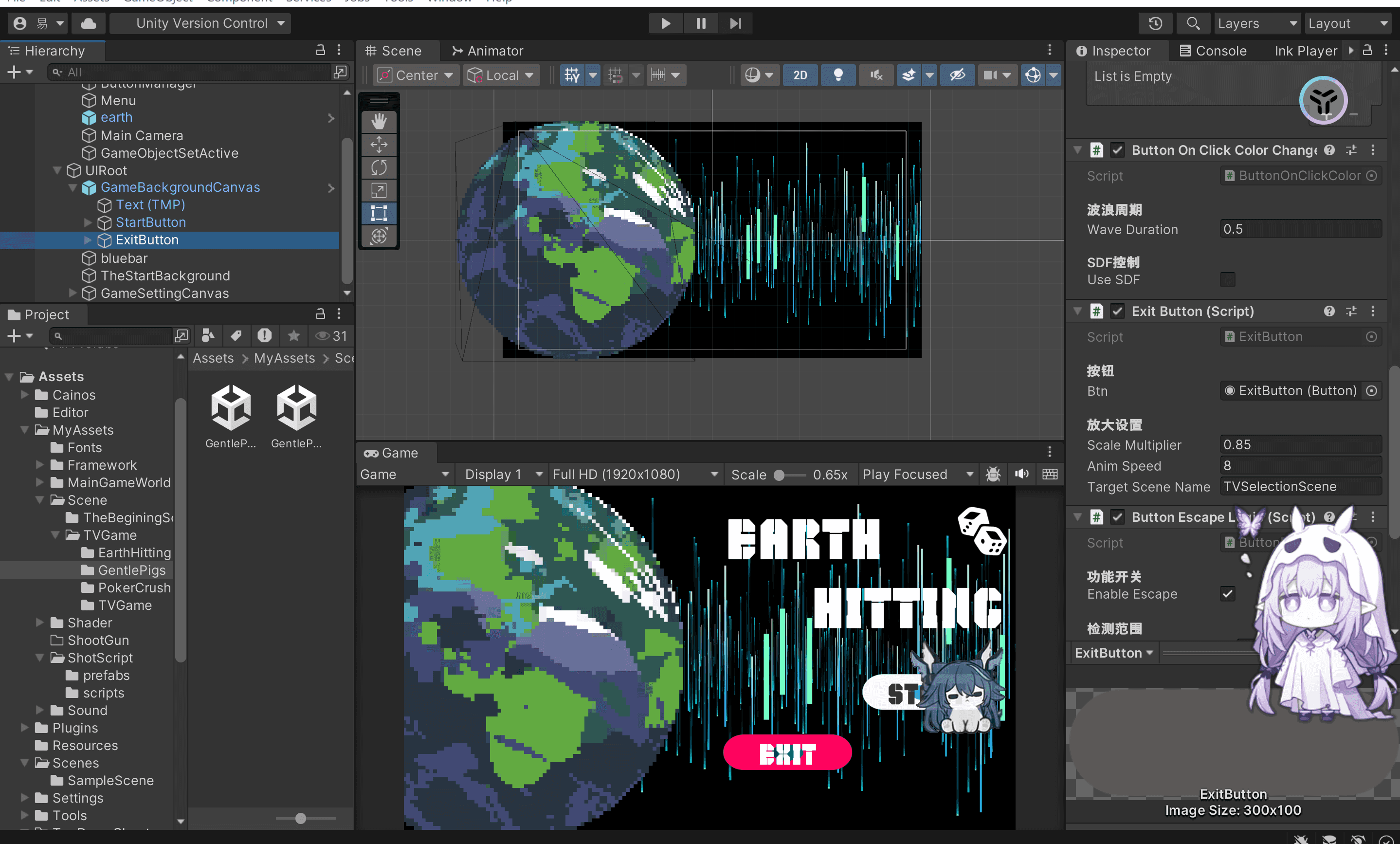
唯一的区别就是给按钮增加了两个shader效果,这个我之前提到过就不说了,反正我是会用shader但是不会写shader
这里多写了一个脚本放到背景图上让它循环向左移动
1
2
3
4
5
6
7
8
9
10
11
12
13
14
15
16
17
18
19
20
21
22
23
24
| using UnityEngine;
namespace MyAssets.Framework
{
public class FloatingItem : MonoBehaviour
{
[Header("浮动参数")]
public float floatAmplitude = 0.5f;
public float floatSpeed = 1f;
private Vector3 startPos;
void Start()
{
startPos = transform.position;
}
void Update()
{
float newY = startPos.y + Mathf.Sin(Time.time * floatSpeed) * floatAmplitude;
transform.position = new Vector3(startPos.x, newY, startPos.z);
}
}
}
|
物体公转
1
2
3
4
5
6
7
8
9
10
11
12
13
14
15
16
17
18
19
20
21
22
23
24
25
26
27
28
29
30
31
32
33
34
35
36
37
38
39
40
41
42
43
44
45
46
47
48
49
50
51
52
53
54
55
56
57
58
59
60
61
62
63
64
65
66
67
68
69
70
71
72
73
74
75
76
| using UnityEngine;
namespace MyAssets.Framework
{
[ExecuteAlways]
public class ItemRevolution : MonoBehaviour
{
[Header("公转中心位置")]
public Transform center;
[Header("轨道半径")]
public float orbitRadius = 2f;
[Header("公转速度")]
public float orbitSpeed = 90f;
[Header("公转方向(默认逆时针)")]
public bool counterClockwise = true;
[Header("可视化轨道")]
public Color orbitColor = Color.cyan;
[Header("轨道分段数")]
public int orbitSegments = 64;
private float currentAngle;
void Start()
{
if (center == null)
{
center = transform.parent;
}else if(center != null)
{
Vector2 offset = transform.position - center.position;
currentAngle = Mathf.Atan2(offset.y, offset.x) * Mathf.Rad2Deg;
orbitRadius = offset.magnitude;
}
}
void Update()
{
if (!Application.isPlaying)
{
return;
}
if (!center)
{
return;
}
float direction = counterClockwise ? 1f : -1f;
currentAngle += orbitSpeed * direction * Time.deltaTime;
float rad = currentAngle * Mathf.Deg2Rad;
Vector2 offset = new Vector2(Mathf.Cos(rad), Mathf.Sin(rad)) * orbitRadius;
transform.position = (Vector2)center.position + offset;
}
void OnDrawGizmos()
{
if (center == null) return;
Gizmos.color = orbitColor;
Vector3 prevPos = center.position + new Vector3(orbitRadius, 0, 0);
for (int i = 1; i <= orbitSegments; i++)
{
float angle = i * (360f / orbitSegments) * Mathf.Deg2Rad;
Vector3 nextPos = center.position + new Vector3(Mathf.Cos(angle), Mathf.Sin(angle), 0) * orbitRadius;
Gizmos.DrawLine(prevPos, nextPos);
prevPos = nextPos;
}
}
}
}
|
物体自转
1
2
3
4
5
6
7
8
9
10
11
12
13
14
15
16
17
18
19
20
21
22
| using UnityEngine;
namespace MyAssets.Framework
{
public class ItemRotation : MonoBehaviour
{
[Header("自转参数")]
[Tooltip("每秒旋转角度(正数)")]
public float rotationSpeed = 90f;
[Tooltip("是否逆时针旋转")]
public bool counterClockwise = true;
void Update()
{
float direction = counterClockwise ? 1f : -1f;
transform.Rotate(0, 0, rotationSpeed * direction * Time.deltaTime);
}
}
}
|

评论区