
之前在哔哩哔哩看到个大佬写的几个非常好看的shader,我一直以为这种效果是用PS搞得图像处理,原来只是程序化生成的玩意
这里科普一下
Unity Shader 是 Unity 引擎中用于控制物体渲染效果的核心工具。它通过 ShaderLab 语言编写,并可嵌套 Cg/HLSL 代码,提供了对材质、光照和纹理的高度控制。
unity shader定义
以下是 Unity Shader 的基本框架及其核心概念。
①—Shader 与材质的关系
Shader 是一段程序,用于定义输入(如颜色、贴图)和输出(渲染结果)。通过将 Shader 与参数结合,生成材质(Material),材质可赋予场景中的物体以实现特定的渲染效果。
②—Unity Shader 的基本框架
Unity Shader 的整体结构如下:
已复制
Shader "ShaderName" {
   Properties {
       // 定义属性
   }
   SubShader {
       // 子着色器
       Pass {
           // 渲染通道
       }
   }
   Fallback "Diffuse" // 回退选项
}
- Properties:定义材质的可调参数,如颜色、贴图等。
- SubShader:包含一个或多个 Pass,用于适配不同的显卡。
- Pass:定义具体的渲染步骤。
- Fallback:当设备不支持当前 Shader 时,使用的替代方案。
③—属性模块(Properties)
Properties 是 Shader 与材质之间的桥梁,用于定义可调参数。常见属性类型包括:
已复制
Properties {
   _Color ("Main Color", Color) = (1,1,1,1) // 颜色
   _MainTex ("Texture", 2D) = "white" {} // 贴图
   _Shininess ("Shininess", Range(0,1)) = 0.5 // 滑动条
}
这些属性可在材质面板中动态调整,并通过 [属性名] 在代码中访问。
④—子着色器(SubShader)
SubShader 是 Shader 的核心部分,包含多个 Pass,用于定义渲染逻辑。每个 Pass 是一个完整的渲染流程,支持以下功能:
已复制
SubShader {
   Tags { "RenderType"="Opaque" }
   Pass {
       CGPROGRAM
       #pragma vertex vert
       #pragma fragment frag
       ENDCG
   }
}
- Tags:设置渲染标签,控制渲染顺序。
- Pass:定义具体的渲染步骤,支持顶点和片元着色器。
Shader 类型
Unity 提供三种主要的 Shader 类型:
- 表面着色器(Surface Shader):封装了光照模型,适合复杂光照场景。
- 顶点/片元着色器(Vertex/Fragment Shader):灵活性高,可实现自定义效果。
- 固定函数着色器(Fixed Function Shader):适用于老旧设备,但功能有限。
以下是shader代码
一, 变色按钮
① 普通效果
已复制
Shader "Unlit/BtnClickWaveShader"
{
   Properties
    {
        _MainTex ("Texture", 2D) = "white" {}
        _ColorLeft ("ColorLeft", Color) = (0,1,0,1)
        _ColorRight ("ColorRight", Color) = (0,0,1,1)
        _Radius ("Radius", Float) = 1
        _RadiusThickness ("RadiusThickness", Float) = 1
        _WaveAlpha ("WaveAlpha", Range(0, 1)) = 0.5
        [HDR] _WaveColor ("WaveColor", Color) = (1,1,1,1)
        [hideInInspector] _CircleScaleOffset ("CircleScaleOffset", Float) = 1 // Width / Height
        [hideInInspector] _MouseUVPos ("MouseUVPos", Vector) = (0,0,0,0)
    }
    SubShader
    {
        Tags { "RenderType"="Transparent" "Queue"="Transparent"}
        Blend SrcAlpha OneMinusSrcAlpha

        Pass
        {
            CGPROGRAM
            #pragma vertex vert
            #pragma fragment frag

            #include "UnityCG.cginc"

            struct appdata
            {
                float4 vertex : POSITION;
                float2 uv : TEXCOORD0;
            };

            struct v2f
            {
                float2 uv : TEXCOORD0;
                float4 vertex : SV_POSITION;
            };

            sampler2D _MainTex;
            float4 _MainTex_ST;
            float4 _ColorLeft;
            float4 _ColorRight;


            v2f vert (appdata v)
            {
                v2f o;
                o.vertex = UnityObjectToClipPos(v.vertex);
                o.uv = TRANSFORM_TEX(v.uv, _MainTex);
                return o;
            }

            fixed4 frag (v2f i) : SV_Target
            {
                fixed4 shape = tex2D(_MainTex, i.uv);
                fixed4 col = fixed4(lerp(_ColorLeft, _ColorRight, i.uv.x).rgb, shape.a);
                return col;
            }
            ENDCG
        }
        Pass
        {
            CGPROGRAM
            #pragma vertex vert
            #pragma fragment frag

            #include "UnityCG.cginc"

            struct appdata
            {
                float4 vertex : POSITION;
                float2 uv : TEXCOORD0;
            };

            struct v2f
            {
                float2 uv : TEXCOORD0;
                float4 vertex : SV_POSITION;
            };

            sampler2D _MainTex;
            float4 _MainTex_ST;
            float4 _ColorLeft;
            float4 _ColorRight;
            float _Radius;
            float _RadiusThickness;
            float _CircleScaleOffset;
            float _WaveAlpha;
            float4 _WaveColor;
            float4 _MouseUVPos;

            fixed4 PixelColor(float2 uv)
            {
                // 将uv原点移到中心
                uv -= _MouseUVPos.xy;
                uv = uv * 2 - 1;
                // 离uv坐标原点的距离,排除屏幕长宽比、图片长宽比的影响
                float2 dv = float2(uv.x, uv.y)* float2(_ScreenParams.x / _ScreenParams.y * _CircleScaleOffset, 1);
                float d = sqrt(pow(dv.x, 2) + pow(dv.y, 2));
                // 用小圆减大圆 得到圆环
                fixed3 c = smoothstep(_Radius-_RadiusThickness, _Radius, d) - smoothstep(_Radius, _Radius+_RadiusThickness, d);

                return fixed4(c * _WaveColor.rgb, saturate(c.g)); // -0.5
            }

            v2f vert (appdata v)
            {
                v2f o;
                o.vertex = UnityObjectToClipPos(v.vertex);
                o.uv = TRANSFORM_TEX(v.uv, _MainTex);
                return o;
            }

            fixed4 frag (v2f i) : SV_Target
            {
                fixed4 shape = tex2D(_MainTex, i.uv);
                fixed4 wave = PixelColor(i.uv);
                wave.rgb *= _WaveColor.rgb;
                wave.a *= shape.a * _WaveAlpha;
                return wave;
            }
            ENDCG
        }
    }
}
② 带SDF效果
已复制
Shader "Unlit/BtnClickWaveSDFShader"
{
    Properties
    {
        _MainTex ("Texture", 2D) = "white" {}
        _ColorLeft ("ColorLeft", Color) = (0,1,0,1)
        _ColorRight ("ColorRight", Color) = (0,0,1,1)
        [hideInInspector] _CircleScaleOffset ("CircleScaleOffset", Float) = 1 // Width / Height
        [hideInInspector] _CirclePosOffset ("CirclePosOffset", Vector) = (0,0,0,0)
        _Radius ("Radius", Float) = 1.5
        _RadiusThickness ("RadiusThickness", Float) = 0.2
        [HDR] _WaveColor ("WaveColor", Color) = (1,1,1,1)
    }
    SubShader
    {
        Tags { "RenderType"="Transparent" "Queue"="Transparent"}
        Blend SrcAlpha OneMinusSrcAlpha

        Pass
        {
            CGPROGRAM
            #pragma vertex vert
            #pragma fragment frag

            #include "UnityCG.cginc"

            struct appdata
            {
                float4 vertex : POSITION;
                float2 uv : TEXCOORD0;
            };

            struct v2f
            {
                float2 uv : TEXCOORD0;
                float4 vertex : SV_POSITION;
            };

            sampler2D _MainTex;
            float4 _MainTex_ST;
            float4 _ColorLeft;
            float4 _ColorRight;

            v2f vert (appdata v)
            {
                v2f o;
                o.vertex = UnityObjectToClipPos(v.vertex);
                o.uv = TRANSFORM_TEX(v.uv, _MainTex);
                return o;
            }

            fixed4 frag (v2f i) : SV_Target
            {
                fixed4 shape = tex2D(_MainTex, i.uv);
                fixed4 col = fixed4(lerp(_ColorLeft, _ColorRight, i.uv.x).rgb, shape.a);
                return col;
            }
            ENDCG
        }
        Pass
        {
            CGPROGRAM
            #pragma vertex vert
            #pragma fragment frag

            #include "UnityCG.cginc"

            struct appdata
            {
                float4 vertex : POSITION;
                float2 uv : TEXCOORD0;
            };

            struct v2f
            {
                float2 uv : TEXCOORD0;
                float4 vertex : SV_POSITION;
            };

            sampler2D _MainTex;
            float4 _MainTex_ST;
            float _CircleScaleOffset;
            float _Radius;
            float4 _CirclePosOffset;
            float _RadiusThickness;
            float4 _WaveColor;

            v2f vert (appdata v)
            {
                v2f o;
                o.vertex = UnityObjectToClipPos(v.vertex);
                o.uv = TRANSFORM_TEX(v.uv, _MainTex);
                return o;
            }

            float sdCircle(float2 p, float r)
            {
                return length(p) - r;
            }
            float opAnnular(float sdf, float r)
            {
                return abs(sdf) - r;
            }

            fixed4 frag (v2f i) : SV_Target
            {
                fixed4 shape = tex2D(_MainTex, i.uv);
                // 全象限
                i.uv -= _CirclePosOffset.xy;
                i.uv.y = 1.0 - i.uv.y;
                i.uv = i.uv * 2 - 1;
                // 消除屏幕拉伸影响
                float w = _ScreenParams.x;
                float h = _ScreenParams.y;
                half co = w/h * _CircleScaleOffset;
                i.uv = float2(i.uv.x * co, i.uv.y);

                float step = 1.0 / w;
                fixed4 circle = smoothstep(step, -step, opAnnular(sdCircle(i.uv, _Radius) , _RadiusThickness));

                fixed4 col = fixed4(circle.rgb, shape.a);
                col.rgb = col.rgb * _WaveColor.rgb;
                col.a *= col.r;
                col.a = _WaveColor.a * col.a;

                return col;
            }
            ENDCG
        }
    }
}
效果图
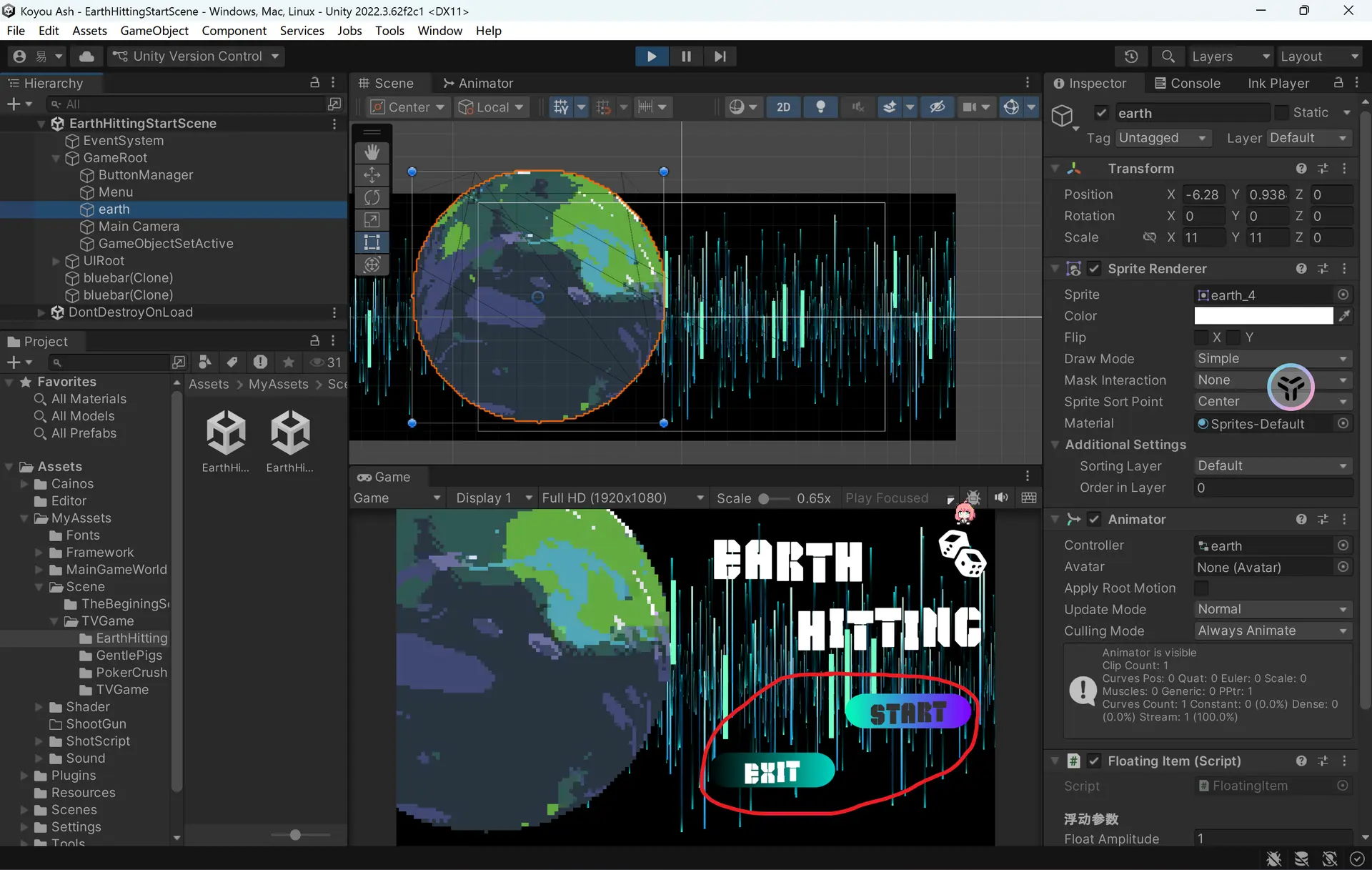
二,圆角窗口
已复制
Shader "Unlit/ImageRoundCorner"
{
    Properties
    {
        [PerRendererData]_MainTex ("Texture", 2D) = "white" {}
        _Color ("Tint", Color) = (1,1,1,1)

        // 四个角的半径
        _Radius ("Corner Radius (LTRB)", Vector) = (0.1, 0.1, 0.1, 0.1)

        // 边框
        _BorderWidth ("Border Width", Float) = 0.0
        _BorderColor ("Border Color", Color) = (1,1,1,1)

        // 全局透明度
        _Alpha ("Alpha", Range(0,1)) = 1.0
    }

    SubShader
    {
        Tags
        {
            "Queue"="Transparent"
            "IgnoreProjector"="True"
            "RenderType"="Transparent"
            "PreviewType"="Plane"
            "CanUseSpriteAtlas"="True"
        }

        Cull Off
        Lighting Off
        ZWrite Off
        Blend SrcAlpha OneMinusSrcAlpha

        Pass
        {
            CGPROGRAM
            #pragma vertex vert
            #pragma fragment frag
            #include "UnityCG.cginc"

            struct appdata
            {
                float4 vertex : POSITION;
                float2 uv : TEXCOORD0;
                float4 color : COLOR;
            };

            struct v2f
            {
                float4 pos : SV_POSITION;
                float2 uv : TEXCOORD0;
                float4 color : COLOR;
            };

            sampler2D _MainTex;
            float4 _MainTex_TexelSize;
            float4 _MainTex_ST;
            fixed4 _Color;

            float4 _Radius; // 左上、右上、右下、左下 半径
            float _BorderWidth;
            fixed4 _BorderColor;
            float _Alpha;

            v2f vert(appdata v)
            {
                v2f o;
                o.pos = UnityObjectToClipPos(v.vertex);
                o.uv = TRANSFORM_TEX(v.uv, _MainTex);
                o.color = v.color * _Color;
                return o;
            }

            fixed4 frag(v2f i) : SV_Target
            {
                fixed4 col = tex2D(_MainTex, i.uv) * i.color;
                float2 uv = i.uv;
                float width = 1.0;
                float height = 1.0;

                float rL = _Radius.x; // 左上
                float rR = _Radius.y; // 右上
                float rB = _Radius.z; // 右下
                float rBL = _Radius.w; // 左下

                float b = _BorderWidth;

                // 四个角圆角+边框处理
                float2 p = uv;

                // 左下角
                if (p.x < rBL && p.y < rBL)
                {
                    float d = distance(p, float2(rBL, rBL));
                    if (d > rBL) col.a = 0;
                    else if (b > 0 && d > rBL - b) col = _BorderColor;
                }

                // 左上角
                if (p.x < rL && p.y > 1 - rL)
                {
                    float d = distance(p, float2(rL, 1 - rL));
                    if (d > rL) col.a = 0;
                    else if (b > 0 && d > rL - b) col = _BorderColor;
                }

                // 右下角
                if (p.x > 1 - rB && p.y < rB)
                {
                    float d = distance(p, float2(1 - rB, rB));
                    if (d > rB) col.a = 0;
                    else if (b > 0 && d > rB - b) col = _BorderColor;
                }

                // 右上角
                if (p.x > 1 - rR && p.y > 1 - rR)
                {
                    float d = distance(p, float2(1 - rR, 1 - rR));
                    if (d > rR) col.a = 0;
                    else if (b > 0 && d > rR - b) col = _BorderColor;
                }

                // 透明度控制
                col.a *= _Alpha;

                return col;
            }
            ENDCG
        }
    }
}
效果图
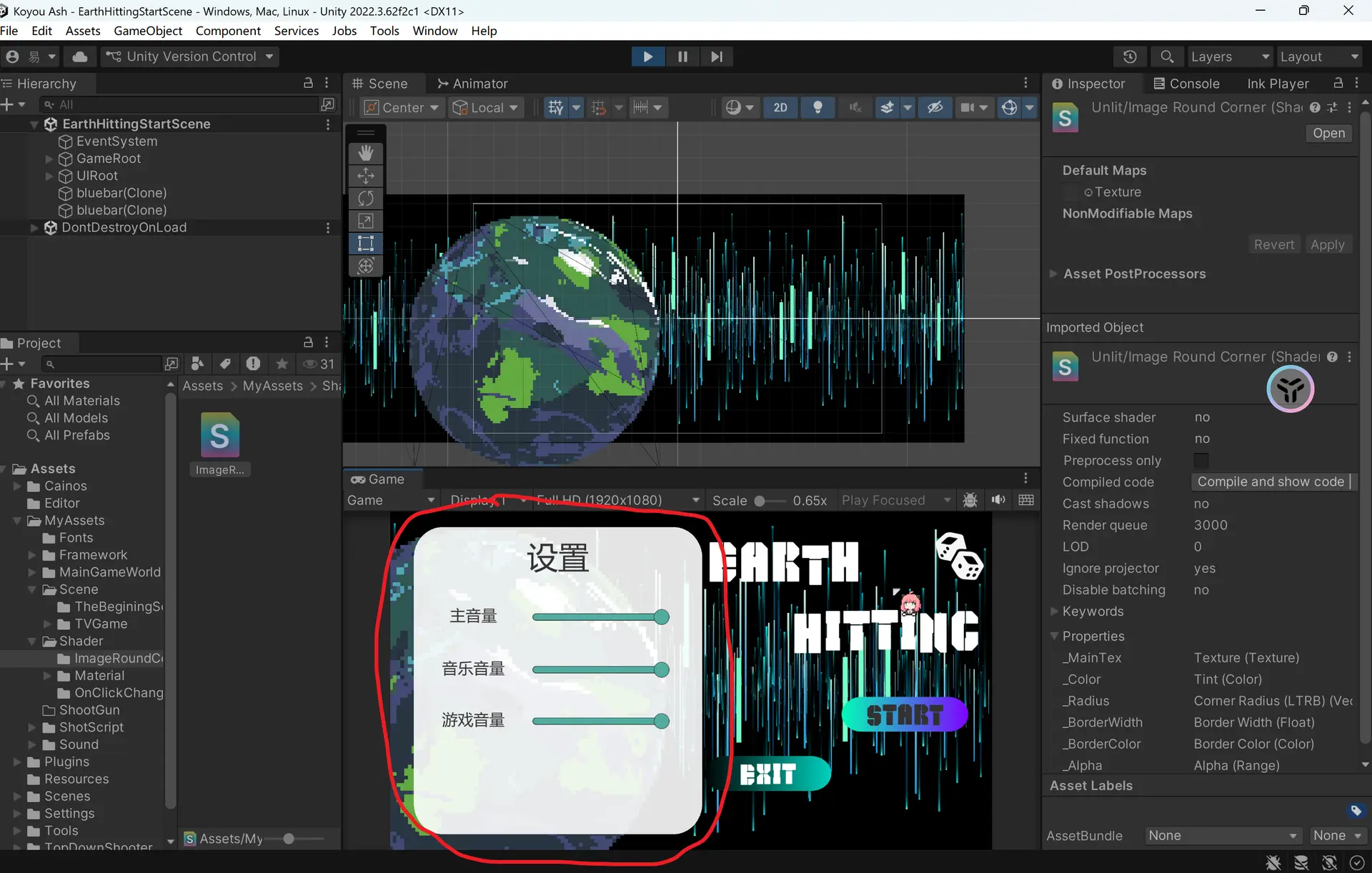
我去,感觉自己对shader的理解程度不到百分之0.01,实锤了我是菜逼看也看不懂改也改不了只会用,听说这玩意的本质是数学,好像是线性代数还是什么,但是我之前线性代数和高等数学差点就挂了……so,数学这种抽象东西还是给AI来吧,人类一败涂地

评论区