之前在哔哩哔哩看到个大佬写的几个非常好看的shader,我一直以为这种效果是用PS搞得图像处理,原来只是程序化生成的玩意

这里科普一下

Unity Shader 是 Unity 引擎中用于控制物体渲染效果的核心工具。它通过 ShaderLab 语言编写,并可嵌套 Cg/HLSL 代码,提供了对材质、光照和纹理的高度控制。

unity shader定义

以下是 Unity Shader 的基本框架及其核心概念。

①—Shader 与材质的关系

Shader 是一段程序,用于定义输入(如颜色、贴图)和输出(渲染结果)。通过将 Shader 与参数结合,生成材质(Material),材质可赋予场景中的物体以实现特定的渲染效果。

②—Unity Shader 的基本框架

Unity Shader 的整体结构如下:

1
2
3
4
5
6
7
8
9
10
11
12
Shader "ShaderName" {
Properties {
// 定义属性
}
SubShader {
// 子着色器
Pass {
// 渲染通道
}
}
Fallback "Diffuse" // 回退选项
}
  • Properties:定义材质的可调参数,如颜色、贴图等。
  • SubShader:包含一个或多个 Pass,用于适配不同的显卡。
  • Pass:定义具体的渲染步骤。
  • Fallback:当设备不支持当前 Shader 时,使用的替代方案。

③—属性模块(Properties)

Properties 是 Shader 与材质之间的桥梁,用于定义可调参数。常见属性类型包括:

1
2
3
4
5
Properties {
_Color ("Main Color", Color) = (1,1,1,1) // 颜色
_MainTex ("Texture", 2D) = "white" {} // 贴图
_Shininess ("Shininess", Range(0,1)) = 0.5 // 滑动条
}

这些属性可在材质面板中动态调整,并通过 [属性名] 在代码中访问。

④—子着色器(SubShader)

SubShader 是 Shader 的核心部分,包含多个 Pass,用于定义渲染逻辑。每个 Pass 是一个完整的渲染流程,支持以下功能:

1
2
3
4
5
6
7
8
9
SubShader {
Tags { "RenderType"="Opaque" }
Pass {
CGPROGRAM
#pragma vertex vert
#pragma fragment frag
ENDCG
}
}
  • Tags:设置渲染标签,控制渲染顺序。
  • Pass:定义具体的渲染步骤,支持顶点和片元着色器。

Shader 类型

Unity 提供三种主要的 Shader 类型:

  • 表面着色器(Surface Shader):封装了光照模型,适合复杂光照场景。
  • 顶点/片元着色器(Vertex/Fragment Shader):灵活性高,可实现自定义效果。
  • 固定函数着色器(Fixed Function Shader):适用于老旧设备,但功能有限。

以下是shader代码

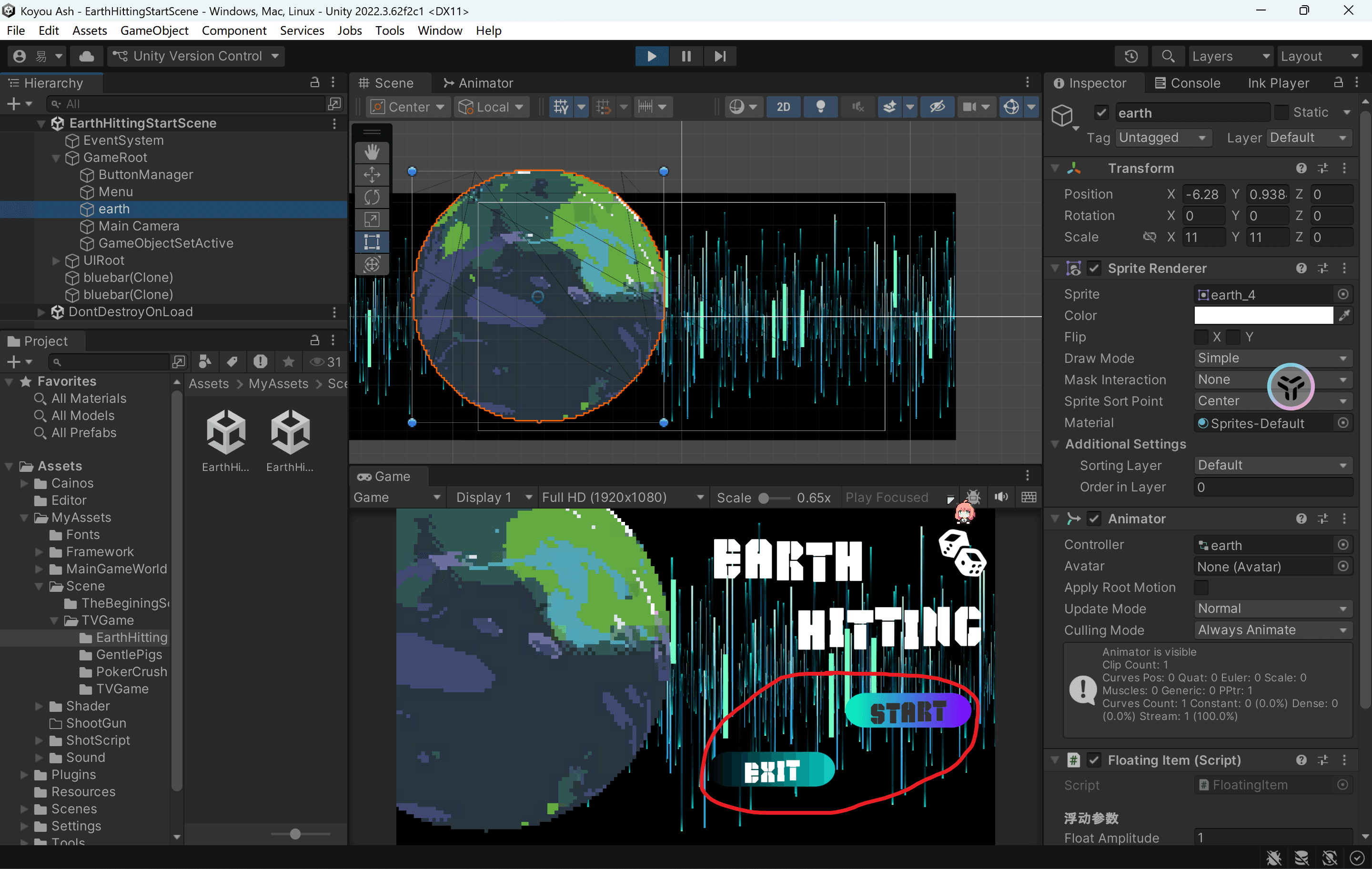
一, 变色按钮

① 普通效果

1
2
3
4
5
6
7
8
9
10
11
12
13
14
15
16
17
18
19
20
21
22
23
24
25
26
27
28
29
30
31
32
33
34
35
36
37
38
39
40
41
42
43
44
45
46
47
48
49
50
51
52
53
54
55
56
57
58
59
60
61
62
63
64
65
66
67
68
69
70
71
72
73
74
75
76
77
78
79
80
81
82
83
84
85
86
87
88
89
90
91
92
93
94
95
96
97
98
99
100
101
102
103
104
105
106
107
108
109
110
111
112
113
114
115
116
117
118
119
120
121
122
123
124
125
126
Shader "Unlit/BtnClickWaveShader"
{
Properties
{
_MainTex ("Texture", 2D) = "white" {}
_ColorLeft ("ColorLeft", Color) = (0,1,0,1)
_ColorRight ("ColorRight", Color) = (0,0,1,1)
_Radius ("Radius", Float) = 1
_RadiusThickness ("RadiusThickness", Float) = 1
_WaveAlpha ("WaveAlpha", Range(0, 1)) = 0.5
[HDR] _WaveColor ("WaveColor", Color) = (1,1,1,1)
[hideInInspector] _CircleScaleOffset ("CircleScaleOffset", Float) = 1 // Width / Height
[hideInInspector] _MouseUVPos ("MouseUVPos", Vector) = (0,0,0,0)
}
SubShader
{
Tags { "RenderType"="Transparent" "Queue"="Transparent"}
Blend SrcAlpha OneMinusSrcAlpha

Pass
{
CGPROGRAM
#pragma vertex vert
#pragma fragment frag

#include "UnityCG.cginc"

struct appdata
{
float4 vertex : POSITION;
float2 uv : TEXCOORD0;
};

struct v2f
{
float2 uv : TEXCOORD0;
float4 vertex : SV_POSITION;
};

sampler2D _MainTex;
float4 _MainTex_ST;
float4 _ColorLeft;
float4 _ColorRight;


v2f vert (appdata v)
{
v2f o;
o.vertex = UnityObjectToClipPos(v.vertex);
o.uv = TRANSFORM_TEX(v.uv, _MainTex);
return o;
}

fixed4 frag (v2f i) : SV_Target
{
fixed4 shape = tex2D(_MainTex, i.uv);
fixed4 col = fixed4(lerp(_ColorLeft, _ColorRight, i.uv.x).rgb, shape.a);
return col;
}
ENDCG
}
Pass
{
CGPROGRAM
#pragma vertex vert
#pragma fragment frag

#include "UnityCG.cginc"

struct appdata
{
float4 vertex : POSITION;
float2 uv : TEXCOORD0;
};

struct v2f
{
float2 uv : TEXCOORD0;
float4 vertex : SV_POSITION;
};

sampler2D _MainTex;
float4 _MainTex_ST;
float4 _ColorLeft;
float4 _ColorRight;
float _Radius;
float _RadiusThickness;
float _CircleScaleOffset;
float _WaveAlpha;
float4 _WaveColor;
float4 _MouseUVPos;

fixed4 PixelColor(float2 uv)
{
// 将uv原点移到中心
uv -= _MouseUVPos.xy;
uv = uv * 2 - 1;
// 离uv坐标原点的距离,排除屏幕长宽比、图片长宽比的影响
float2 dv = float2(uv.x, uv.y)* float2(_ScreenParams.x / _ScreenParams.y * _CircleScaleOffset, 1);
float d = sqrt(pow(dv.x, 2) + pow(dv.y, 2));
// 用小圆减大圆 得到圆环
fixed3 c = smoothstep(_Radius-_RadiusThickness, _Radius, d) - smoothstep(_Radius, _Radius+_RadiusThickness, d);

return fixed4(c * _WaveColor.rgb, saturate(c.g)); // -0.5
}

v2f vert (appdata v)
{
v2f o;
o.vertex = UnityObjectToClipPos(v.vertex);
o.uv = TRANSFORM_TEX(v.uv, _MainTex);
return o;
}

fixed4 frag (v2f i) : SV_Target
{
fixed4 shape = tex2D(_MainTex, i.uv);
fixed4 wave = PixelColor(i.uv);
wave.rgb *= _WaveColor.rgb;
wave.a *= shape.a * _WaveAlpha;
return wave;
}
ENDCG
}
}
}

② 带SDF效果

1
2
3
4
5
6
7
8
9
10
11
12
13
14
15
16
17
18
19
20
21
22
23
24
25
26
27
28
29
30
31
32
33
34
35
36
37
38
39
40
41
42
43
44
45
46
47
48
49
50
51
52
53
54
55
56
57
58
59
60
61
62
63
64
65
66
67
68
69
70
71
72
73
74
75
76
77
78
79
80
81
82
83
84
85
86
87
88
89
90
91
92
93
94
95
96
97
98
99
100
101
102
103
104
105
106
107
108
109
110
111
112
113
114
115
116
117
118
119
120
121
122
123
124
125
126
127
128
129
130
131
Shader "Unlit/BtnClickWaveSDFShader"
{
Properties
{
_MainTex ("Texture", 2D) = "white" {}
_ColorLeft ("ColorLeft", Color) = (0,1,0,1)
_ColorRight ("ColorRight", Color) = (0,0,1,1)
[hideInInspector] _CircleScaleOffset ("CircleScaleOffset", Float) = 1 // Width / Height
[hideInInspector] _CirclePosOffset ("CirclePosOffset", Vector) = (0,0,0,0)
_Radius ("Radius", Float) = 1.5
_RadiusThickness ("RadiusThickness", Float) = 0.2
[HDR] _WaveColor ("WaveColor", Color) = (1,1,1,1)
}
SubShader
{
Tags { "RenderType"="Transparent" "Queue"="Transparent"}
Blend SrcAlpha OneMinusSrcAlpha

Pass
{
CGPROGRAM
#pragma vertex vert
#pragma fragment frag

#include "UnityCG.cginc"

struct appdata
{
float4 vertex : POSITION;
float2 uv : TEXCOORD0;
};

struct v2f
{
float2 uv : TEXCOORD0;
float4 vertex : SV_POSITION;
};

sampler2D _MainTex;
float4 _MainTex_ST;
float4 _ColorLeft;
float4 _ColorRight;

v2f vert (appdata v)
{
v2f o;
o.vertex = UnityObjectToClipPos(v.vertex);
o.uv = TRANSFORM_TEX(v.uv, _MainTex);
return o;
}

fixed4 frag (v2f i) : SV_Target
{
fixed4 shape = tex2D(_MainTex, i.uv);
fixed4 col = fixed4(lerp(_ColorLeft, _ColorRight, i.uv.x).rgb, shape.a);
return col;
}
ENDCG
}
Pass
{
CGPROGRAM
#pragma vertex vert
#pragma fragment frag

#include "UnityCG.cginc"

struct appdata
{
float4 vertex : POSITION;
float2 uv : TEXCOORD0;
};

struct v2f
{
float2 uv : TEXCOORD0;
float4 vertex : SV_POSITION;
};

sampler2D _MainTex;
float4 _MainTex_ST;
float _CircleScaleOffset;
float _Radius;
float4 _CirclePosOffset;
float _RadiusThickness;
float4 _WaveColor;

v2f vert (appdata v)
{
v2f o;
o.vertex = UnityObjectToClipPos(v.vertex);
o.uv = TRANSFORM_TEX(v.uv, _MainTex);
return o;
}

float sdCircle(float2 p, float r)
{
return length(p) - r;
}
float opAnnular(float sdf, float r)
{
return abs(sdf) - r;
}

fixed4 frag (v2f i) : SV_Target
{
fixed4 shape = tex2D(_MainTex, i.uv);
// 全象限
i.uv -= _CirclePosOffset.xy;
i.uv.y = 1.0 - i.uv.y;
i.uv = i.uv * 2 - 1;
// 消除屏幕拉伸影响
float w = _ScreenParams.x;
float h = _ScreenParams.y;
half co = w/h * _CircleScaleOffset;
i.uv = float2(i.uv.x * co, i.uv.y);

float step = 1.0 / w;
fixed4 circle = smoothstep(step, -step, opAnnular(sdCircle(i.uv, _Radius) , _RadiusThickness));

fixed4 col = fixed4(circle.rgb, shape.a);
col.rgb = col.rgb * _WaveColor.rgb;
col.a *= col.r;
col.a = _WaveColor.a * col.a;

return col;
}
ENDCG
}
}
}

效果图

image-20260201233916124

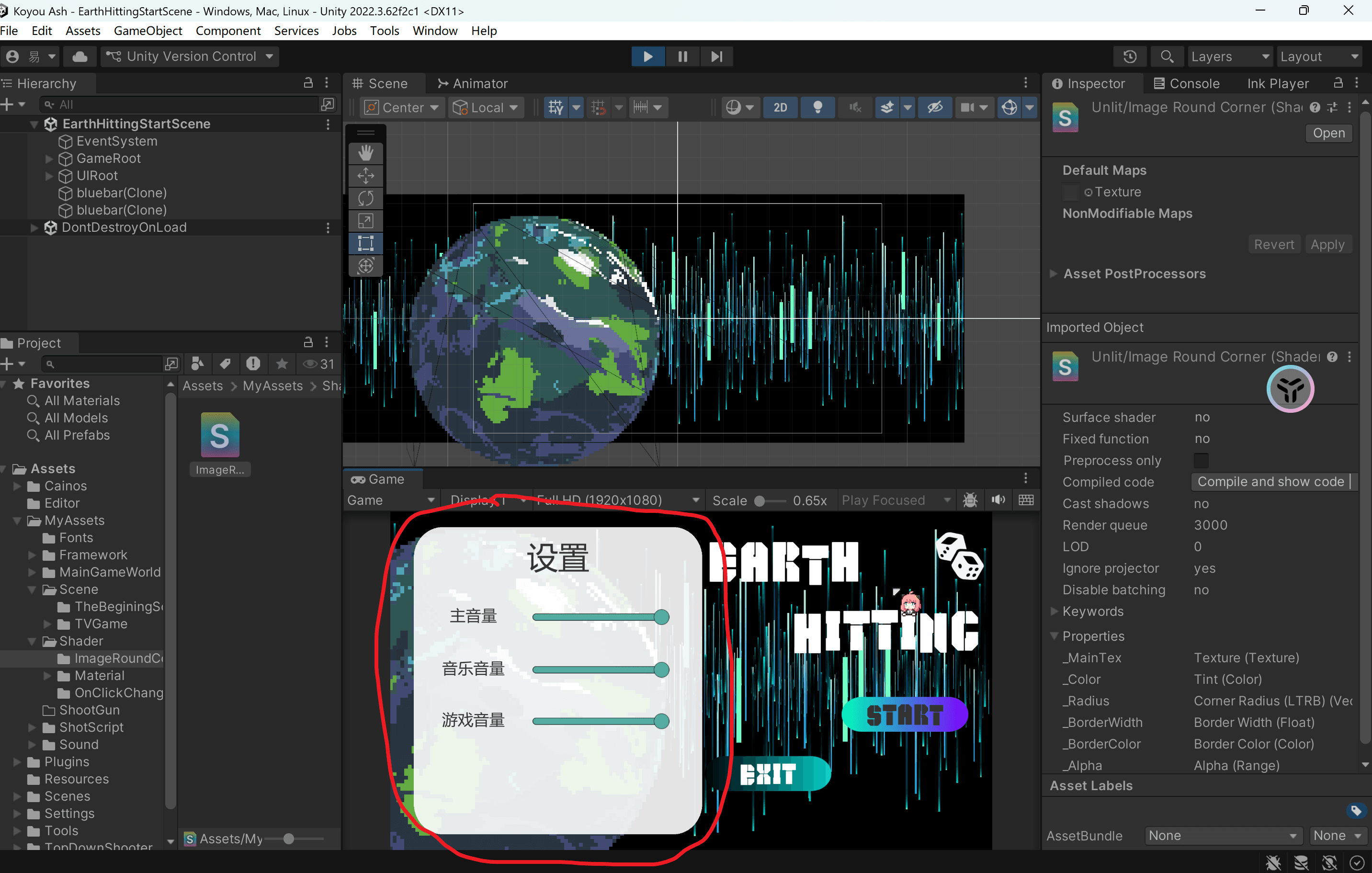
二,圆角窗口

1
2
3
4
5
6
7
8
9
10
11
12
13
14
15
16
17
18
19
20
21
22
23
24
25
26
27
28
29
30
31
32
33
34
35
36
37
38
39
40
41
42
43
44
45
46
47
48
49
50
51
52
53
54
55
56
57
58
59
60
61
62
63
64
65
66
67
68
69
70
71
72
73
74
75
76
77
78
79
80
81
82
83
84
85
86
87
88
89
90
91
92
93
94
95
96
97
98
99
100
101
102
103
104
105
106
107
108
109
110
111
112
113
114
115
116
117
118
119
120
121
122
123
124
125
126
127
128
129
130
131
132
Shader "Unlit/ImageRoundCorner"
{
Properties
{
[PerRendererData]_MainTex ("Texture", 2D) = "white" {}
_Color ("Tint", Color) = (1,1,1,1)

// 四个角的半径
_Radius ("Corner Radius (LTRB)", Vector) = (0.1, 0.1, 0.1, 0.1)

// 边框
_BorderWidth ("Border Width", Float) = 0.0
_BorderColor ("Border Color", Color) = (1,1,1,1)

// 全局透明度
_Alpha ("Alpha", Range(0,1)) = 1.0
}

SubShader
{
Tags
{
"Queue"="Transparent"
"IgnoreProjector"="True"
"RenderType"="Transparent"
"PreviewType"="Plane"
"CanUseSpriteAtlas"="True"
}

Cull Off
Lighting Off
ZWrite Off
Blend SrcAlpha OneMinusSrcAlpha

Pass
{
CGPROGRAM
#pragma vertex vert
#pragma fragment frag
#include "UnityCG.cginc"

struct appdata
{
float4 vertex : POSITION;
float2 uv : TEXCOORD0;
float4 color : COLOR;
};

struct v2f
{
float4 pos : SV_POSITION;
float2 uv : TEXCOORD0;
float4 color : COLOR;
};

sampler2D _MainTex;
float4 _MainTex_TexelSize;
float4 _MainTex_ST;
fixed4 _Color;

float4 _Radius; // 左上、右上、右下、左下 半径
float _BorderWidth;
fixed4 _BorderColor;
float _Alpha;

v2f vert(appdata v)
{
v2f o;
o.pos = UnityObjectToClipPos(v.vertex);
o.uv = TRANSFORM_TEX(v.uv, _MainTex);
o.color = v.color * _Color;
return o;
}

fixed4 frag(v2f i) : SV_Target
{
fixed4 col = tex2D(_MainTex, i.uv) * i.color;
float2 uv = i.uv;
float width = 1.0;
float height = 1.0;

float rL = _Radius.x; // 左上
float rR = _Radius.y; // 右上
float rB = _Radius.z; // 右下
float rBL = _Radius.w; // 左下

float b = _BorderWidth;

// 四个角圆角+边框处理
float2 p = uv;

// 左下角
if (p.x < rBL && p.y < rBL)
{
float d = distance(p, float2(rBL, rBL));
if (d > rBL) col.a = 0;
else if (b > 0 && d > rBL - b) col = _BorderColor;
}

// 左上角
if (p.x < rL && p.y > 1 - rL)
{
float d = distance(p, float2(rL, 1 - rL));
if (d > rL) col.a = 0;
else if (b > 0 && d > rL - b) col = _BorderColor;
}

// 右下角
if (p.x > 1 - rB && p.y < rB)
{
float d = distance(p, float2(1 - rB, rB));
if (d > rB) col.a = 0;
else if (b > 0 && d > rB - b) col = _BorderColor;
}

// 右上角
if (p.x > 1 - rR && p.y > 1 - rR)
{
float d = distance(p, float2(1 - rR, 1 - rR));
if (d > rR) col.a = 0;
else if (b > 0 && d > rR - b) col = _BorderColor;
}

// 透明度控制
col.a *= _Alpha;

return col;
}
ENDCG
}
}
}

效果图

image-20260201234237217

我去,感觉自己对shader的理解程度不到百分之0.01,实锤了我是菜逼看也看不懂改也改不了只会用,听说这玩意的本质是数学,好像是线性代数还是什么,但是我之前线性代数和高等数学差点就挂了……so,数学这种抽象东西还是给AI来吧,人类一败涂地1f4361f4361f436