
今天来看自定义函数
因为部分想要的效果无法通过unity内置的节点实现,所以我们可以自定义函数
众所周知,unity的shdergraph本质上是shader的HLSL和ShaderLab代码的可视化,这是计算机图形学的内容
但是shadergraph具有一定的局限性,比如同样的shadergraph换一个引擎就不能用了,以及部分效果无法用节点实现
如果你对脚本版本的shader感兴趣可以学一下方便理解节点(不过我数学不好,看不懂)
我们复用之前学习自定义光照时的celshaded的shadergraph
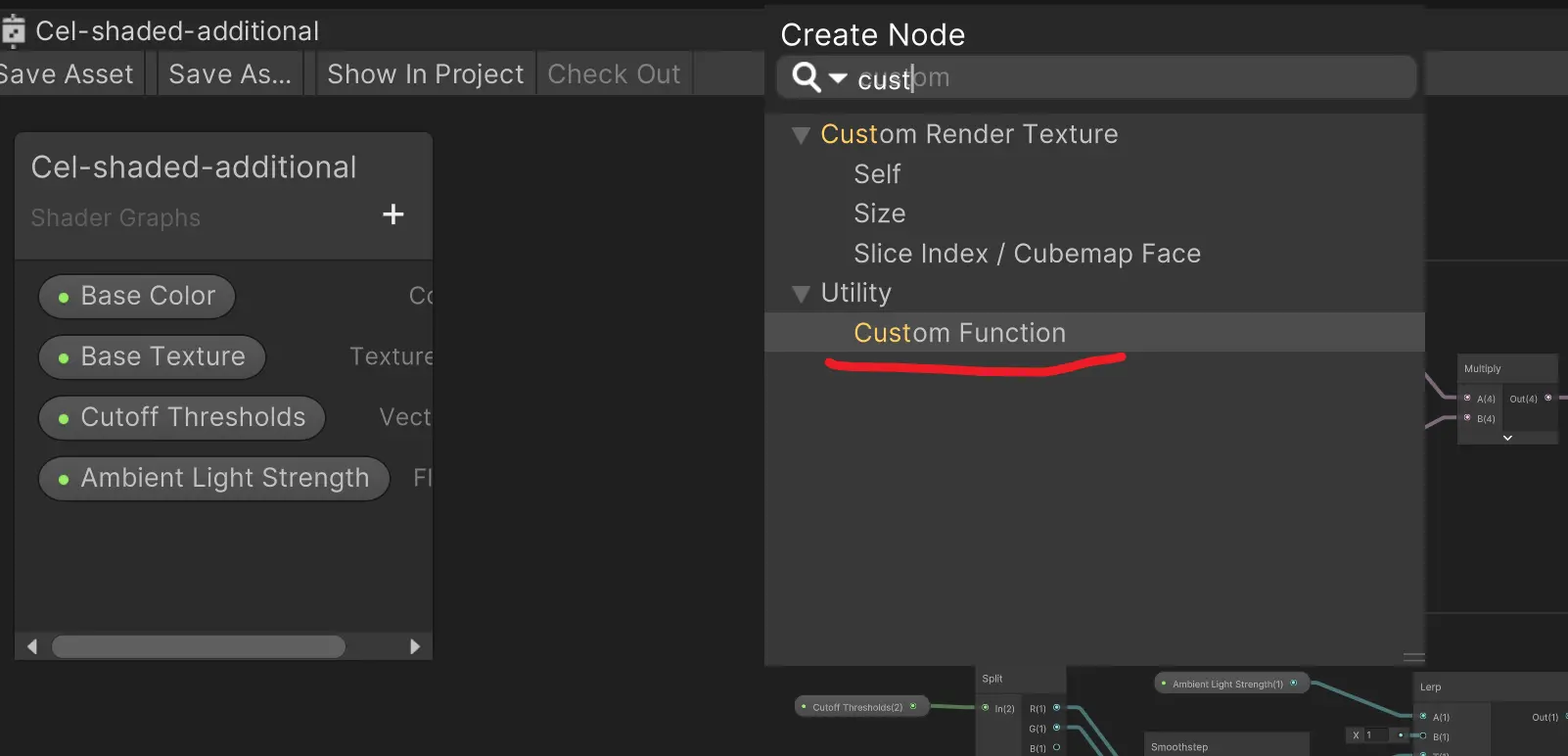
我们首先创建自定义节点
然后自己在VScode或者VS或Rider里创建一个hlsl文件
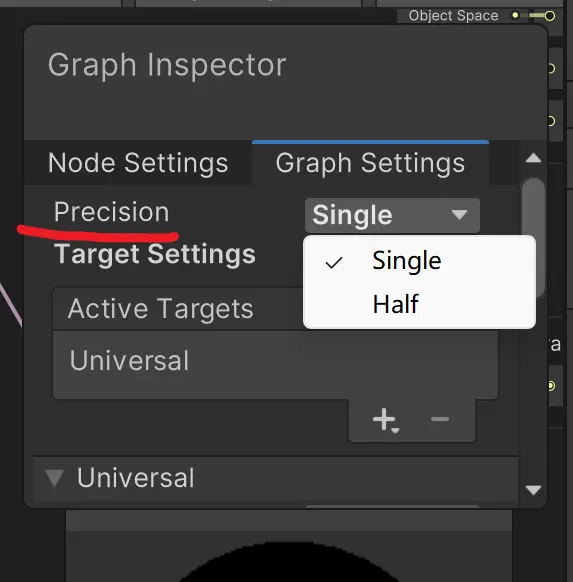
在 Unity Shader Graph 中,Precision(精度) 指的是节点和整个 Shader 计算时使用的数值精度类型。它主要影响 GPU 性能、内存占用 和 渲染质量
| 精度 | 全称 | 说明 | 适用场景 |
|---|---|---|---|
| Half | 16-bit floating point (fp16) | 低精度,计算快,占用少 | 颜色、UV、简单运算、移动设备 |
| Single(float) | 32-bit floating point (fp32) | 高精度,计算慢,占用多 | 位置、深度、复杂数学运算、需要高精度的效果 |
我们在hlsl里输入以下代码,这里就直接给完整的
#ifndef ADDITIONAL_LIGHT_INCLUDED
#define ADDITIONAL_LIGHT_INCLUDED

void MainLight_float(float3 WorldPos, out float3 Direction, out float3 Color, out float Attenuation)
{
#ifdef SHADERGRAPH_PREVIEW
    Direction = normalize(float3(1.0f, 1.0f, 0.0f));
    Color = 1.0f;
    Attenuation = 1.0f;
#else
    Light mainLight = GetMainLight();
    Direction = mainLight.direction;
    Color = mainLight.color;
    Attenuation = mainLight.distanceAttenuation;
#endif
}

void MainLight_half(half3 WorldPos, out half3 Direction, out half3 Color, out half Attenuation)
{
#ifdef SHADERGRAPH_PREVIEW
    Direction = normalize(half3(1.0f, 1.0f, 0.0f));
    Color = 1.0f;
    Attenuation = 1.0f;
#else
    Light mainLight = GetMainLight();
    Direction = mainLight.direction;
    Color = mainLight.color;
    Attenuation = mainLight.distanceAttenuation;
#endif
}

void AdditionalLight_float(float3 WorldPos, int lightID, out float3 Direction, out float3 Color, out float Attenuation)
{
    Direction = normalize(float3(1.0f, 1.0f, 0.0f));
    Color = 0.0f;
    Attenuation = 0.0f;

#ifndef SHADERGRAPH_PREVIEW
    int lightCount = GetAdditionalLightsCount();
    if(lightID < lightCount)
    {
        Light light = GetAdditionalLight(lightID, WorldPos);
        Direction = light.direction;
        Color = light.color;
        Attenuation = light.distanceAttenuation;
    }
#endif
}

void AdditionalLight_half(half3 WorldPos, int lightID, out half3 Direction, out half3 Color, out half Attenuation)
{
    Direction = normalize(half3(1.0f, 1.0f, 0.0f));
    Color = 0.0f;
    Attenuation = 0.0f;

#ifndef SHADERGRAPH_PREVIEW
    int lightCount = GetAdditionalLightsCount();
    if(lightID < lightCount)
    {
        Light light = GetAdditionalLight(lightID, WorldPos);
        Direction = light.direction;
        Color = light.color;
        Attenuation = light.distanceAttenuation;
    }
#endif
}

void AllAdditionalLights_float(float3 WorldPos, float3 WorldNormal, float2 CutoffThresholds, out float3 LightColor)
{
    LightColor = 0.0f;

#ifndef SHADERGRAPH_PREVIEW
    int lightCount = GetAdditionalLightsCount();

    for(int i = 0; i < lightCount; ++i)
    {
        Light light = GetAdditionalLight(i, WorldPos);

        float3 color = dot(light.direction, WorldNormal);
        color = smoothstep(CutoffThresholds.x, CutoffThresholds.y, color);
        color *= light.color;
        color *= light.distanceAttenuation;

        LightColor += color;
    }
#endif
}

void AllAdditionalLights_half(half3 WorldPos, half3 WorldNormal, half2 CutoffThresholds, out half3 LightColor)
{
    LightColor = 0.0f;

#ifndef SHADERGRAPH_PREVIEW
    int lightCount = GetAdditionalLightsCount();

    for(int i = 0; i < lightCount; ++i)
    {
        Light light = GetAdditionalLight(i, WorldPos);

        float3 color = dot(light.direction, WorldNormal);
        color = smoothstep(CutoffThresholds.x, CutoffThresholds.y, color);
        color *= light.color;
        color *= light.distanceAttenuation;

        LightColor += color;
    }
#endif
}

#endif // ADDITIONAL_LIGHT_INCLUDED
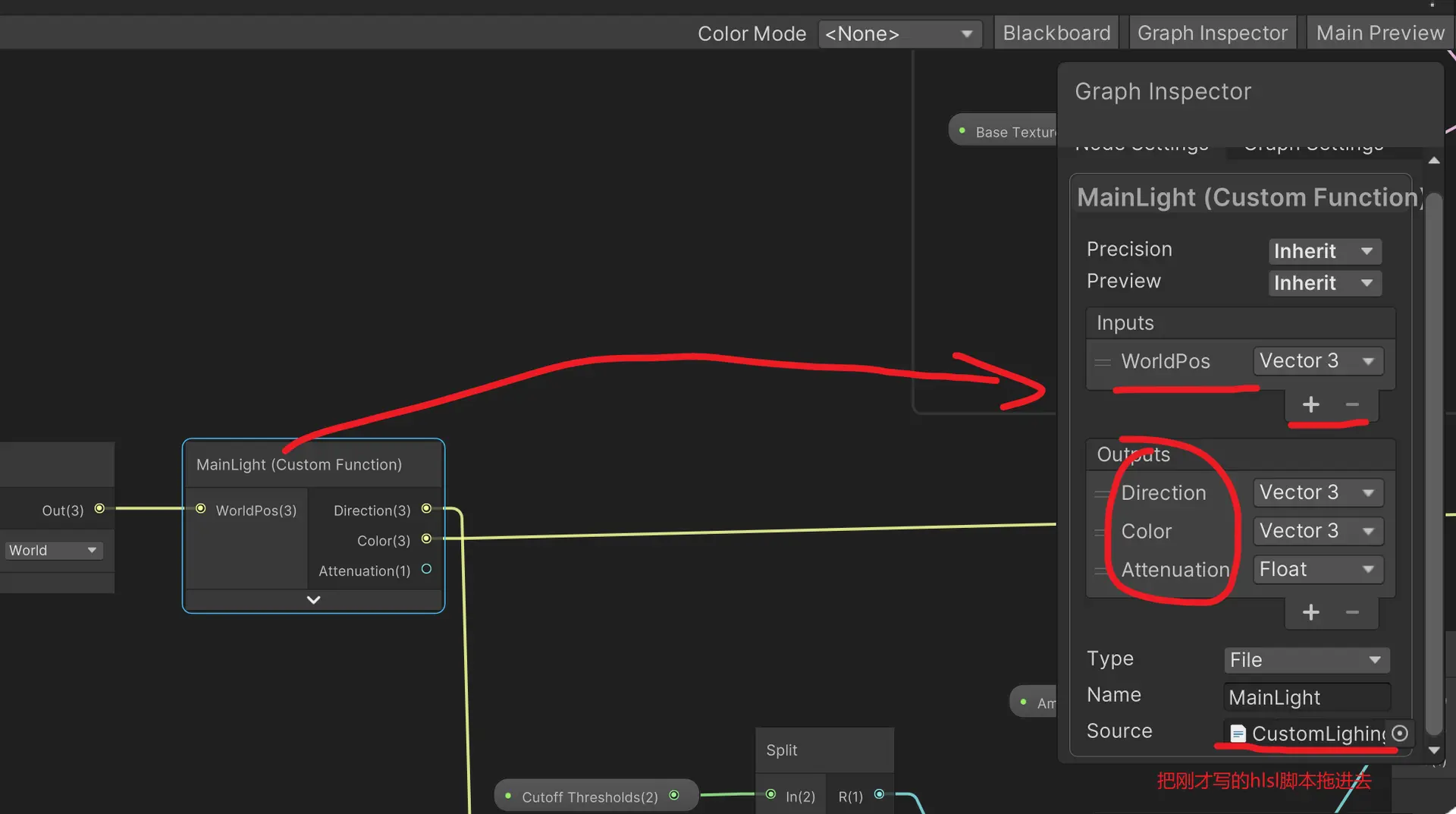
我们这个脚本运用到刚才的自定义函数 Mainlight节点上,并设置输入 vector3类型的worldpos(世界坐标) 输入 和 vector3类型direction(方向) 和 Color (颜色)以及 浮点类型的Attenuation(虚弱) 输出
此时不再使用之前的 main light direction主光源节点和 negate取反节点
先实现主要的参数
#ifndef ADDITIONAL_LIGHT_INCLUDED
#define ADDITIONAL_LIGHT_INCLUDED

//这个是单精度模式
void MainLight_float(float3 WorldPos, out float3 Direction, out float3 Color, out float Attenuation)
{
#ifdef SHADERGRAPH_PREVIEW
    Direction = normalize(float3(1.0f, 1.0f, 0.0f));
    Color = 1.0f;
    Attenuation = 1.0f;
#else
    Light mainLight = GetMainLight();
    Direction = mainLight.direction;
    Color = mainLight.color;
    Attenuation = mainLight.distanceAttenuation;
#endif
}

//这个是半精度模式
void MainLight_half(half3 WorldPos, out half3 Direction, out half3 Color, out half Attenuation)
{
#ifdef SHADERGRAPH_PREVIEW
    Direction = normalize(half3(1.0f, 1.0f, 0.0f));
    Color = 1.0f;
    Attenuation = 1.0f;
#else
    Light mainLight = GetMainLight();
    Direction = mainLight.direction;
    Color = mainLight.color;
    Attenuation = mainLight.distanceAttenuation;
#endif
}

#endif // ADDITIONAL_LIGHT_INCLUDED
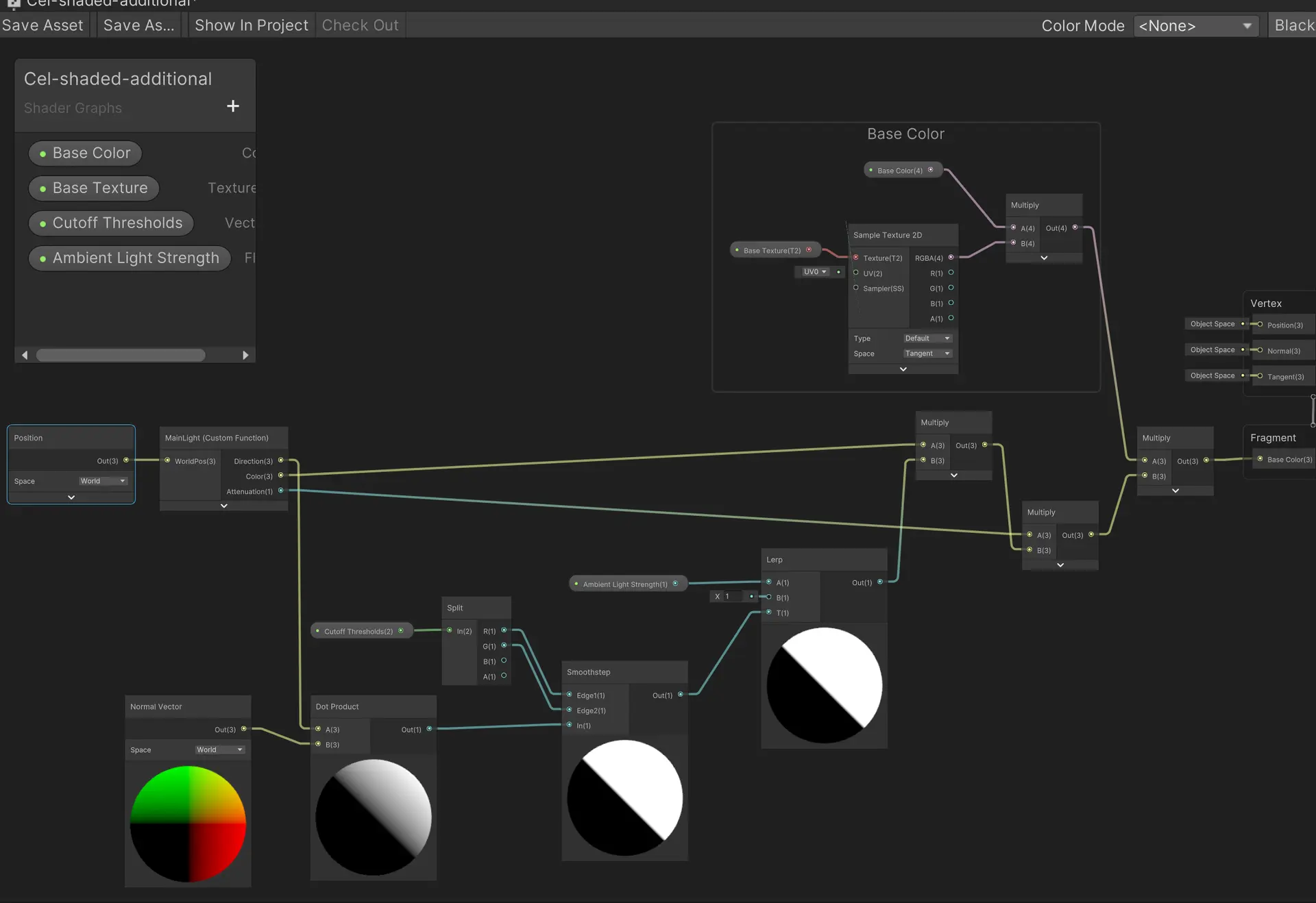
先给自定义的这个节点输入position world 位置节点
我们需要考虑衰减因素,获取环境光插值节点 lerp,然后乘以光源亮度后再和衰减值相乘后与基础色相乘
此时已经可以通过调整灯光控制材质颜色了
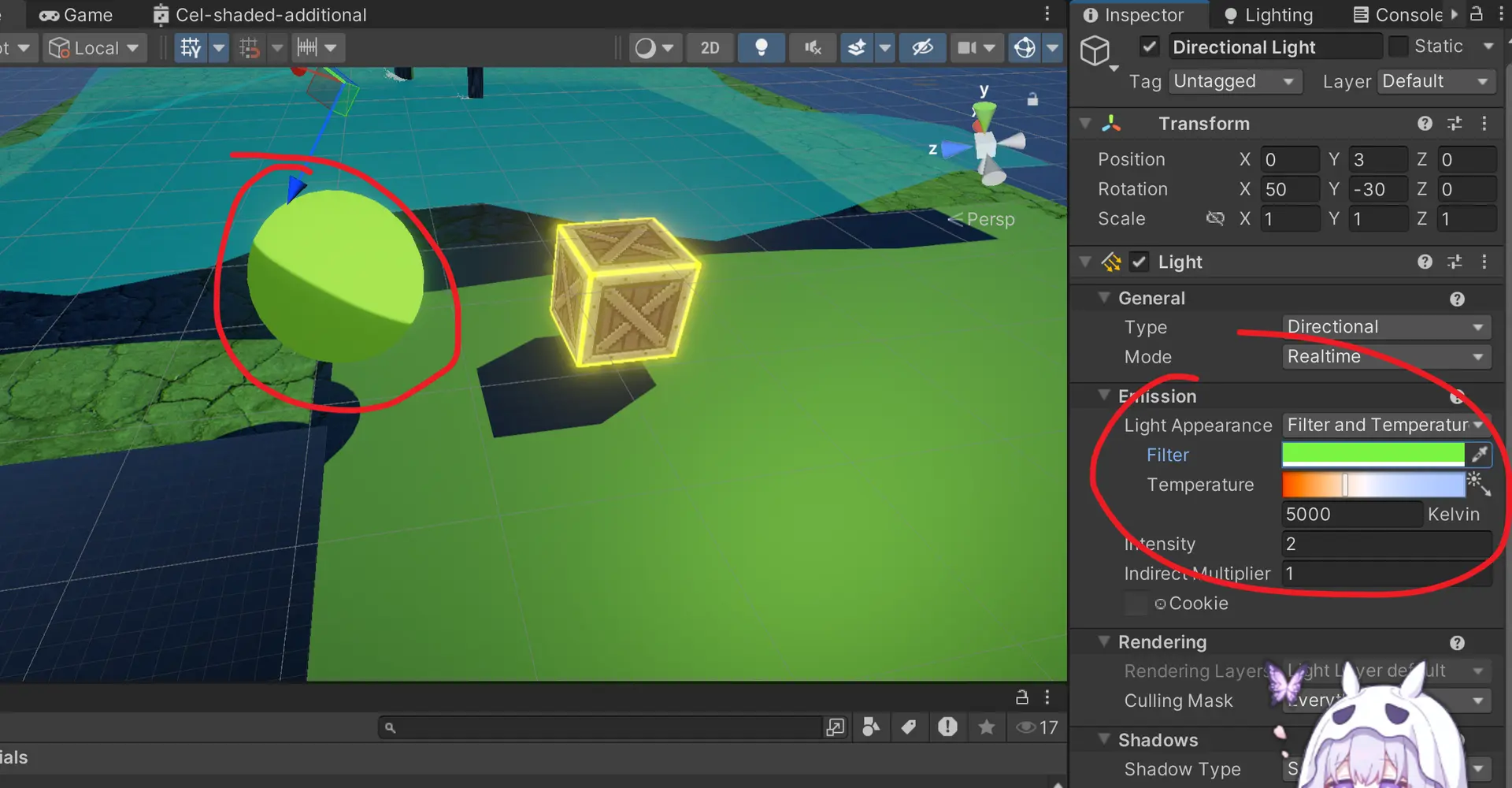
由于这是主光源的情况,而如果在物体旁边添加其他的点光源则需要额外的自定义函数
//这个是单精度
void AdditionalLight_float(float3 WorldPos, int lightID, out float3 Direction, out float3 Color, out float Attenuation)
{
    Direction = normalize(float3(1.0f, 1.0f, 0.0f));
    Color = 0.0f;
    Attenuation = 0.0f;

#ifndef SHADERGRAPH_PREVIEW
    int lightCount = GetAdditionalLightsCount();
    if(lightID < lightCount)
    {
        Light light = GetAdditionalLight(lightID, WorldPos);
        Direction = light.direction;
        Color = light.color;
        Attenuation = light.distanceAttenuation;
    }
#endif
}

//这个是半精度
void AdditionalLight_half(half3 WorldPos, int lightID, out half3 Direction, out half3 Color, out half Attenuation)
{
    Direction = normalize(half3(1.0f, 1.0f, 0.0f));
    Color = 0.0f;
    Attenuation = 0.0f;

#ifndef SHADERGRAPH_PREVIEW
    int lightCount = GetAdditionalLightsCount();
    if(lightID < lightCount)
    {
        Light light = GetAdditionalLight(lightID, WorldPos);
        Direction = light.direction;
        Color = light.color;
        Attenuation = light.distanceAttenuation;
    }
#endif
}
同样的加入自定义函数并按照HLSL脚本导入输入和输出
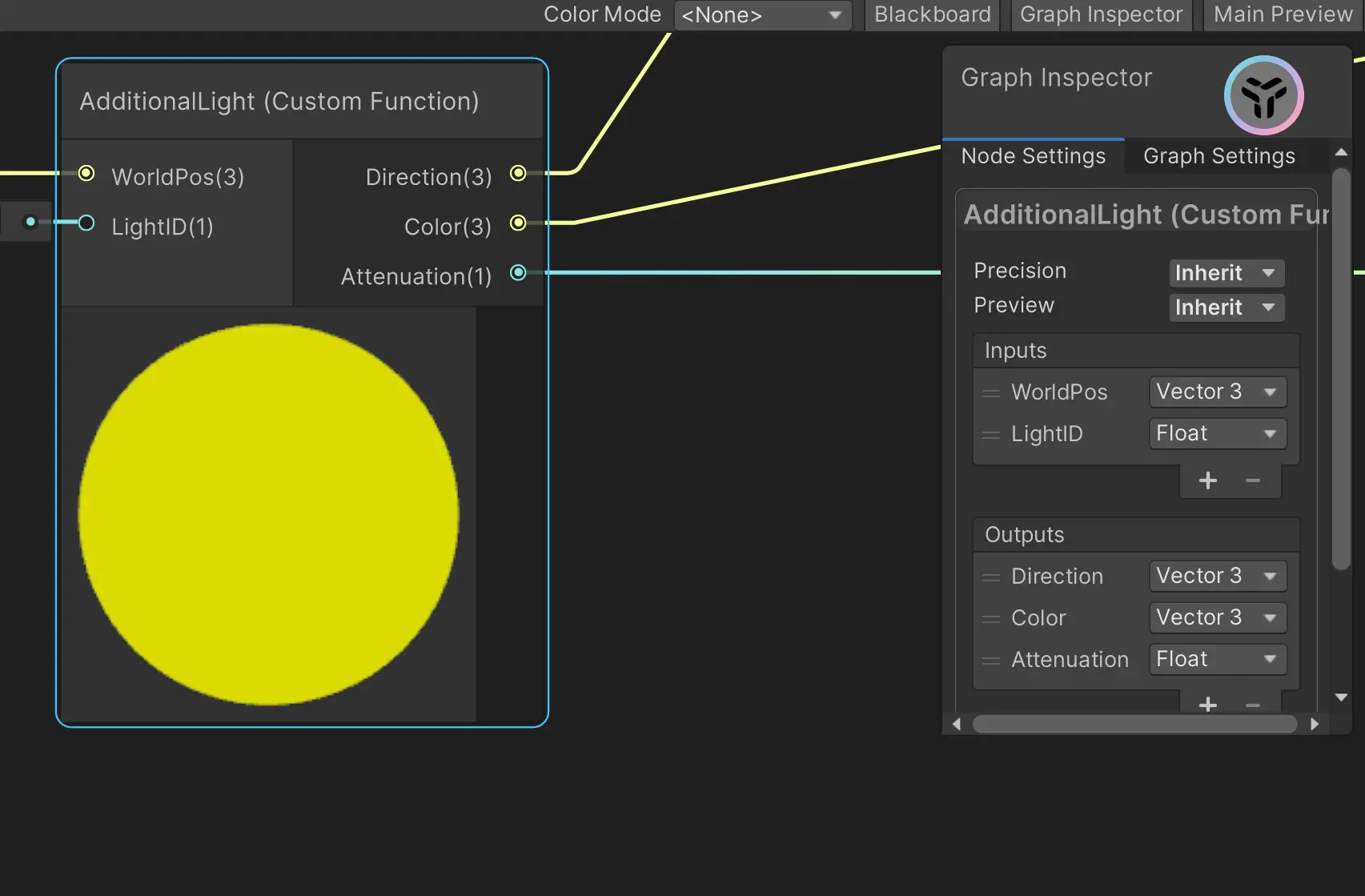
由于shader无法使用像for循环那样的遍历场景里的每一个光源,这就导致不仅要复制附加光源节点还要对每个光源进行计算,而且无法动态监测实际存在的光源的数量,所以现在是假设场景里是有4个光源
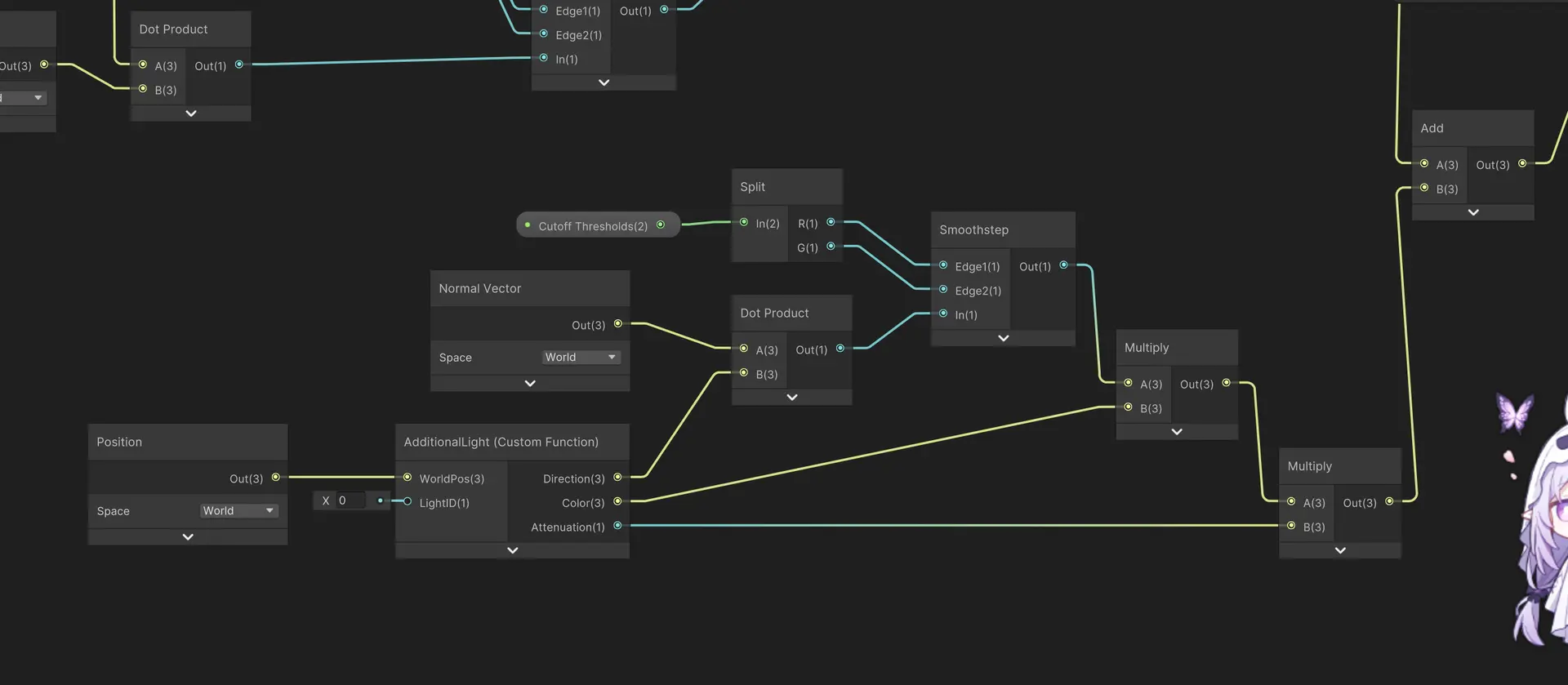
可以看到现在节点实在是太多了,我们可以使用之前学的子图sub来简化,把特定的功能封装进子图只暴露输入输出接口
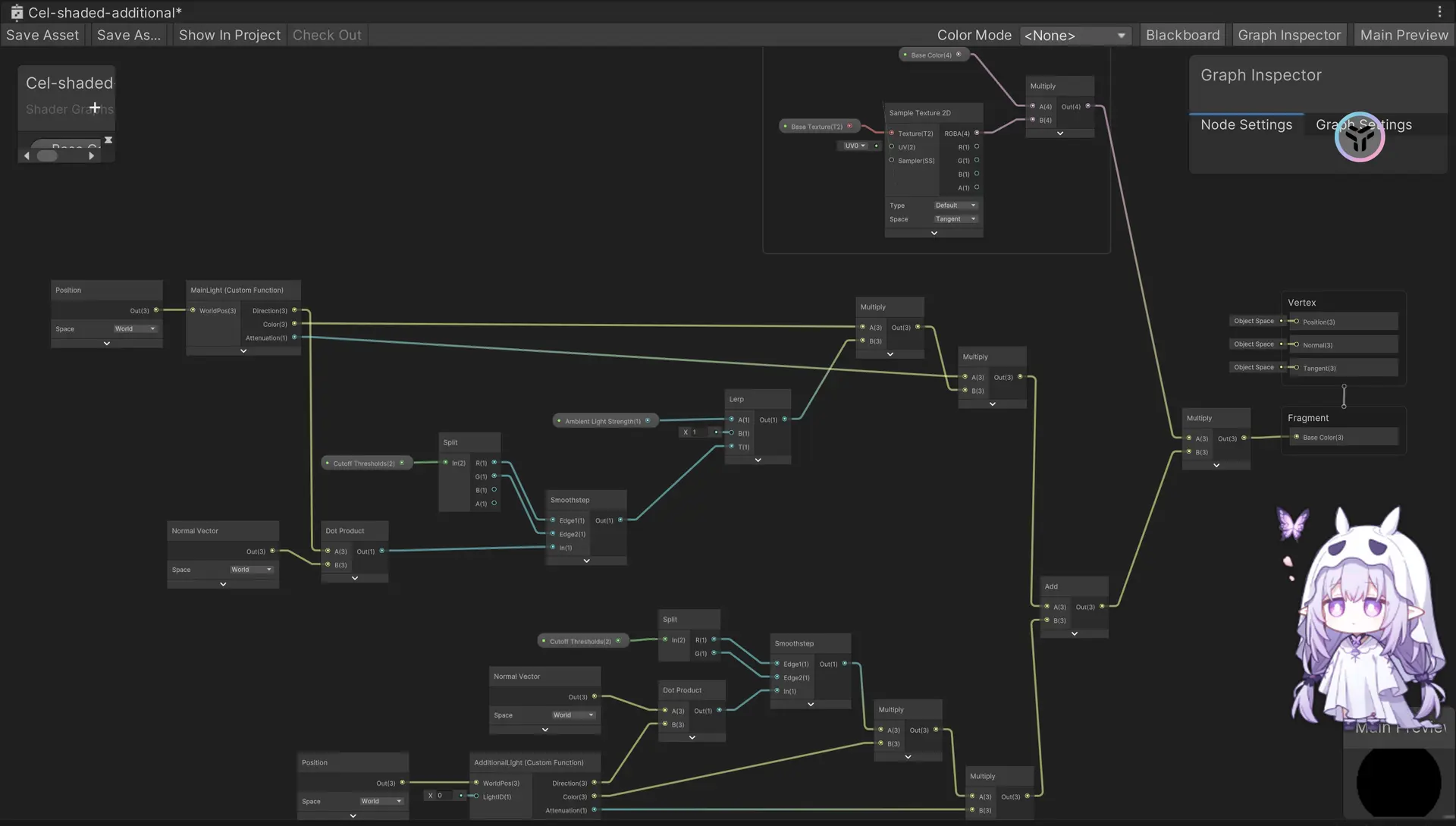
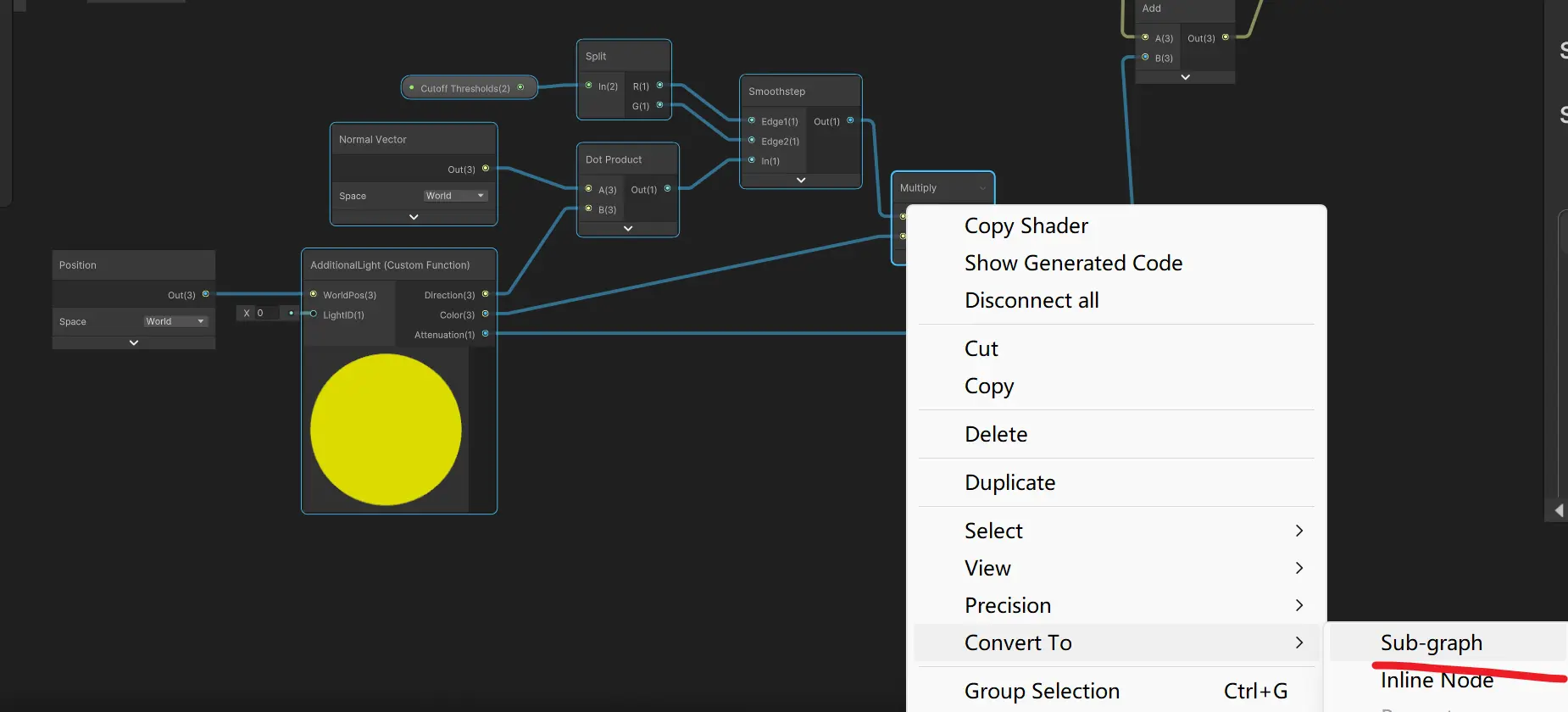
包括前面的position节点也要包含在内,不然编辑器会报错空引用
子图添加light ID float属性,将输出值改为vector3类型的lightColor
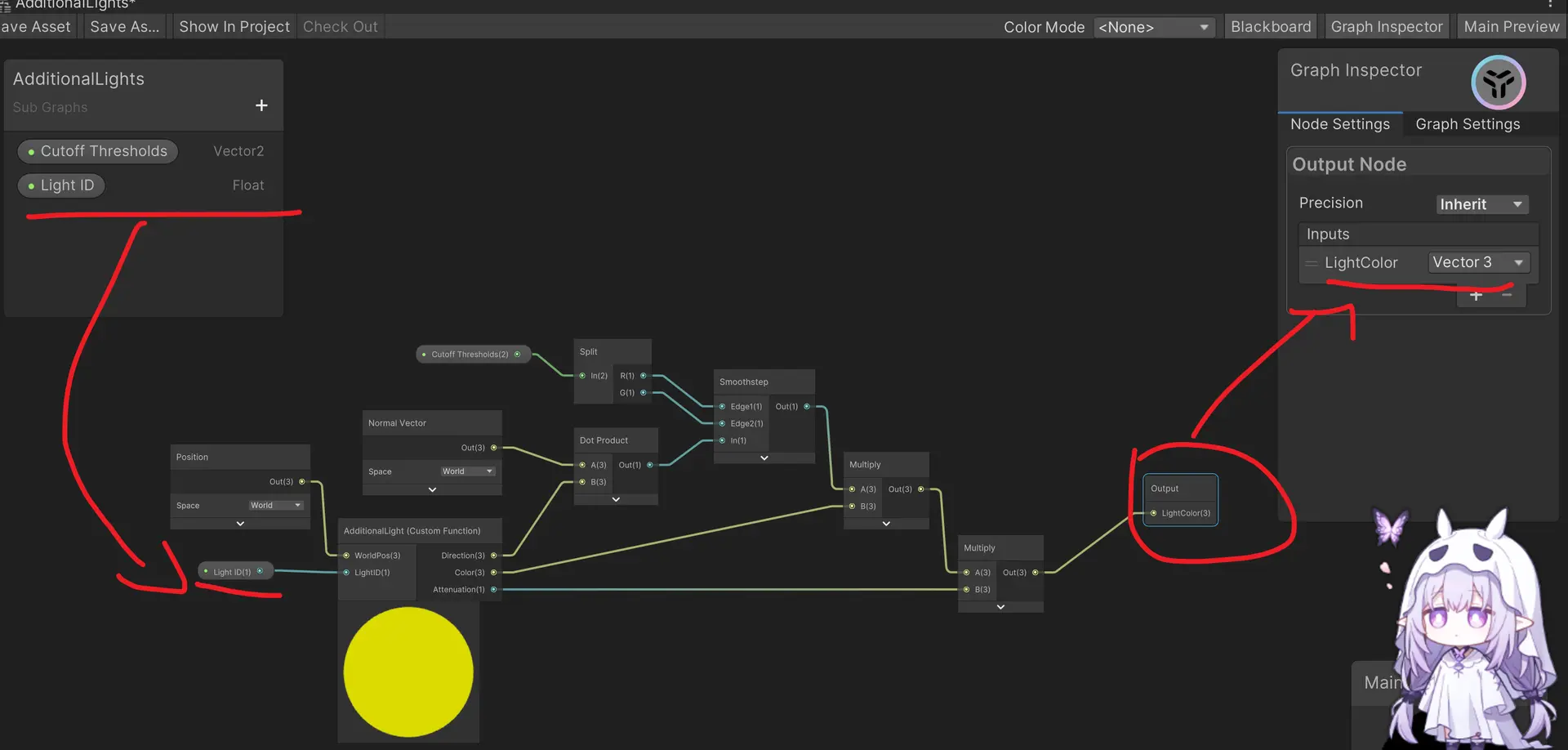
然后在主图里需要复制四个子图并赋值给Light ID为1
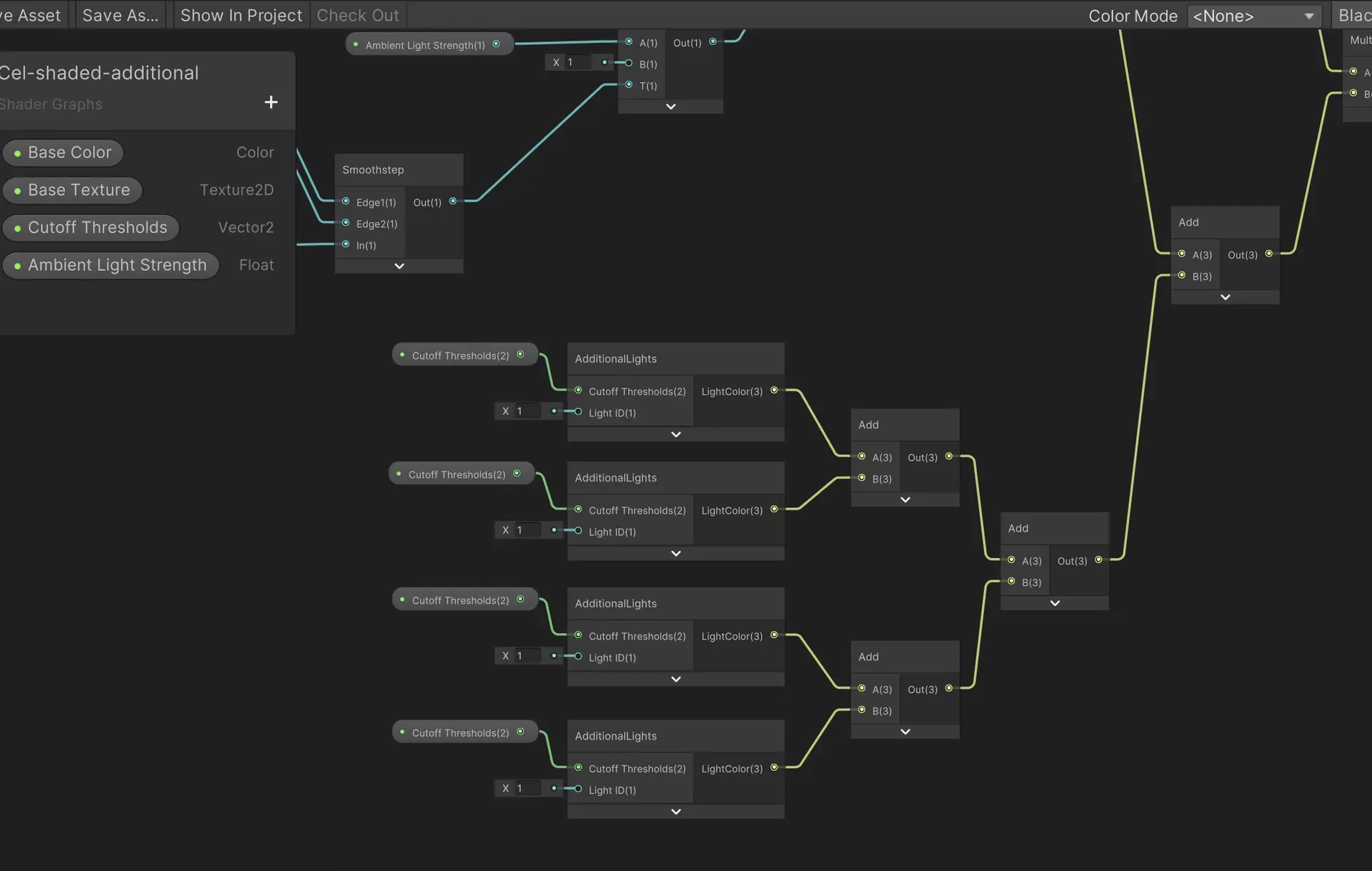
但是这种方法相比你也发现了,如果场景里超过四盏灯就不行了,第五个灯光将不会被检测,而且需要添加一大堆节点
void AllAdditionalLights_float(float3 WorldPos, float3 WorldNormal, float2 CutoffThresholds, out float3 LightColor)
{
    LightColor = 0.0f;

#ifndef SHADERGRAPH_PREVIEW
    int lightCount = GetAdditionalLightsCount();

    for(int i = 0; i < lightCount; ++i)
    {
        Light light = GetAdditionalLight(i, WorldPos);

        float3 color = dot(light.direction, WorldNormal);
        color = smoothstep(CutoffThresholds.x, CutoffThresholds.y, color);
        color *= light.color;
        color *= light.distanceAttenuation;

        LightColor += color;
    }
#endif
}

void AllAdditionalLights_half(half3 WorldPos, half3 WorldNormal, half2 CutoffThresholds, out half3 LightColor)
{
    LightColor = 0.0f;

#ifndef SHADERGRAPH_PREVIEW
    int lightCount = GetAdditionalLightsCount();

    for(int i = 0; i < lightCount; ++i)
    {
        Light light = GetAdditionalLight(i, WorldPos);

        float3 color = dot(light.direction, WorldNormal);
        color = smoothstep(CutoffThresholds.x, CutoffThresholds.y, color);
        color *= light.color;
        color *= light.distanceAttenuation;

        LightColor += color;
    }
#endif
}
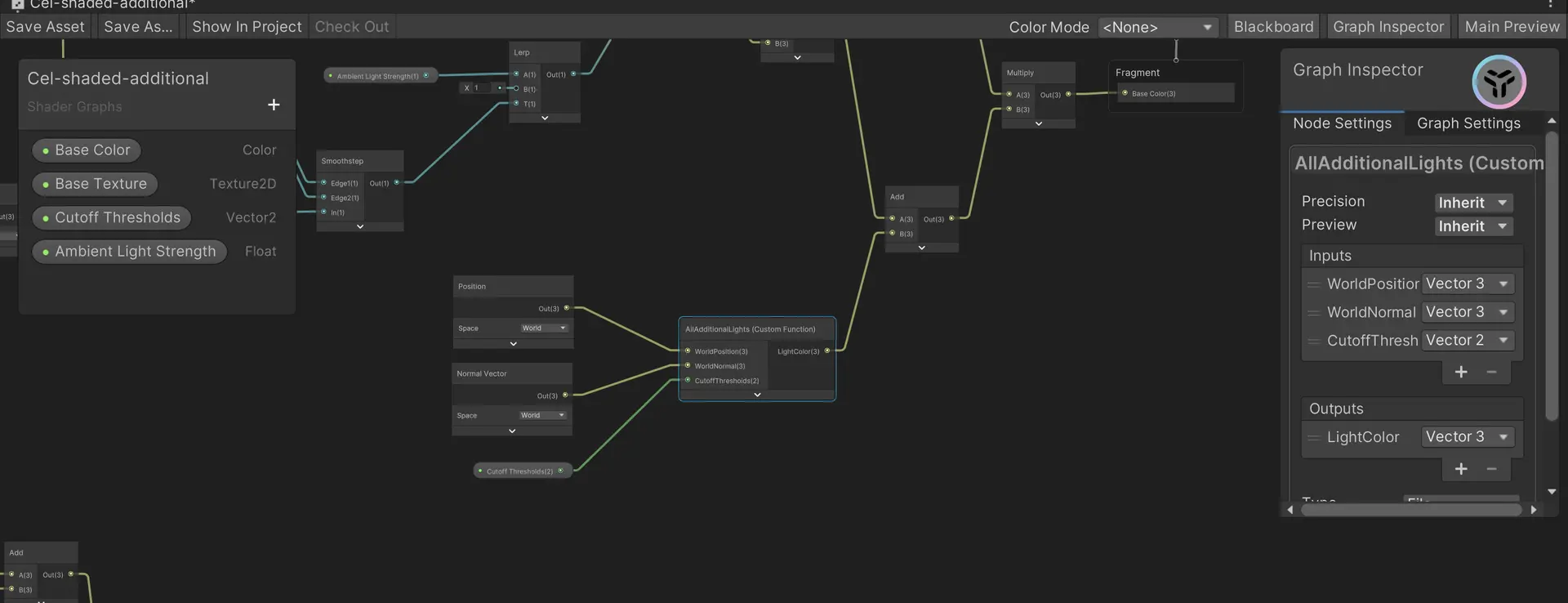
我们使用一个新的自定义函数节点,此时只需要一个节点便可以解决,但是仍然只能处理8个光源
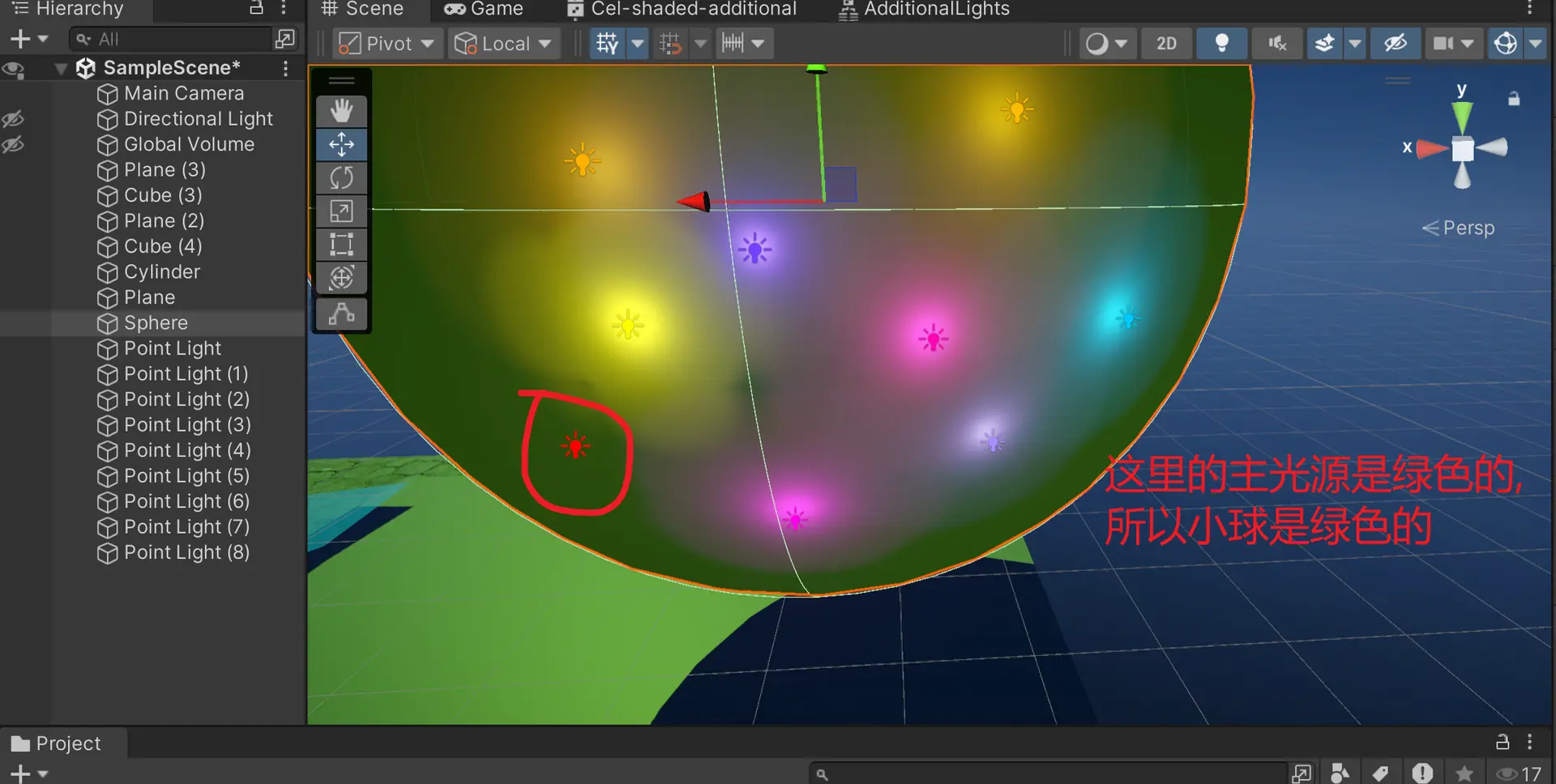
如图,我们的圈出来的这个红色光源没有渲染出来,是因为这是小球材质上的第9个光源
这个是因为unity默认每个物体最多可以接收8个除了主光源以外的额外光源的光来节约性能,因为光源太多会加重GPU的负担
所以我们明白了一件事就是节点不是万能的,有的时候需要自己写HLSL

评论区