
今天我看到了微软Markitdown这个软件
这个是一个命令行工具,可以将各种文件转换为markdown文件
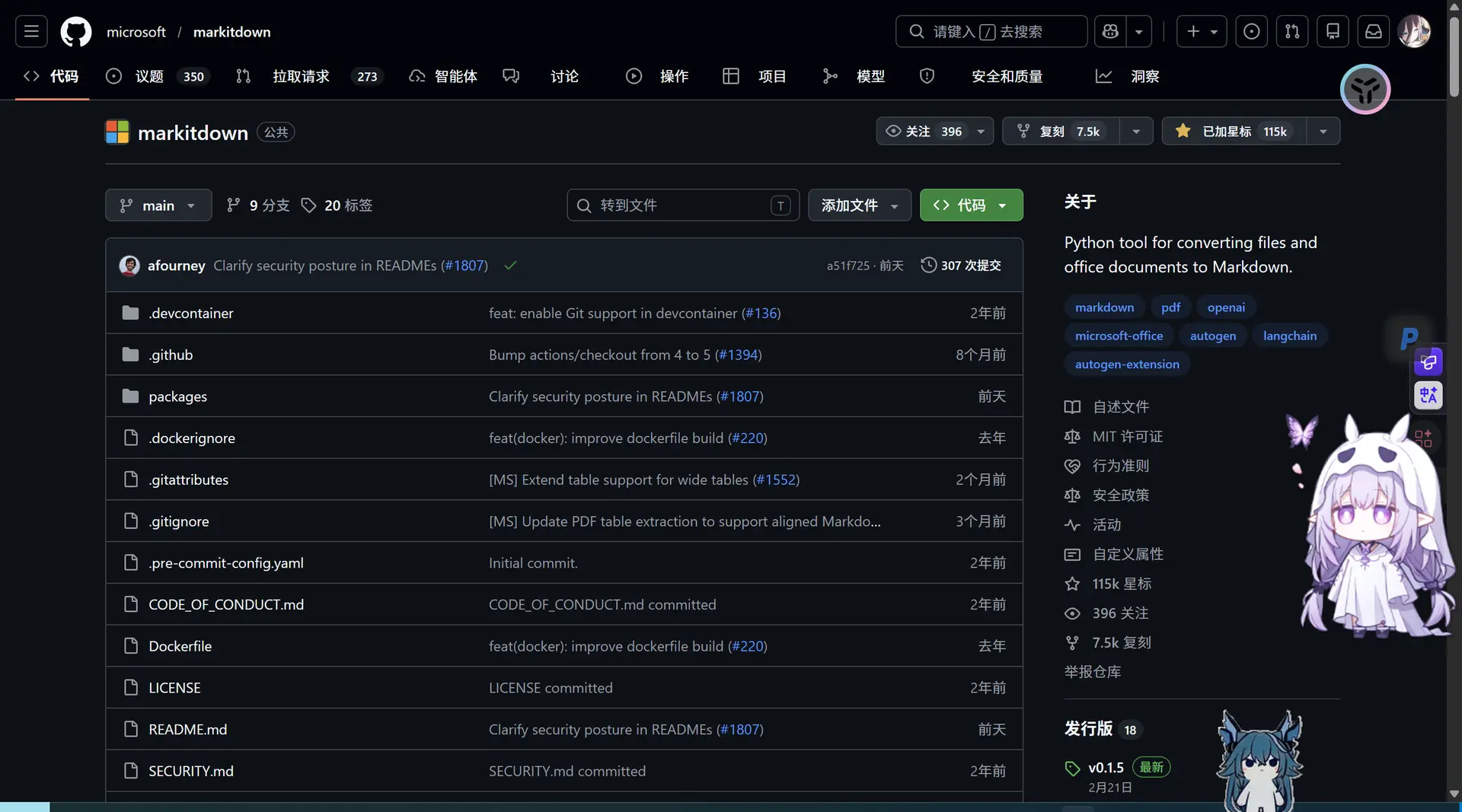 但是我在使用起来十分的恶心,虽然官方说这是给AI用的,但是就不能给一个人类能用的吗真的是,好歹我还觉得这个东西还挺新奇的
我就说说过程吧
最开始的时候我是
已复制
git clone git@github.com:microsoft/markitdown.git
cd markitdown
pip install "markitdown[all]"   //all就是全部功能
然后创建虚拟环境
已复制
md_env\Scripts\activate
pip install "markitdown[all]"
然后程序又报错说没装ffmpeg和ffprobe我又去装这些东西
然后试了各种命令来使用这个软件
最后为了方便下载搞了个清单让系统自己下载
已复制
D:\markitdown\md_env\Scripts\activate
pip freeze > D:\markitdown\requirements.txt
结果就是更加麻烦了,然后我放弃这个想法了
然后又让AI写了一个安装脚本ps1和一个界面脚本ps1和自启动脚本bat实现了一键下载和启动,但是还是非常简陋,而且别的电脑用不了,尤其是电脑上没有python的用户和python版本过时的用户
这里我最终的选择是内置一个python,就像大多数软件一样在里面塞一个jdk或者python,使用的是markitdown支持的最稳定的python版本的阉割版3.11.9 点击下载 只有20MB
然后根目录添加一个get-pip.py文件来使用pip
- 下载上面的压缩包,解压到工具箱目录,文件夹命名为
python_env- 进入
python_env文件夹,找到python311._pth文件,用记事本打开- 找到最后一行
#import site,把前面的#删掉(变成import site),保存- 下载 get-pip.py 另存放到文件夹根目录,然后在根目录打开 CMD 运行:
.\python_env\python.exe get-pip.py- 这样便携版 Python 就可以像正常 Python 一样使用
.\python_env\python.exe -m pip install markitdown了(此时就不再需要venv虚拟环境了,以后发给别人,直接把整个python_env文件夹连同工具箱一起打包发送即可)
然后就是一系列操作让程序使用这个内置的python
而添加magic_convert.py 负责底层暴力的文件操作、图片提取、YAML 注入和多图片融合
然后就是不停的改bug 提需求 迭代
最终版本文件树如下(第一层)
markitdown-quickstyle
├── input (待处理文件存放区)
├── output (处理完成文件存放区)
├── python_env(python相关文件)
├──ffmpeg.exe(音频处理)
├── ffprobe.exe(音频处理)
├── get-pip.py(pip下载)
├── install.ps1(下载环境和依赖)
├── magic_convert.py(额外逻辑相关)
├── run.ps1(运行软件主体)
├── .installed(环境配置完成确认文件)
└── start.bat(启动程序)
start.bat
POWERSHELL已复制
@echo off
chcp 65001 >nul
title ✨ MarkItDown 魔法工具箱 ✨

:: 放弃使用 CMD 打印中文,将所有控制权直接无缝移交给 PowerShell 脚本
:: 使用 ScriptBlock 方式彻底解决编码问题,并传递当前绝对路径
powershell.exe -NoProfile -ExecutionPolicy Bypass -Command "& ([ScriptBlock]::Create((Get-Content -LiteralPath '%~dp0run.ps1' -Encoding UTF8 -Raw))) -ScriptDir '%~dp0\'"

pause
run.ps1
POWERSHELL已复制
param([string]$ScriptDir = $PWD.Path)
$ScriptDir = $ScriptDir.Trim("'", '"', ' ')
Set-Location -Path $ScriptDir
[console]::OutputEncoding = [System.Text.Encoding]::UTF8
$host.ui.RawUI.WindowTitle = "✨ MarkItDown 魔法工具箱 V2.0 ✨"

# ================= 首次安装引导逻辑 =================
if (!(Test-Path ".installed")) {
    Clear-Host
    Write-Host "=================================================" -ForegroundColor Cyan
    Write-Host "       ✨ 欢迎来到 MarkItDown 魔法工具箱 ✨        " -ForegroundColor Cyan
    Write-Host "=================================================" -ForegroundColor Cyan
    Write-Host "`n呀,检测到你是第一次来到这里呢!👋" -ForegroundColor Yellow
    Write-Host "我们需要先布置一下运行环境(只需要进行一次哦)~`n" -ForegroundColor White

    Write-Host "1. 🚀 开始安装环境 (冲鸭!)"
    Write-Host "2. 🏃 暂时退出 (下次一定)`n"

    $installChoice = Read-Host "👉 请输入选项并按回车"

    if ($installChoice -eq "1") {
        Write-Host "`n🌟 正在启动安装向导..." -ForegroundColor Cyan
        $installCmd = "& ([ScriptBlock]::Create((Get-Content -LiteralPath 'install.ps1' -Encoding UTF8 -Raw)))"
        powershell.exe -NoProfile -ExecutionPolicy Bypass -Command $installCmd

        New-Item -Path ".installed" -ItemType File -Force | Out-Null

        Write-Host "`n🎉 太棒啦,环境布置完成!正在带你进入主界面..." -ForegroundColor Green
        Start-Sleep -Seconds 2
    } else {
        Write-Host "`n拜拜啦,期待下次相见~ 👋" -ForegroundColor Cyan
        Start-Sleep -Seconds 2
        exit
    }
}
# ====================================================

$InputDir = Join-Path $ScriptDir "input"
$OutputDir = Join-Path $ScriptDir "output"
if (!(Test-Path $InputDir)) { New-Item -ItemType Directory -Force -Path $InputDir | Out-Null }
if (!(Test-Path $OutputDir)) { New-Item -ItemType Directory -Force -Path $OutputDir | Out-Null }

$ScriptsDir = Join-Path $ScriptDir "python_env\Scripts"
$env:PATH = "$ScriptDir;$ScriptsDir;" + $env:PATH
$PythonExe = Join-Path $ScriptDir "python_env\python.exe"

function Show-Manual {
    Clear-Host
    Write-Host "=================================================" -ForegroundColor Cyan
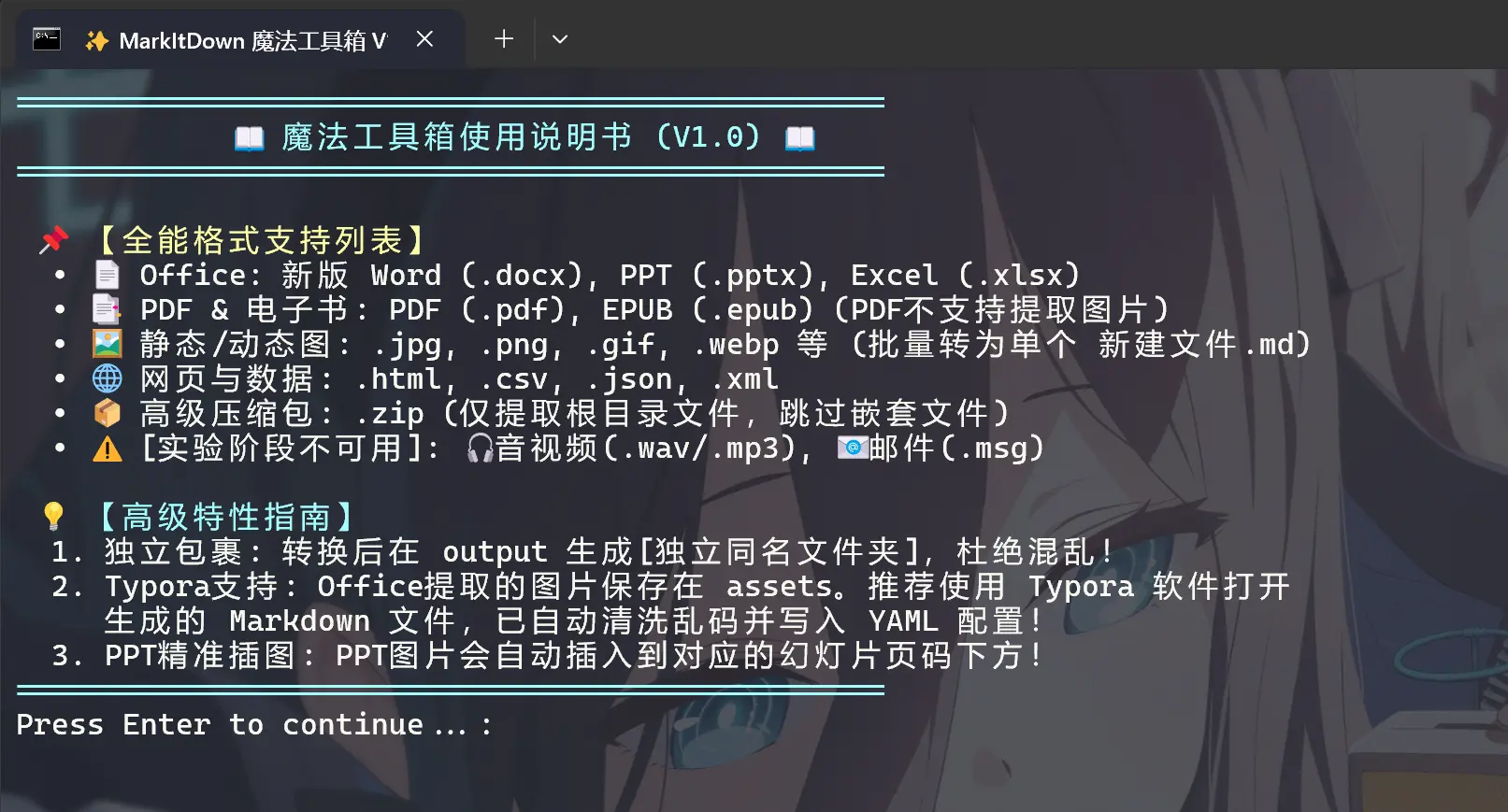
    Write-Host "            📖 魔法工具箱使用说明书 (V2.0) 📖      " -ForegroundColor Cyan
    Write-Host "=================================================" -ForegroundColor Cyan
    Write-Host "`n 📌 【全能格式支持列表】" -ForegroundColor Yellow
    Write-Host "  • 📄 Office: 新版 Word (.docx), PPT (.pptx), Excel (.xlsx)"
    Write-Host "  • 📑 PDF & 电子书: PDF (.pdf), EPUB (.epub) (PDF不支持提取图片)"
    Write-Host "  • 🖼️ 静态/动态图: .jpg, .png, .gif, .webp 等 (批量转为单个 新建文件.md)"
    Write-Host "  • 🌐 网页与数据: .html, .csv, .json, .xml"
    Write-Host "  • 📦 高级压缩包: .zip (仅提取根目录文件,跳过嵌套文件夹)"
    Write-Host "  • ⚠️ [实验阶段不可用]: 🎧音视频(.wav/.mp3), 📧邮件(.msg)"
    Write-Host "`n 💡 【高级特性指南】" -ForegroundColor Cyan
    Write-Host "  1. 独立包裹: 转换后在 output 生成[独立同名文件夹],杜绝混乱!"
    Write-Host "  2. Typora支持: Office提取的图片保存在 assets。推荐使用 Typora 软件打开"
    Write-Host "     生成的 Markdown 文件,已自动清洗乱码并写入 YAML 配置!"
    Write-Host "  3. PPT精准插图: PPT图片会自动插入到对应的幻灯片页码下方!"
    Write-Host "=================================================" -ForegroundColor Cyan
    pause
}

function Run-Python {
    param([string]$Mode, [string]$Target, [string]$Exts="", [string]$CatName="")
    if ($Exts) {
        & $PythonExe "magic_convert.py" $Mode $Target $OutputDir $Exts $CatName
    } else {
        & $PythonExe "magic_convert.py" $Mode $Target $OutputDir "NONE" $CatName
    }
}

function Show-BatchMenu {
    while ($true) {
        Clear-Host
        Write-Host "=================================================" -ForegroundColor Cyan
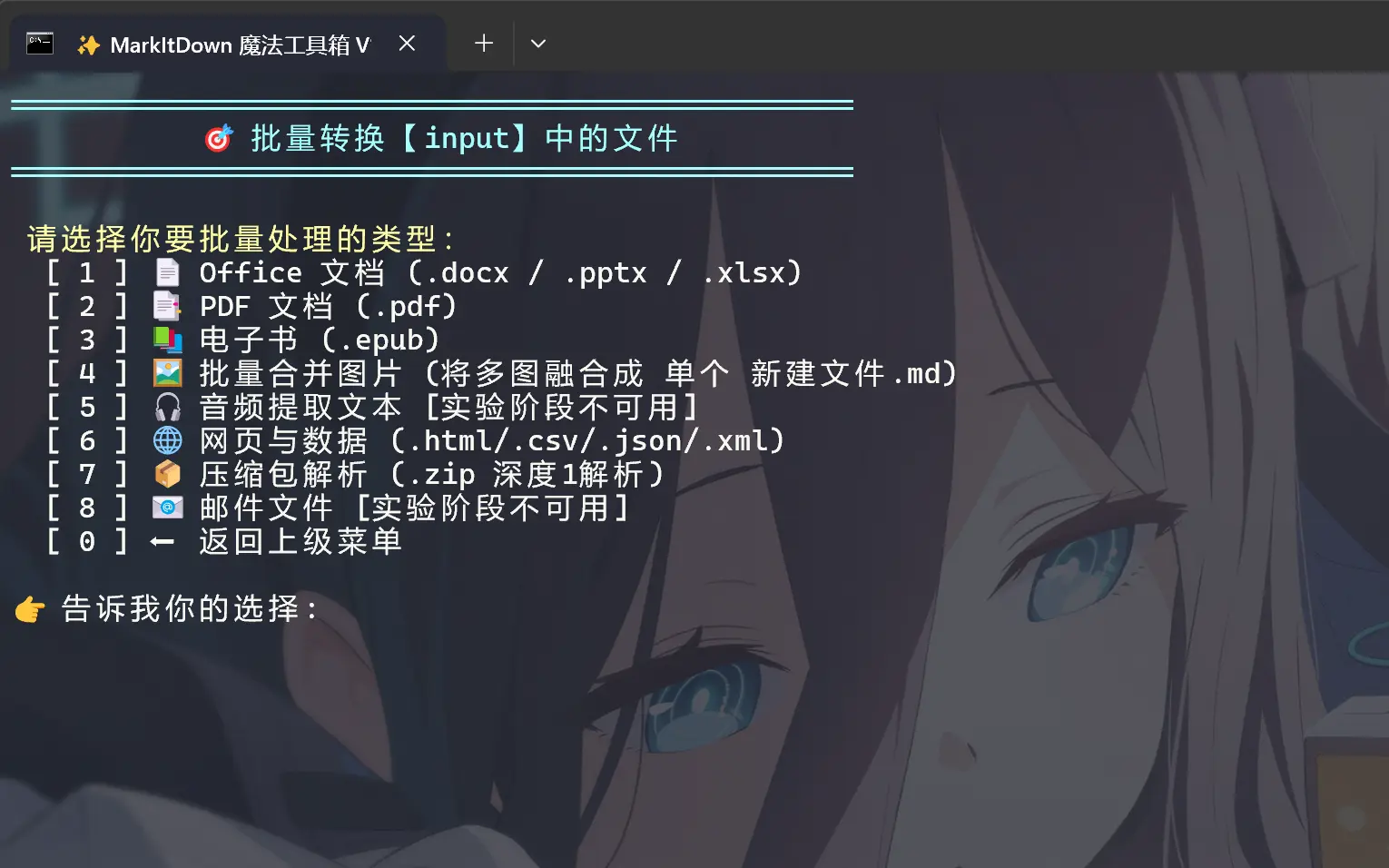
        Write-Host "           🎯 批量转换【input】中的文件          " -ForegroundColor Cyan
        Write-Host "=================================================" -ForegroundColor Cyan
        Write-Host "`n 请选择你要批量处理的类型:" -ForegroundColor Yellow
        Write-Host "  [ 1 ] 📄 Office 文档 (.docx / .pptx / .xlsx)"
        Write-Host "  [ 2 ] 📑 PDF 文档 (.pdf)"
        Write-Host "  [ 3 ] 📚 电子书 (.epub)"
        Write-Host "  [ 4 ] 🖼️ 批量合并图片 (将多图融合成 单个 新建文件.md)"
        Write-Host "  [ 5 ] 🎧 音频提取文本 [实验阶段不可用]"
        Write-Host "  [ 6 ] 🌐 网页与数据 (.html/.csv/.json/.xml)"
        Write-Host "  [ 7 ] 📦 压缩包解析 (.zip 深度1解析)"
        Write-Host "  [ 8 ] 📧 邮件文件 [实验阶段不可用]"
        Write-Host "  [ 0 ] ⬅️ 返回上级菜单`n"

        $bChoice = Read-Host "👉 告诉我你的选择"

        if ($bChoice -eq "5" -or $bChoice -eq "8") {
            Write-Host "`n❌ 此功能处于实验阶段,目前暂不可用!" -ForegroundColor Red
            pause
            continue
        }

        if ($bChoice -eq "0") { return }

        switch ($bChoice) {
            "1" { Run-Python "batch" $InputDir ".docx,.pptx,.xlsx" "Office" }
            "2" { Run-Python "batch" $InputDir ".pdf" "PDF" }
            "3" { Run-Python "batch" $InputDir ".epub" "电子书" }
            "4" { Run-Python "batch_images" $InputDir "" "图片(静态/动图)" }
            "6" { Run-Python "batch" $InputDir ".html,.htm,.csv,.json,.xml" "网页与数据" }
            "7" { Run-Python "batch" $InputDir ".zip" "压缩包" }
            default { Write-Host "❌ 无效选项" -ForegroundColor Red }
        }
        Write-Host "`n✅ 操作结束!请前往 output 文件夹查看结果。" -ForegroundColor Green
        pause
        return
    }
}

while ($true) {
    Clear-Host
    Write-Host "=================================================" -ForegroundColor Cyan
    Write-Host "               ✨ MarkItDown 魔法工具箱 ✨        " -ForegroundColor Cyan
    Write-Host "=================================================" -ForegroundColor Cyan
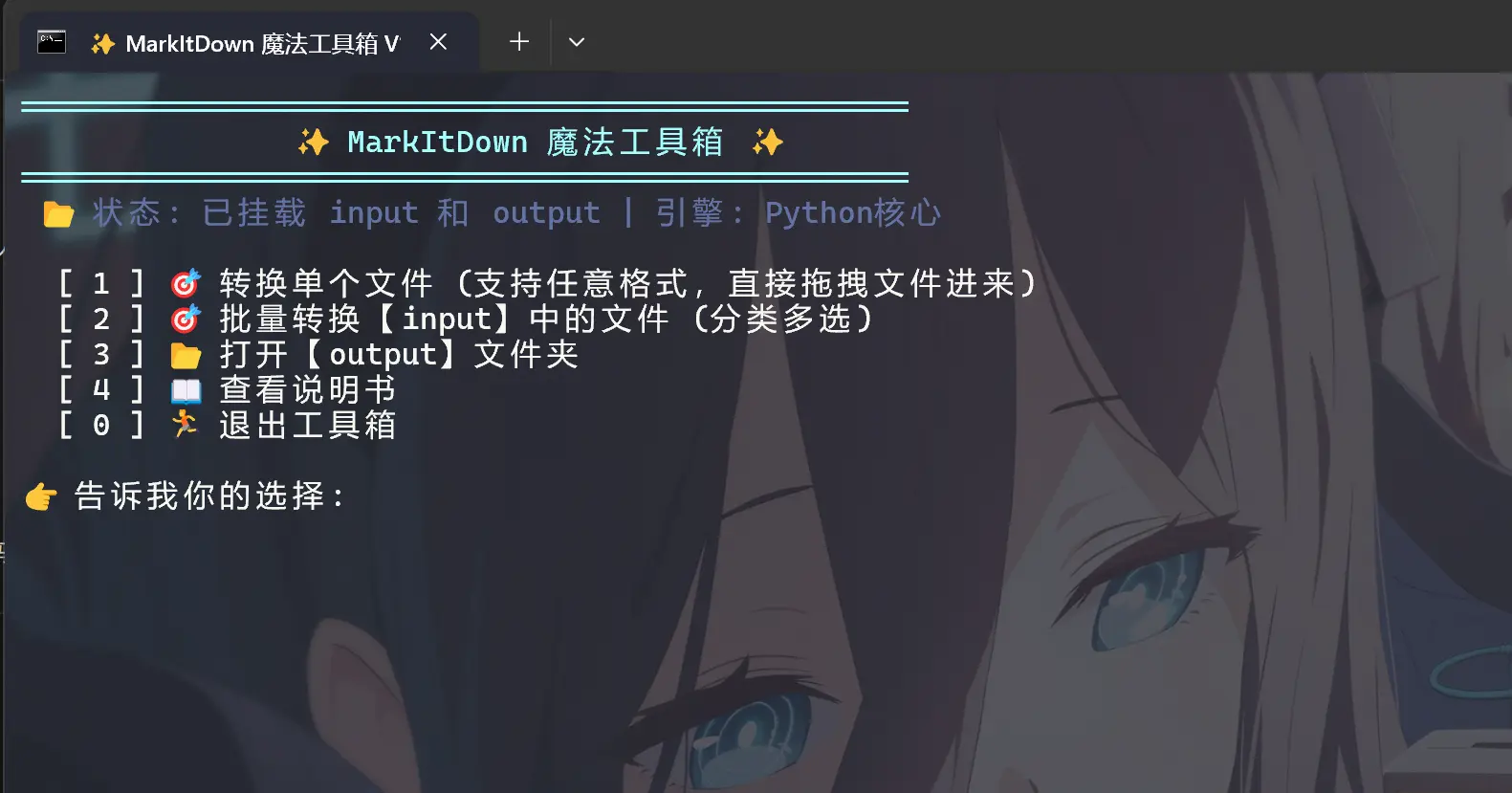
    Write-Host " 📂 状态: 已挂载 input 和 output | 引擎: Python核心" -ForegroundColor DarkGray
    Write-Host ""
    Write-Host "  [ 1 ] 🎯 转换单个文件 (支持任意格式,直接拖拽文件进来)"
    Write-Host "  [ 2 ] 🎯 批量转换【input】中的文件 (分类多选)"
    Write-Host "  [ 3 ] 📂 打开【output】文件夹"
    Write-Host "  [ 4 ] 📖 查看说明书"
    Write-Host "  [ 0 ] 🏃 退出工具箱"
    Write-Host ""

    $choice = Read-Host "👉 告诉我你的选择"
    switch ($choice) {
        "1" {
            $rawInput = Read-Host "📥 请输入或拖入文件路径"
            if ([string]::IsNullOrWhiteSpace($rawInput)) {
                Write-Host "❌ 输入不能为空!" -ForegroundColor Red
                pause
                continue
            }

            $file = $rawInput.Trim('"').Trim("'")
            if (Test-Path $file) {
                Write-Host "`n✨ 正在呼叫魔法引擎..." -ForegroundColor Yellow
                Run-Python "single" $file
            } else {
                Write-Host "❌ 哎呀,没找到这个文件,是不是路径写错了呀?" -ForegroundColor Red
            }
            pause
        }
        "2" { Show-BatchMenu }
        "3" { Invoke-Item -Path $OutputDir }
        "4" { Show-Manual }
        "0" { exit }
    }
}
install.ps1
POWERSHELL已复制
# 修复终端中文乱码
[console]::OutputEncoding = [System.Text.Encoding]::UTF8

Write-Host "=================================================" -ForegroundColor Cyan
Write-Host "  ✨ 正在为你施放 MarkItDown 安装魔法,请稍候... ✨" -ForegroundColor Cyan
Write-Host "=================================================" -ForegroundColor Cyan
Write-Host ""

$ScriptDir = $PWD.Path
$PythonExe = Join-Path $ScriptDir "python_env\python.exe"
$GetPipScript = Join-Path $ScriptDir "get-pip.py"
$PipExe = Join-Path $ScriptDir "python_env\Scripts\pip.exe"

if (!(Test-Path $PythonExe)) {
    Write-Host "❌ 哎呀,没有找到内置的 Python 环境!" -ForegroundColor Red
    Write-Host "请确保你已经把便携版 Python 解压并重命名为了 'python_env' 文件夹。" -ForegroundColor Yellow
    pause
    exit
}

# 智能检测:如果没有 pip,就自动执行 get-pip.py (显示进度条,屏蔽黄字警告)
if (!(Test-Path $PipExe)) {
    if (!(Test-Path $GetPipScript)) {
        Write-Host "❌ 缺少核心安装组件:get-pip.py!请将该文件放入工具箱目录。" -ForegroundColor Red
        pause
        exit
    }
    Write-Host "💧 正在注入初始化魔力 (自动安装 Pip 工具)..." -ForegroundColor Yellow
    & $PythonExe $GetPipScript --no-warn-script-location
} else {
    Write-Host "💧 正在更新魔力源泉 (升级 pip)..." -ForegroundColor Yellow
    & $PythonExe -m pip install --upgrade pip --no-warn-script-location
}

Write-Host "`n📦 正在搬运格式转换法宝 (安装 markitdown 核心组件)..." -ForegroundColor Yellow
Write-Host "   (由于需要从云端下载,这可能需要 1~3 分钟,请欣赏魔法进度条 ☕)" -ForegroundColor Cyan

# 强制让便携版 Python 安装 markitdown (显示进度条,屏蔽黄字警告)
& $PythonExe -m pip install "markitdown[all]" --no-warn-script-location

Write-Host ""
Write-Host "✅ 魔法环境布置大功告成啦!准备起飞~ 🚀" -ForegroundColor Green
magic_convert.py
PYTHON已复制
import os
import sys
import shutil
import zipfile
import tempfile
import re
from pathlib import Path
from markitdown import MarkItDown
IMAGE_EXTS = {'.jpg', '.jpeg', '.png', '.gif', '.webp', '.svg', '.bmp', '.tiff'}
def inject_yaml_and_save(md_content, out_md_path, assets_folder_name):
yaml_header = f"---\ntypora-copy-images-to: ./{assets_folder_name}\n---\n\n"
with open(out_md_path, 'w', encoding='utf-8') as f:
f.write(yaml_header + md_content)
def extract_and_map_ppt_images(file_path, assets_dir):
slide_images = {}
try:
with zipfile.ZipFile(file_path, 'r') as z:
for info in z.infolist():
if '/media/' in info.filename and not info.filename.endswith('/'):
img_name = Path(info.filename).name
with open(assets_dir / img_name, 'wb') as f:
f.write(z.read(info.filename))
for info in z.infolist():
if info.filename.startswith('ppt/slides/_rels/slide') and info.filename.endswith('.xml.rels'):
match = re.search(r'slide(\d+)\.xml\.rels', info.filename)
if match:
slide_num = int(match.group(1))
xml_content = z.read(info.filename).decode('utf-8', errors='ignore')
images = re.findall(r'Target="\.\./media/([^"]+)"', xml_content)
if images:
slide_images[slide_num] = images
except: pass
return slide_images
def extract_word_images(file_path, assets_dir):
images = []
try:
with zipfile.ZipFile(file_path, 'r') as z:
for info in z.infolist():
if 'word/media/' in info.filename and not info.filename.endswith('/'):
img_name = Path(info.filename).name
with open(assets_dir / img_name, 'wb') as f:
f.write(z.read(info.filename))
images.append(img_name)
except: pass
return images
def convert_single_file(file_path, base_out_dir, silent=False):
file_path = Path(file_path)
if not file_path.exists() or file_path.suffix.lower() in ['.zip', '.doc', '.ppt', '.xls']:
return False
base_name = file_path.stem
ext = file_path.suffix.lower()
wrapper_dir = Path(base_out_dir) / base_name
wrapper_dir.mkdir(parents=True, exist_ok=True)
assets_folder_name = f"{base_name}_assets"
assets_dir = wrapper_dir / assets_folder_name
assets_dir.mkdir(parents=True, exist_ok=True)
ppt_slide_images = {}
word_images = []
if ext == '.pptx':
ppt_slide_images = extract_and_map_ppt_images(file_path, assets_dir)
elif ext == '.docx':
word_images = extract_word_images(file_path, assets_dir)
if not silent:
print(f" 🔄 正在解析: {file_path.name} ...")
try:
md = MarkItDown()
result = md.convert(str(file_path))
md_content = result.text_content if result else ""
except Exception as e:
print(f" ❌ {file_path.name} 转换失败: {e}")
return False
md_content = re.sub(r'!\[.*?\]\(data:image/[^;]+;base64,[^\)]+\)', '', md_content)
if ext == '.pdf':
md_content = "> ⚠️ **注意**:PDF 格式目前仅支持文本提取,图片不可提取。\n\n" + md_content
if ext == '.pptx' and ppt_slide_images:
lines = md_content.split('\n')
new_lines = []
for line in lines:
new_lines.append(line)
match = re.search(r'<!-- Slide number: (\d+) -->', line)
if match:
slide_num = int(match.group(1))
if slide_num in ppt_slide_images:
new_lines.append("\n> 📎 **本页附图**:")
for img in ppt_slide_images[slide_num]:
new_lines.append(f"")
new_lines.append("\n---")
md_content = '\n'.join(new_lines)
if ext == '.docx' and word_images:
md_content += "\n\n---\n### 📎 文档提取的附图资源\n"
for img in word_images:
md_content += f"\n\n"
out_md_path = wrapper_dir / f"{base_name}.md"
inject_yaml_and_save(md_content, out_md_path, assets_folder_name)
return True
def convert_merged_images(image_paths, base_out_dir, folder_name="新建文件"):
if not image_paths: return False
wrapper_dir = Path(base_out_dir) / folder_name
wrapper_dir.mkdir(parents=True, exist_ok=True)
assets_folder_name = f"{folder_name}_assets"
assets_dir = wrapper_dir / assets_folder_name
assets_dir.mkdir(parents=True, exist_ok=True)
md_lines = []
for img in image_paths:
img = Path(img)
shutil.copy(img, assets_dir)
md_lines.append(f"\n")
out_md_path = wrapper_dir / f"{folder_name}.md"
inject_yaml_and_save("\n".join(md_lines), out_md_path, assets_folder_name)
return True
def process_zip_depth1(zip_path, base_out_dir):
zip_path = Path(zip_path)
zip_wrapper_dir = Path(base_out_dir) / zip_path.stem
temp_dir = Path(tempfile.mkdtemp())
with zipfile.ZipFile(zip_path, 'r') as z:
# 获取深度为 1 的所有文件(排除文件夹和嵌套文件)
depth1_infos = [info for info in z.infolist() if not info.is_dir() and '/' not in info.filename]
if not depth1_infos:
print(f"\n 👀 ZIP包 [{zip_path.name}] 的根目录没有发现文件,已跳过。")
shutil.rmtree(temp_dir, ignore_errors=True)
return
file_names = [info.filename for info in depth1_infos]
print(f"\n 📦 已检测到 ZIP [{zip_path.name}] 深度 1 包含以下文件:\n - " + "\n - ".join(file_names))
zip_wrapper_dir.mkdir(parents=True, exist_ok=True)
images_to_merge = []
regular_converted = []
for info in depth1_infos:
extracted_path = z.extract(info, path=temp_dir)
if Path(extracted_path).suffix.lower() in IMAGE_EXTS:
images_to_merge.append(extracted_path)
else:
if convert_single_file(extracted_path, zip_wrapper_dir, silent=True):
regular_converted.append(info.filename)
# 输出战报
if regular_converted:
print(f" ✅ ZIP 内已成功转换为以下文件:\n - " + "\n - ".join(regular_converted))
if images_to_merge:
convert_merged_images(images_to_merge, zip_wrapper_dir, "新建文件")
img_names = [Path(p).name for p in images_to_merge]
print(f" ✅ ZIP 内已将以下图片合并为 [新建文件.md]:\n - " + "\n - ".join(img_names))
shutil.rmtree(temp_dir, ignore_errors=True)
def main():
if len(sys.argv) < 3: return
mode = sys.argv[1]
target = sys.argv[2]
out_dir = sys.argv[3] if len(sys.argv) > 3 else "output"
if mode == "single":
if target.lower().endswith('.zip'):
process_zip_depth1(target, out_dir)
else:
if convert_single_file(target, out_dir):
print(f" ✅ 已成功转换: {Path(target).name}")
elif mode == "batch_images":
cat_name = sys.argv[5] if len(sys.argv) > 5 else "图片"
input_dir = Path(target)
images = [f for f in input_dir.iterdir() if f.suffix.lower() in IMAGE_EXTS and f.is_file()]
if not images:
print(f"\n 👀 未检测到 {cat_name} 格式的文件!")
return
print(f"\n ✨ 发现 {len(images)} 张图片,正在合并...")
if convert_merged_images(images, out_dir, "新建文件"):
img_names = [img.name for img in images]
print(f" ✅ 已将以下图片合并为 [新建文件.md]:\n - " + "\n - ".join(img_names))
elif mode == "batch":
input_dir = Path(target)
category_exts = sys.argv[4].split(',') if len(sys.argv) > 4 else []
cat_name = sys.argv[5] if len(sys.argv) > 5 else "指定"
valid_files = [f for f in input_dir.iterdir() if f.is_file() and f.suffix.lower() in category_exts]
if not valid_files:
print(f"\n 👀 未检测到 {cat_name} 格式的文件!")
return
print(f"\n ✨ 发现 {len(valid_files)} 个 {cat_name} 文件,开始施法...")
converted_files = []
for f in valid_files:
if f.suffix.lower() == '.zip':
process_zip_depth1(f, out_dir)
else:
if convert_single_file(f, out_dir):
converted_files.append(f.name)
if converted_files:
print(f"\n ✅ 已成功转换以下文件:\n - " + "\n - ".join(converted_files))
if __name__ == "__main__": main()

评论区