
今天来了解一些flutter的组件
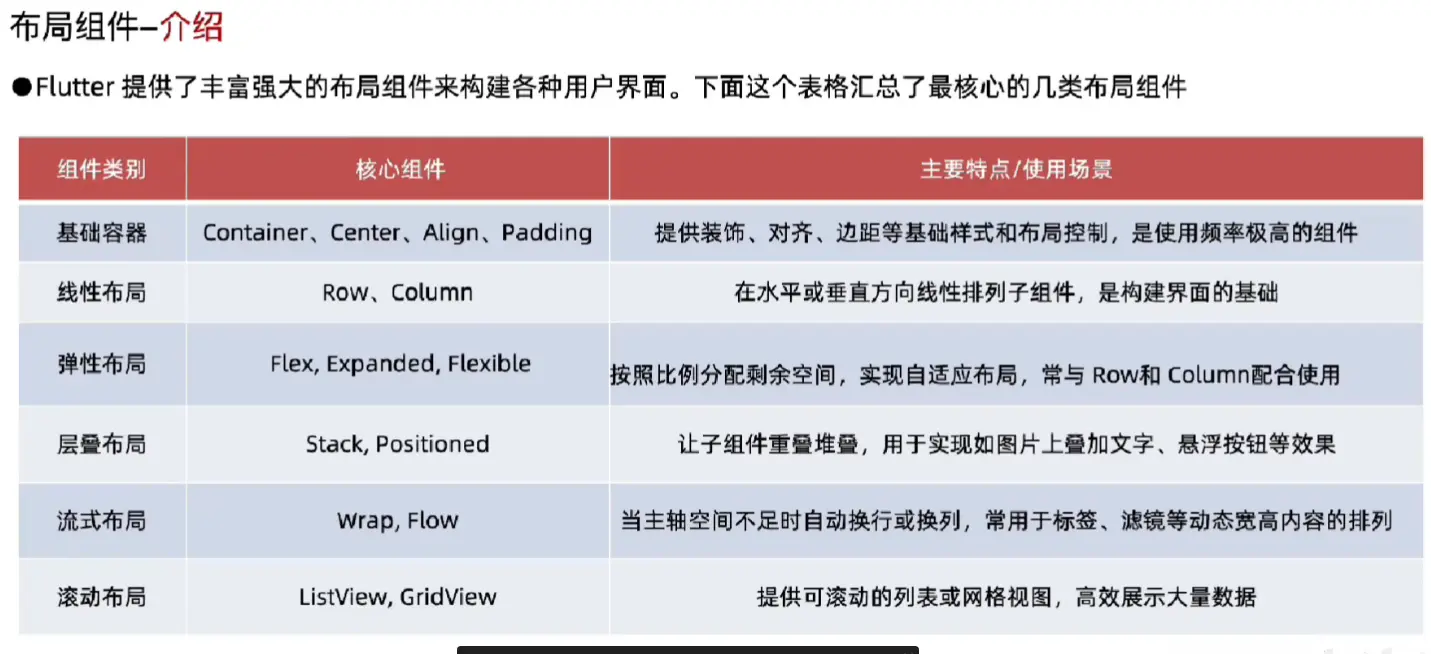
Container(布局组件)
定义:Container是功能丰富的布局组件,是个多功能组合容器
尺寸控制:可通过多种方式定义大小,有明确优先级规则
优先级:明确宽高>constraints约束>父组件约束>自适应组件大小
装饰系统:通过decoration属性实现视觉效果,但和color属性互斥
布局控制:提供内外边距和对齐方式
可选变化:支持绘制时进行矩阵变换,如旋转、倾斜、平移等
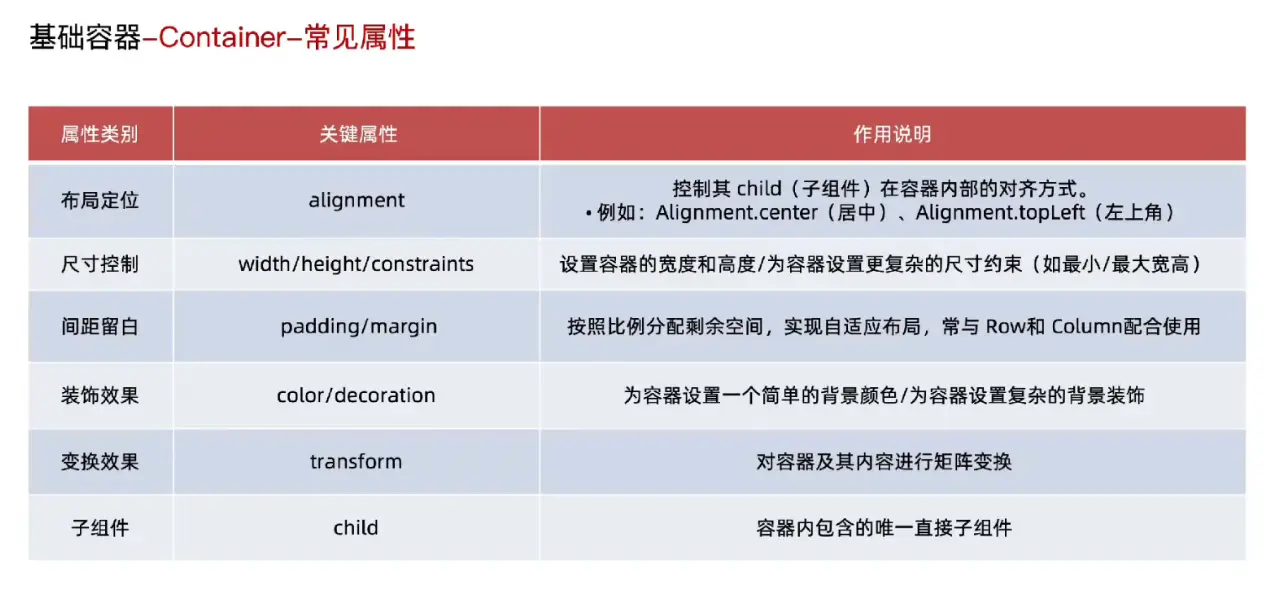
例如
import 'package:flutter/material.dart';
void main() {
runApp(MainPage());
}
class MainPage extends StatelessWidget {
const MainPage({super.key});
Widget build(BuildContext context) {
return MaterialApp(
title: "终末地AI群聊",
home: Scaffold(
appBar: AppBar(centerTitle: true, title: Text("终末地AI群聊")),
body: Container(width: 200, height: 200, color: Colors.red),
bottomNavigationBar: Container(
height: 80,
child: Center(child: Text("终末地AI群聊")),
),
),
);
}
}
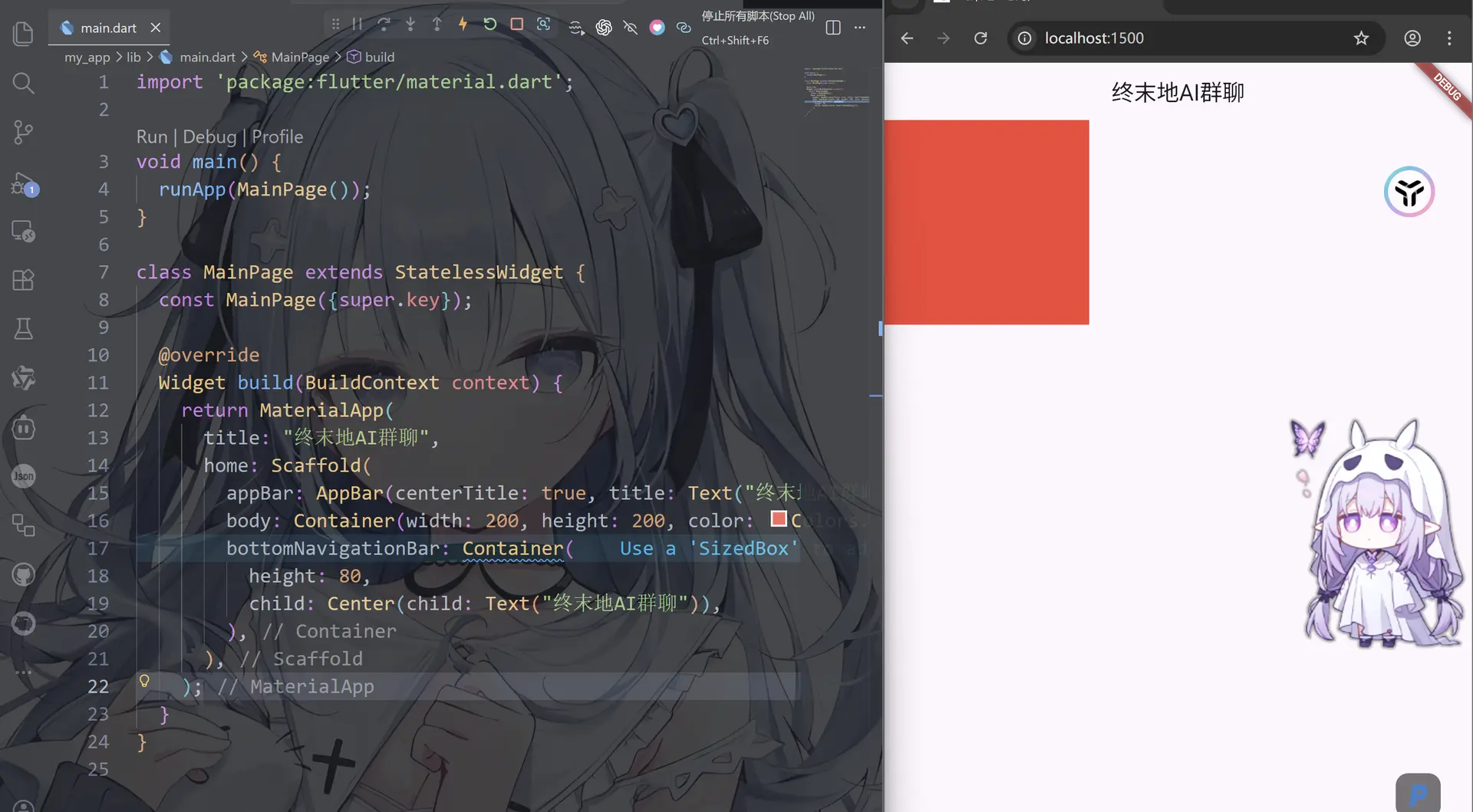
好的,我们可以看到出现了红色方块,这个是用color来填充颜色的,而我们还有一种方式就是decoration装饰器
import 'package:flutter/material.dart';
void main() {
runApp(MainPage());
}
class MainPage extends StatelessWidget {
const MainPage({super.key});
Widget build(BuildContext context) {
return MaterialApp(
title: "终末地AI群聊",
home: Scaffold(
appBar: AppBar(centerTitle: true, title: Text("终末地AI群聊")),
body: Container(
transform: Matrix4.rotationZ(0.1), // 旋转,弧度并非角度
margin: EdgeInsets.all(20), // 外边距,这个组件“外面”的间距(和父组件之间的距离)
alignment: Alignment.center, //这个是子组件的对齐方式即文本居中
width: 200, //宽度
height: 200, //高度
decoration: BoxDecoration(
//装饰器
color: Colors.tealAccent, //填充颜色
borderRadius: BorderRadius.circular(45), // 圆角
border: Border.all(color: Colors.black, width: 3), //黑色边框,宽度3
),
child: Text(
"终末地AI群聊",
style: TextStyle(
// 文本样式
color: Colors.white,
fontSize: 20,
fontWeight: FontWeight.bold,
),
),
),
bottomNavigationBar: Container(
height: 80,
child: Center(child: Text("终末地AI群聊")),
),
),
);
}
}
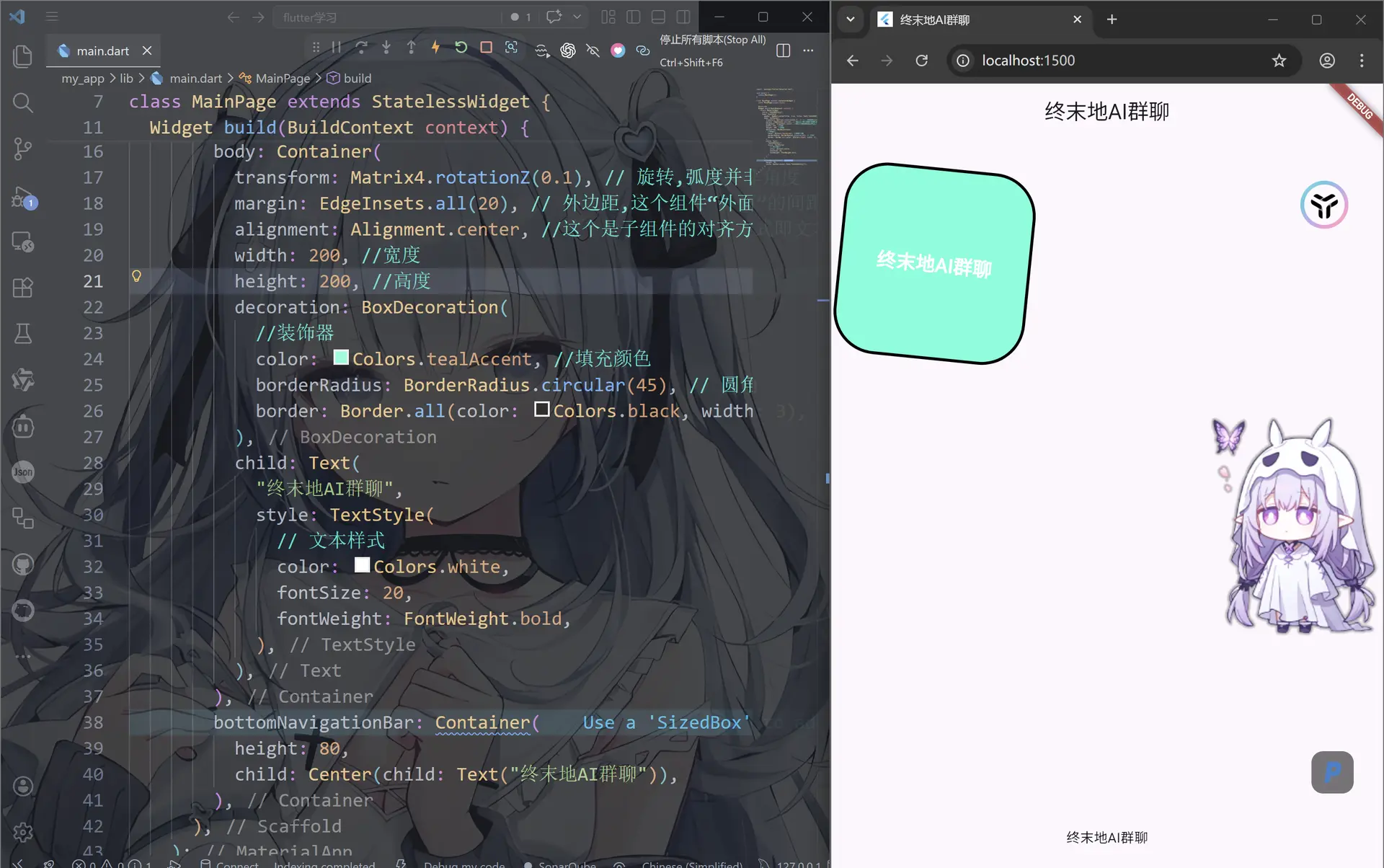
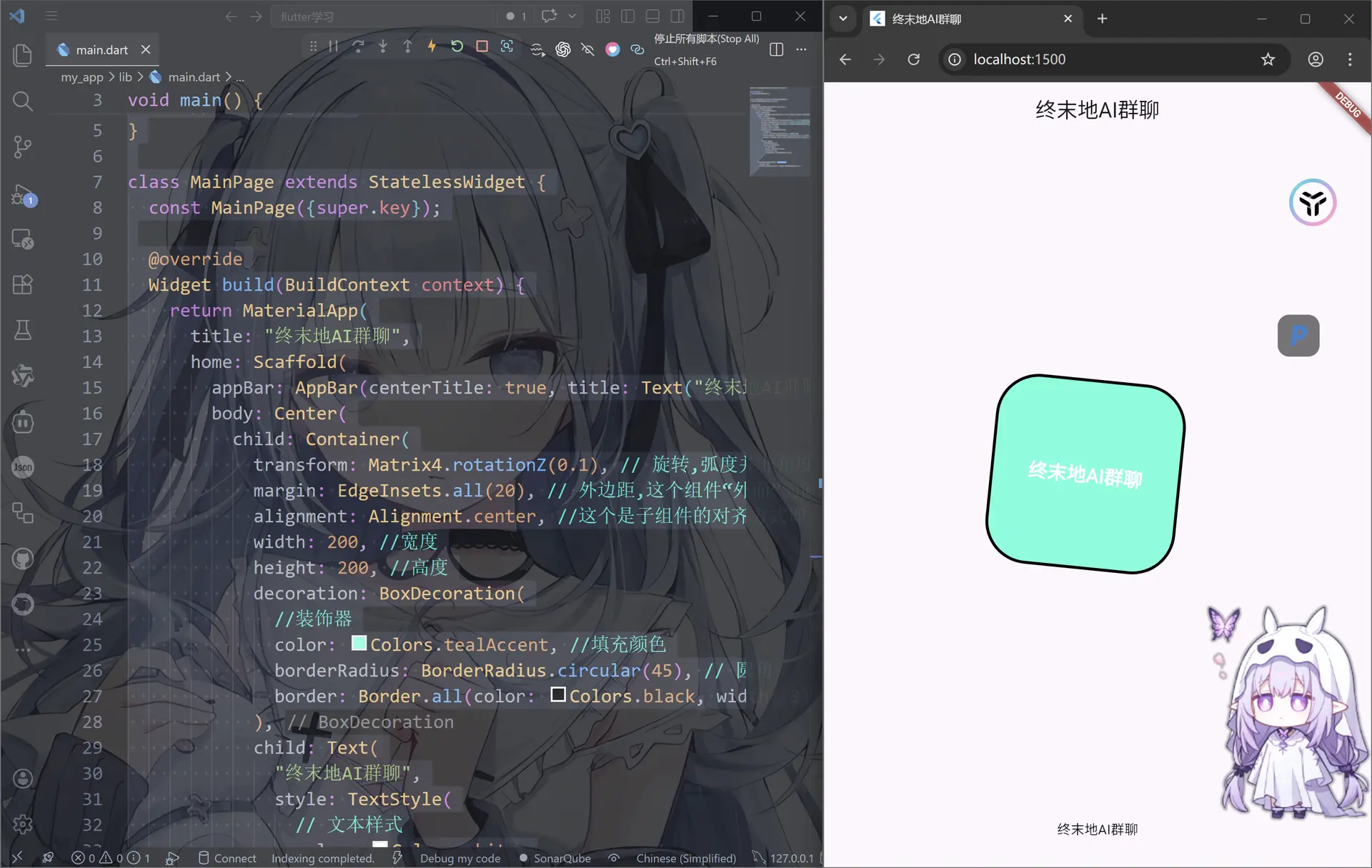
Center(居中组件)
Center:将其子组件在父容器的空间内进行水平和垂直方向上的居中排列
注意事项:Center不能设置宽高,Center的最终大小取决于其父组件传递给它的约束,Center会向它的父组件申请尽可能大的空间
实现固定宽且居中的组件:Center去包裹一个具有固定宽高的子组件。Container/SizeBox
import 'package:flutter/material.dart';
void main() {
runApp(MainPage());
}
class MainPage extends StatelessWidget {
const MainPage({super.key});
Widget build(BuildContext context) {
return MaterialApp(
title: "终末地AI群聊",
home: Scaffold(
appBar: AppBar(centerTitle: true, title: Text("终末地AI群聊")),
body: Center(
child: Container(
transform: Matrix4.rotationZ(0.1), // 旋转,弧度并非角度
margin: EdgeInsets.all(20), // 外边距,这个组件“外面”的间距(和父组件之间的距离)
alignment: Alignment.center, //这个是子组件的对齐方式即文本居中
width: 200, //宽度
height: 200, //高度
decoration: BoxDecoration(
//装饰器
color: Colors.tealAccent, //填充颜色
borderRadius: BorderRadius.circular(45), // 圆角
border: Border.all(color: Colors.black, width: 3), //黑色边框,宽度3
),
child: Text(
"终末地AI群聊",
style: TextStyle(
// 文本样式
color: Colors.white,
fontSize: 20,
fontWeight: FontWeight.bold,
),
),
),
),
bottomNavigationBar: Container(
height: 80,
child: Center(child: Text("终末地AI群聊")),
),
),
);
}
}
Align(对齐组件)
作用:精确控制其子组件在父容器空间内的对齐位置
alignment(对齐方式):子组件在父容器内的对齐方式
widthFactor(宽度因子):Align的宽度将是子组件宽度乘以该因子
heightFactor(高度因子):Align的高度将是子组件高度乘以该因子
import 'package:flutter/material.dart';
void main() {
runApp(MainPage());
}
class MainPage extends StatelessWidget {
const MainPage({super.key});
Widget build(BuildContext context) {
return MaterialApp(
title: "终末地AI群聊",
home: Scaffold(
appBar: AppBar(centerTitle: true, title: Text("终末地AI群聊")),
body: Container(
color: Colors.black,
child: Align(
// 使用Align组件来控制IconButton的对齐方式
alignment: Alignment.center, // 设置对齐方式为居中
widthFactor:
null, // 设置宽度因子为1,使IconButton占满父级宽度,默认是null,表示根据子组件的宽度来确定父组件的宽度
heightFactor:
null, // 设置高度因子为1,使IconButton占满父级高度,默认是null,表示根据子组件的高度来确定父组件的高度
child: IconButton(
onPressed: () {
// 处理点击事件
},
icon: Icon(
Icons.connecting_airports,
size: 100,
color: Colors.cyanAccent,
),
),
),
),
bottomNavigationBar: Container(
height: 80,
child: Center(child: Text("终末地AI群聊")),
),
),
);
}
}
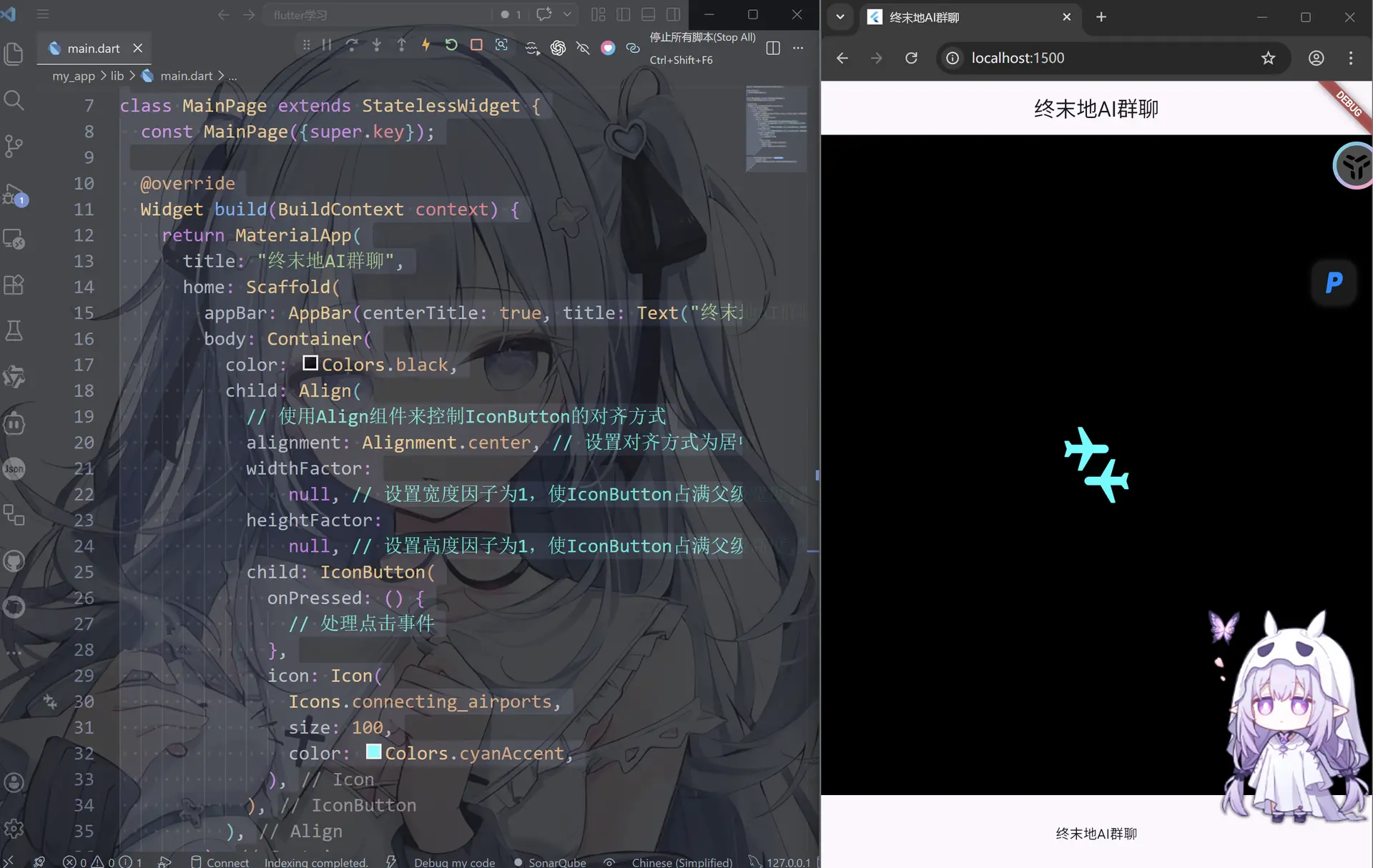
- 与Center的区别:Center是Align的一个特例,继承自Align,相当于一个将alignment属性为居中的Align.Center
- 使用场景:当需要将个组件放置在父容器的特定角落,Align是理想选择
- 动态尺寸:通过widthFactor和heightFactor,可以创建出与子组件大小成比例的容器,动态布局中很有用
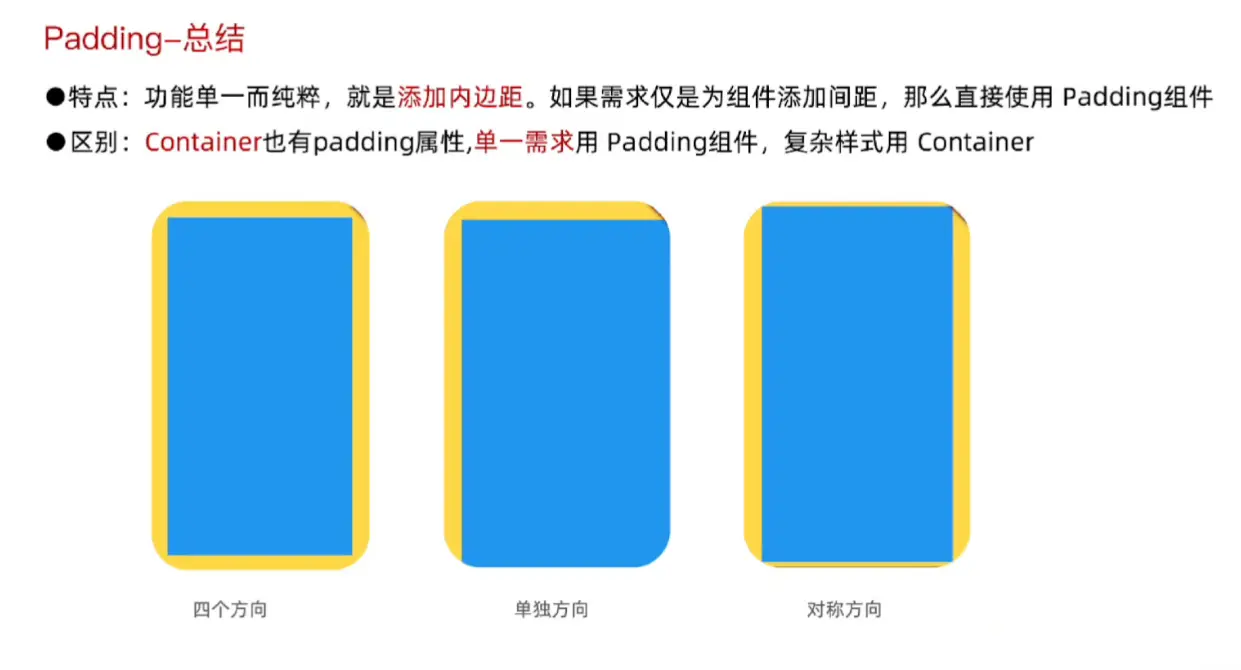
Padding(内边距组件)
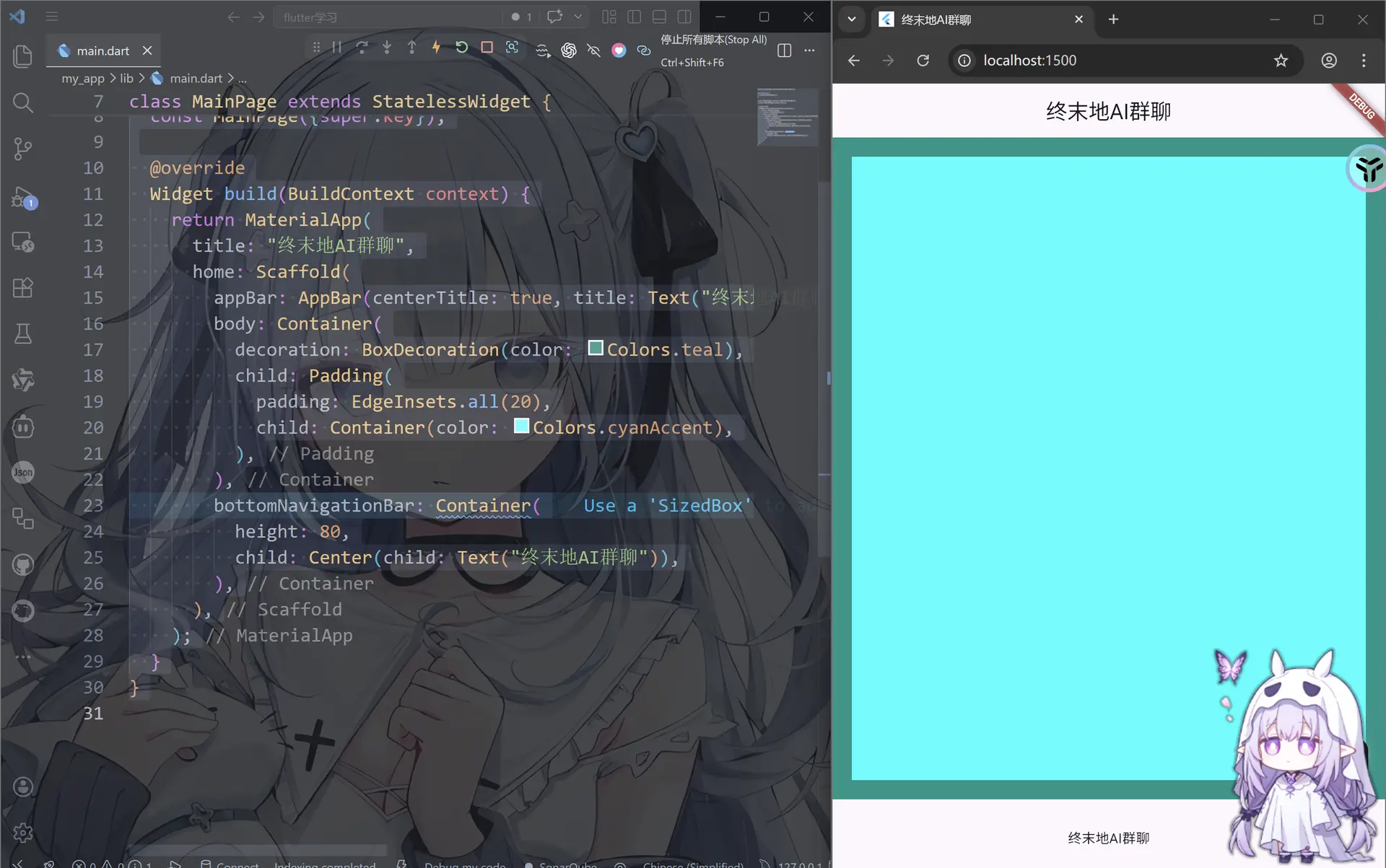
单独设置某个或者某几个方向的边距
EdgeInsets.all
import 'package:flutter/material.dart';
void main() {
runApp(MainPage());
}
class MainPage extends StatelessWidget {
const MainPage({super.key});
Widget build(BuildContext context) {
return MaterialApp(
title: "终末地AI群聊",
home: Scaffold(
appBar: AppBar(centerTitle: true, title: Text("终末地AI群聊")),
body: Container(
decoration: BoxDecoration(color: Colors.teal),
child: Padding(
padding: EdgeInsets.all(20),//这里all就是所有方向
child: Container(color: Colors.cyanAccent),
),
),
bottomNavigationBar: Container(
height: 80,
child: Center(child: Text("终末地AI群聊")),
),
),
);
}
}
EdgeInsets.only
当然也可以指定那些
import 'package:flutter/material.dart';
void main() {
runApp(MainPage());
}
class MainPage extends StatelessWidget {
const MainPage({super.key});
Widget build(BuildContext context) {
return MaterialApp(
title: "终末地AI群聊",
home: Scaffold(
appBar: AppBar(centerTitle: true, title: Text("终末地AI群聊")),
body: Container(
decoration: BoxDecoration(color: Colors.teal),
child: Padding(
padding: EdgeInsets.only(left: 25, right: 25),//使用only来指定对应方向的边距
child: Container(color: Colors.cyanAccent),
),
),
bottomNavigationBar: Container(
height: 80,
child: Center(child: Text("终末地AI群聊")),
),
),
);
}
}
我们也可以,使用Edgelnsets.symmetric属性进行对称设置,vertical(纵向)、horizontal(横向)来直接同时改两个方向
import 'package:flutter/material.dart';
void main() {
runApp(MainPage());
}
class MainPage extends StatelessWidget {
const MainPage({super.key});
Widget build(BuildContext context) {
return MaterialApp(
title: "终末地AI群聊",
home: Scaffold(
appBar: AppBar(centerTitle: true, title: Text("终末地AI群聊")),
body: Container(
decoration: BoxDecoration(color: Colors.teal),
child: Padding(
padding: EdgeInsets.symmetric(horizontal: 50, vertical: 30),
child: Container(color: Colors.cyanAccent),
),
),
bottomNavigationBar: Container(
height: 80,
child: Center(child: Text("终末地AI群聊")),
),
),
);
}
}
Column(垂直线性布局)
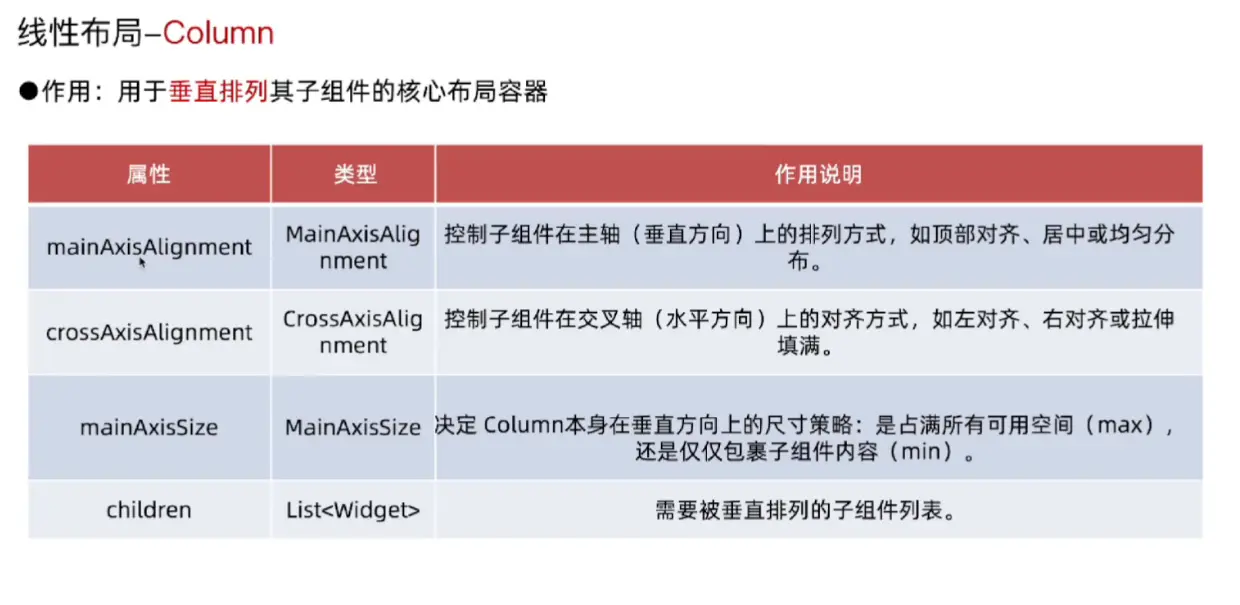
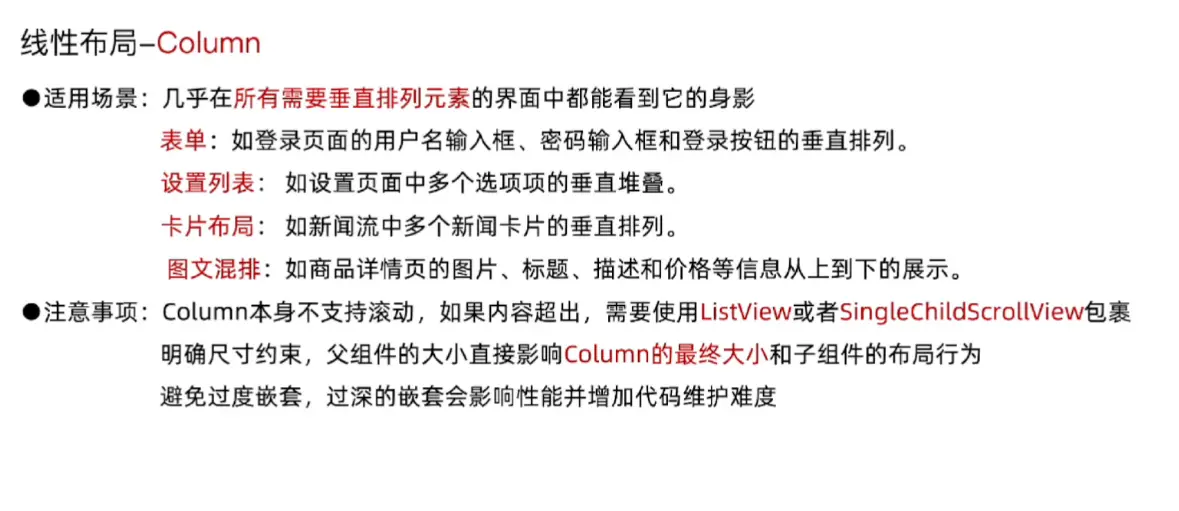
主轴
主轴就是垂直的放在界面中间的轴
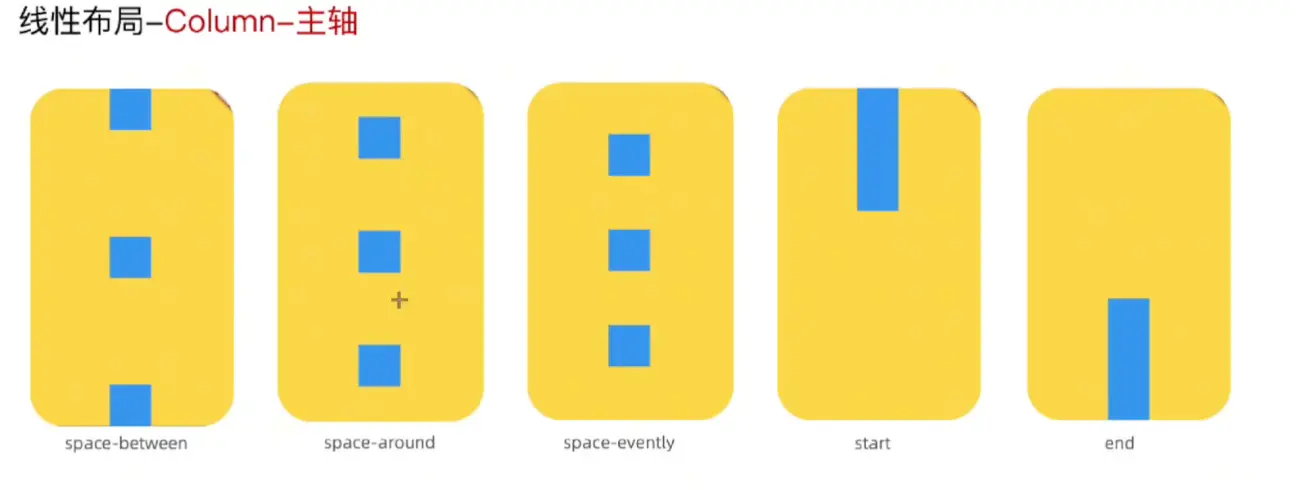
import 'package:flutter/material.dart';
void main() {
runApp(MainPage());
}
class MainPage extends StatelessWidget {
const MainPage({super.key});
Widget build(BuildContext context) {
return MaterialApp(
title: "终末地AI群聊",
home: Scaffold(
appBar: AppBar(centerTitle: true, title: Text("终末地AI群聊")),
body: Container(
width: double.infinity, //宽度占满父组件
height: double.infinity, //高度占满父组件
decoration: BoxDecoration(color: Colors.tealAccent),
child: Column(
//mainAxisAlignment: MainAxisAlignment.spaceAround,//环绕模式
//mainAxisAlignment: MainAxisAlignment.spaceBetween,//两头对齐
//mainAxisAlignment: MainAxisAlignment.spaceEvenly, //均分模式
//mainAxisAlignment: MainAxisAlignment.center,//居中模式
//mainAxisAlignment: MainAxisAlignment.start, //从头对齐
mainAxisAlignment: MainAxisAlignment.end, //从尾对齐
children: [
Container(height: 100, width: 100, color: Colors.blue),
Container(height: 100, width: 100, color: Colors.green),
Container(height: 100, width: 100, color: Colors.yellow),
Container(height: 100, width: 100, color: Colors.orange),
Container(height: 100, width: 100, color: Colors.pink),
Container(height: 100, width: 100, color: Colors.purple),
],
),
),
bottomNavigationBar: Container(
height: 80,
child: Center(child: Text("终末地AI群聊")),
),
),
);
}
}
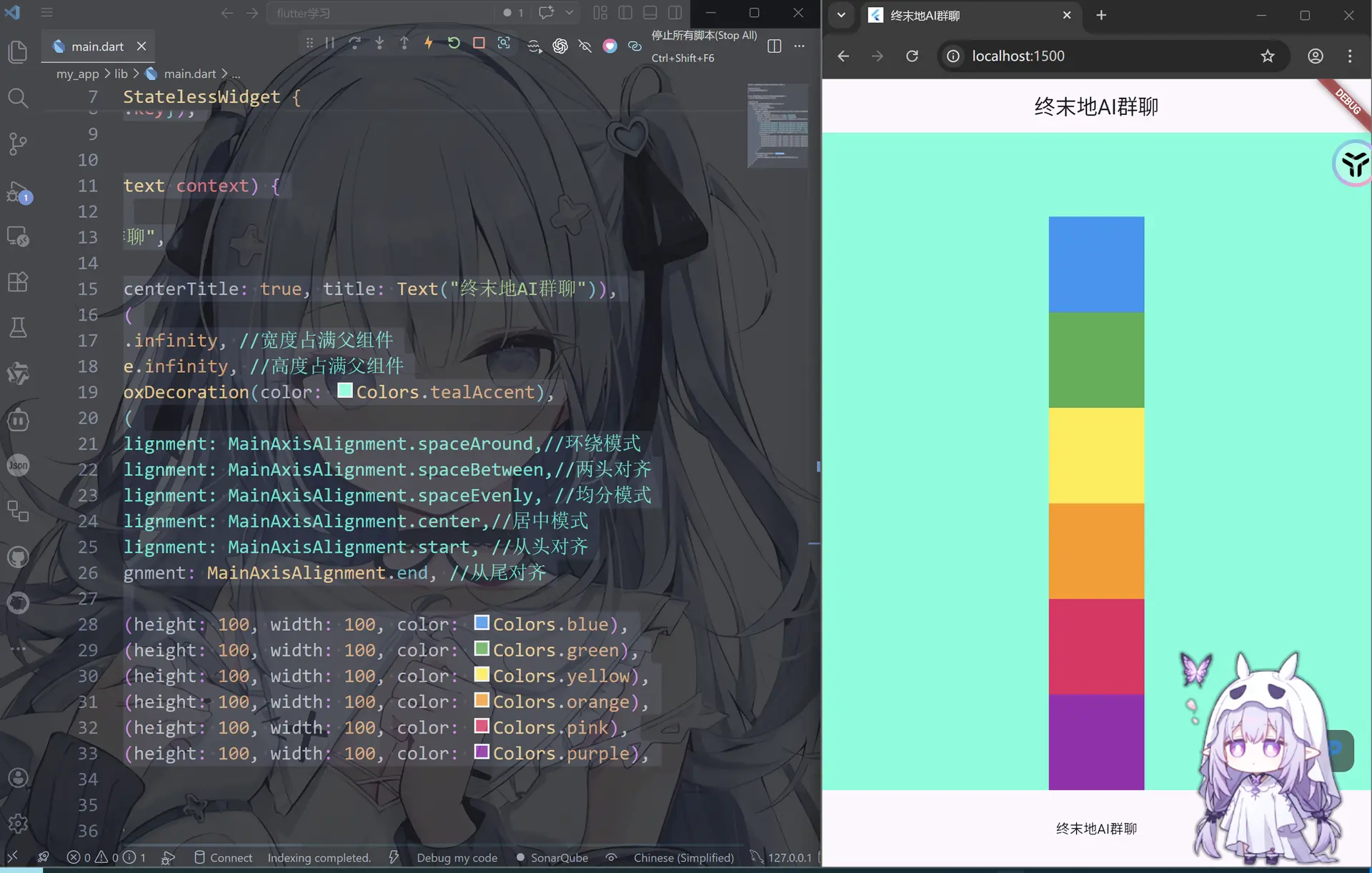
mainAxisAligment
这里假设column有如下的资
Column(
  children: [
    Text("A"),
    Text("B"),
    Text("C"),
  ],
)
start
mainAxisAlignment: MainAxisAlignment.start
A
B
C


(全部挤在上面)
center
mainAxisAlignment: MainAxisAlignment.center
A
B
C


(整体居中)
end
mainAxisAlignment: MainAxisAlignment.end
A
B
C
(在底部)
spaceBetween
mainAxisAlignment: MainAxisAlignment.spaceBetween
A


B


C
(首尾贴边,中间平均分)
spaceAround
mainAxisAlignment: MainAxisAlignment.spaceAround
A

B

C

(上下都有间距)
spaceEvenly
mainAxisAlignment: MainAxisAlignment.spaceEvenly
A

B

C

(间距完全一样)
交叉轴
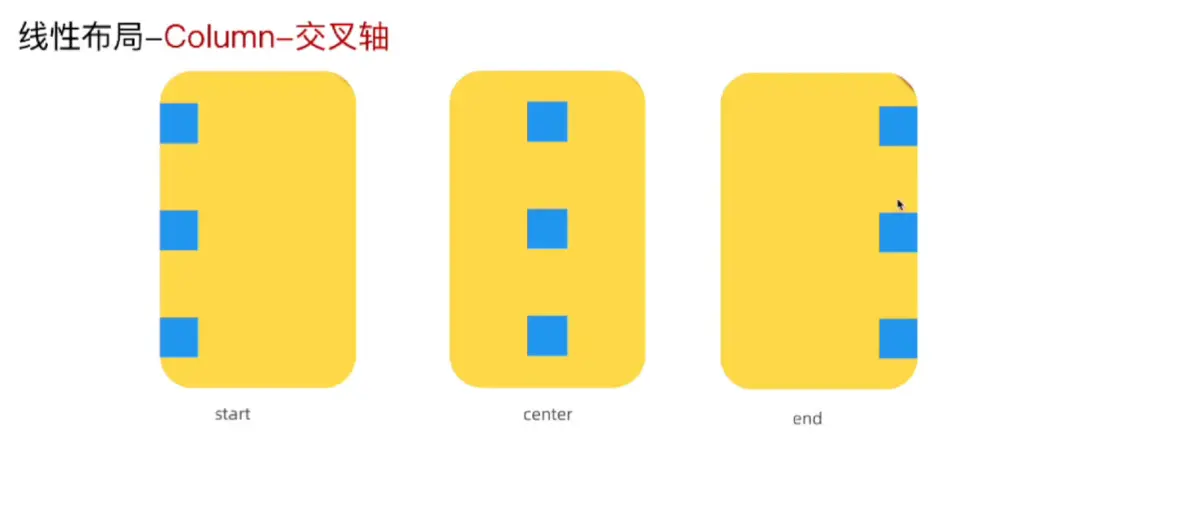
| 属性 | 控制方向 |
|---|---|
| mainAxisAlignment | 上下(主轴) |
| crossAxisAlignment | 左右(交叉轴) |
import 'package:flutter/material.dart';
void main() {
runApp(MainPage());
}
class MainPage extends StatelessWidget {
const MainPage({super.key});
Widget build(BuildContext context) {
return MaterialApp(
title: "终末地AI群聊",
home: Scaffold(
appBar: AppBar(centerTitle: true, title: Text("终末地AI群聊")),
body: Container(
width: double.infinity, //宽度占满父组件
height: double.infinity, //高度占满父组件
decoration: BoxDecoration(color: Colors.tealAccent),
child: Column(
//crossAxisAlignment: CrossAxisAlignment.center, //水平居中
//crossAxisAlignment: CrossAxisAlignment.start, //水平靠左
crossAxisAlignment: CrossAxisAlignment.end, //水平靠右
children: [
Container(height: 100, width: 100, color: Colors.blue),
Container(height: 100, width: 100, color: Colors.green),
Container(height: 100, width: 100, color: Colors.yellow),
Container(height: 100, width: 100, color: Colors.orange),
Container(
height: 100,
width: 100,
color: const Color.fromARGB(255, 235, 29, 98),
),
Container(height: 100, width: 100, color: Colors.purple),
],
),
),
bottomNavigationBar: Container(
height: 80,
child: Center(child: Text("终末地AI群聊")),
),
),
);
}
}
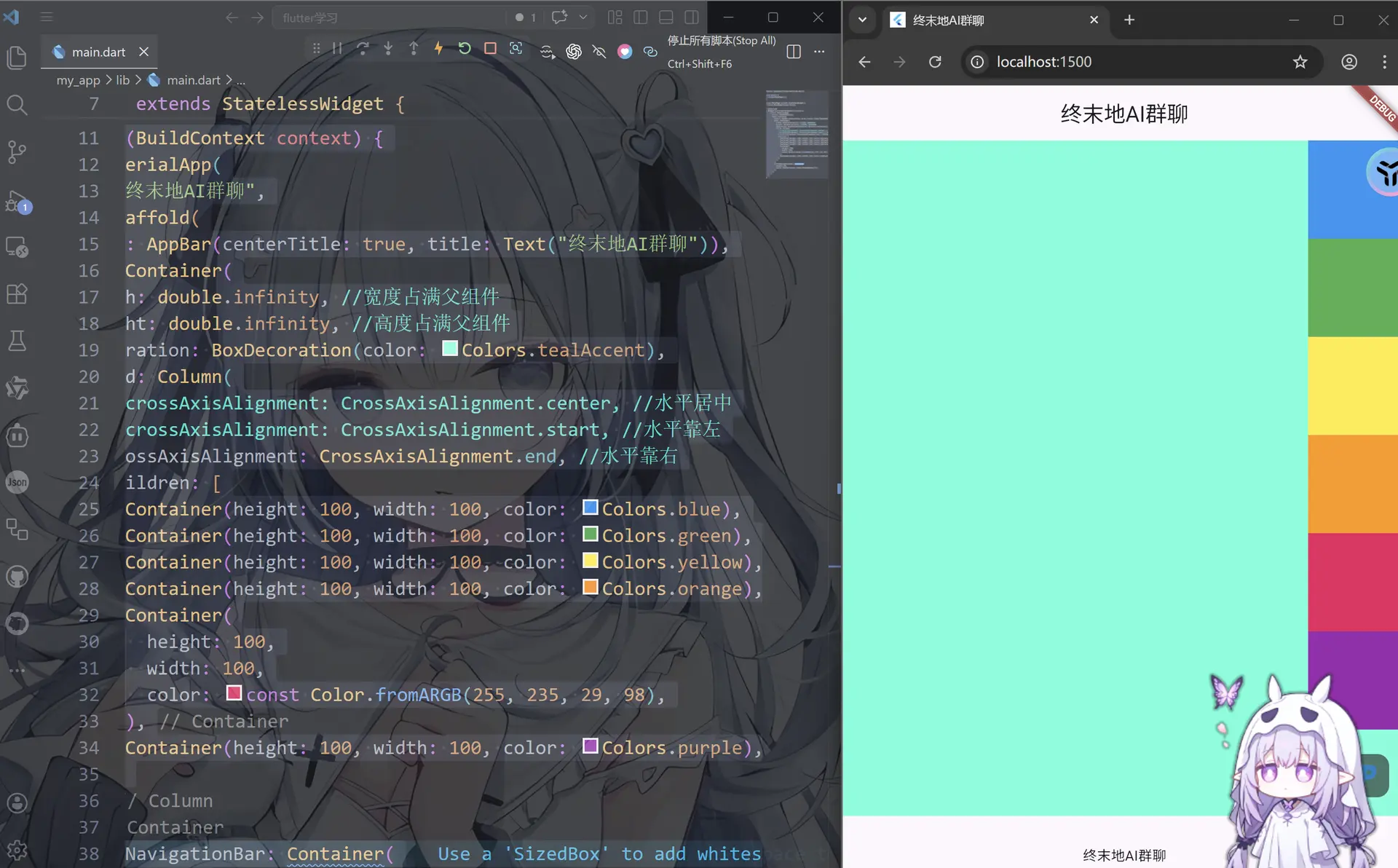
crossAxisAlignment
start
crossAxisAlignment: CrossAxisAlignment.start
A
B
C
(左对齐)
center
crossAxisAlignment: CrossAxisAlignment.center
   A
   B
   C
(水平居中)
end
crossAxisAlignment: CrossAxisAlignment.end
        A
        B
        C
(右对齐)
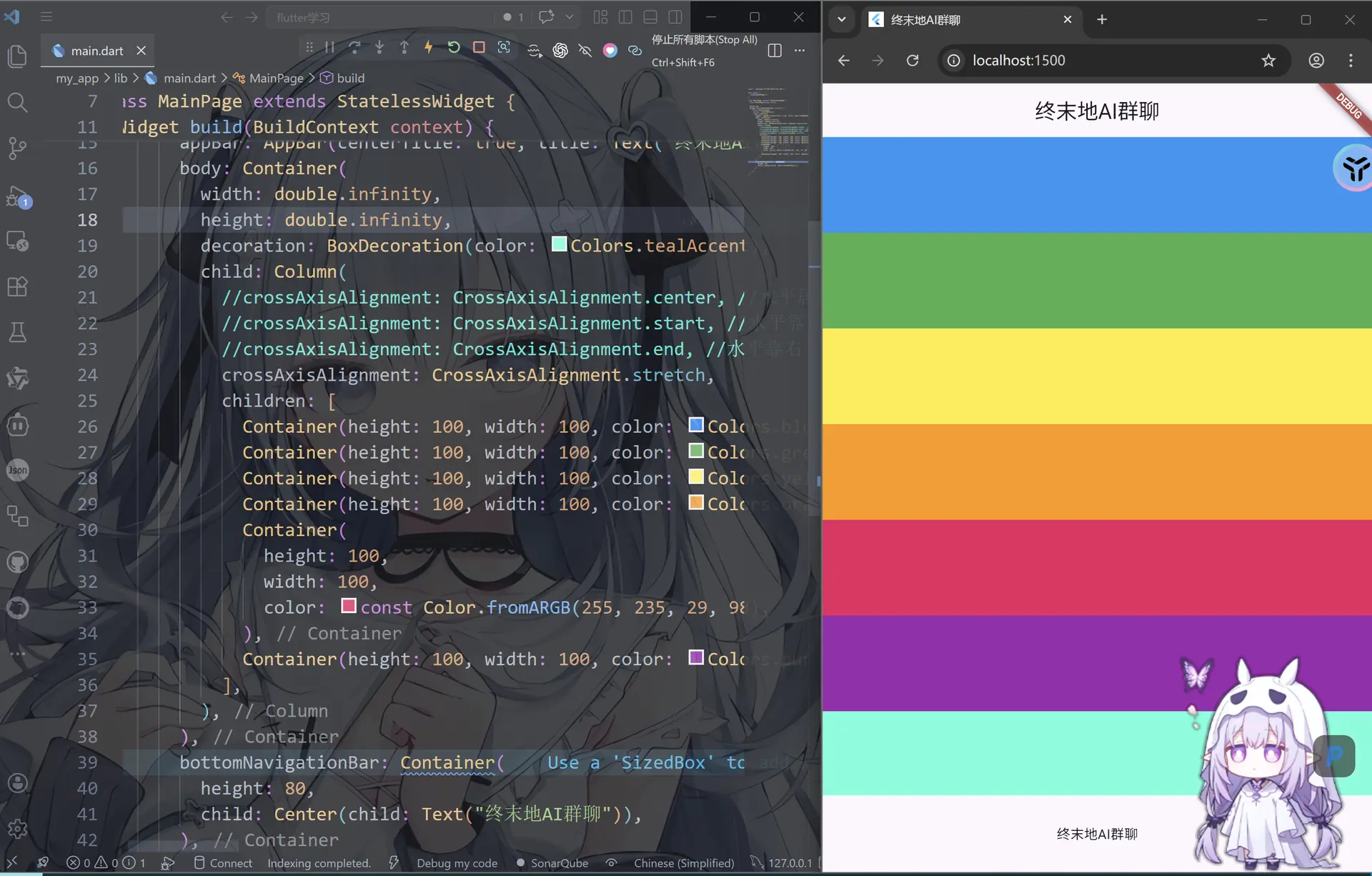
stretch
crossAxisAlignment: CrossAxisAlignment.stretch
这个不好描述,大概就是如字面意思stretch延伸
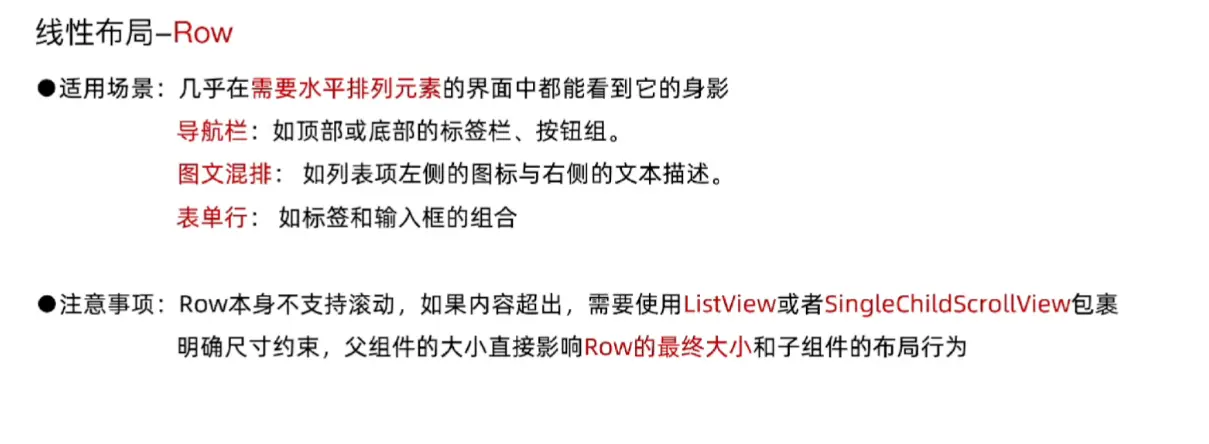
Row(水平线性布局)
主轴
刚才我们学的都是竖直排列的,现在我们看看水平排列的吧
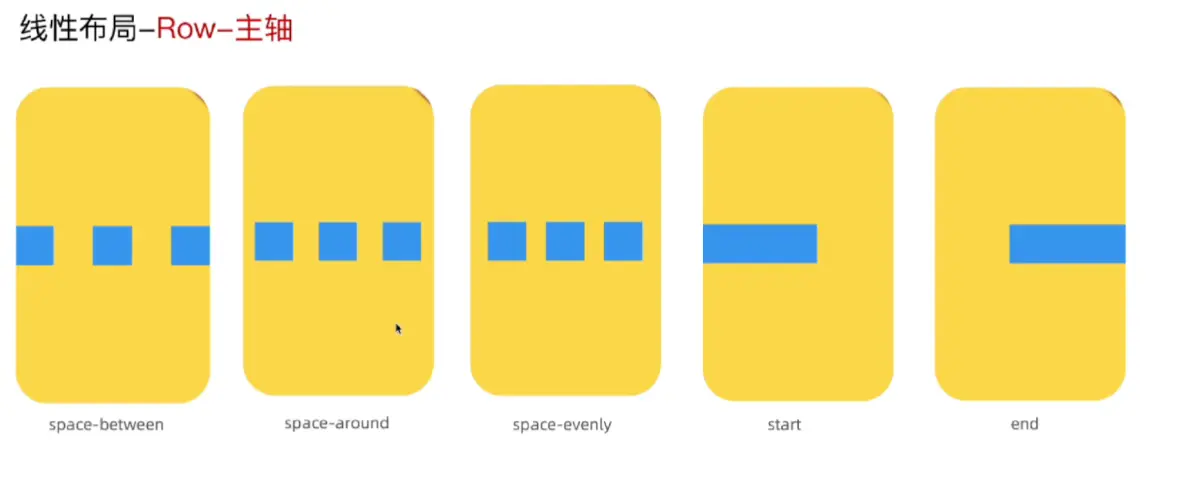
这个和Column几乎一模一样,连属性都可以复用
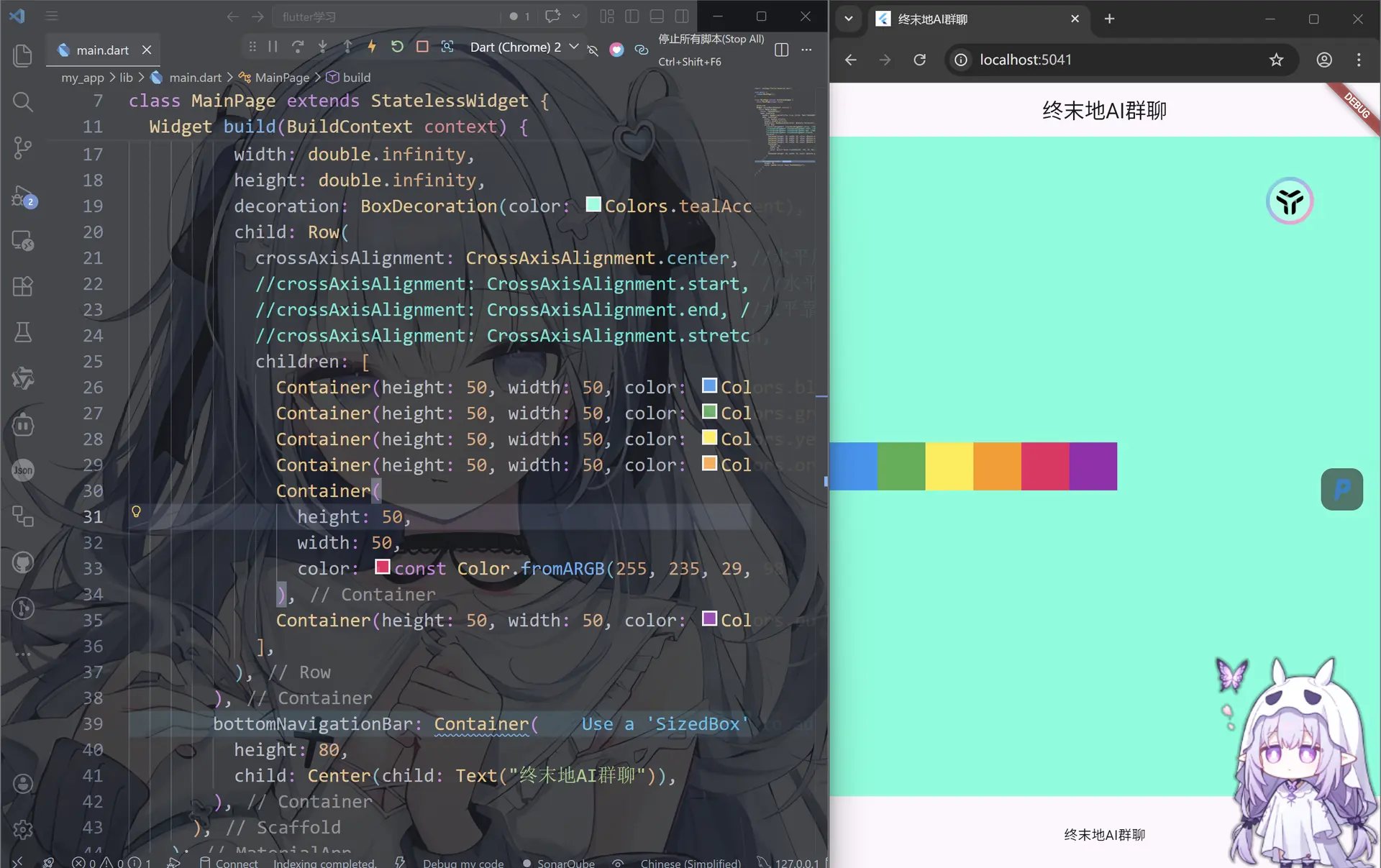
import 'package:flutter/material.dart';
void main() {
runApp(MainPage());
}
class MainPage extends StatelessWidget {
const MainPage({super.key});
Widget build(BuildContext context) {
return MaterialApp(
title: "终末地AI群聊",
home: Scaffold(
appBar: AppBar(centerTitle: true, title: Text("终末地AI群聊")),
body: Container(
width: double.infinity,
height: double.infinity,
decoration: BoxDecoration(color: Colors.tealAccent),
child: Row(
crossAxisAlignment: CrossAxisAlignment.center, //水平居中
//crossAxisAlignment: CrossAxisAlignment.start, //水平靠左
//crossAxisAlignment: CrossAxisAlignment.end, //水平靠右
//crossAxisAlignment: CrossAxisAlignment.stretch,
children: [
Container(height: 50, width: 50, color: Colors.blue),
Container(height: 50, width: 50, color: Colors.green),
Container(height: 50, width: 50, color: Colors.yellow),
Container(height: 50, width: 50, color: Colors.orange),
Container(
height: 50,
width: 50,
color: const Color.fromARGB(255, 235, 29, 98),
),
Container(height: 50, width: 50, color: Colors.purple),
],
),
),
bottomNavigationBar: Container(
height: 80,
child: Center(child: Text("终末地AI群聊")),
),
),
);
}
}
SizedBox
当然我们也可以手动增加边距使用SizedBox
import 'package:flutter/material.dart';
void main() {
runApp(MainPage());
}
class MainPage extends StatelessWidget {
const MainPage({super.key});
Widget build(BuildContext context) {
return MaterialApp(
title: "终末地AI群聊",
home: Scaffold(
appBar: AppBar(centerTitle: true, title: Text("终末地AI群聊")),
body: Container(
width: double.infinity,
height: double.infinity,
decoration: BoxDecoration(color: Colors.tealAccent),
child: Row(
crossAxisAlignment: CrossAxisAlignment.center, //水平居中
//crossAxisAlignment: CrossAxisAlignment.start, //水平靠左
//crossAxisAlignment: CrossAxisAlignment.end, //水平靠右
//crossAxisAlignment: CrossAxisAlignment.stretch,
children: [
Container(height: 50, width: 50, color: Colors.blue),
SizedBox(width: 10), //添加水平间距
Container(height: 50, width: 50, color: Colors.green),
SizedBox(width: 10),
Container(height: 50, width: 50, color: Colors.yellow),
SizedBox(width: 10),
Container(height: 50, width: 50, color: Colors.orange),
SizedBox(width: 10),
Container(
height: 50,
width: 50,
color: const Color.fromARGB(255, 235, 29, 98),
),
SizedBox(width: 10),
Container(height: 50, width: 50, color: Colors.purple),
],
),
),
bottomNavigationBar: Container(
height: 80,
child: Center(child: Text("终末地AI群聊")),
),
),
);
}
}
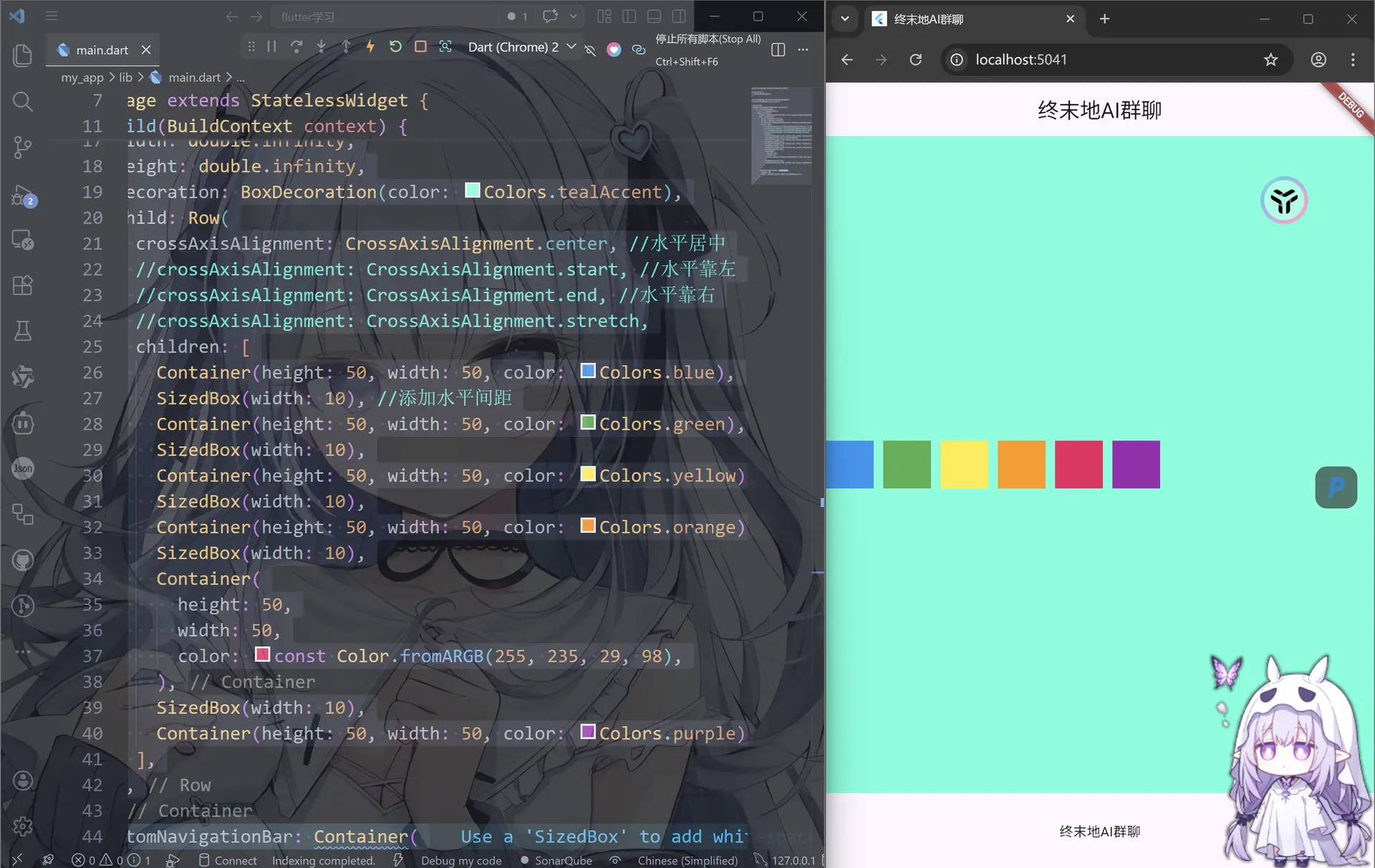
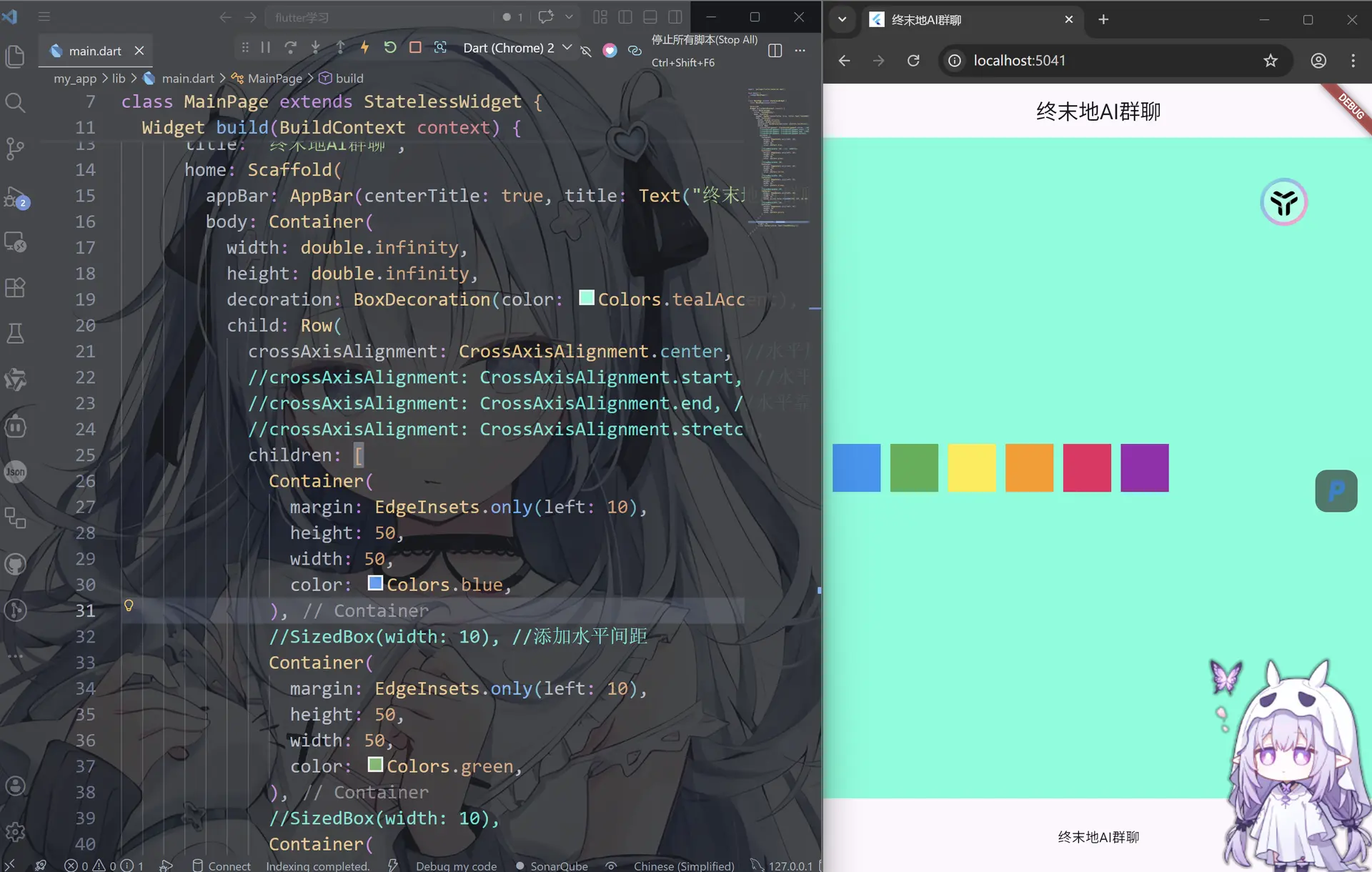
margin
还有一种方式就是使用margin
import 'package:flutter/material.dart';
void main() {
runApp(MainPage());
}
class MainPage extends StatelessWidget {
const MainPage({super.key});
Widget build(BuildContext context) {
return MaterialApp(
title: "终末地AI群聊",
home: Scaffold(
appBar: AppBar(centerTitle: true, title: Text("终末地AI群聊")),
body: Container(
width: double.infinity,
height: double.infinity,
decoration: BoxDecoration(color: Colors.tealAccent),
child: Row(
crossAxisAlignment: CrossAxisAlignment.center, //水平居中
//crossAxisAlignment: CrossAxisAlignment.start, //水平靠左
//crossAxisAlignment: CrossAxisAlignment.end, //水平靠右
//crossAxisAlignment: CrossAxisAlignment.stretch,
children: [
Container(
margin: EdgeInsets.only(left: 10),
height: 50,
width: 50,
color: Colors.blue,
),
//SizedBox(width: 10), //添加水平间距
Container(
margin: EdgeInsets.only(left: 10),
height: 50,
width: 50,
color: Colors.green,
),
//SizedBox(width: 10),
Container(
margin: EdgeInsets.only(left: 10),
height: 50,
width: 50,
color: Colors.yellow,
),
//SizedBox(width: 10),
Container(
margin: EdgeInsets.only(left: 10),
height: 50,
width: 50,
color: Colors.orange,
),
//SizedBox(width: 10),
Container(
margin: EdgeInsets.only(left: 10),
height: 50,
width: 50,
color: const Color.fromARGB(255, 235, 29, 98),
),
//SizedBox(width: 10),
Container(
margin: EdgeInsets.only(left: 10),
height: 50,
width: 50,
color: Colors.purple,
),
],
),
),
bottomNavigationBar: Container(
height: 80,
child: Center(child: Text("终末地AI群聊")),
),
),
);
}
}
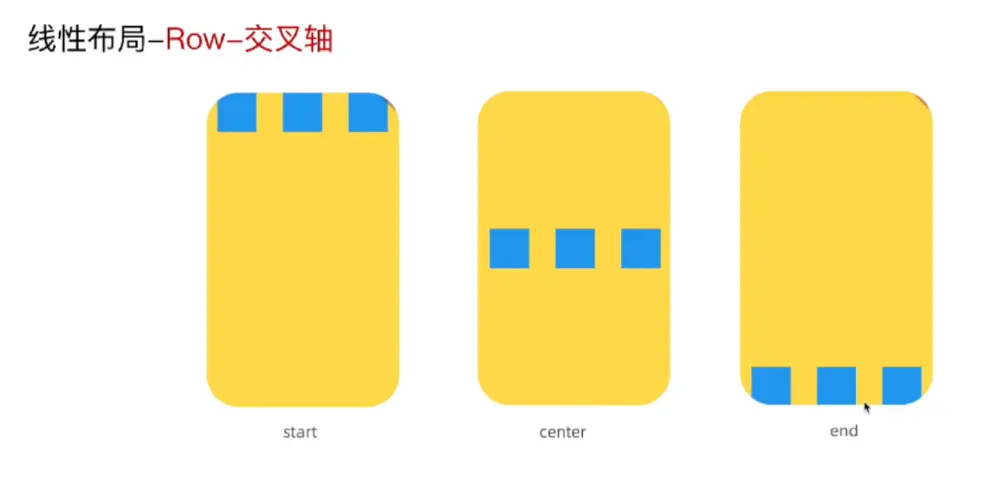
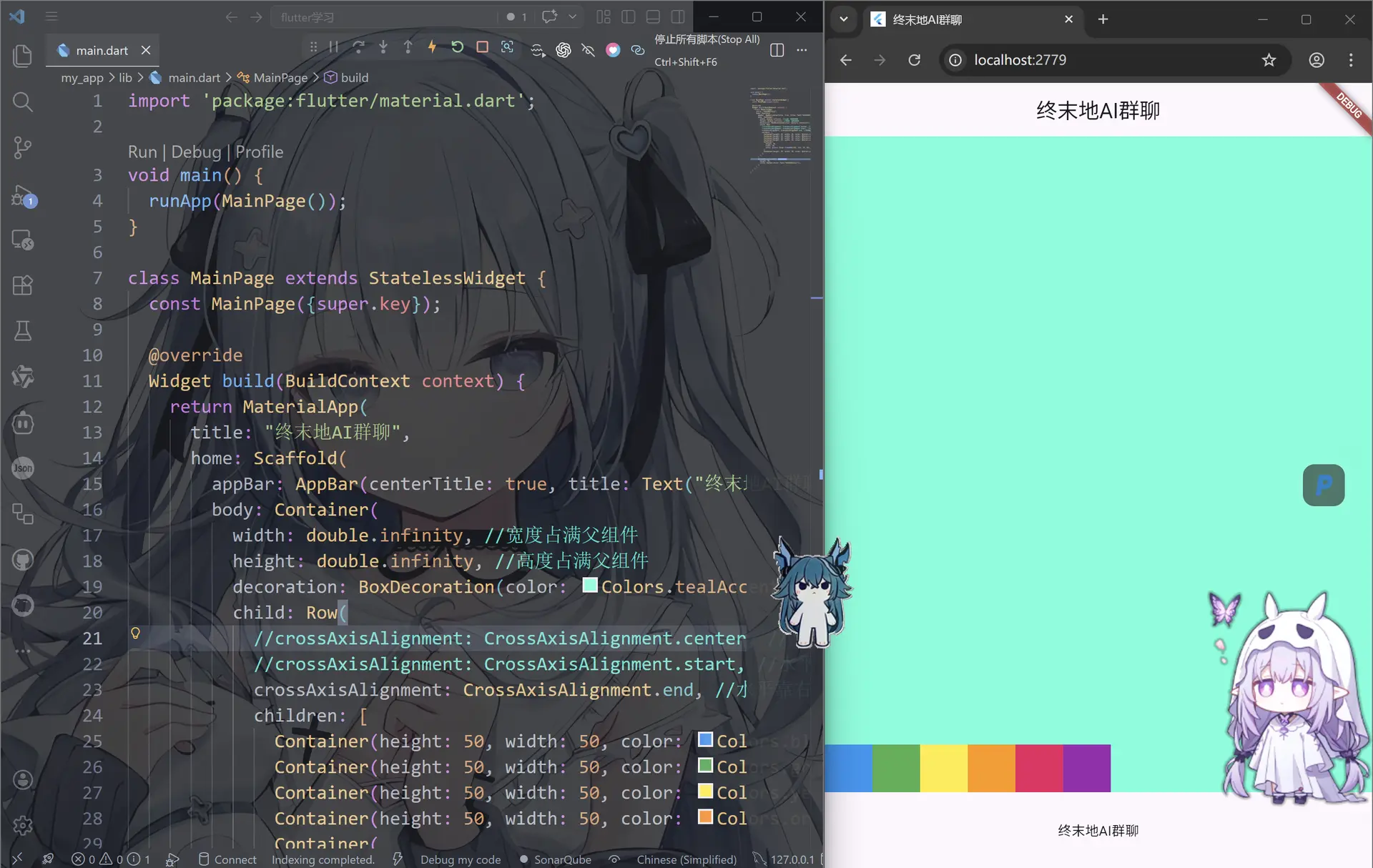
交叉轴
这个和刚才的一样的
import 'package:flutter/material.dart';
void main() {
runApp(MainPage());
}
class MainPage extends StatelessWidget {
const MainPage({super.key});
Widget build(BuildContext context) {
return MaterialApp(
title: "终末地AI群聊",
home: Scaffold(
appBar: AppBar(centerTitle: true, title: Text("终末地AI群聊")),
body: Container(
width: double.infinity, //宽度占满父组件
height: double.infinity, //高度占满父组件
decoration: BoxDecoration(color: Colors.tealAccent),
child: Row(
//crossAxisAlignment: CrossAxisAlignment.center, //水平居中
//crossAxisAlignment: CrossAxisAlignment.start, //水平靠左
crossAxisAlignment: CrossAxisAlignment.end, //水平靠右
children: [
Container(height: 50, width: 50, color: Colors.blue),
Container(height: 50, width: 50, color: Colors.green),
Container(height: 50, width: 50, color: Colors.yellow),
Container(height: 50, width: 50, color: Colors.orange),
Container(
height: 50,
width: 50,
color: const Color.fromARGB(255, 235, 29, 98),
),
Container(height: 50, width: 50, color: Colors.purple),
],
),
),
bottomNavigationBar: Container(
height: 80,
child: Center(child: Text("终末地AI群聊")),
),
),
);
}
}

评论区