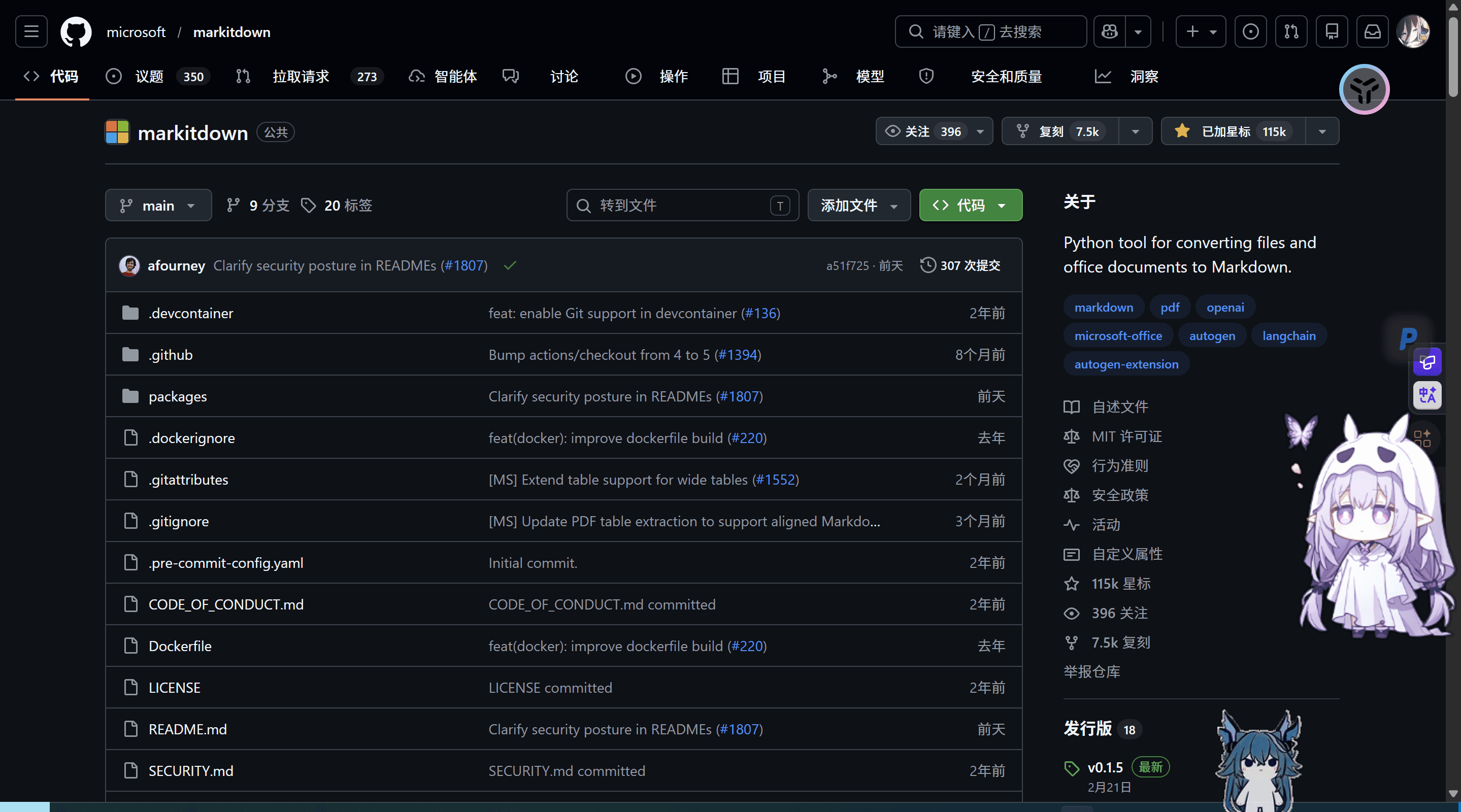
今天我看到了微软Markitdown这个软件

这个是一个命令行工具,可以将各种文件转换为markdown文件

image-20260422212046030但是我在使用起来十分的恶心,虽然官方说这是给AI用的,但是就不能给一个人类能用的吗真的是,好歹我还觉得这个东西还挺新奇的

我就说说过程吧

最开始的时候我是

1
2
3
git clone git@github.com:microsoft/markitdown.git
cd markitdown
pip install "markitdown[all]" //all就是全部功能

然后创建虚拟环境

1
2
md_env\Scripts\activate
pip install "markitdown[all]"

然后程序又报错说没装ffmpeg和ffprobe我又去装这些东西

然后试了各种命令来使用这个软件

最后为了方便下载搞了个清单让系统自己下载

1
2
D:\markitdown\md_env\Scripts\activate
pip freeze > D:\markitdown\requirements.txt

结果就是更加麻烦了,然后我放弃这个想法了

然后又让AI写了一个安装脚本ps1和一个界面脚本ps1和自启动脚本bat实现了一键下载和启动,但是还是非常简陋,而且别的电脑用不了,尤其是电脑上没有python的用户和python版本过时的用户

这里我最终的选择是内置一个python,就像大多数软件一样在里面塞一个jdk或者python,使用的是markitdown支持的最稳定的python版本的阉割版3.11.9 点击下载 只有20MB

然后根目录添加一个get-pip.py文件来使用pip

  1. 下载上面的压缩包,解压到工具箱目录,文件夹命名为 python_env
  2. 进入 python_env 文件夹,找到 python311._pth 文件,用记事本打开
  3. 找到最后一行 #import site把前面的 # 删掉(变成 import site),保存
  4. 下载 get-pip.py 另存放到文件夹根目录,然后在根目录打开 CMD 运行:.\python_env\python.exe get-pip.py
  5. 这样便携版 Python 就可以像正常 Python 一样使用 .\python_env\python.exe -m pip install markitdown 了(此时就不再需要 venv 虚拟环境了,以后发给别人,直接把整个 python_env 文件夹连同工具箱一起打包发送即可)

然后就是一系列操作让程序使用这个内置的python

而添加magic_convert.py 负责底层暴力的文件操作、图片提取、YAML 注入和多图片融合

然后就是不停的改bug 提需求 迭代

最终版本文件树如下(第一层)

markitdown-quickstyle
├── input (待处理文件存放区)
├── output (处理完成文件存放区)
├── python_env(python相关文件)
├──ffmpeg.exe(音频处理)
├── ffprobe.exe(音频处理)
├── get-pip.py(pip下载)
├── install.ps1(下载环境和依赖)
├── magic_convert.py(额外逻辑相关)
├── run.ps1(运行软件主体)
├── .installed(环境配置完成确认文件)
└── start.bat(启动程序)

start.bat

1
2
3
4
5
6
7
8
9
@echo off
chcp 65001 >nul
title ✨ MarkItDown 魔法工具箱 ✨

:: 放弃使用 CMD 打印中文,将所有控制权直接无缝移交给 PowerShell 脚本
:: 使用 ScriptBlock 方式彻底解决编码问题,并传递当前绝对路径
powershell.exe -NoProfile -ExecutionPolicy Bypass -Command "& ([ScriptBlock]::Create((Get-Content -LiteralPath '%~dp0run.ps1' -Encoding UTF8 -Raw))) -ScriptDir '%~dp0\'"

pause

run.ps1

1
2
3
4
5
6
7
8
9
10
11
12
13
14
15
16
17
18
19
20
21
22
23
24
25
26
27
28
29
30
31
32
33
34
35
36
37
38
39
40
41
42
43
44
45
46
47
48
49
50
51
52
53
54
55
56
57
58
59
60
61
62
63
64
65
66
67
68
69
70
71
72
73
74
75
76
77
78
79
80
81
82
83
84
85
86
87
88
89
90
91
92
93
94
95
96
97
98
99
100
101
102
103
104
105
106
107
108
109
110
111
112
113
114
115
116
117
118
119
120
121
122
123
124
125
126
127
128
129
130
131
132
133
134
135
136
137
138
139
140
141
142
143
144
145
146
147
148
149
150
151
152
153
154
155
156
157
param([string]$ScriptDir = $PWD.Path)
$ScriptDir = $ScriptDir.Trim("'", '"', ' ')
Set-Location -Path $ScriptDir
[console]::OutputEncoding = [System.Text.Encoding]::UTF8
$host.ui.RawUI.WindowTitle = "✨ MarkItDown 魔法工具箱 V2.0 ✨"

# ================= 首次安装引导逻辑 =================
if (!(Test-Path ".installed")) {
Clear-Host
Write-Host "=================================================" -ForegroundColor Cyan
Write-Host " ✨ 欢迎来到 MarkItDown 魔法工具箱 ✨ " -ForegroundColor Cyan
Write-Host "=================================================" -ForegroundColor Cyan
Write-Host "`n呀,检测到你是第一次来到这里呢!👋" -ForegroundColor Yellow
Write-Host "我们需要先布置一下运行环境(只需要进行一次哦)~`n" -ForegroundColor White

Write-Host "1. 🚀 开始安装环境 (冲鸭!)"
Write-Host "2. 🏃 暂时退出 (下次一定)`n"

$installChoice = Read-Host "👉 请输入选项并按回车"

if ($installChoice -eq "1") {
Write-Host "`n🌟 正在启动安装向导..." -ForegroundColor Cyan
$installCmd = "& ([ScriptBlock]::Create((Get-Content -LiteralPath 'install.ps1' -Encoding UTF8 -Raw)))"
powershell.exe -NoProfile -ExecutionPolicy Bypass -Command $installCmd

New-Item -Path ".installed" -ItemType File -Force | Out-Null

Write-Host "`n🎉 太棒啦,环境布置完成!正在带你进入主界面..." -ForegroundColor Green
Start-Sleep -Seconds 2
} else {
Write-Host "`n拜拜啦,期待下次相见~ 👋" -ForegroundColor Cyan
Start-Sleep -Seconds 2
exit
}
}
# ====================================================

$InputDir = Join-Path $ScriptDir "input"
$OutputDir = Join-Path $ScriptDir "output"
if (!(Test-Path $InputDir)) { New-Item -ItemType Directory -Force -Path $InputDir | Out-Null }
if (!(Test-Path $OutputDir)) { New-Item -ItemType Directory -Force -Path $OutputDir | Out-Null }

$ScriptsDir = Join-Path $ScriptDir "python_env\Scripts"
$env:PATH = "$ScriptDir;$ScriptsDir;" + $env:PATH
$PythonExe = Join-Path $ScriptDir "python_env\python.exe"

function Show-Manual {
Clear-Host
Write-Host "=================================================" -ForegroundColor Cyan
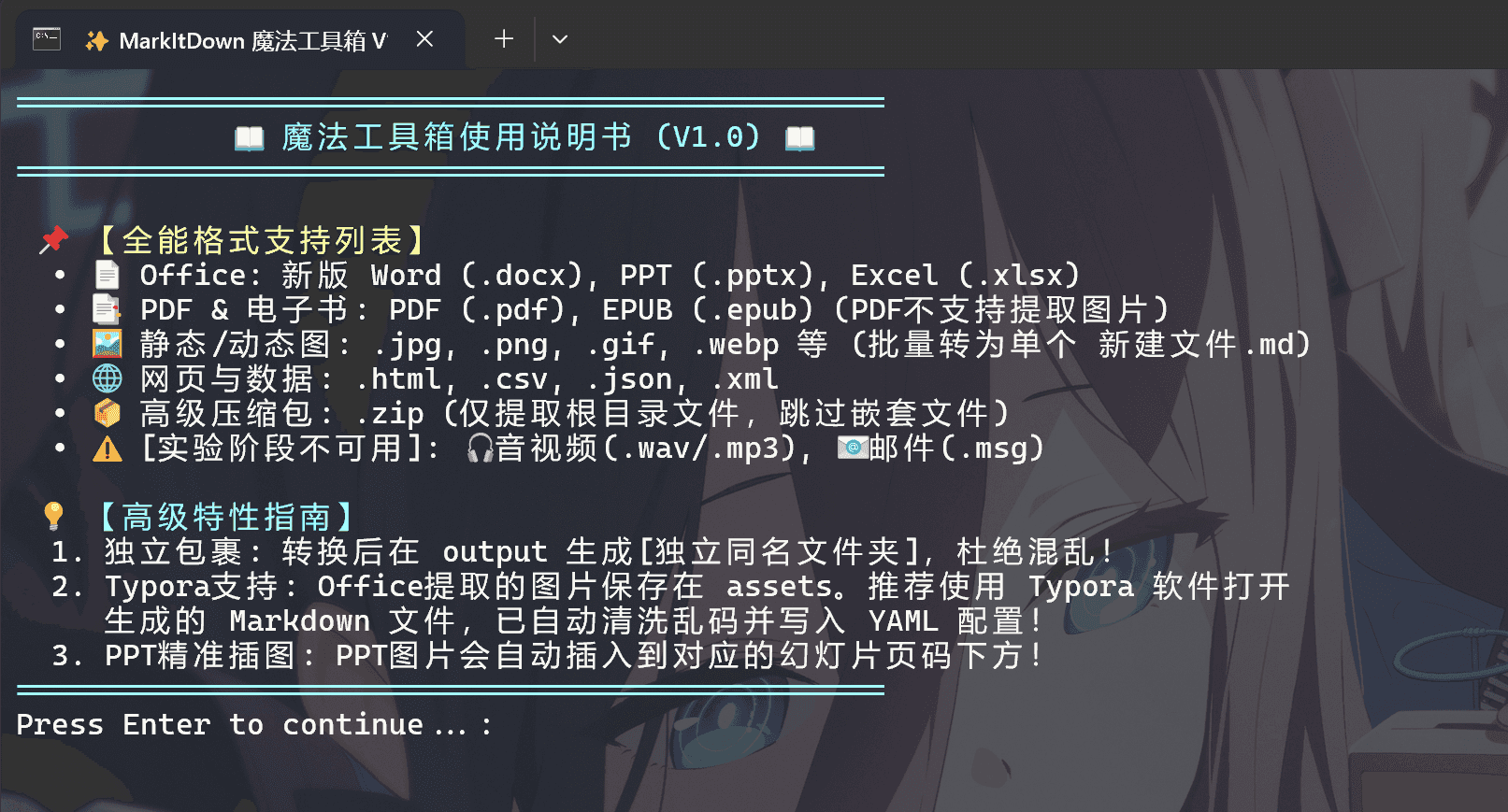
Write-Host " 📖 魔法工具箱使用说明书 (V2.0) 📖 " -ForegroundColor Cyan
Write-Host "=================================================" -ForegroundColor Cyan
Write-Host "`n 📌 【全能格式支持列表】" -ForegroundColor Yellow
Write-Host " • 📄 Office: 新版 Word (.docx), PPT (.pptx), Excel (.xlsx)"
Write-Host " • 📑 PDF & 电子书: PDF (.pdf), EPUB (.epub) (PDF不支持提取图片)"
Write-Host " • 🖼️ 静态/动态图: .jpg, .png, .gif, .webp 等 (批量转为单个 新建文件.md)"
Write-Host " • 🌐 网页与数据: .html, .csv, .json, .xml"
Write-Host " • 📦 高级压缩包: .zip (仅提取根目录文件,跳过嵌套文件夹)"
Write-Host " • ⚠️ [实验阶段不可用]: 🎧音视频(.wav/.mp3), 📧邮件(.msg)"
Write-Host "`n 💡 【高级特性指南】" -ForegroundColor Cyan
Write-Host " 1. 独立包裹: 转换后在 output 生成[独立同名文件夹],杜绝混乱!"
Write-Host " 2. Typora支持: Office提取的图片保存在 assets。推荐使用 Typora 软件打开"
Write-Host " 生成的 Markdown 文件,已自动清洗乱码并写入 YAML 配置!"
Write-Host " 3. PPT精准插图: PPT图片会自动插入到对应的幻灯片页码下方!"
Write-Host "=================================================" -ForegroundColor Cyan
pause
}

function Run-Python {
param([string]$Mode, [string]$Target, [string]$Exts="", [string]$CatName="")
if ($Exts) {
& $PythonExe "magic_convert.py" $Mode $Target $OutputDir $Exts $CatName
} else {
& $PythonExe "magic_convert.py" $Mode $Target $OutputDir "NONE" $CatName
}
}

function Show-BatchMenu {
while ($true) {
Clear-Host
Write-Host "=================================================" -ForegroundColor Cyan
Write-Host " 🎯 批量转换【input】中的文件 " -ForegroundColor Cyan
Write-Host "=================================================" -ForegroundColor Cyan
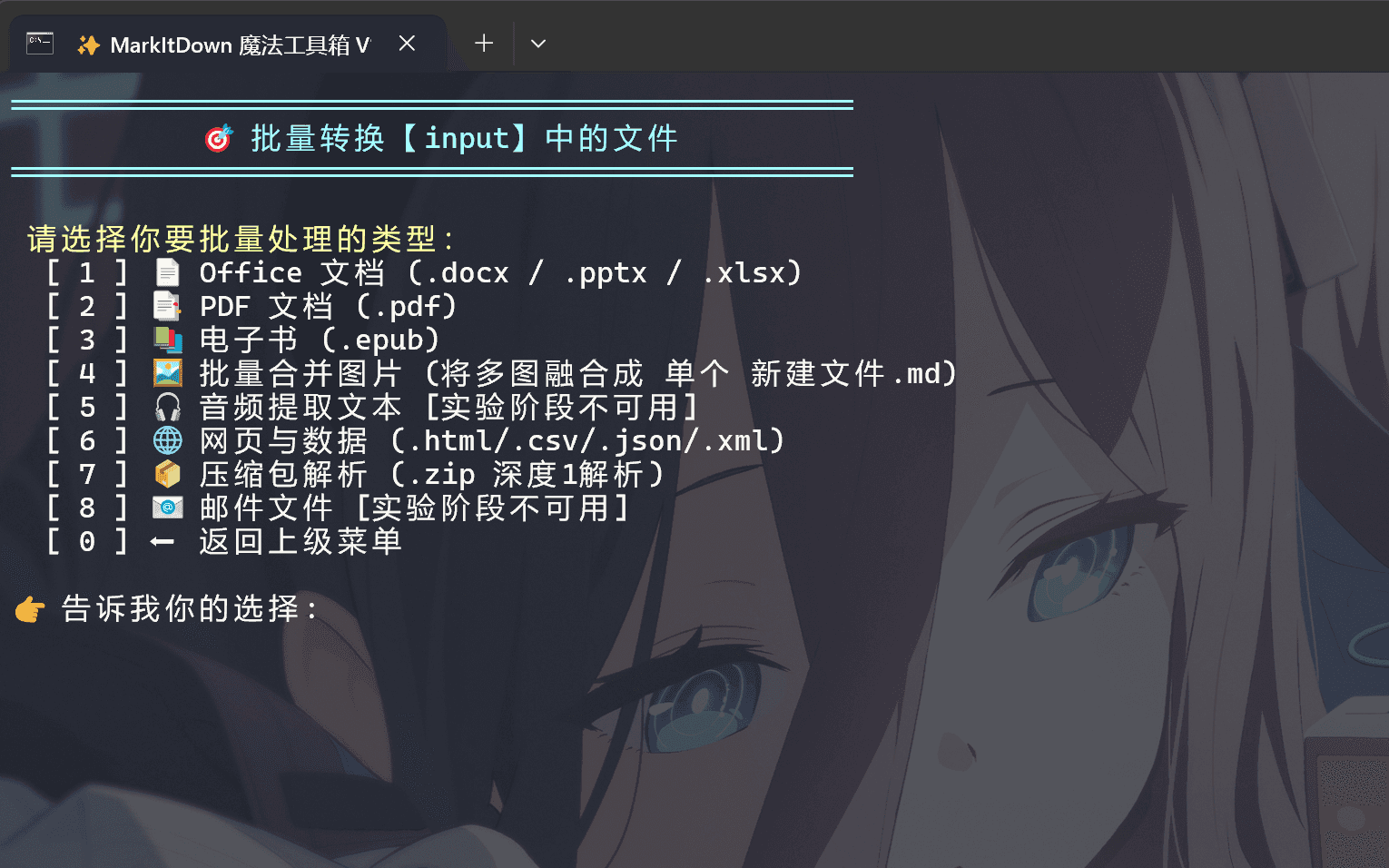
Write-Host "`n 请选择你要批量处理的类型:" -ForegroundColor Yellow
Write-Host " [ 1 ] 📄 Office 文档 (.docx / .pptx / .xlsx)"
Write-Host " [ 2 ] 📑 PDF 文档 (.pdf)"
Write-Host " [ 3 ] 📚 电子书 (.epub)"
Write-Host " [ 4 ] 🖼️ 批量合并图片 (将多图融合成 单个 新建文件.md)"
Write-Host " [ 5 ] 🎧 音频提取文本 [实验阶段不可用]"
Write-Host " [ 6 ] 🌐 网页与数据 (.html/.csv/.json/.xml)"
Write-Host " [ 7 ] 📦 压缩包解析 (.zip 深度1解析)"
Write-Host " [ 8 ] 📧 邮件文件 [实验阶段不可用]"
Write-Host " [ 0 ] ⬅️ 返回上级菜单`n"

$bChoice = Read-Host "👉 告诉我你的选择"

if ($bChoice -eq "5" -or $bChoice -eq "8") {
Write-Host "`n❌ 此功能处于实验阶段,目前暂不可用!" -ForegroundColor Red
pause
continue
}

if ($bChoice -eq "0") { return }

switch ($bChoice) {
"1" { Run-Python "batch" $InputDir ".docx,.pptx,.xlsx" "Office" }
"2" { Run-Python "batch" $InputDir ".pdf" "PDF" }
"3" { Run-Python "batch" $InputDir ".epub" "电子书" }
"4" { Run-Python "batch_images" $InputDir "" "图片(静态/动图)" }
"6" { Run-Python "batch" $InputDir ".html,.htm,.csv,.json,.xml" "网页与数据" }
"7" { Run-Python "batch" $InputDir ".zip" "压缩包" }
default { Write-Host "❌ 无效选项" -ForegroundColor Red }
}
Write-Host "`n✅ 操作结束!请前往 output 文件夹查看结果。" -ForegroundColor Green
pause
return
}
}

while ($true) {
Clear-Host
Write-Host "=================================================" -ForegroundColor Cyan
Write-Host " ✨ MarkItDown 魔法工具箱 ✨ " -ForegroundColor Cyan
Write-Host "=================================================" -ForegroundColor Cyan
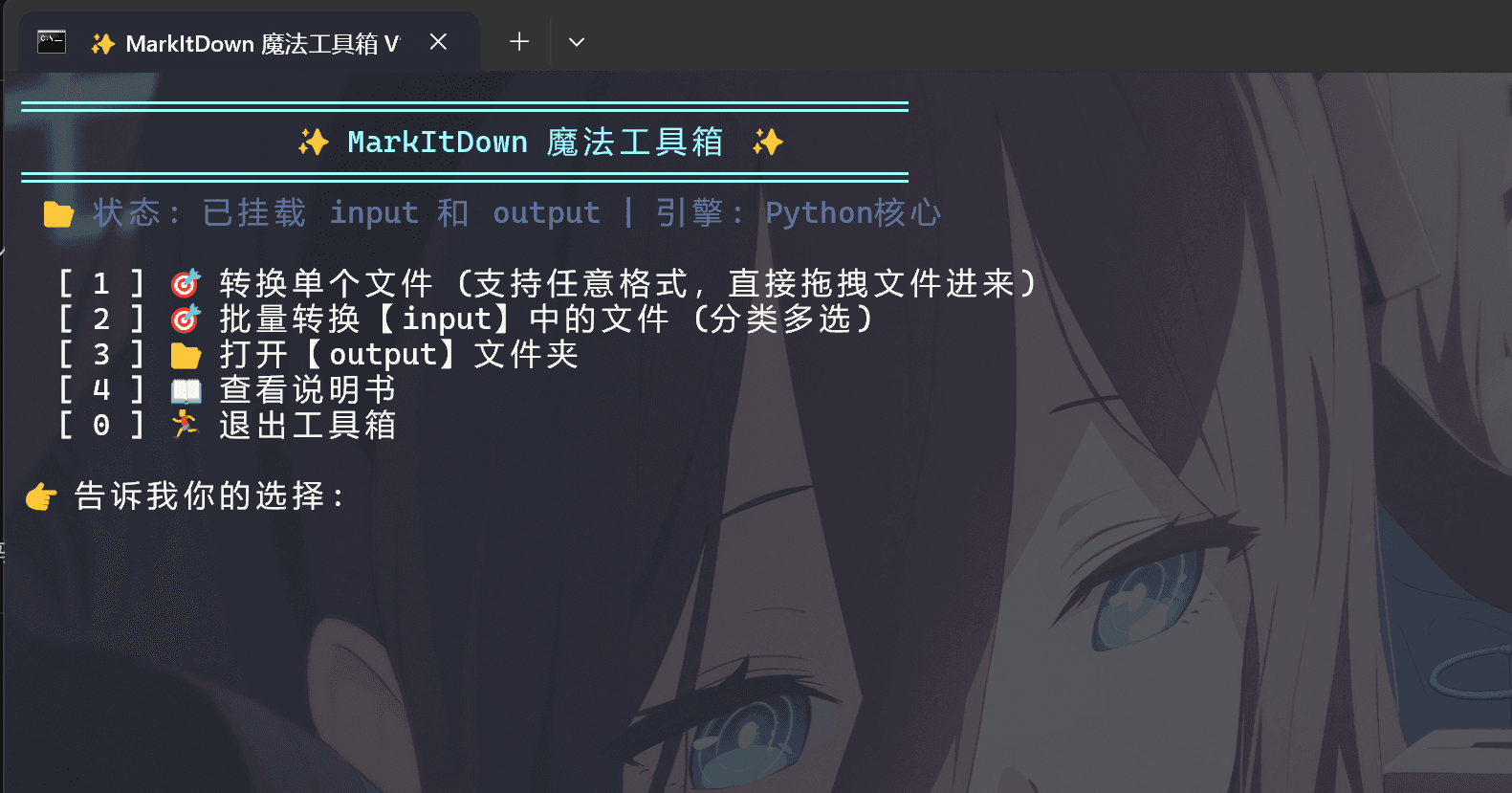
Write-Host " 📂 状态: 已挂载 input 和 output | 引擎: Python核心" -ForegroundColor DarkGray
Write-Host ""
Write-Host " [ 1 ] 🎯 转换单个文件 (支持任意格式,直接拖拽文件进来)"
Write-Host " [ 2 ] 🎯 批量转换【input】中的文件 (分类多选)"
Write-Host " [ 3 ] 📂 打开【output】文件夹"
Write-Host " [ 4 ] 📖 查看说明书"
Write-Host " [ 0 ] 🏃 退出工具箱"
Write-Host ""

$choice = Read-Host "👉 告诉我你的选择"
switch ($choice) {
"1" {
$rawInput = Read-Host "📥 请输入或拖入文件路径"
if ([string]::IsNullOrWhiteSpace($rawInput)) {
Write-Host "❌ 输入不能为空!" -ForegroundColor Red
pause
continue
}

$file = $rawInput.Trim('"').Trim("'")
if (Test-Path $file) {
Write-Host "`n✨ 正在呼叫魔法引擎..." -ForegroundColor Yellow
Run-Python "single" $file
} else {
Write-Host "❌ 哎呀,没找到这个文件,是不是路径写错了呀?" -ForegroundColor Red
}
pause
}
"2" { Show-BatchMenu }
"3" { Invoke-Item -Path $OutputDir }
"4" { Show-Manual }
"0" { exit }
}
}

install.ps1

1
2
3
4
5
6
7
8
9
10
11
12
13
14
15
16
17
18
19
20
21
22
23
24
25
26
27
28
29
30
31
32
33
34
35
36
37
38
39
40
41
42
# 修复终端中文乱码
[console]::OutputEncoding = [System.Text.Encoding]::UTF8

Write-Host "=================================================" -ForegroundColor Cyan
Write-Host " ✨ 正在为你施放 MarkItDown 安装魔法,请稍候... ✨" -ForegroundColor Cyan
Write-Host "=================================================" -ForegroundColor Cyan
Write-Host ""

$ScriptDir = $PWD.Path
$PythonExe = Join-Path $ScriptDir "python_env\python.exe"
$GetPipScript = Join-Path $ScriptDir "get-pip.py"
$PipExe = Join-Path $ScriptDir "python_env\Scripts\pip.exe"

if (!(Test-Path $PythonExe)) {
Write-Host "❌ 哎呀,没有找到内置的 Python 环境!" -ForegroundColor Red
Write-Host "请确保你已经把便携版 Python 解压并重命名为了 'python_env' 文件夹。" -ForegroundColor Yellow
pause
exit
}

# 智能检测:如果没有 pip,就自动执行 get-pip.py (显示进度条,屏蔽黄字警告)
if (!(Test-Path $PipExe)) {
if (!(Test-Path $GetPipScript)) {
Write-Host "❌ 缺少核心安装组件:get-pip.py!请将该文件放入工具箱目录。" -ForegroundColor Red
pause
exit
}
Write-Host "💧 正在注入初始化魔力 (自动安装 Pip 工具)..." -ForegroundColor Yellow
& $PythonExe $GetPipScript --no-warn-script-location
} else {
Write-Host "💧 正在更新魔力源泉 (升级 pip)..." -ForegroundColor Yellow
& $PythonExe -m pip install --upgrade pip --no-warn-script-location
}

Write-Host "`n📦 正在搬运格式转换法宝 (安装 markitdown 核心组件)..." -ForegroundColor Yellow
Write-Host " (由于需要从云端下载,这可能需要 1~3 分钟,请欣赏魔法进度条 ☕)" -ForegroundColor Cyan

# 强制让便携版 Python 安装 markitdown (显示进度条,屏蔽黄字警告)
& $PythonExe -m pip install "markitdown[all]" --no-warn-script-location

Write-Host ""
Write-Host "✅ 魔法环境布置大功告成啦!准备起飞~ 🚀" -ForegroundColor Green

magic_convert.py

1
2
3
4
5
6
7
8
9
10
11
12
13
14
15
16
17
18
19
20
21
22
23
24
25
26
27
28
29
30
31
32
33
34
35
36
37
38
39
40
41
42
43
44
45
46
47
48
49
50
51
52
53
54
55
56
57
58
59
60
61
62
63
64
65
66
67
68
69
70
71
72
73
74
75
76
77
78
79
80
81
82
83
84
85
86
87
88
89
90
91
92
93
94
95
96
97
98
99
100
101
102
103
104
105
106
107
108
109
110
111
112
113
114
115
116
117
118
119
120
121
122
123
124
125
126
127
128
129
130
131
132
133
134
135
136
137
138
139
140
141
142
143
144
145
146
147
148
149
150
151
152
153
154
155
156
157
158
159
160
161
162
163
164
165
166
167
168
169
170
171
172
173
174
175
176
177
178
179
180
181
182
183
184
185
186
187
188
189
190
191
192
193
194
195
196
197
198
199
200
201
202
203
204
205
206
207
208
209
210
211
212
213
214
215
216
217
218
219
220
221
import os
import sys
import shutil
import zipfile
import tempfile
import re
from pathlib import Path
from markitdown import MarkItDown

IMAGE_EXTS = {'.jpg', '.jpeg', '.png', '.gif', '.webp', '.svg', '.bmp', '.tiff'}

def inject_yaml_and_save(md_content, out_md_path, assets_folder_name):
yaml_header = f"---\ntypora-copy-images-to: ./{assets_folder_name}\n---\n\n"
with open(out_md_path, 'w', encoding='utf-8') as f:
f.write(yaml_header + md_content)

def extract_and_map_ppt_images(file_path, assets_dir):
slide_images = {}
try:
with zipfile.ZipFile(file_path, 'r') as z:
for info in z.infolist():
if '/media/' in info.filename and not info.filename.endswith('/'):
img_name = Path(info.filename).name
with open(assets_dir / img_name, 'wb') as f:
f.write(z.read(info.filename))
for info in z.infolist():
if info.filename.startswith('ppt/slides/_rels/slide') and info.filename.endswith('.xml.rels'):
match = re.search(r'slide(\d+)\.xml\.rels', info.filename)
if match:
slide_num = int(match.group(1))
xml_content = z.read(info.filename).decode('utf-8', errors='ignore')
images = re.findall(r'Target="\.\./media/([^"]+)"', xml_content)
if images:
slide_images[slide_num] = images
except: pass
return slide_images

def extract_word_images(file_path, assets_dir):
images = []
try:
with zipfile.ZipFile(file_path, 'r') as z:
for info in z.infolist():
if 'word/media/' in info.filename and not info.filename.endswith('/'):
img_name = Path(info.filename).name
with open(assets_dir / img_name, 'wb') as f:
f.write(z.read(info.filename))
images.append(img_name)
except: pass
return images

def convert_single_file(file_path, base_out_dir, silent=False):
file_path = Path(file_path)
if not file_path.exists() or file_path.suffix.lower() in ['.zip', '.doc', '.ppt', '.xls']:
return False

base_name = file_path.stem
ext = file_path.suffix.lower()

wrapper_dir = Path(base_out_dir) / base_name
wrapper_dir.mkdir(parents=True, exist_ok=True)

assets_folder_name = f"{base_name}_assets"
assets_dir = wrapper_dir / assets_folder_name
assets_dir.mkdir(parents=True, exist_ok=True)

ppt_slide_images = {}
word_images = []

if ext == '.pptx':
ppt_slide_images = extract_and_map_ppt_images(file_path, assets_dir)
elif ext == '.docx':
word_images = extract_word_images(file_path, assets_dir)

if not silent:
print(f" 🔄 正在解析: {file_path.name} ...")

try:
md = MarkItDown()
result = md.convert(str(file_path))
md_content = result.text_content if result else ""
except Exception as e:
print(f" ❌ {file_path.name} 转换失败: {e}")
return False

md_content = re.sub(r'!\[.*?\]\(data:image/[^;]+;base64,[^\)]+\)', '', md_content)

if ext == '.pdf':
md_content = "> ⚠️ **注意**:PDF 格式目前仅支持文本提取,图片不可提取。\n\n" + md_content

if ext == '.pptx' and ppt_slide_images:
lines = md_content.split('\n')
new_lines = []
for line in lines:
new_lines.append(line)
match = re.search(r'<!-- Slide number: (\d+) -->', line)
if match:
slide_num = int(match.group(1))
if slide_num in ppt_slide_images:
new_lines.append("\n> 📎 **本页附图**:")
for img in ppt_slide_images[slide_num]:
new_lines.append(f"![{img}](./{assets_folder_name}/{img})")
new_lines.append("\n---")
md_content = '\n'.join(new_lines)

if ext == '.docx' and word_images:
md_content += "\n\n---\n### 📎 文档提取的附图资源\n"
for img in word_images:
md_content += f"![{img}](./{assets_folder_name}/{img})\n\n"

out_md_path = wrapper_dir / f"{base_name}.md"
inject_yaml_and_save(md_content, out_md_path, assets_folder_name)
return True

def convert_merged_images(image_paths, base_out_dir, folder_name="新建文件"):
if not image_paths: return False
wrapper_dir = Path(base_out_dir) / folder_name
wrapper_dir.mkdir(parents=True, exist_ok=True)
assets_folder_name = f"{folder_name}_assets"
assets_dir = wrapper_dir / assets_folder_name
assets_dir.mkdir(parents=True, exist_ok=True)

md_lines = []
for img in image_paths:
img = Path(img)
shutil.copy(img, assets_dir)
md_lines.append(f"![{img.stem}](./{assets_folder_name}/{img.name})\n")

out_md_path = wrapper_dir / f"{folder_name}.md"
inject_yaml_and_save("\n".join(md_lines), out_md_path, assets_folder_name)
return True

def process_zip_depth1(zip_path, base_out_dir):
zip_path = Path(zip_path)
zip_wrapper_dir = Path(base_out_dir) / zip_path.stem
temp_dir = Path(tempfile.mkdtemp())

with zipfile.ZipFile(zip_path, 'r') as z:
# 获取深度为 1 的所有文件(排除文件夹和嵌套文件)
depth1_infos = [info for info in z.infolist() if not info.is_dir() and '/' not in info.filename]

if not depth1_infos:
print(f"\n 👀 ZIP包 [{zip_path.name}] 的根目录没有发现文件,已跳过。")
shutil.rmtree(temp_dir, ignore_errors=True)
return

file_names = [info.filename for info in depth1_infos]
print(f"\n 📦 已检测到 ZIP [{zip_path.name}] 深度 1 包含以下文件:\n - " + "\n - ".join(file_names))

zip_wrapper_dir.mkdir(parents=True, exist_ok=True)
images_to_merge = []
regular_converted = []

for info in depth1_infos:
extracted_path = z.extract(info, path=temp_dir)
if Path(extracted_path).suffix.lower() in IMAGE_EXTS:
images_to_merge.append(extracted_path)
else:
if convert_single_file(extracted_path, zip_wrapper_dir, silent=True):
regular_converted.append(info.filename)

# 输出战报
if regular_converted:
print(f" ✅ ZIP 内已成功转换为以下文件:\n - " + "\n - ".join(regular_converted))
if images_to_merge:
convert_merged_images(images_to_merge, zip_wrapper_dir, "新建文件")
img_names = [Path(p).name for p in images_to_merge]
print(f" ✅ ZIP 内已将以下图片合并为 [新建文件.md]:\n - " + "\n - ".join(img_names))

shutil.rmtree(temp_dir, ignore_errors=True)

def main():
if len(sys.argv) < 3: return
mode = sys.argv[1]
target = sys.argv[2]
out_dir = sys.argv[3] if len(sys.argv) > 3 else "output"

if mode == "single":
if target.lower().endswith('.zip'):
process_zip_depth1(target, out_dir)
else:
if convert_single_file(target, out_dir):
print(f" ✅ 已成功转换: {Path(target).name}")

elif mode == "batch_images":
cat_name = sys.argv[5] if len(sys.argv) > 5 else "图片"
input_dir = Path(target)
images = [f for f in input_dir.iterdir() if f.suffix.lower() in IMAGE_EXTS and f.is_file()]

if not images:
print(f"\n 👀 未检测到 {cat_name} 格式的文件!")
return

print(f"\n ✨ 发现 {len(images)} 张图片,正在合并...")
if convert_merged_images(images, out_dir, "新建文件"):
img_names = [img.name for img in images]
print(f" ✅ 已将以下图片合并为 [新建文件.md]:\n - " + "\n - ".join(img_names))

elif mode == "batch":
input_dir = Path(target)
category_exts = sys.argv[4].split(',') if len(sys.argv) > 4 else []
cat_name = sys.argv[5] if len(sys.argv) > 5 else "指定"

valid_files = [f for f in input_dir.iterdir() if f.is_file() and f.suffix.lower() in category_exts]
if not valid_files:
print(f"\n 👀 未检测到 {cat_name} 格式的文件!")
return

print(f"\n ✨ 发现 {len(valid_files)}{cat_name} 文件,开始施法...")
converted_files = []

for f in valid_files:
if f.suffix.lower() == '.zip':
process_zip_depth1(f, out_dir)
else:
if convert_single_file(f, out_dir):
converted_files.append(f.name)

if converted_files:
print(f"\n ✅ 已成功转换以下文件:\n - " + "\n - ".join(converted_files))

if __name__ == "__main__": main()

image-20260422230457495

image-20260422230516690

image-20260422230555997