
之前是想制作一个给电脑一键切换DNS的软件,然后了解到了WPF
但是我不想用autohotkey来制作了,因为autohotkey实现GUI太困难了,而且缺少很多参考案例
但是我听说可以使用C#里的WPF来制作软件,虽然WinUI3目前最流行,但是wpf可以保证绝大多数电脑都可以使用,而且大多数公司用的也是wpf
哔哩哔哩视频学习
配置WPF的环境
首先配置好你的Visual Studio的.NET的配置,下载好这个东西
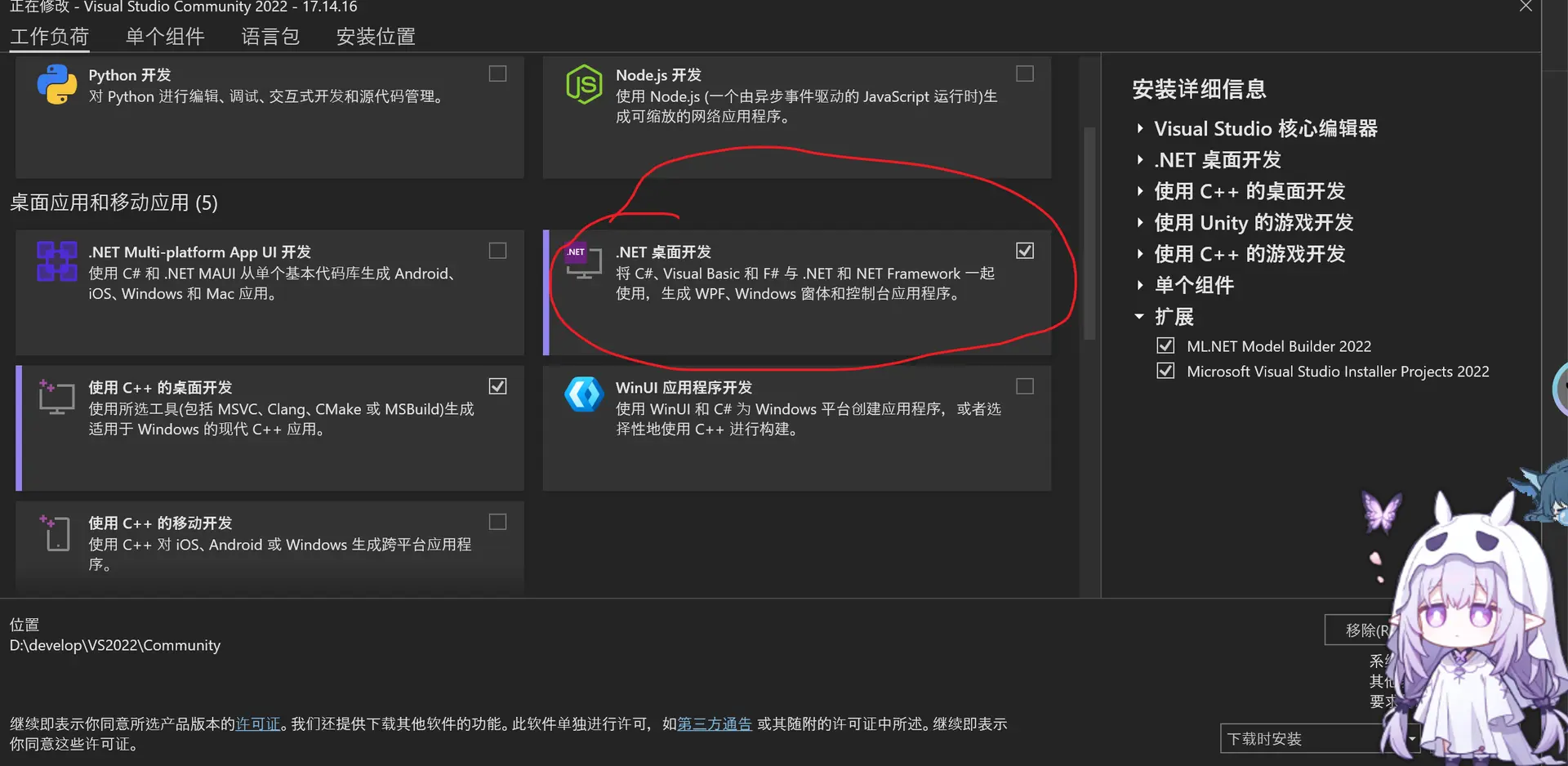
创建WPF项目
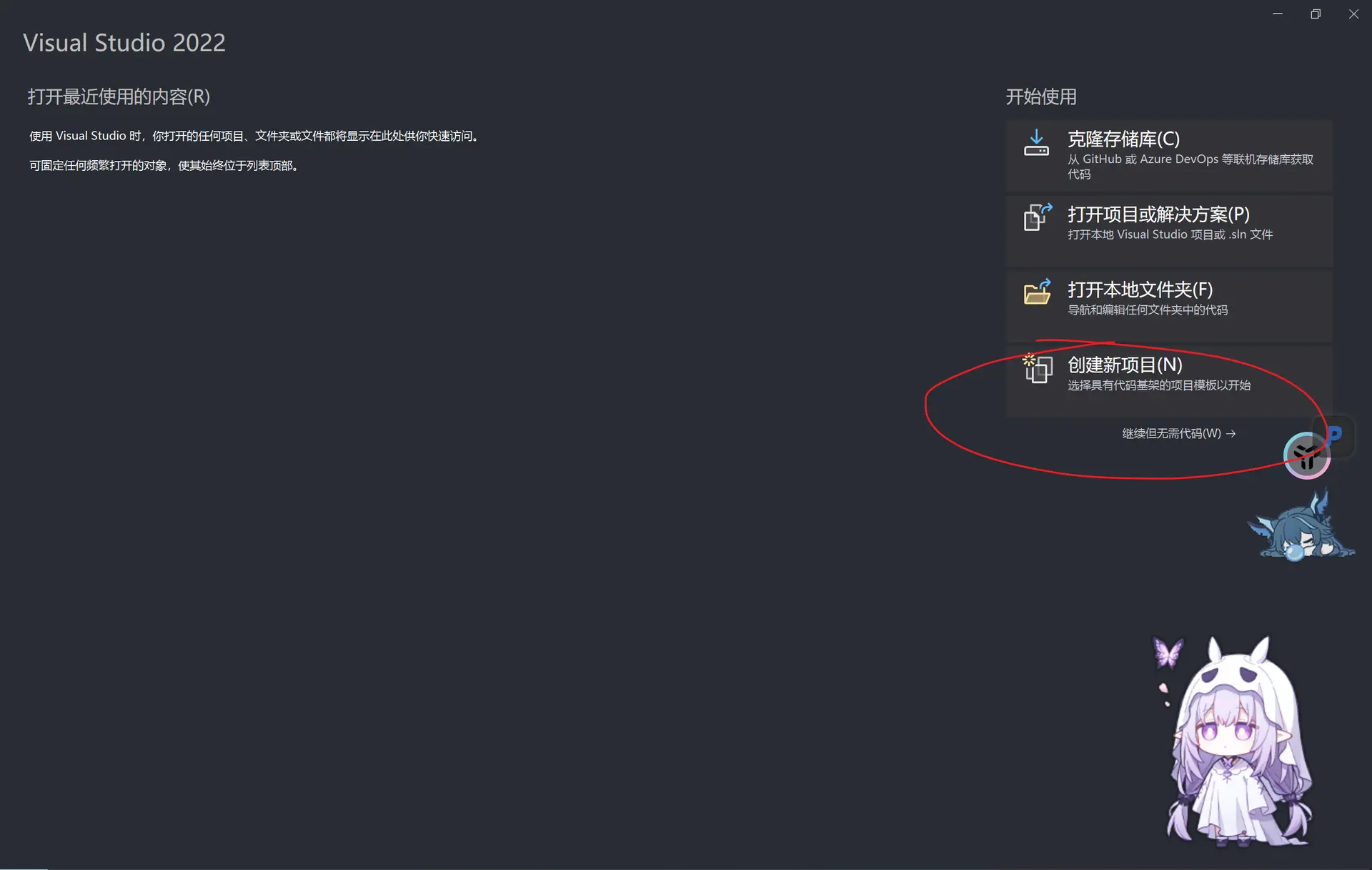
然后创建项目
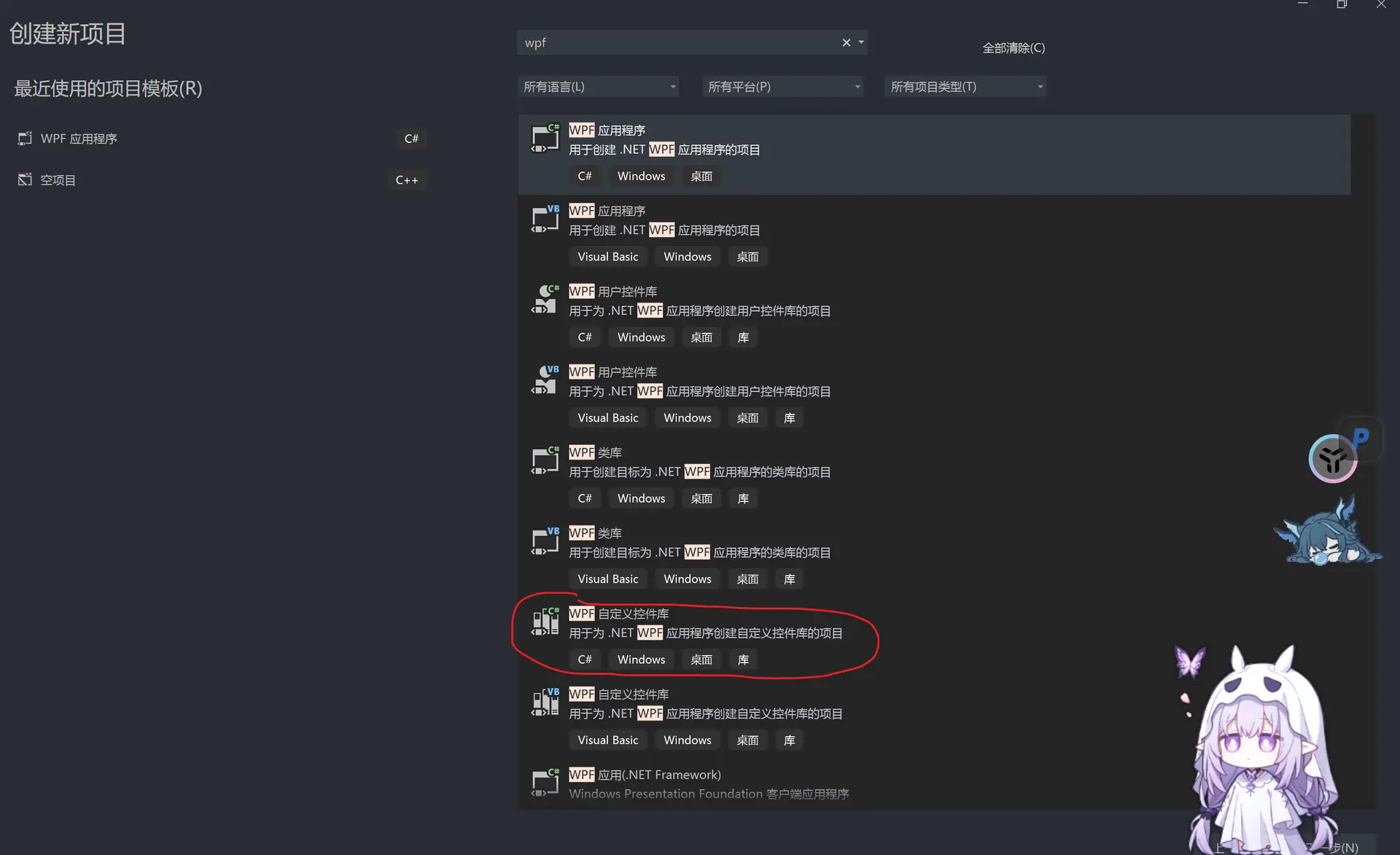
选择WPF自定义控件库(WpfCustomControlLibrary)
然后创建项目,选择.NET 8.0(因为这个长期支持)
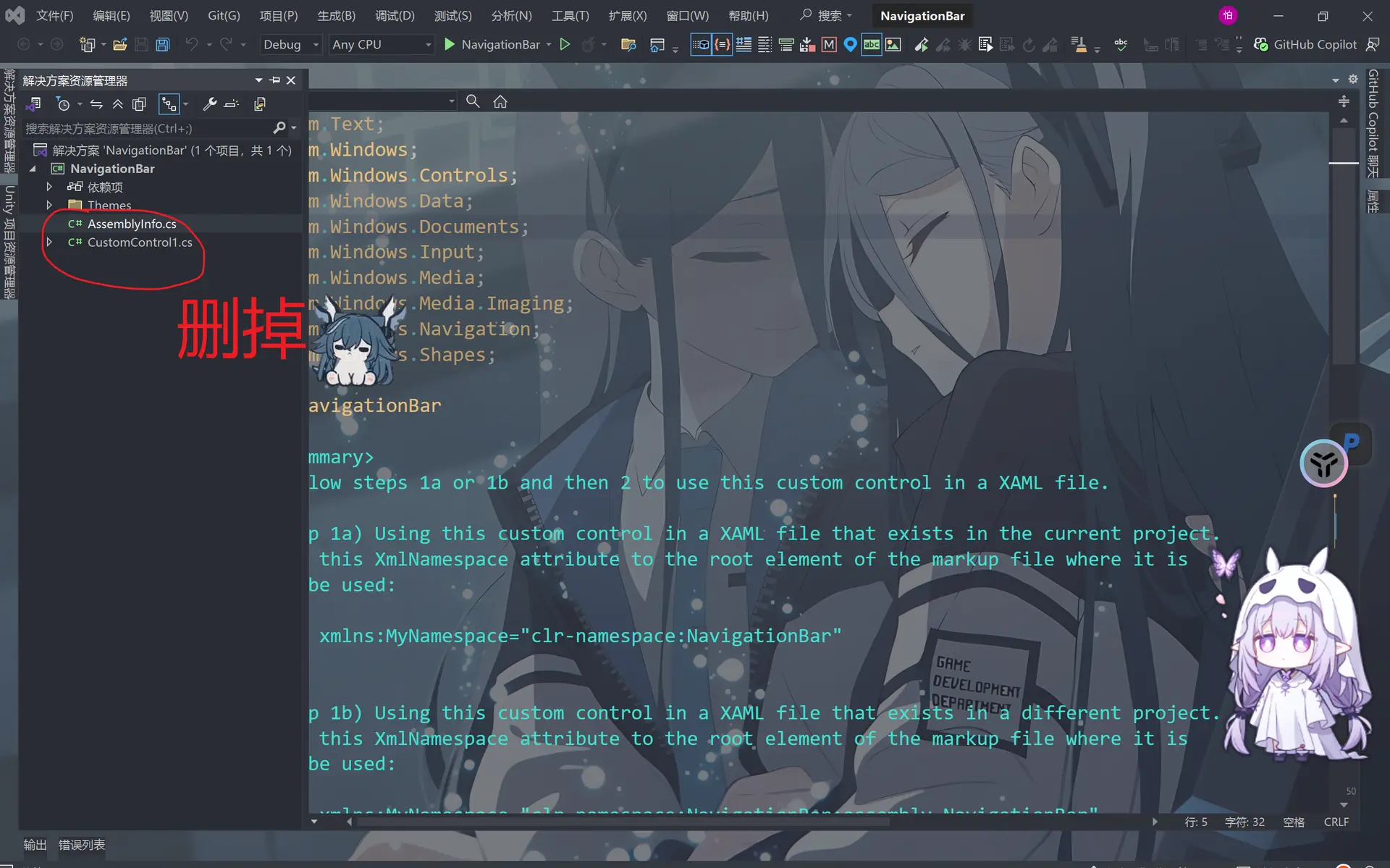
然后我们先创建一个新的类(class)
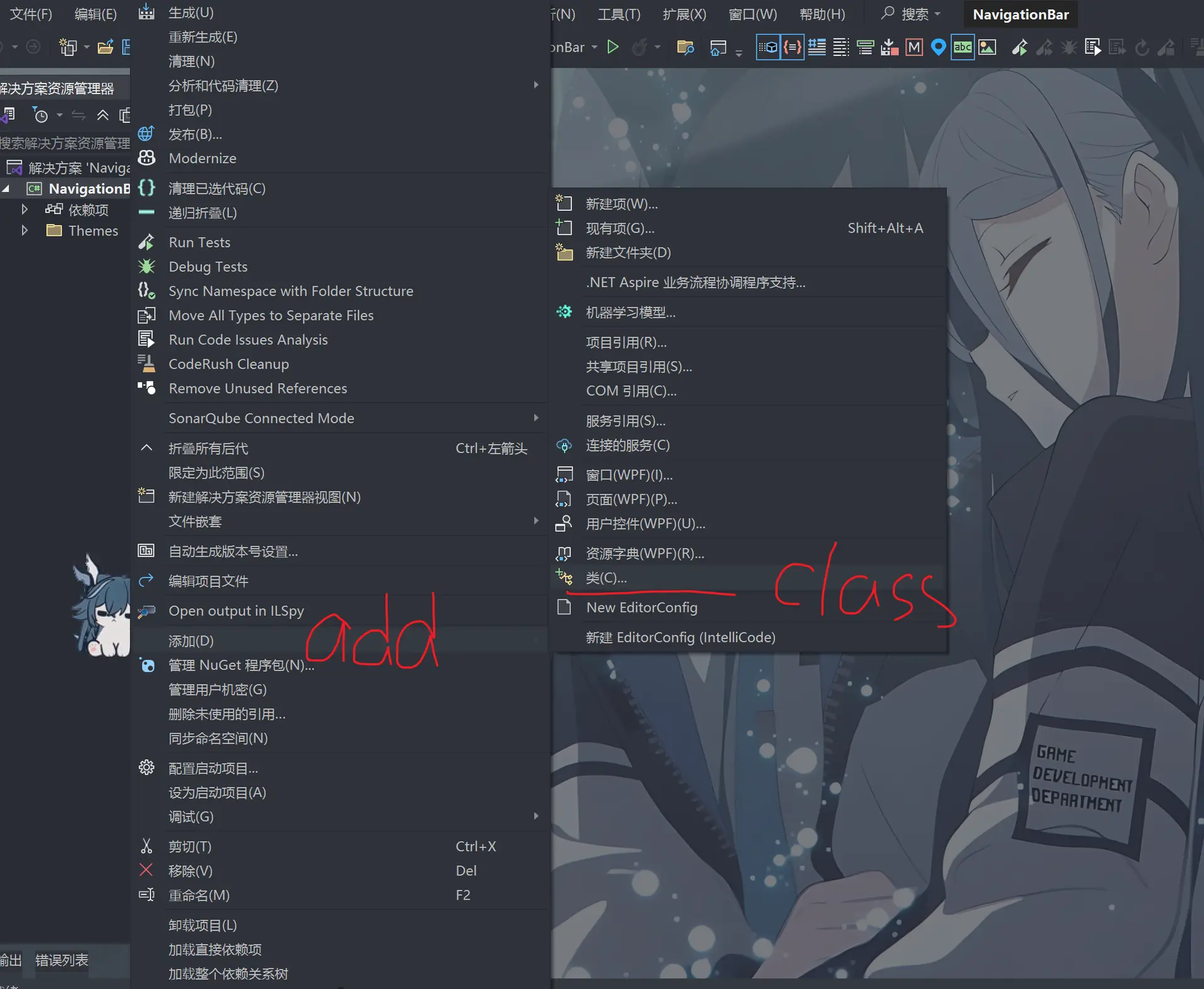
然后添加custom control
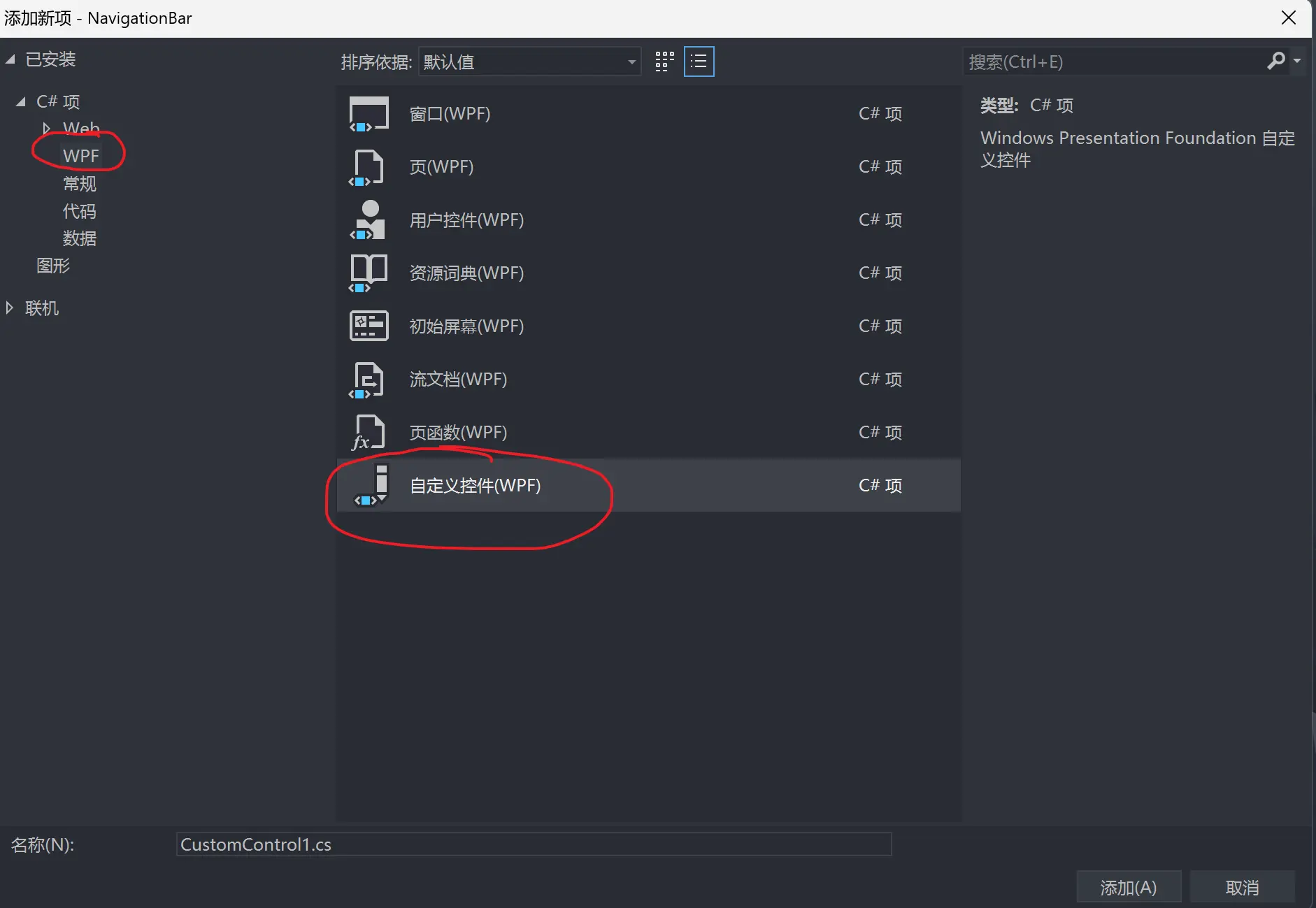
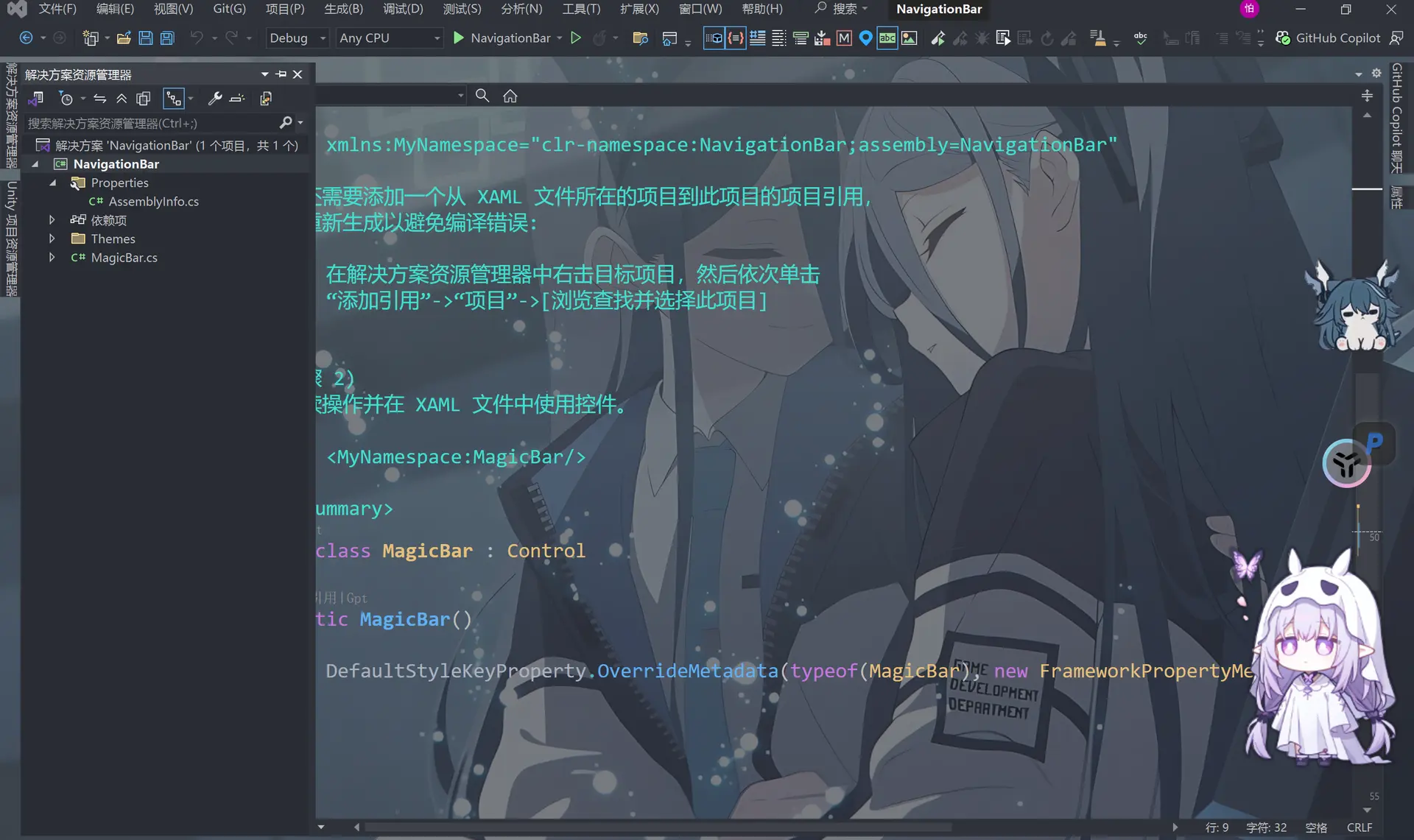
于是我们得到了这个
此时会自动生成一个xaml文件
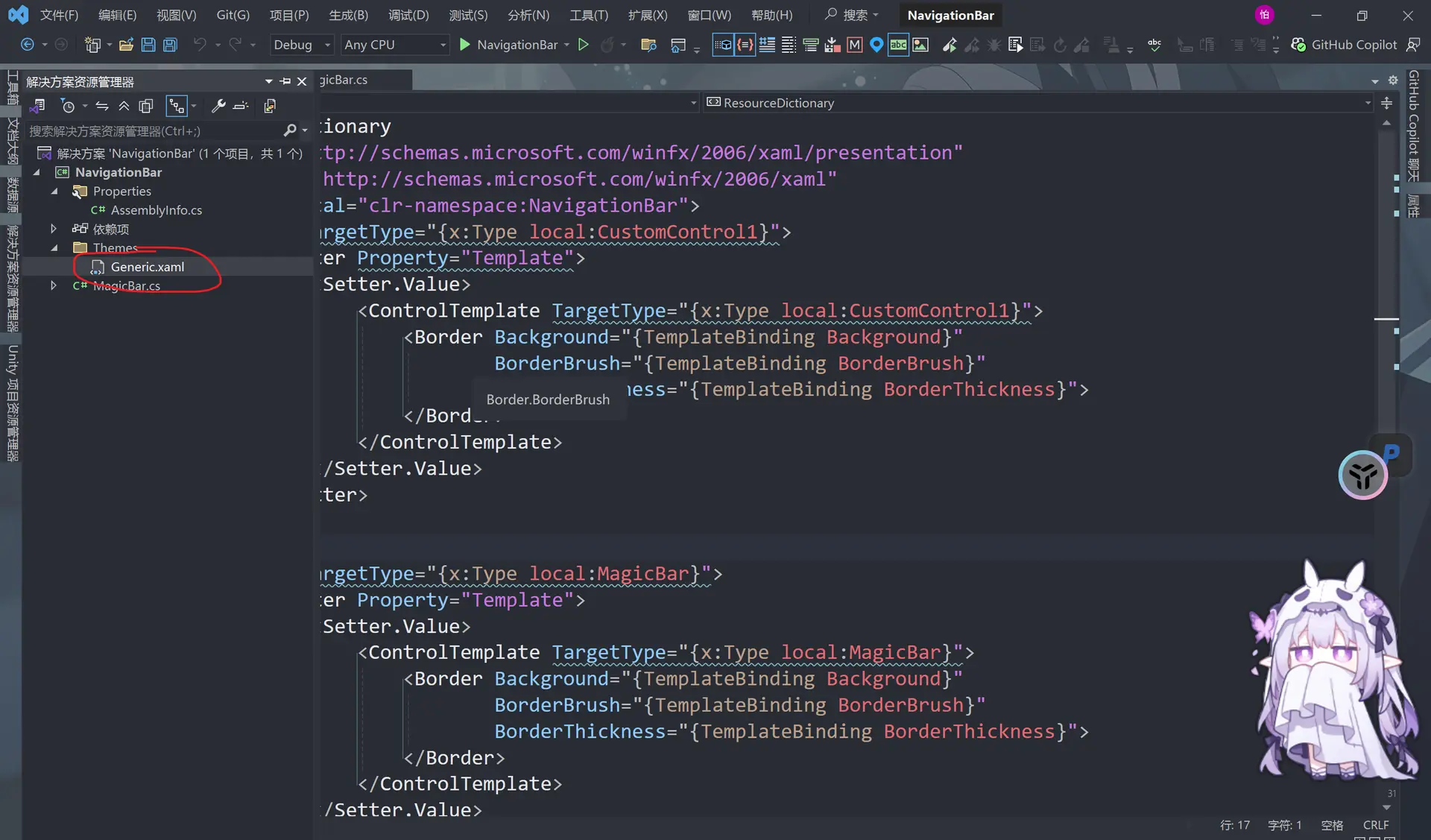
我们把这个generic.xaml改为
<ResourceDictionary
    xmlns="http://schemas.microsoft.com/winfx/2006/xaml/presentation"
    xmlns:x="http://schemas.microsoft.com/winfx/2006/xaml"
    xmlns:local="clr-namespace:NavigationBar">

    <Style TargetType="{x:Type local:MagicBar}">
        <Setter Property="Template">
            <Setter.Value>
                <ControlTemplate TargetType="{x:Type local:MagicBar}">
                    <Border Background="{TemplateBinding Background}"
                            BorderBrush="{TemplateBinding BorderBrush}"
                            BorderThickness="{TemplateBinding BorderThickness}">
                        <Slider />   <!-- 添加一个侧滑条-->
                    </Border>
                </ControlTemplate>
            </Setter.Value>
        </Setter>
    </Style>
</ResourceDictionary>
由于这个无法运行,所以我们仍然需要添加一个项目——WPF应用程序(WPF Application)
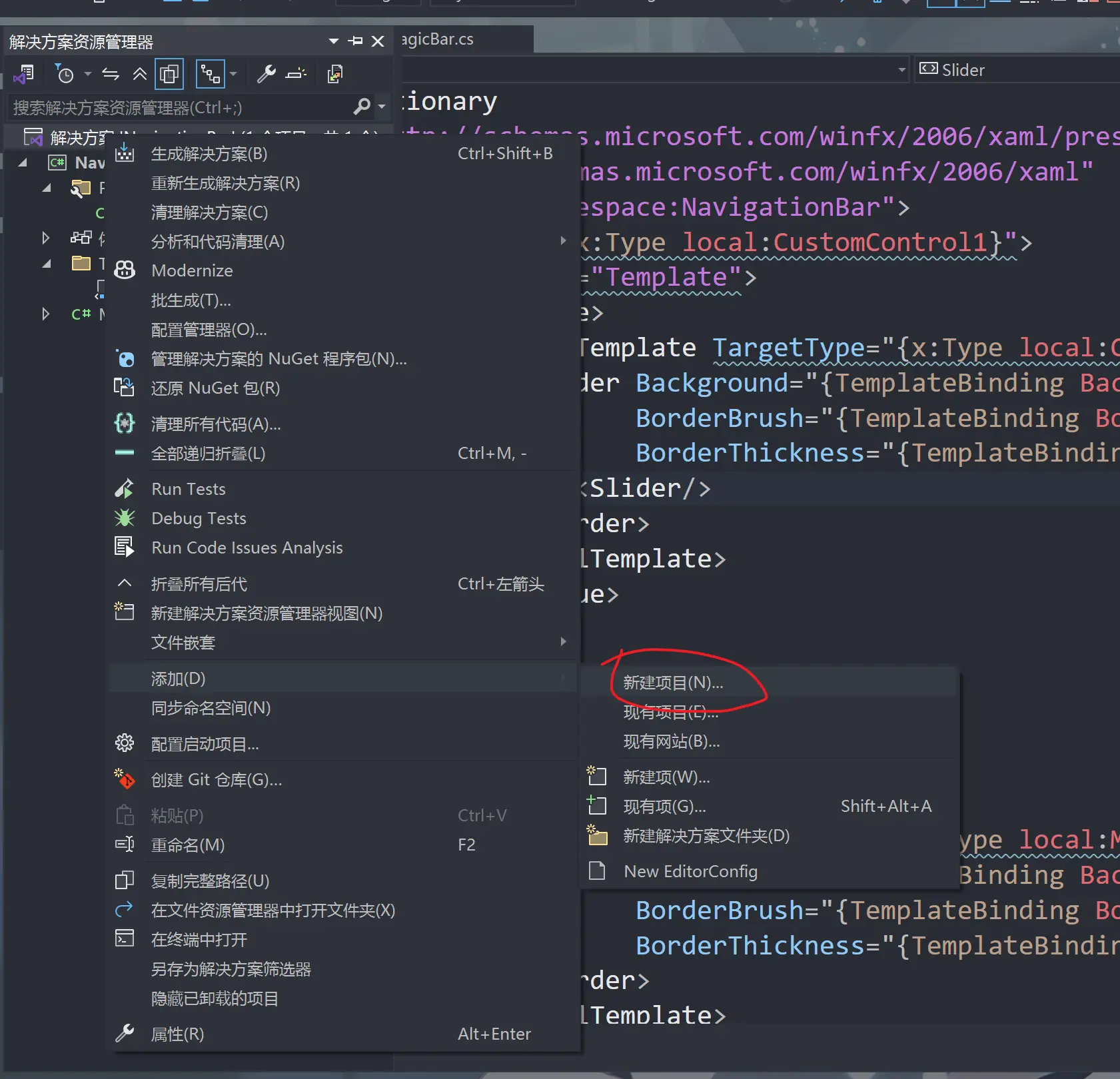
然后就是和刚才一样,选.NET 8.0
此时我们得到
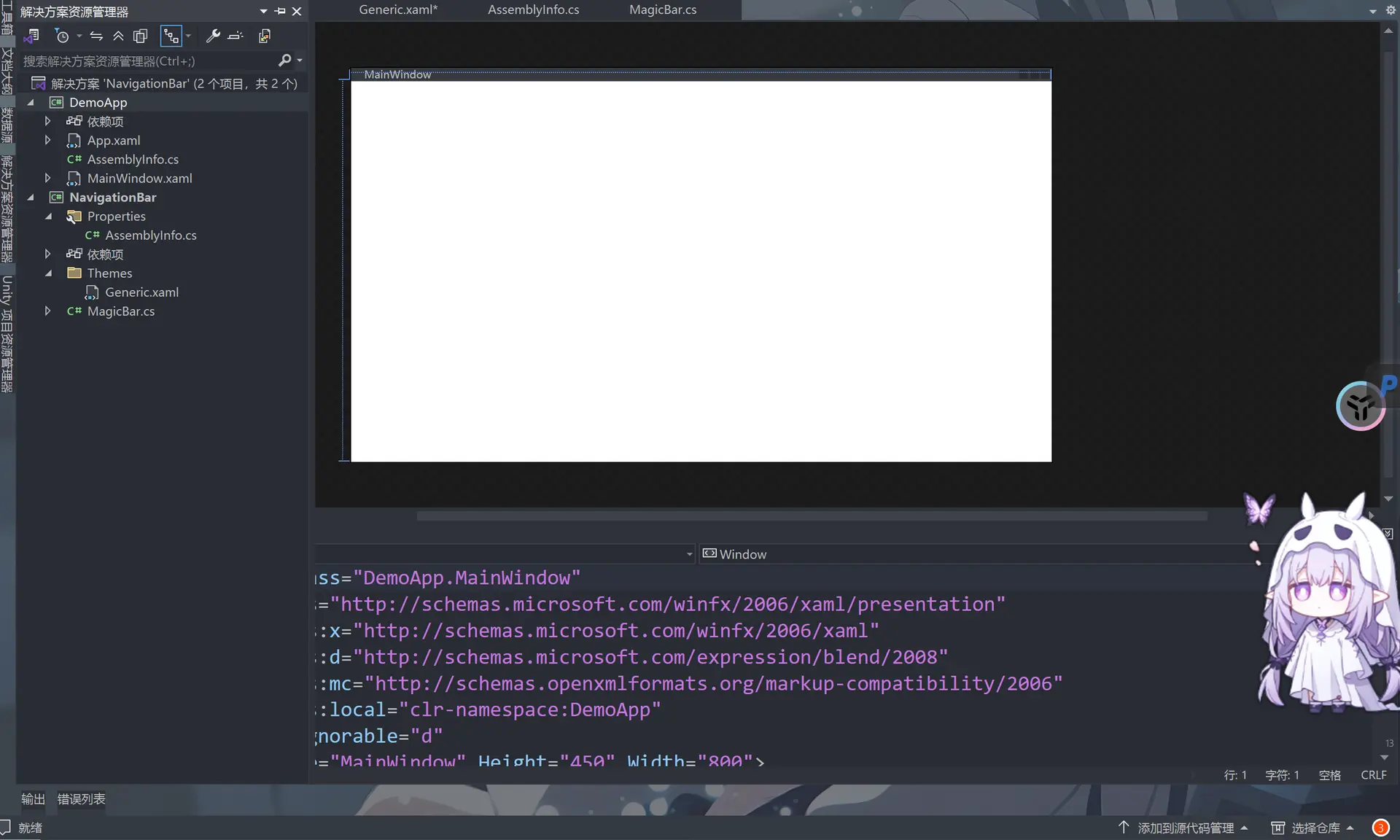
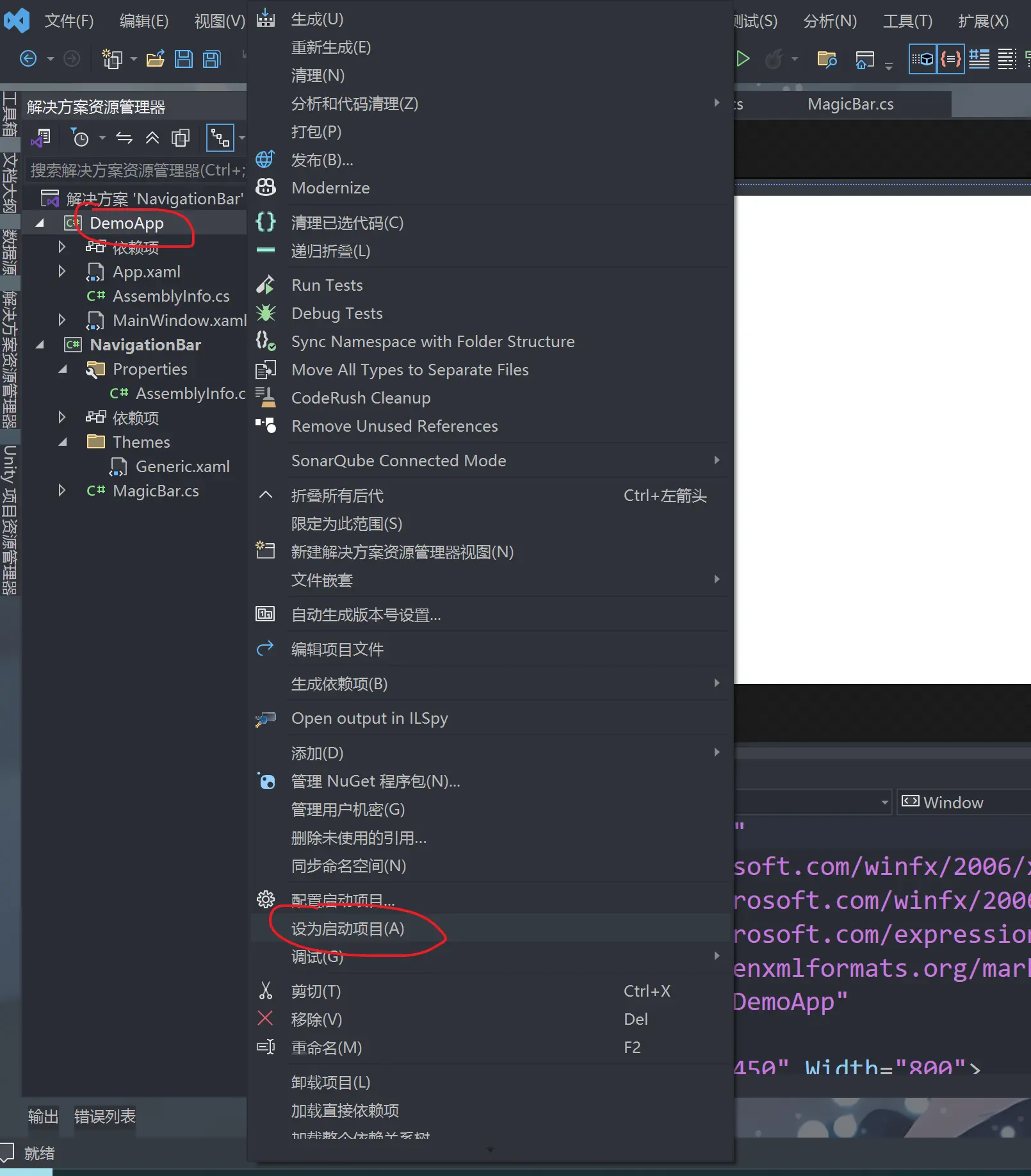
然后我们右键点击这个选择set as startup project(s设为启动项目)
然后我们添加刚才的NavigationBar
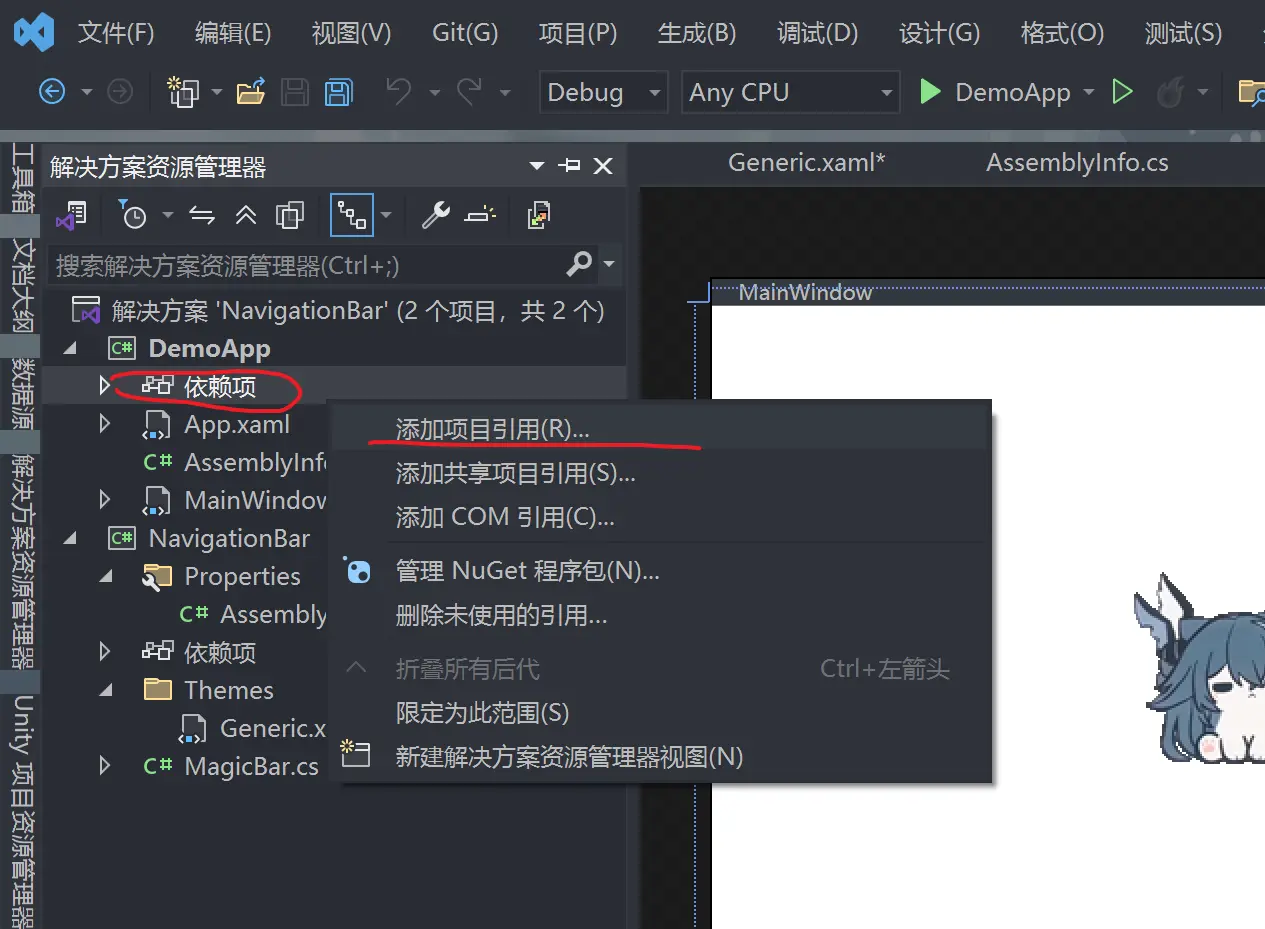
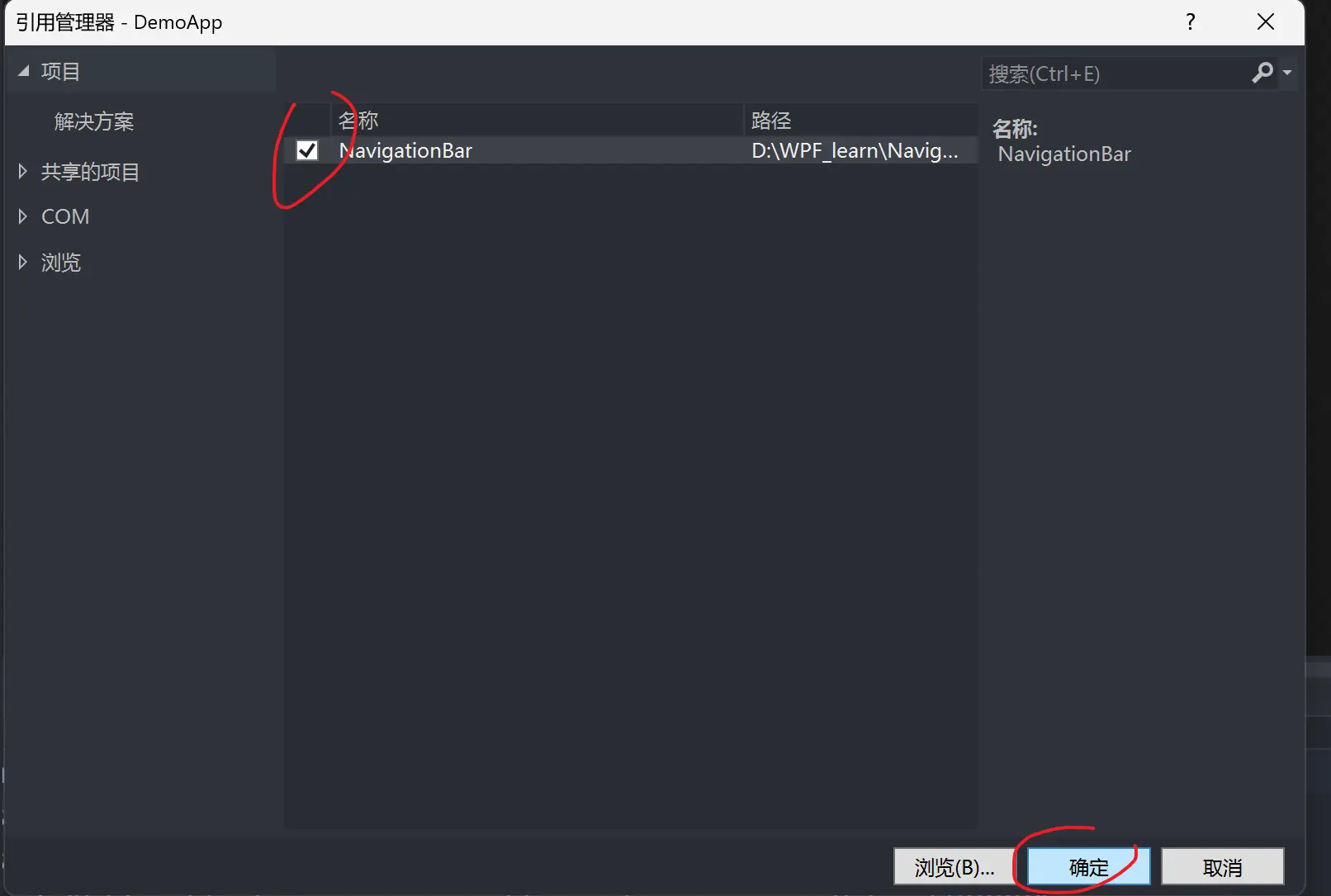
添加完之后
在MainWindow.xaml文件里修改并保存
<Window x:Class="DemoApp.MainWindow"
        xmlns="http://schemas.microsoft.com/winfx/2006/xaml/presentation"
        xmlns:x="http://schemas.microsoft.com/winfx/2006/xaml"
        xmlns:d="http://schemas.microsoft.com/expression/blend/2008"
        xmlns:mc="http://schemas.openxmlformats.org/markup-compatibility/2006"
        xmlns:local="clr-namespace:DemoApp"
        xmlns:navigation="clr-namespace:NavigationBar;assembly=NavigationBar" <!-- 添加地址-->
        mc:Ignorable="d"
        Title="MainWindow" Height="450" Width="800">
    <Grid>
        <navigation:MagicBar/>    <!-- 添加-->
    </Grid>
</Window>
然后我们运行
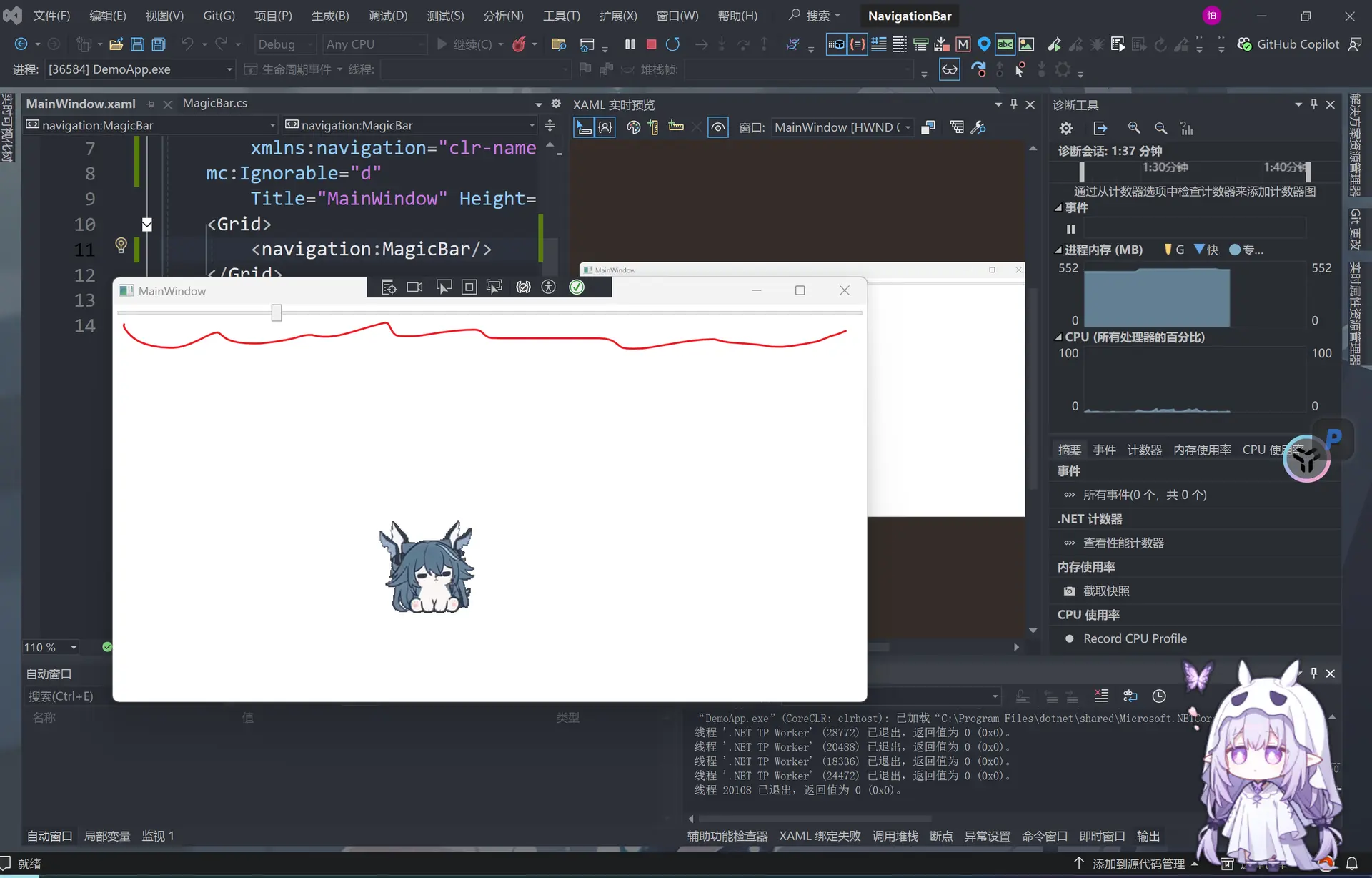
就得到我们刚才的slider(滑动条)
然后我们就要去修改magicbar.cs里的代码
using System;
using System.Collections.Generic;
using System.Linq;
using System.Text;
using System.Threading.Tasks;
using System.Windows;
using System.Windows.Controls;
using System.Windows.Data;
using System.Windows.Documents;
using System.Windows.Input;
using System.Windows.Media;
using System.Windows.Media.Imaging;
using System.Windows.Navigation;
using System.Windows.Shapes;

namespace NavigationBar
{

    public class MagicBar : ListBox //ListBox 是一个核心控件,用于显示可滚动的项目列表,并允许用户进行单选或多选
    {
        static MagicBar()
        {
            DefaultStyleKeyProperty.OverrideMetadata(typeof(MagicBar), new FrameworkPropertyMetadata(typeof(MagicBar)));
        }
    }
}
然后在generic.xaml里修改
<ResourceDictionary
    xmlns="http://schemas.microsoft.com/winfx/2006/xaml/presentation"
    xmlns:x="http://schemas.microsoft.com/winfx/2006/xaml"
    xmlns:local="clr-namespace:NavigationBar">

    <!-- 增加Bar-->
    <Style x:Key="Bar" TargetType="{x:Type Border}">
        <Setter Property="Background" Value="#DDDDDD" />
        <Setter Property="Margin" Value="0,40,0,0" />
        <Setter Property="CornerRadius" Value="10" />
    </Style>

    <Style TargetType="{x:Type local:MagicBar}">
        <Setter Property="Width" Value="440" />
        <Setter Property="Height" Value="120" />
        <Setter Property="Template">
            <Setter.Value>
                <ControlTemplate TargetType="{x:Type local:MagicBar}">
                    <!--Bar-->
                    <Grid>
                        <Border Style="{StaticResource Bar}" />
                    </Grid>

                </ControlTemplate>
            </Setter.Value>
        </Setter>
    </Style>
</ResourceDictionary>
然后我们添加背景色
MainWindow.xaml
<Window x:Class="DemoApp.MainWindow"
        xmlns="http://schemas.microsoft.com/winfx/2006/xaml/presentation"
        xmlns:x="http://schemas.microsoft.com/winfx/2006/xaml"
        xmlns:d="http://schemas.microsoft.com/expression/blend/2008"
        xmlns:mc="http://schemas.openxmlformats.org/markup-compatibility/2006"
        xmlns:local="clr-namespace:DemoApp"
        xmlns:navigation="clr-namespace:NavigationBar;assembly=NavigationBar"
        mc:Ignorable="d"
        Background="#222222" <!--  背景是黑色 -->
        Title="MainWindow" Height="450" Width="800">
    <Grid>
        <navigation:MagicBar/>
    </Grid>
</Window>
generic.xaml
<ResourceDictionary
    xmlns="http://schemas.microsoft.com/winfx/2006/xaml/presentation"
    xmlns:x="http://schemas.microsoft.com/winfx/2006/xaml"
    xmlns:local="clr-namespace:NavigationBar">

    <Style x:Key="Bar" TargetType="{x:Type Border}">
        <Setter Property="Background" Value="#DDDDDD" />  <!--白色的条-->
        <Setter Property="Margin" Value="0,40,0,0" />
        <Setter Property="CornerRadius" Value="10" />
    </Style>

    <Style TargetType="{x:Type local:MagicBar}">
        <Setter Property="Background" Value="Brown" /> <!--棕红色背景条-->
        <Setter Property="Width" Value="440" />
        <Setter Property="Height" Value="120" />
        <Setter Property="Template">
            <Setter.Value>
                <ControlTemplate TargetType="{x:Type local:MagicBar}">
                    <Grid Background="{TemplateBinding Background}">  <!--添加-->
                        <Border Style="{StaticResource Bar}" />
                    </Grid>
                </ControlTemplate>
            </Setter.Value>
        </Setter>
    </Style>
</ResourceDictionary>
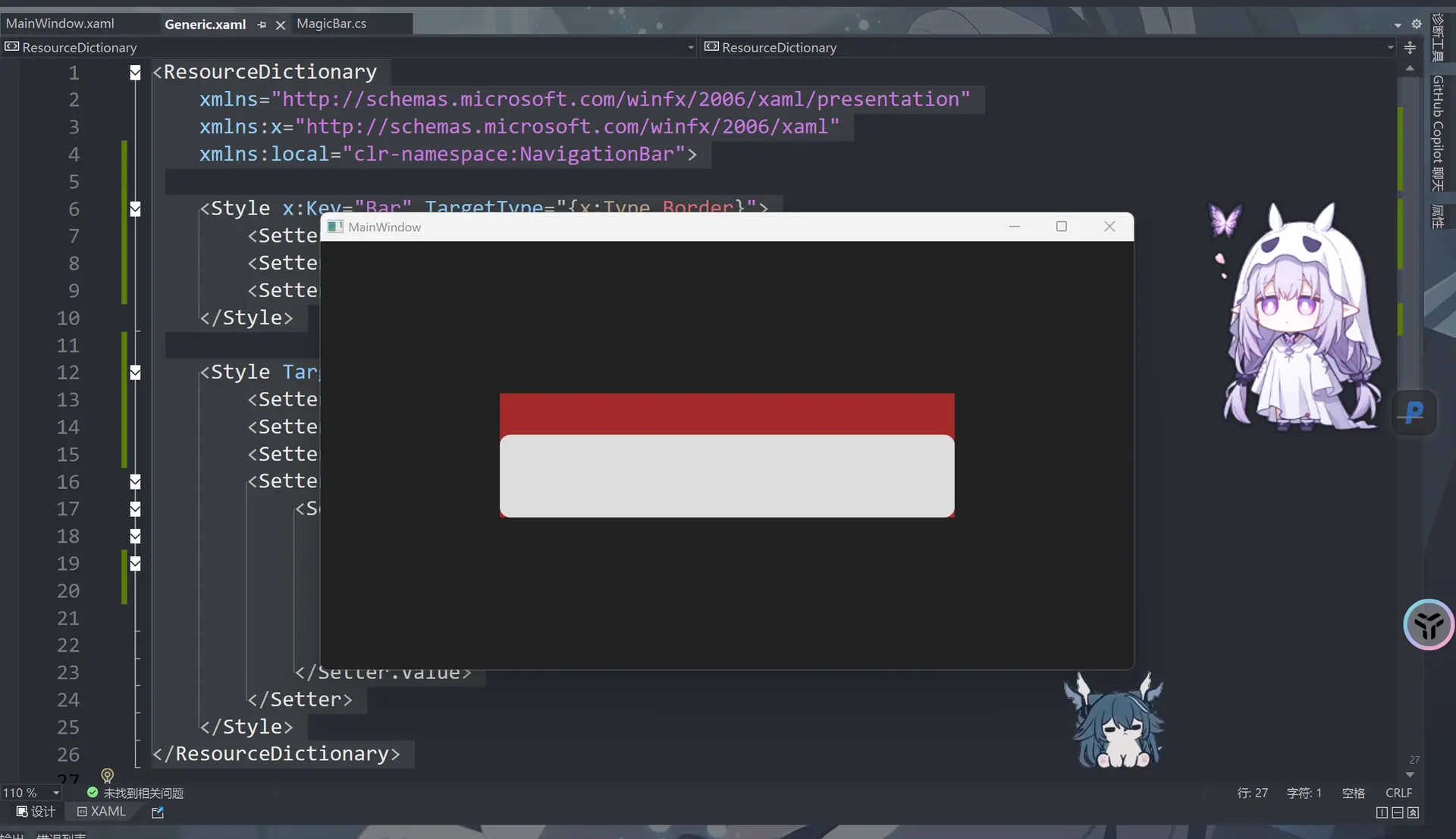
然后我们增加一个圆(话说这个东西怎么和前端里的CSS那么像呢)
修改generic.xaml
<ResourceDictionary
    xmlns="http://schemas.microsoft.com/winfx/2006/xaml/presentation"
    xmlns:x="http://schemas.microsoft.com/winfx/2006/xaml"
    xmlns:local="clr-namespace:NavigationBar">

    <Style x:Key="Bar" TargetType="{x:Type Border}">
        <Setter Property="Background" Value="#DDDDDD" />
        <Setter Property="Margin" Value="0,40,0,0" />
        <Setter Property="CornerRadius" Value="10" />
    </Style>

    <Style x:Key="Circle" TargetType="{x:Type Grid}">  <!--增加圆的样式-->
        <Setter Property="Width" Value="80" />
        <Setter Property="Height" Value="80" />
    </Style>

    <Style TargetType="{x:Type local:MagicBar}">
        <Setter Property="Background" Value="Brown" />
        <Setter Property="Width" Value="440" />
        <Setter Property="Height" Value="120" />
        <Setter Property="Template">
            <Setter.Value>
                <ControlTemplate TargetType="{x:Type local:MagicBar}">
                    <Grid Background="{TemplateBinding Background}">
                        <Border Style="{StaticResource Bar}" />
                        <Canvas>                                        <!--棕色球-->
                            <Grid Style="{StaticResource Circle}">
                                <Ellipse Fill="Brown" />
                            </Grid>
                        </Canvas>
                    </Grid>
                </ControlTemplate>
            </Setter.Value>
        </Setter>
    </Style>
</ResourceDictionary>
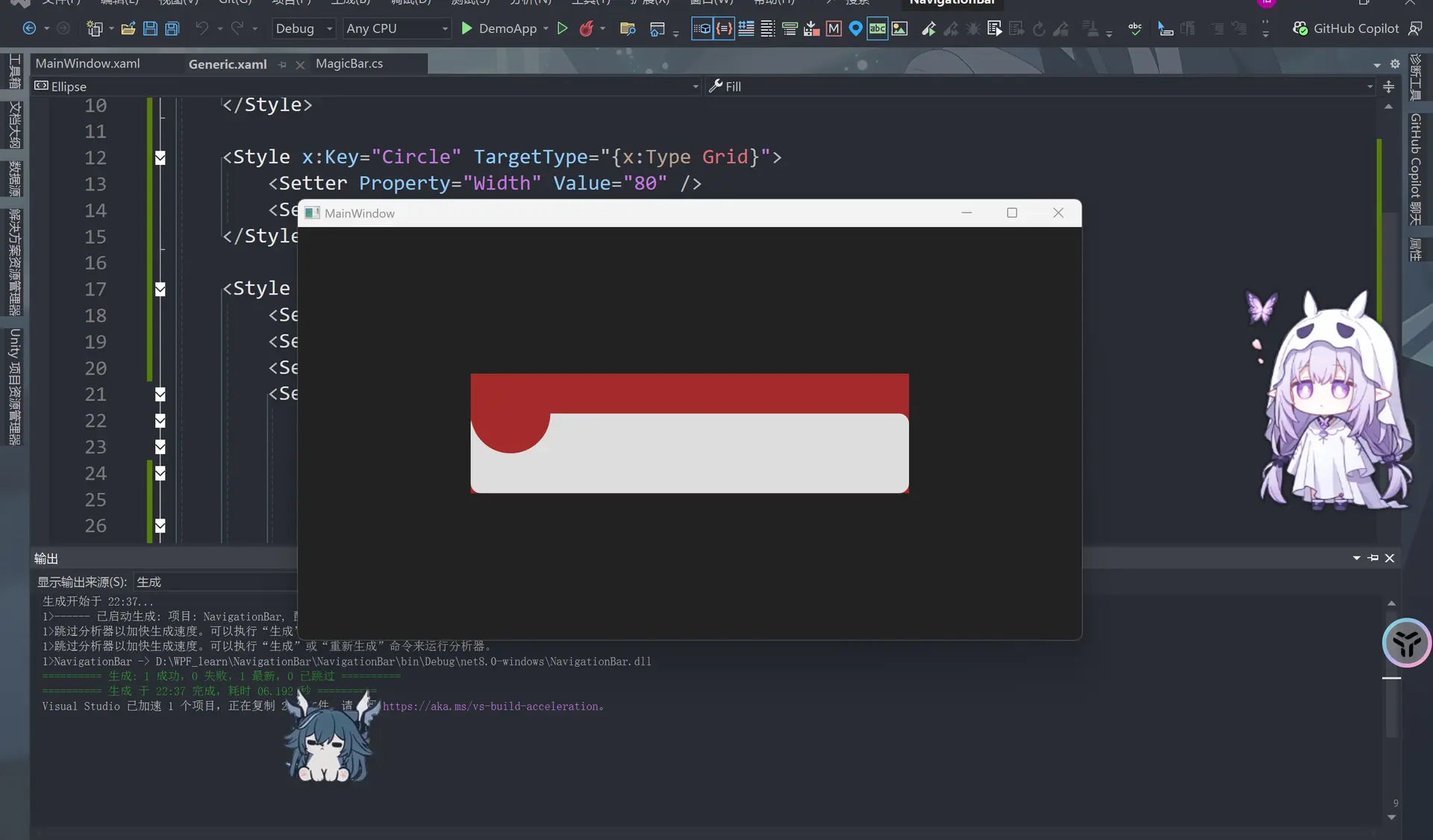
然后在 <Ellipse Fill="Brown" />下面增加这一句
<Ellipse Margin="6" Fill="CadetBlue" />
得到
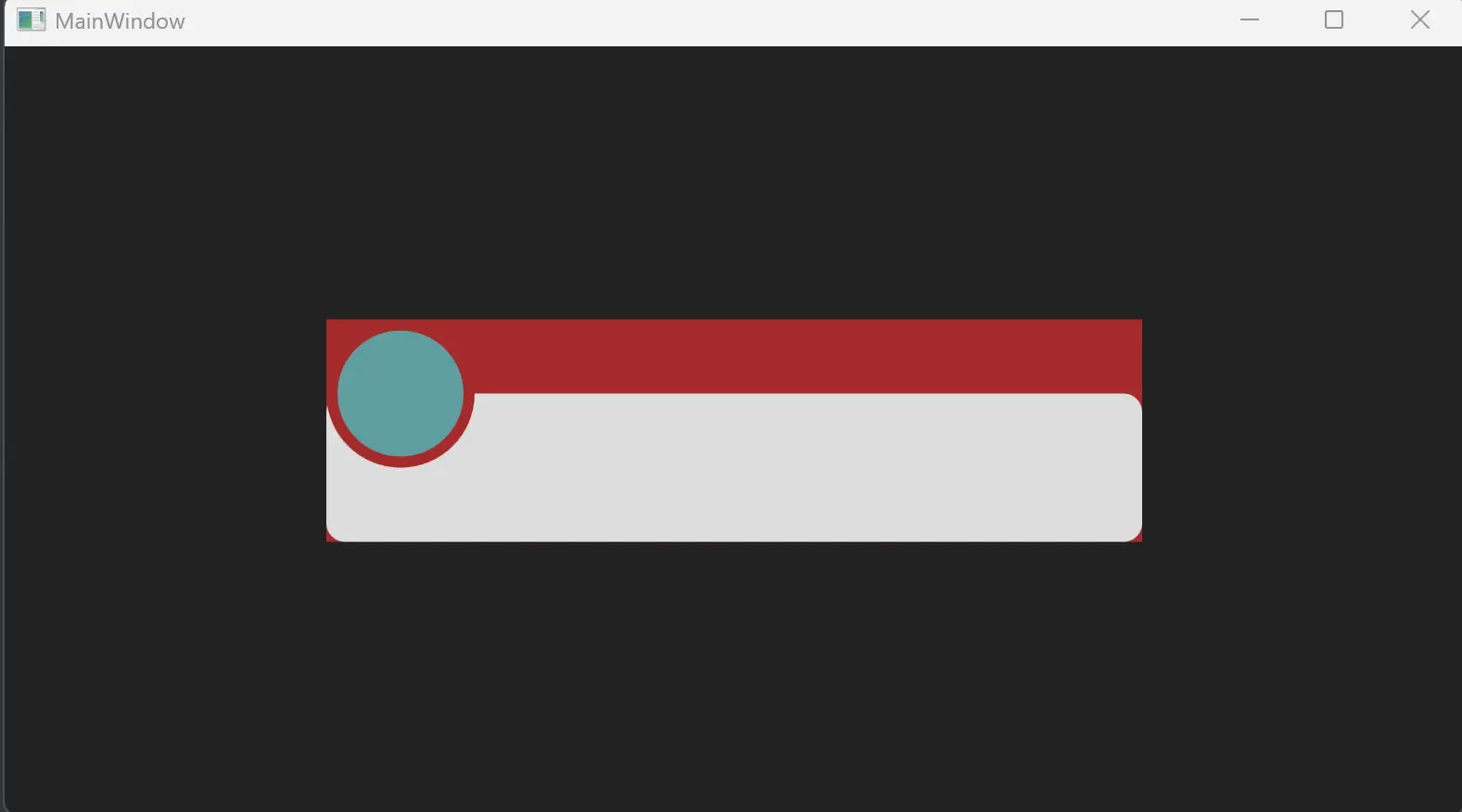
使用Blend
打开Blend,这个是Visual studio自带的东西
在Blend中打开我们的项目,这个类似建模软件,只不过是可以代码驱动的
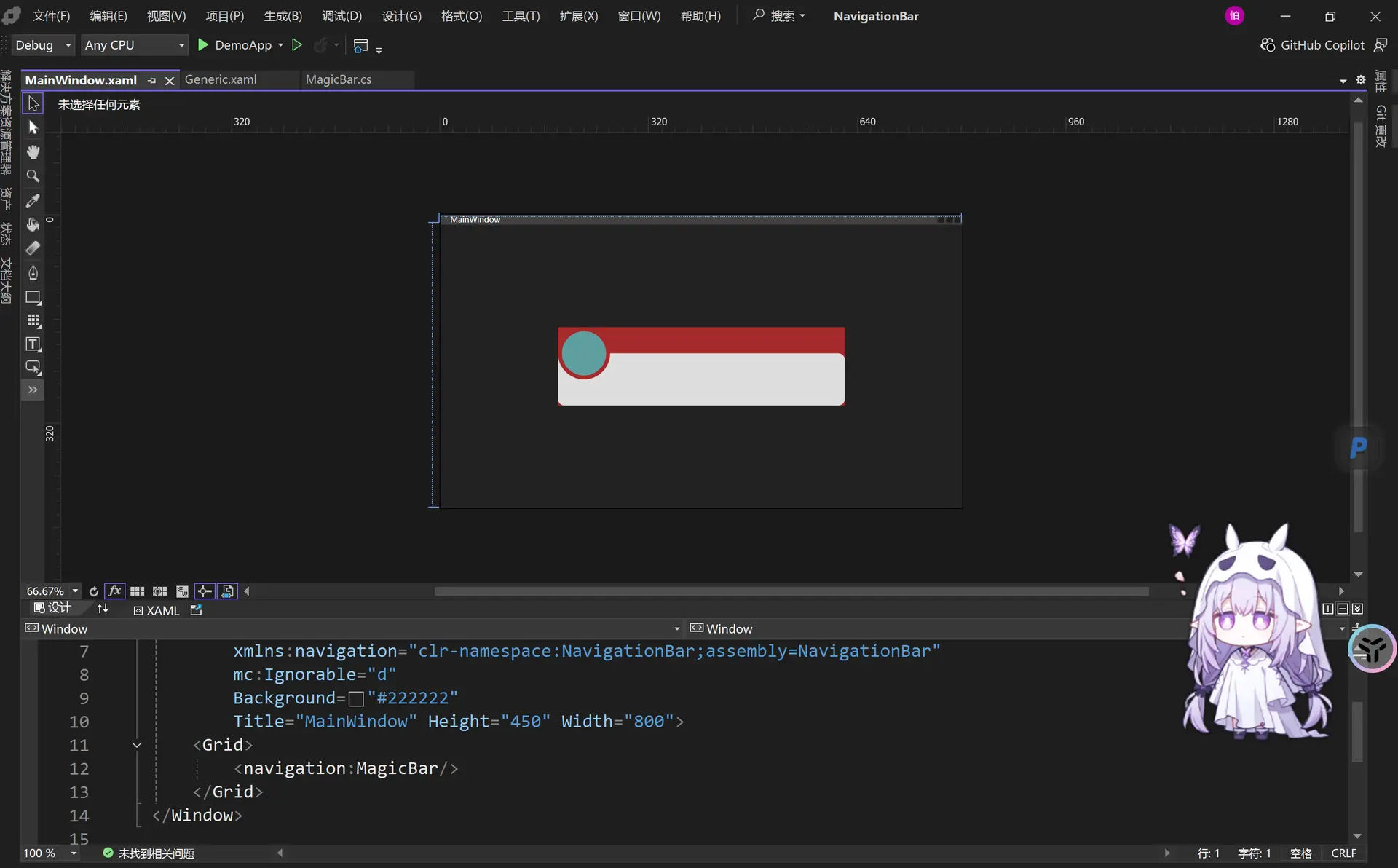
然后我们将这个<navigation:Magicbar / >注释掉 Visual studio中单行注释是ctrl +K ctrl +C 取消注释是Ctrl +K ctrl +U
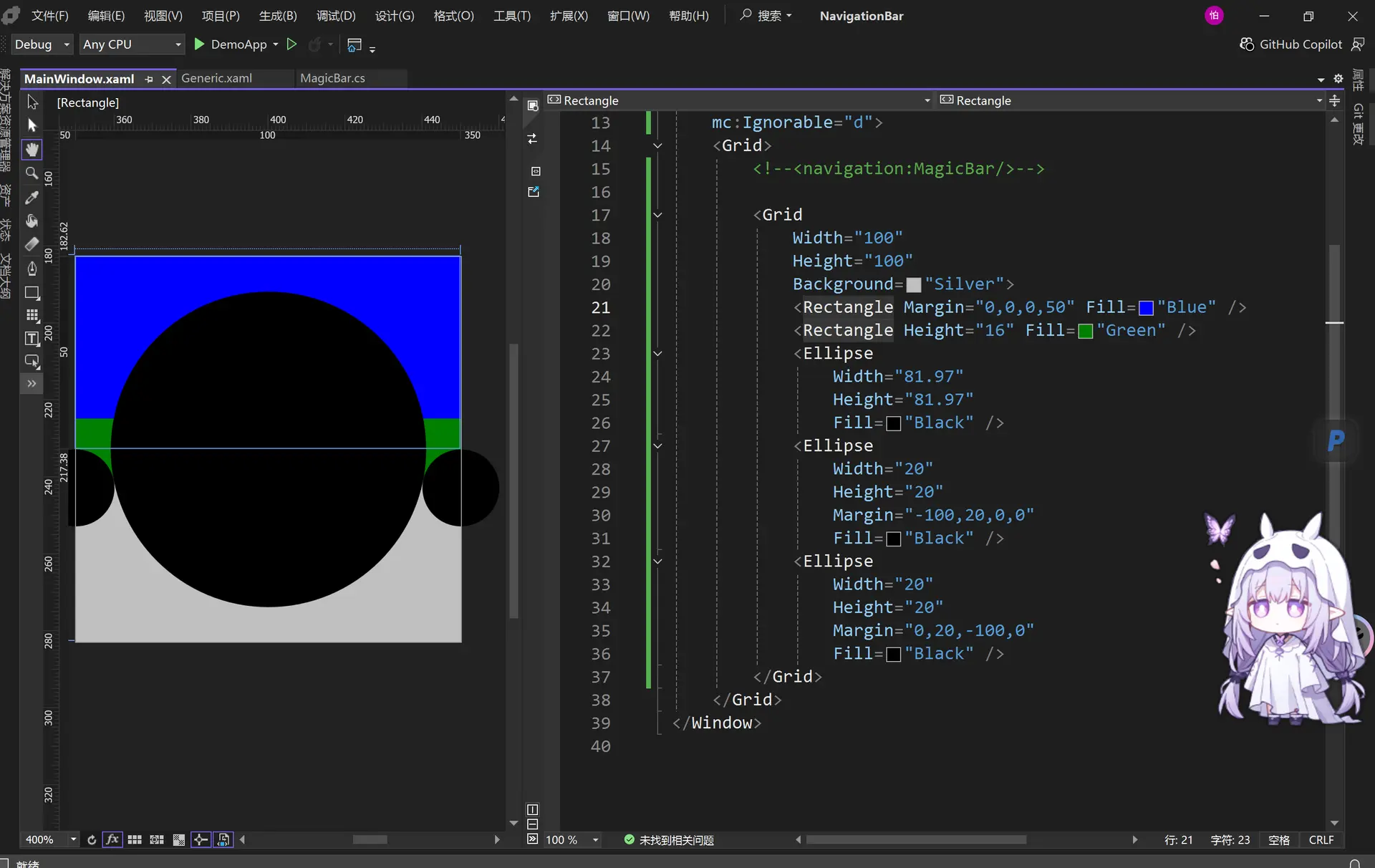
<Window
    x:Class="DemoApp.MainWindow"
    xmlns="http://schemas.microsoft.com/winfx/2006/xaml/presentation"
    xmlns:x="http://schemas.microsoft.com/winfx/2006/xaml"
    xmlns:d="http://schemas.microsoft.com/expression/blend/2008"
    xmlns:local="clr-namespace:DemoApp"
    xmlns:mc="http://schemas.openxmlformats.org/markup-compatibility/2006"
    xmlns:navigation="clr-namespace:NavigationBar;assembly=NavigationBar"
    Title="MainWindow"
    Width="800"
    Height="450"
    Background="#222222"
    mc:Ignorable="d">
    <Grid>
        <!--<navigation:MagicBar/>-->

        <Grid
            Width="100"
            Height="100"
            Background="Silver">
            <Rectangle Margin="0,0,0,50" Fill="Blue" />
            <Rectangle Height="16" Fill="Green" />
            <Ellipse
                Width="81.97"
                Height="81.97"
                Fill="Black" />
            <Ellipse
                Width="20"
                Height="20"
                Margin="-100,20,0,0"
                Fill="Black" />
            <Ellipse
                Width="20"
                Height="20"
                Margin="0,20,-100,0"
                Fill="Black" />
        </Grid>
    </Grid>
</Window>
然后按住Shift 在左边加选黑色的大圆和蓝色部分和绿色部分 然后右键 选择合并(combine)->相并(Unite)
注意选中的顺序,先选蓝色这样结果才是蓝色
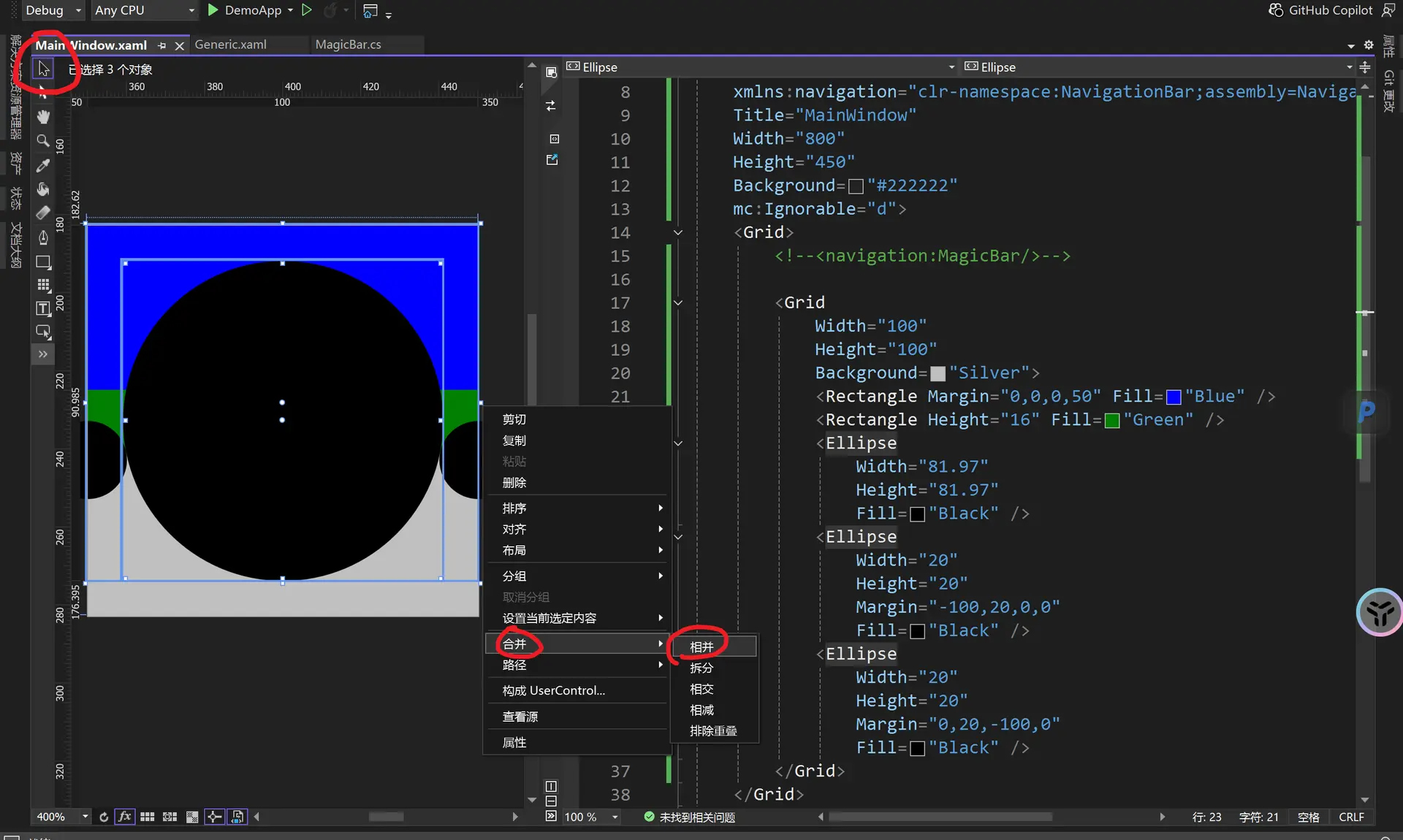
得到
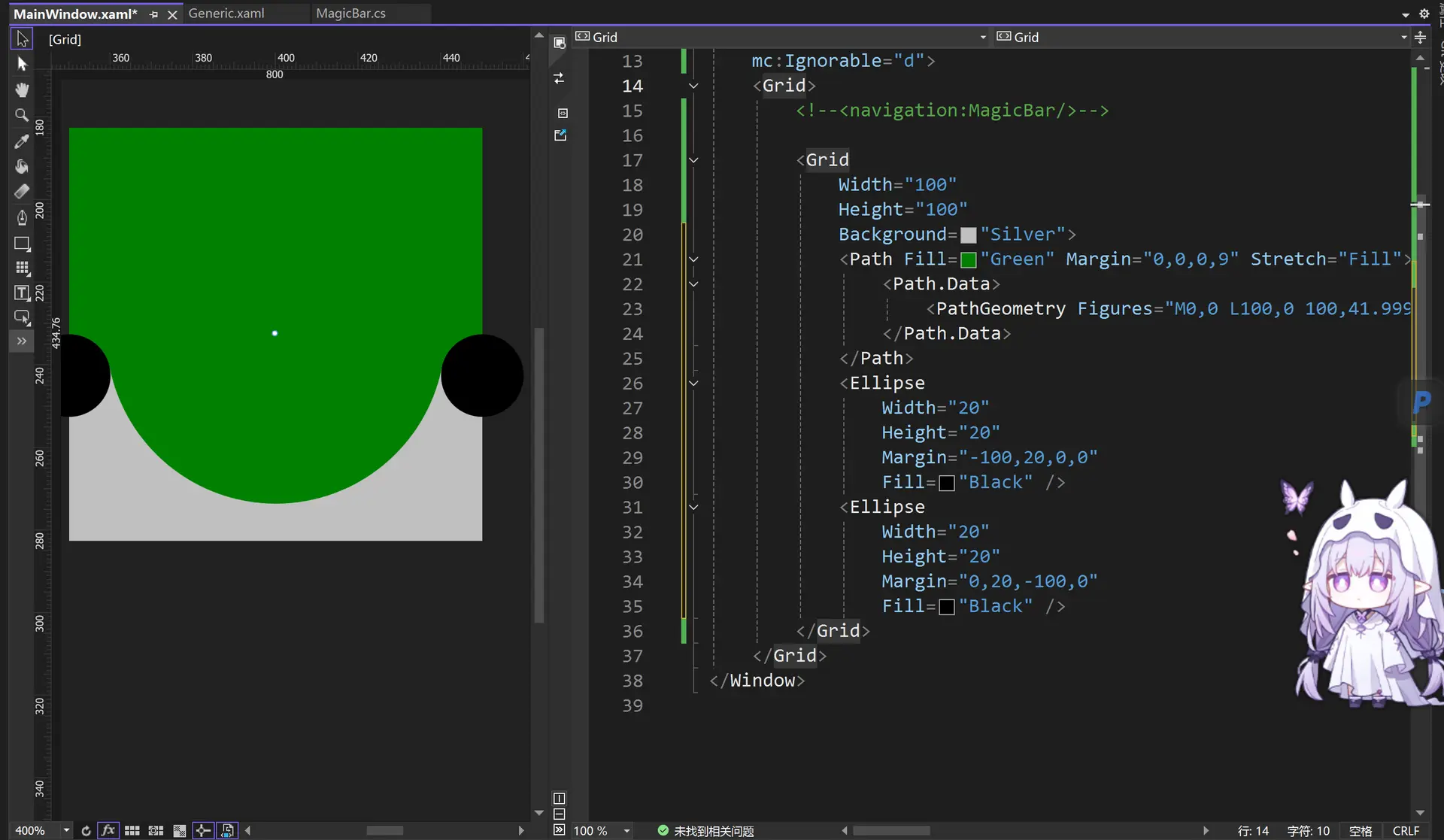
然后选择选中右侧小黑圆和绿色区域,右键 选择合并(combine)->相减(Subtract)
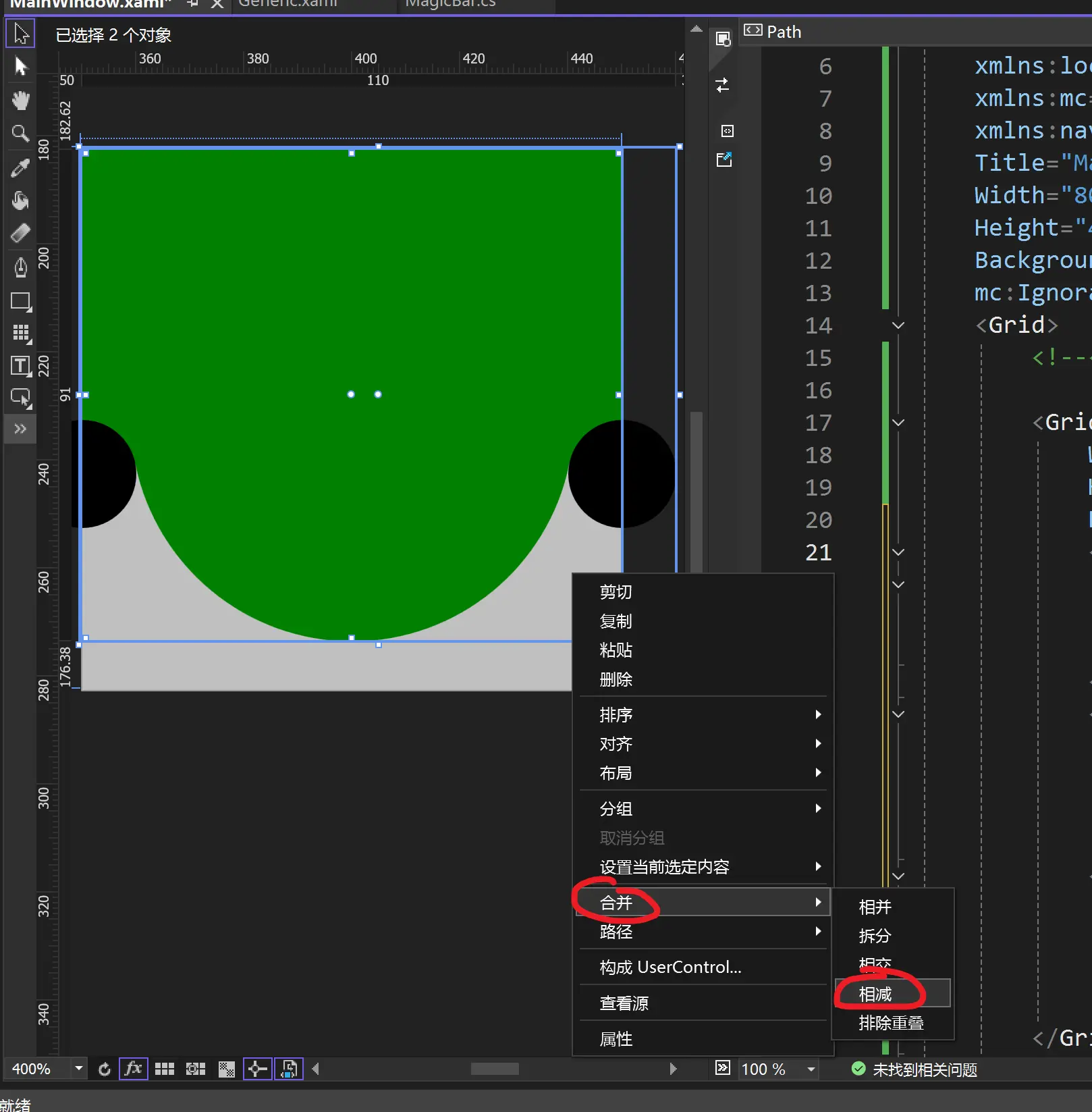
同理去除左侧的小黑圆
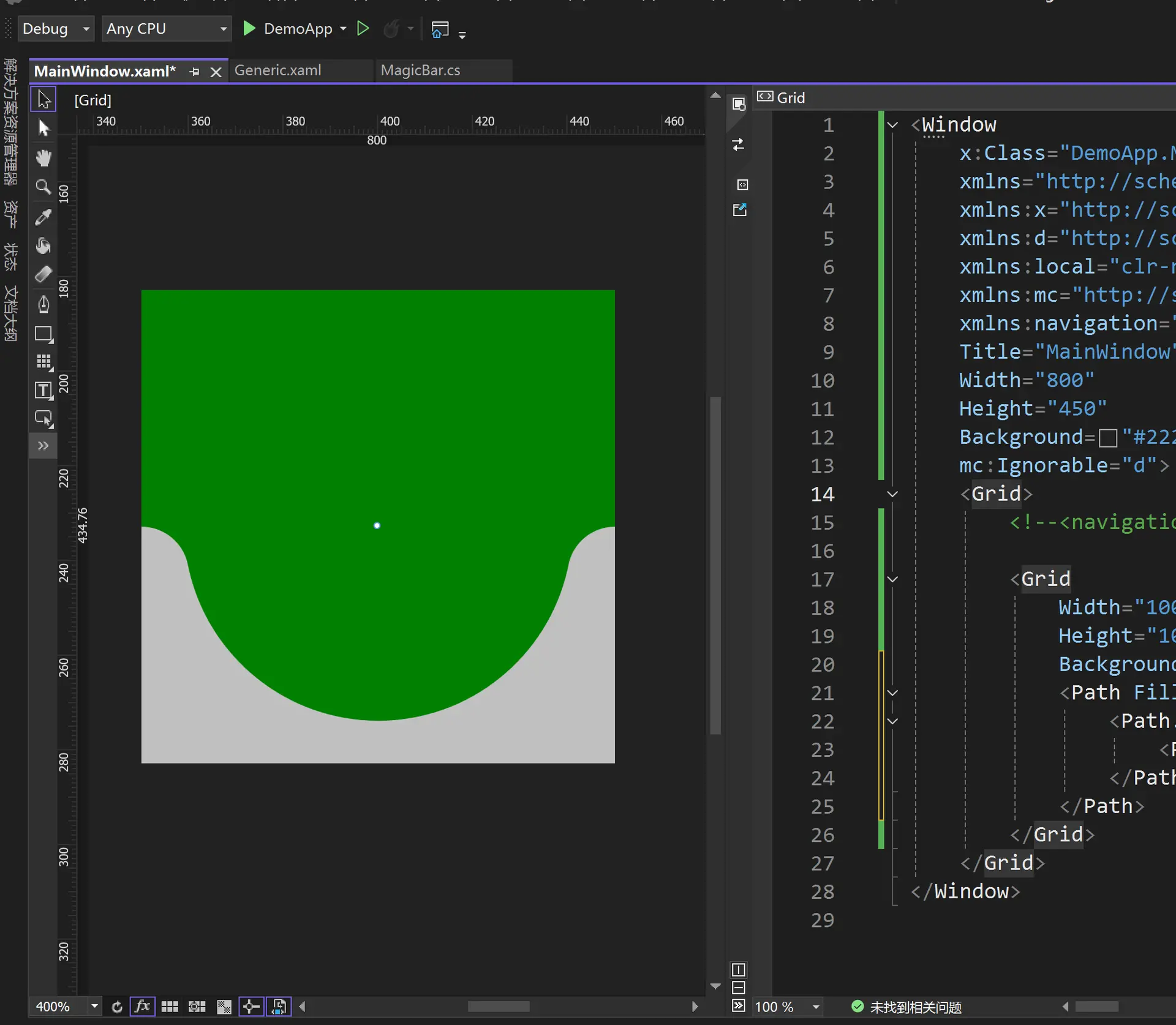
此时的布局里增加一个长方形re
<Window
    x:Class="DemoApp.MainWindow"
    xmlns="http://schemas.microsoft.com/winfx/2006/xaml/presentation"
    xmlns:x="http://schemas.microsoft.com/winfx/2006/xaml"
    xmlns:d="http://schemas.microsoft.com/expression/blend/2008"
    xmlns:local="clr-namespace:DemoApp"
    xmlns:mc="http://schemas.openxmlformats.org/markup-compatibility/2006"
    xmlns:navigation="clr-namespace:NavigationBar;assembly=NavigationBar"
    Title="MainWindow"
    Width="800"
    Height="450"
    Background="#222222"
    mc:Ignorable="d">
    <Grid>
        <!--<navigation:MagicBar/>-->

        <Grid
            Width="100"
            Height="100"
            Background="Silver">
            <Path
                Margin="0,0,0,9"
                Fill="Green"
                Stretch="Fill">
                <Path.Data>
                    <PathGeometry Figures="M0,0 L100,0 100,42.006923 100,49.999999 C95.167503,49.999999 91.135627,53.427821 90.203163,57.984649 L90.152122,58.27045 89.96392,59.141677 C85.813438,77.384437 69.496498,90.999999 50,90.999999 30.5035,90.999999 14.186564,77.384437 10.036079,59.141677 L9.847882,58.270492 9.7968356,57.984649 C8.8643729,53.427821 4.8324916,49.999999 0,49.999999 L0,42.006923 z" />
                </Path.Data>
            </Path>
            <Rectangle Margin="0,0,0,50" Fill="blue" />   <!--新增加蓝色矩形-->
        </Grid>
    </Grid>
</Window>
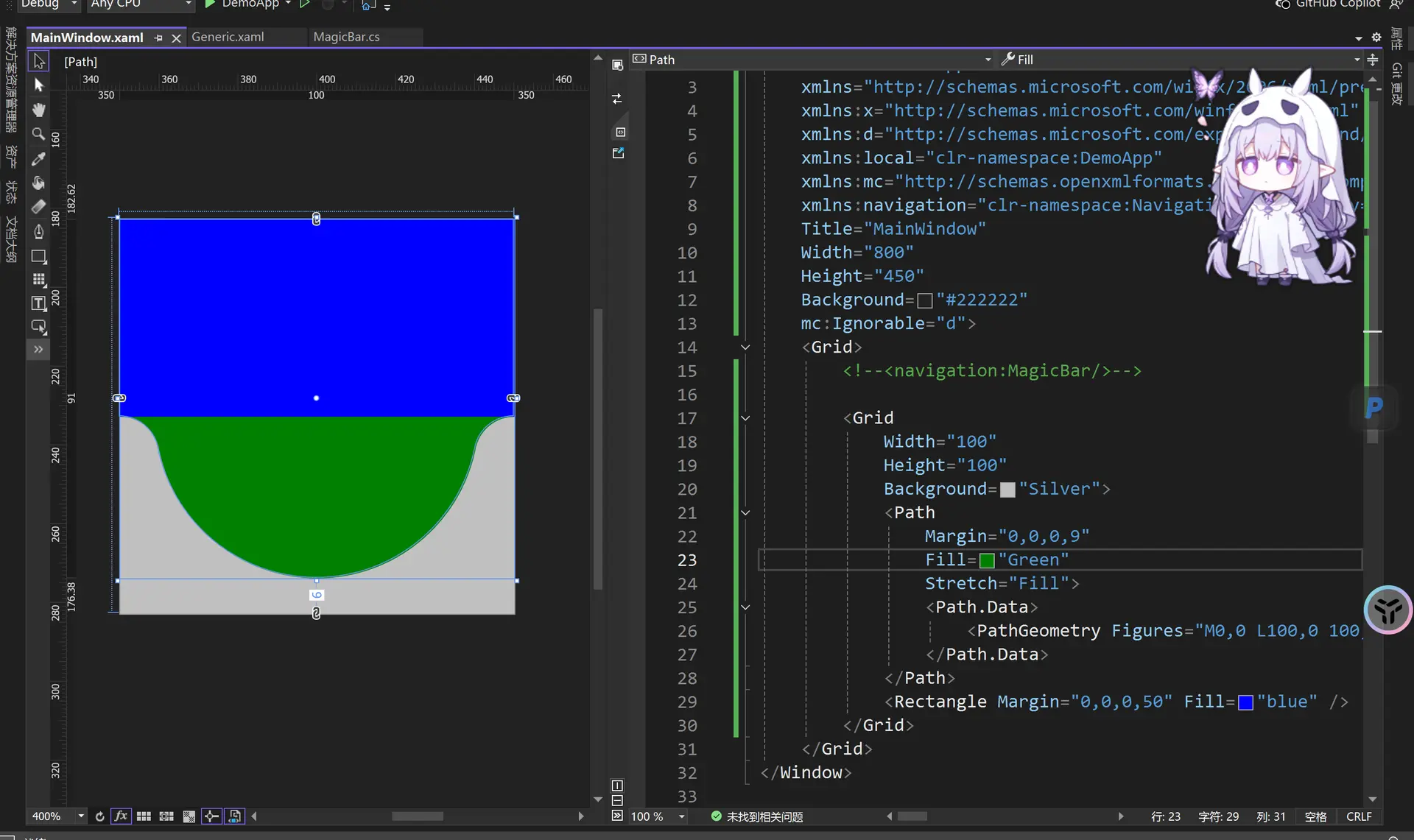
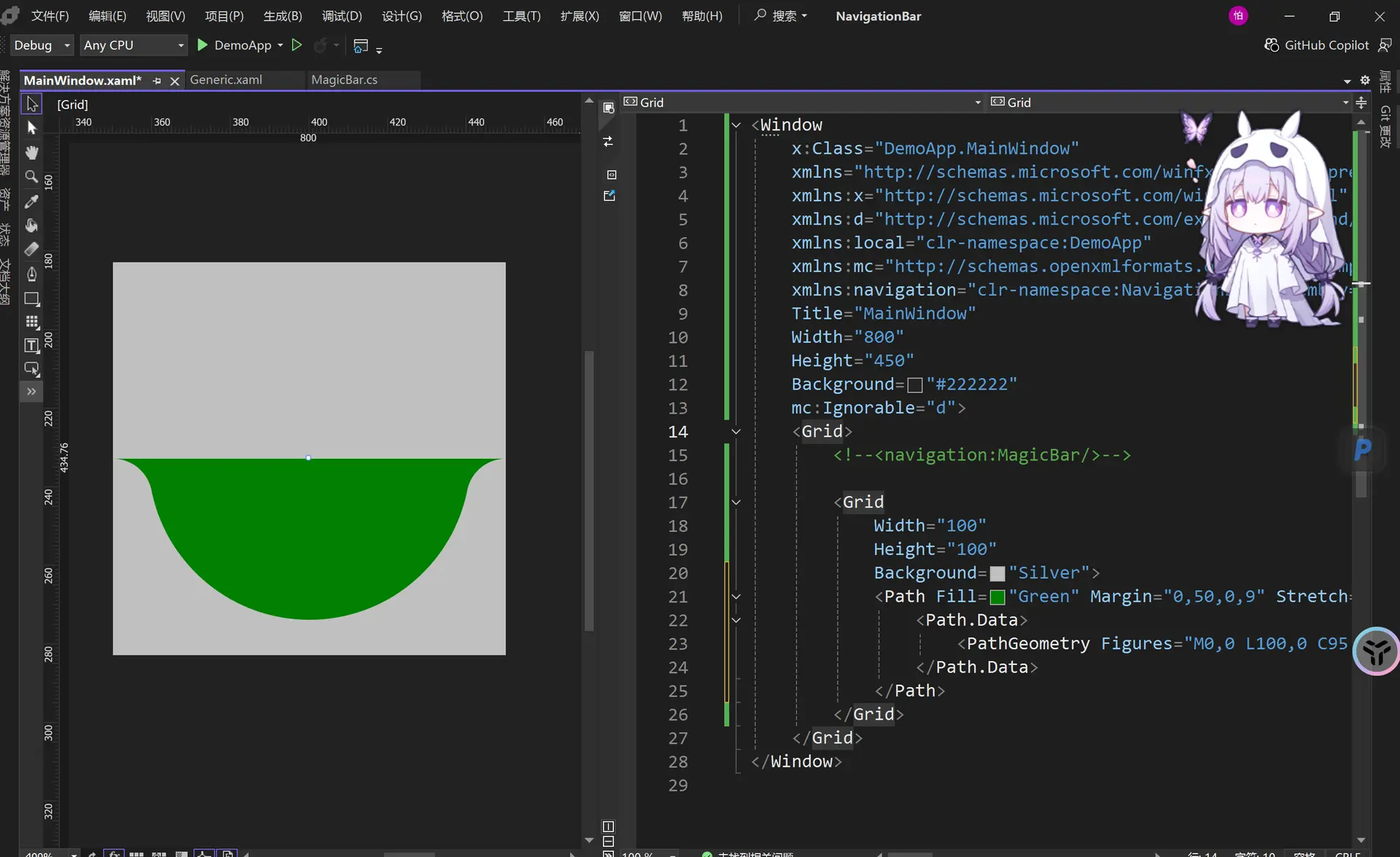
然后选中右侧蓝色和绿色区域,右键 选择合并(combine)->相减(Subtract)
得到一个好看的凹陷形状
<Window
    x:Class="DemoApp.MainWindow"
    xmlns="http://schemas.microsoft.com/winfx/2006/xaml/presentation"
    xmlns:x="http://schemas.microsoft.com/winfx/2006/xaml"
    xmlns:d="http://schemas.microsoft.com/expression/blend/2008"
    xmlns:local="clr-namespace:DemoApp"
    xmlns:mc="http://schemas.openxmlformats.org/markup-compatibility/2006"
    xmlns:navigation="clr-namespace:NavigationBar;assembly=NavigationBar"
    Title="MainWindow"
    Width="800"
    Height="450"
    Background="#222222"
    mc:Ignorable="d">
    <Grid>
        <!--<navigation:MagicBar/>-->

        <Grid
            Width="100"
            Height="100"
            Background="Silver">
            <Path Fill="Green" Margin="0,50,0,9" Stretch="Fill">
                <Path.Data>
                    <PathGeometry Figures="M0,0 L100,0 C95.167503,0 91.135628,3.4278221 90.203163,7.9846497 L90.152122,8.2704506 89.963921,9.1416779 C85.813438,27.384438 69.496498,41 50,41 30.5035,41 14.186564,27.384438 10.036079,9.1416779 L9.8478823,8.2704926 9.7968359,7.9846497 C8.8643732,3.4278221 4.8324914,0 0,0 z"/>
                </Path.Data>
            </Path>
        </Grid>
    </Grid>
</Window>
然后把这个形状提取出来
M0,0 L100,0 C95.167503,0 91.135628,3.4278221 90.203163,7.9846497 L90.152122,8.2704506 89.963921,9.1416779 C85.813438,27.384438 69.496498,41 50,41 30.5035,41 14.186564,27.384438 10.036079,9.1416779 L9.8478823,8.2704926 9.7968359,7.9846497 C8.8643732,3.4278221 4.8324914,0 0,0 z
然后我们在这个generic.xaml文件里使用这个
<ResourceDictionary
    xmlns="http://schemas.microsoft.com/winfx/2006/xaml/presentation"
    xmlns:x="http://schemas.microsoft.com/winfx/2006/xaml"
    xmlns:local="clr-namespace:NavigationBar">

    <Geometry x:Key="ArcData">  <!-- 引入数据-->
        M0,0 L100,0 C95.167503,0 91.135628,3.4278221 90.203163,7.9846497 L90.152122,8.2704506 89.963921,9.1416779 C85.813438,27.384438 69.496498,41 50,41 30.5035,41 14.186564,27.384438 10.036079,9.1416779 L9.8478823,8.2704926 9.7968359,7.9846497 C8.8643732,3.4278221 4.8324914,0 0,0 z
    </Geometry>

    <Style x:Key="Arc" TargetType="{x:Type Path}">      <!--构造图形样式-->
        <Setter Property="Data" Value="{StaticResource ArcData}" />
        <Setter Property="Width" Value="100" />
        <Setter Property="Height" Value="100" />
        <Setter Property="Fill" Value="Yellow" />
        <Setter Property="Margin" Value="-10,40,-10,0" />
    </Style>

    <Style x:Key="Bar" TargetType="{x:Type Border}">
        <Setter Property="Background" Value="#DDDDDD" />
        <Setter Property="Margin" Value="0,40,0,0" />
        <Setter Property="CornerRadius" Value="10" />
    </Style>

    <Style x:Key="Circle" TargetType="{x:Type Grid}">
        <Setter Property="Width" Value="80" />
        <Setter Property="Height" Value="80" />
    </Style>

    <Style TargetType="{x:Type local:MagicBar}">
        <Setter Property="Background" Value="Brown" />
        <Setter Property="Width" Value="440" />
        <Setter Property="Height" Value="120" />
        <Setter Property="Template">
            <Setter.Value>
                <ControlTemplate TargetType="{x:Type local:MagicBar}">
                    <Grid Background="{TemplateBinding Background}">
                        <Border Style="{StaticResource Bar}" />
                        <Canvas>
                            <Grid Style="{StaticResource Circle}">
                                <Ellipse Fill="Brown" />
                                <Ellipse Margin="6" Fill="CadetBlue" />
                                <Path Style="{StaticResource Arc}" />
                            </Grid>
                        </Canvas>
                    </Grid>
                </ControlTemplate>
            </Setter.Value>
        </Setter>
    </Style>
</ResourceDictionary>
然后将刚才的MainWindow.xaml里的测试使用的代码注释掉或删掉
<Window
    x:Class="DemoApp.MainWindow"
    xmlns="http://schemas.microsoft.com/winfx/2006/xaml/presentation"
    xmlns:x="http://schemas.microsoft.com/winfx/2006/xaml"
    xmlns:d="http://schemas.microsoft.com/expression/blend/2008"
    xmlns:local="clr-namespace:DemoApp"
    xmlns:mc="http://schemas.openxmlformats.org/markup-compatibility/2006"
    xmlns:navigation="clr-namespace:NavigationBar;assembly=NavigationBar"
    Title="MainWindow"
    Width="800"
    Height="450"
    Background="#222222"
    mc:Ignorable="d">
    <Grid>
        <navigation:MagicBar />

        <!--<Grid
            Width="100"
            Height="100"
            Background="Silver">
            <Path
                Margin="0,50,0,9"
                Fill="Green"
                Stretch="Fill">
                <Path.Data>
                    <PathGeometry Figures="M0,0 L100,0 C95.167503,0 91.135628,3.4278221 90.203163,7.9846497 L90.152122,8.2704506 89.963921,9.1416779 C85.813438,27.384438 69.496498,41 50,41 30.5035,41 14.186564,27.384438 10.036079,9.1416779 L9.8478823,8.2704926 9.7968359,7.9846497 C8.8643732,3.4278221 4.8324914,0 0,0 z" />
                </Path.Data>
            </Path>
        </Grid>-->
    </Grid>
</Window>
但是注意到,这个并不是很完美,有两个小角,而且圆的下面是平的
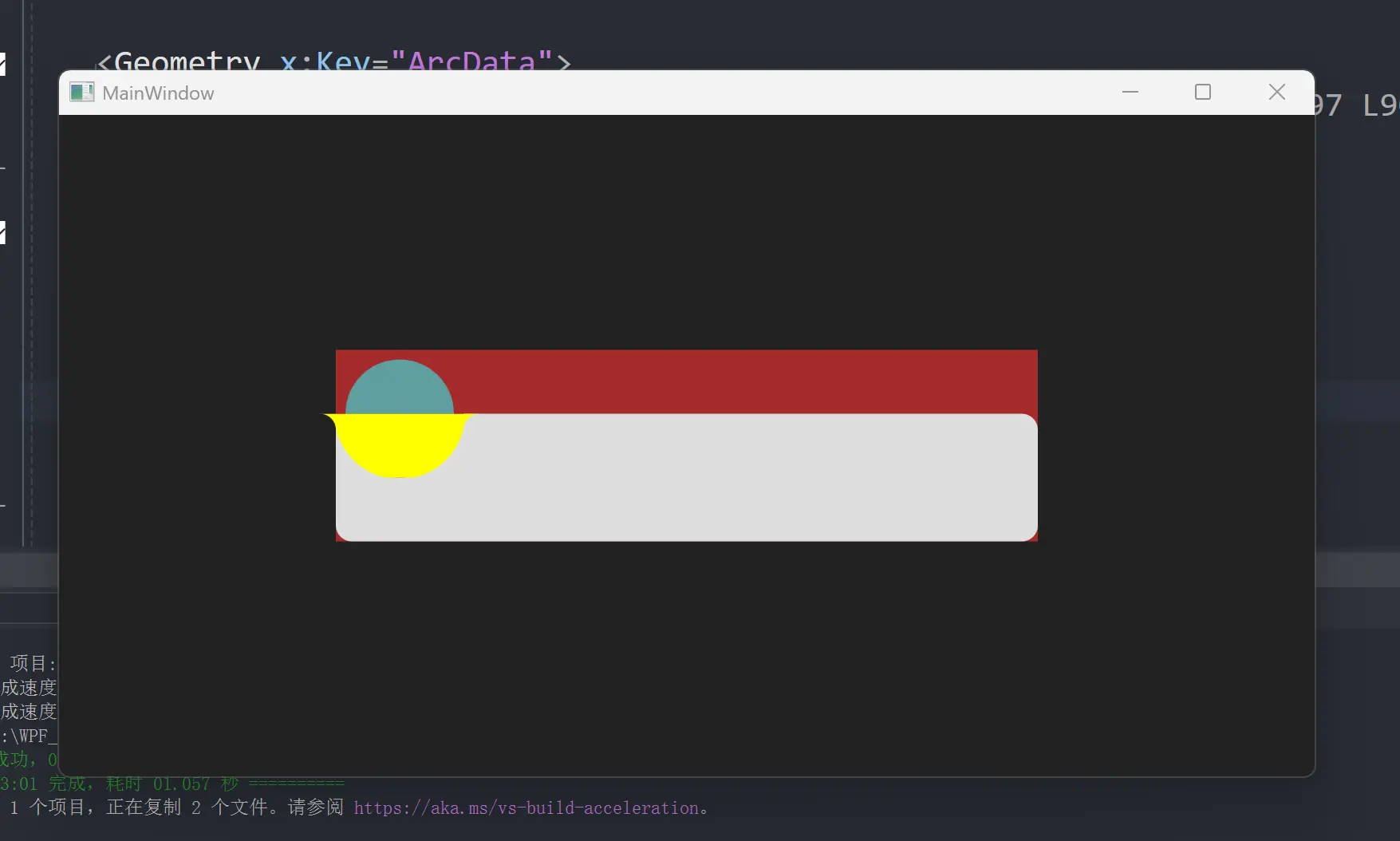
所以我们添加一个修改
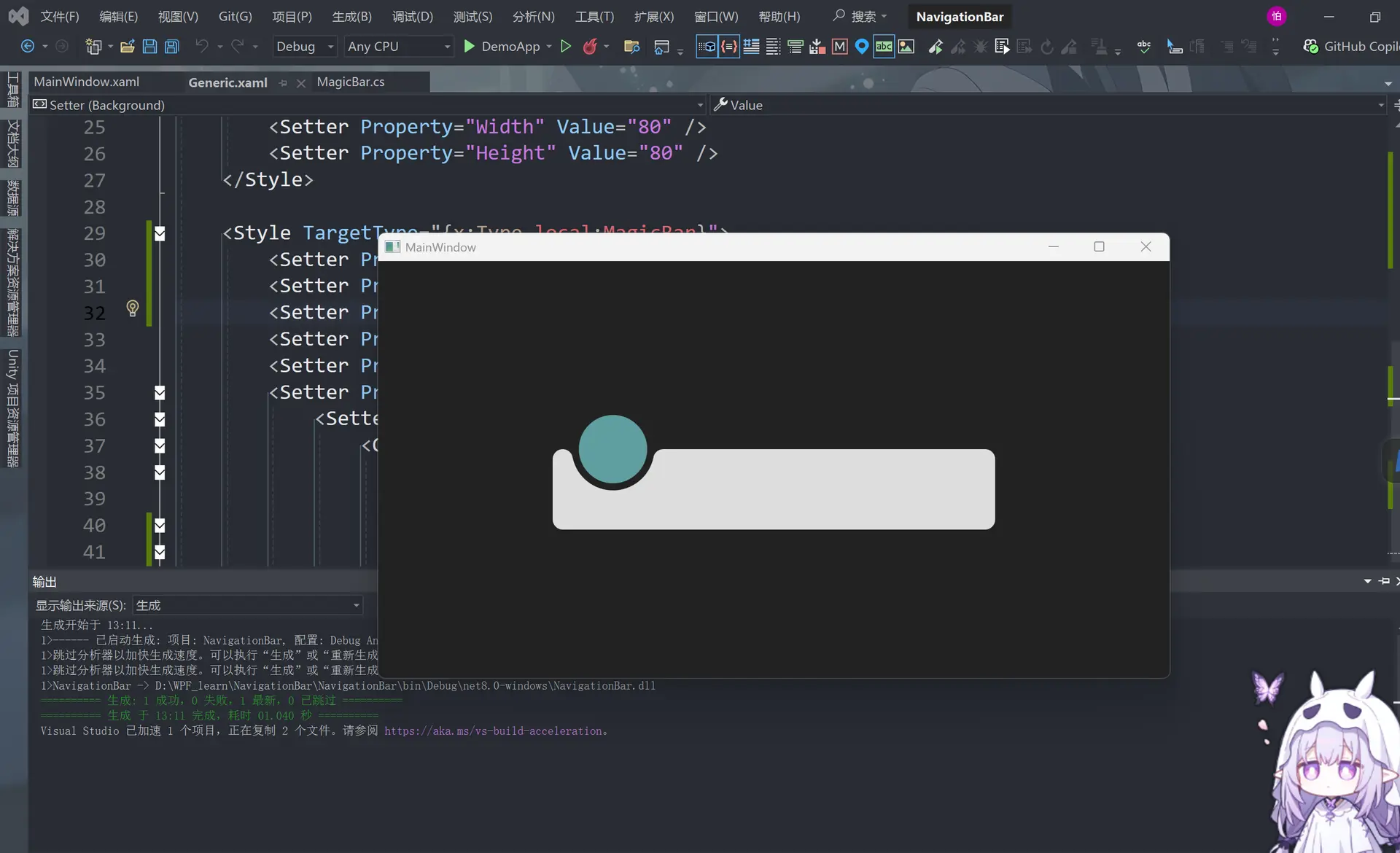
在generic.xaml里面更改这几个地方
<ResourceDictionary
    xmlns="http://schemas.microsoft.com/winfx/2006/xaml/presentation"
    xmlns:x="http://schemas.microsoft.com/winfx/2006/xaml"
    xmlns:local="clr-namespace:NavigationBar">

    <Geometry x:Key="ArcData">
        M0,0 L100,0 C95.167503,0 91.135628,3.4278221 90.203163,7.9846497 L90.152122,8.2704506 89.963921,9.1416779 C85.813438,27.384438 69.496498,41 50,41 30.5035,41 14.186564,27.384438 10.036079,9.1416779 L9.8478823,8.2704926 9.7968359,7.9846497 C8.8643732,3.4278221 4.8324914,0 0,0 z
    </Geometry>

    <Style x:Key="Arc" TargetType="{x:Type Path}">
        <Setter Property="Data" Value="{StaticResource ArcData}" />
        <Setter Property="Width" Value="100" />
        <Setter Property="Height" Value="100" />
        <Setter Property="Fill" Value="#222222" />  <!-- 将刚才的那个圆弧形状改成黑色-->
        <Setter Property="Margin" Value="-10,40,-10,-1" />  <!--改margin值抬高这个圆弧防止出现平底-->
    </Style>

    <Style x:Key="Bar" TargetType="{x:Type Border}">
        <Setter Property="Background" Value="#DDDDDD" />
        <Setter Property="Margin" Value="0,40,0,0" />
        <Setter Property="CornerRadius" Value="10" />
    </Style>

    <Style x:Key="Circle" TargetType="{x:Type Grid}">
        <Setter Property="Width" Value="80" />
        <Setter Property="Height" Value="80" />
    </Style>

    <Style TargetType="{x:Type local:MagicBar}">
        <Setter Property="SnapsToDevicePixels" Value="True" />
        <Setter Property="UseLayoutRounding" Value="True" />
        <Setter Property="Background" Value="Transparent" />   <!--将背景条改成透明-->
        <Setter Property="Width" Value="440" />
        <Setter Property="Height" Value="120" />
        <Setter Property="Template">
            <Setter.Value>
                <ControlTemplate TargetType="{x:Type local:MagicBar}">
                    <Grid Background="{TemplateBinding Background}">
                        <Border Style="{StaticResource Bar}" />
                        <Canvas Margin="20,0,20,0">  <!--改一下margin值显示出左边被盖住的部分-->
                            <Grid Style="{StaticResource Circle}">
                                <Path Style="{StaticResource Arc}" />   <!--将这个移动到上面 -->
                                <Ellipse Fill="#222222" />
                                <Ellipse Margin="6" Fill="CadetBlue" />
                            </Grid>
                        </Canvas>
                    </Grid>
                </ControlTemplate>
            </Setter.Value>
        </Setter>
    </Style>
</ResourceDictionary>
然后我们增加一个东西
generic.xaml
<ResourceDictionary
    xmlns="http://schemas.microsoft.com/winfx/2006/xaml/presentation"
    xmlns:x="http://schemas.microsoft.com/winfx/2006/xaml"
    xmlns:local="clr-namespace:NavigationBar">

    <Geometry x:Key="ArcData">
        M0,0 L100,0 C95.167503,0 91.135628,3.4278221 90.203163,7.9846497 L90.152122,8.2704506 89.963921,9.1416779 C85.813438,27.384438 69.496498,41 50,41 30.5035,41 14.186564,27.384438 10.036079,9.1416779 L9.8478823,8.2704926 9.7968359,7.9846497 C8.8643732,3.4278221 4.8324914,0 0,0 z
    </Geometry>

    <Style x:Key="Arc" TargetType="{x:Type Path}">
        <Setter Property="Data" Value="{StaticResource ArcData}" />
        <Setter Property="Width" Value="100" />
        <Setter Property="Height" Value="100" />
        <Setter Property="Fill" Value="#222222" />
        <Setter Property="Margin" Value="-10,40,-10,-1" />
    </Style>

    <Style x:Key="Bar" TargetType="{x:Type Border}">
        <Setter Property="Background" Value="#DDDDDD" />
        <Setter Property="Margin" Value="0,40,0,0" />
        <Setter Property="CornerRadius" Value="10" />
    </Style>

    <Style x:Key="Circle" TargetType="{x:Type Grid}">
        <Setter Property="Width" Value="80" />
        <Setter Property="Height" Value="80" />
    </Style>

    <Style TargetType="{x:Type local:MagicBar}">
        <Setter Property="SnapsToDevicePixels" Value="True" />
        <Setter Property="UseLayoutRounding" Value="True" />
        <Setter Property="Background" Value="Transparent" />
        <Setter Property="Width" Value="440" />
        <Setter Property="Height" Value="120" />
        <Setter Property="Template">
            <Setter.Value>
                <ControlTemplate TargetType="{x:Type local:MagicBar}">
                    <Grid Background="{TemplateBinding Background}">
                        <Border Style="{StaticResource Bar}" />
                        <Canvas Margin="20,0,20,0">
                            <Grid Style="{StaticResource Circle}">
                                <Path Style="{StaticResource Arc}" />
                                <Ellipse Fill="#222222" />
                                <Ellipse Margin="6" Fill="CadetBlue" />
                            </Grid>
                        </Canvas>
                        <ItemsPresenter />  <!-- 把刚才的12345添加进去-->
                    </Grid>
                </ControlTemplate>
            </Setter.Value>
        </Setter>
    </Style>
</ResourceDictionary>
MainWindow.xaml
<Window
    x:Class="DemoApp.MainWindow"
    xmlns="http://schemas.microsoft.com/winfx/2006/xaml/presentation"
    xmlns:x="http://schemas.microsoft.com/winfx/2006/xaml"
    xmlns:d="http://schemas.microsoft.com/expression/blend/2008"
    xmlns:local="clr-namespace:DemoApp"
    xmlns:mc="http://schemas.openxmlformats.org/markup-compatibility/2006"
    xmlns:navigation="clr-namespace:NavigationBar;assembly=NavigationBar"
    Title="MainWindow"
    Width="800"
    Height="450"
    Background="#222222"
    mc:Ignorable="d">
    <Grid>
        <navigation:MagicBar>  <!-- 增加12345-->
            <ListBoxItem Content="1" />
            <ListBoxItem Content="2" />
            <ListBoxItem Content="3" />
            <ListBoxItem Content="4" />
            <ListBoxItem Content="5" />

        </navigation:MagicBar>

        <!--<Grid
            Width="100"
            Height="100"
            Background="Silver">
            <Path
                Margin="0,50,0,9"
                Fill="Green"
                Stretch="Fill">
                <Path.Data>
                    <PathGeometry Figures="M0,0 L100,0 C95.167503,0 91.135628,3.4278221 90.203163,7.9846497 L90.152122,8.2704506 89.963921,9.1416779 C85.813438,27.384438 69.496498,41 50,41 30.5035,41 14.186564,27.384438 10.036079,9.1416779 L9.8478823,8.2704926 9.7968359,7.9846497 C8.8643732,3.4278221 4.8324914,0 0,0 z" />
                </Path.Data>
            </Path>
        </Grid>-->
    </Grid>
</Window>
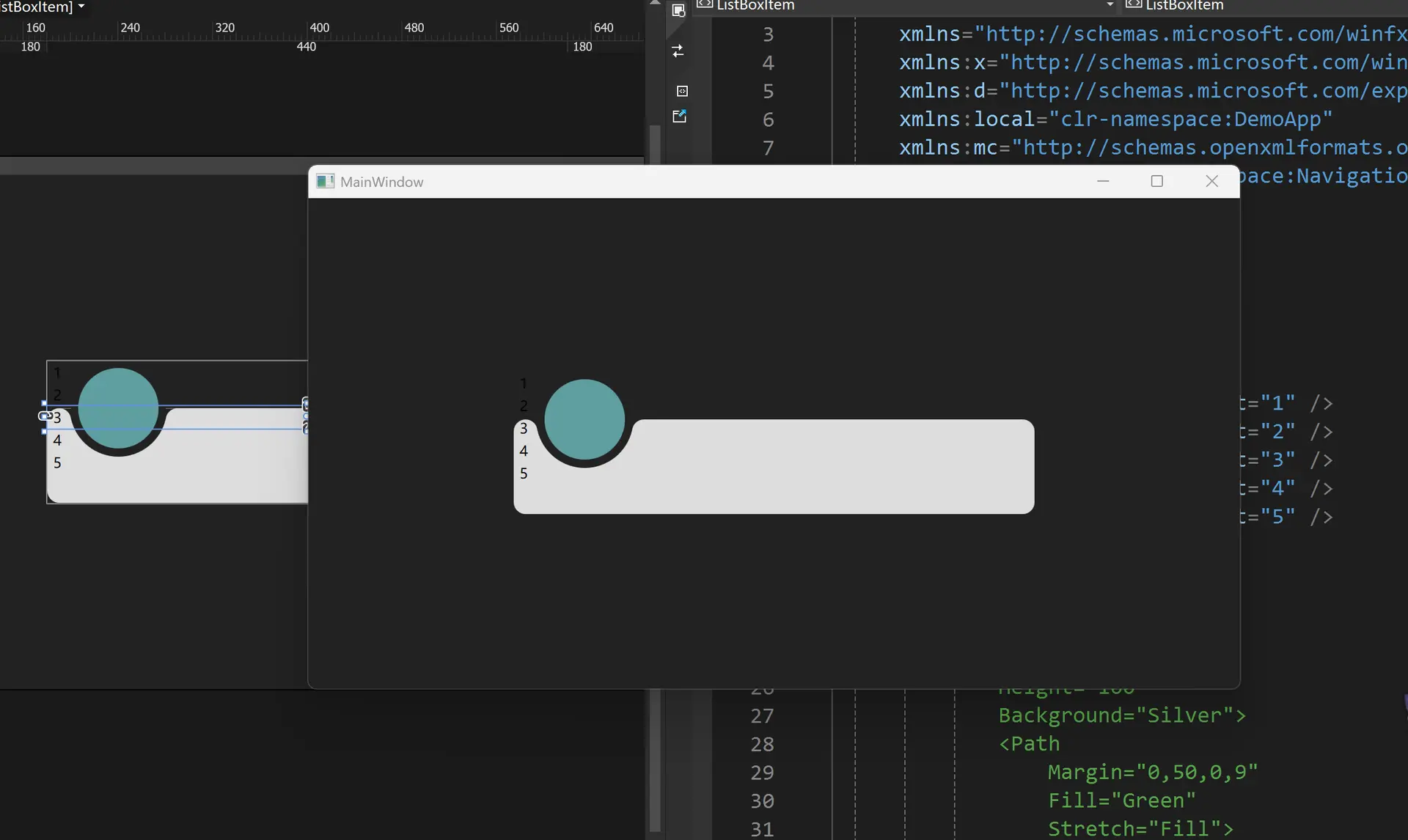
然后改一下位置
<ResourceDictionary
    xmlns="http://schemas.microsoft.com/winfx/2006/xaml/presentation"
    xmlns:x="http://schemas.microsoft.com/winfx/2006/xaml"
    xmlns:local="clr-namespace:NavigationBar">

    <Geometry x:Key="ArcData">
        M0,0 L100,0 C95.167503,0 91.135628,3.4278221 90.203163,7.9846497 L90.152122,8.2704506 89.963921,9.1416779 C85.813438,27.384438 69.496498,41 50,41 30.5035,41 14.186564,27.384438 10.036079,9.1416779 L9.8478823,8.2704926 9.7968359,7.9846497 C8.8643732,3.4278221 4.8324914,0 0,0 z
    </Geometry>

    <Style x:Key="Arc" TargetType="{x:Type Path}">
        <Setter Property="Data" Value="{StaticResource ArcData}" />
        <Setter Property="Width" Value="100" />
        <Setter Property="Height" Value="100" />
        <Setter Property="Fill" Value="#222222" />
        <Setter Property="Margin" Value="-10,40,-10,-1" />
    </Style>

    <Style x:Key="Bar" TargetType="{x:Type Border}">
        <Setter Property="Background" Value="#DDDDDD" />
        <Setter Property="Margin" Value="0,40,0,0" />
        <Setter Property="CornerRadius" Value="10" />
    </Style>

    <Style x:Key="Circle" TargetType="{x:Type Grid}">
        <Setter Property="Width" Value="80" />
        <Setter Property="Height" Value="80" />
    </Style>

    <Style TargetType="{x:Type local:MagicBar}">
        <Setter Property="SnapsToDevicePixels" Value="True" />
        <Setter Property="UseLayoutRounding" Value="True" />
        <Setter Property="Background" Value="Transparent" />
        <Setter Property="Width" Value="440" />
        <Setter Property="Height" Value="120" />
        <Setter Property="Template">
            <Setter.Value>
                <ControlTemplate TargetType="{x:Type local:MagicBar}">
                    <Grid Background="{TemplateBinding Background}">
                        <Border Style="{StaticResource Bar}" />
                        <Canvas Margin="20,0,20,0">
                            <Grid Style="{StaticResource Circle}">
                                <Path Style="{StaticResource Arc}" />
                                <Ellipse Fill="#222222" />
                                <Ellipse Margin="6" Fill="CadetBlue" />
                            </Grid>
                        </Canvas>
                        <ItemsPresenter Margin="20,40,20,0" />  <!--marin大小-->
                    </Grid>
                </ControlTemplate>
            </Setter.Value>
        </Setter>
        <Setter Property="ItemsPanel">
            <Setter.Value>   <!--分成5个-->
                <ItemsPanelTemplate>
                    <UniformGrid Columns="5" />
                </ItemsPanelTemplate>
            </Setter.Value>
        </Setter>
    </Style>
</ResourceDictionary>
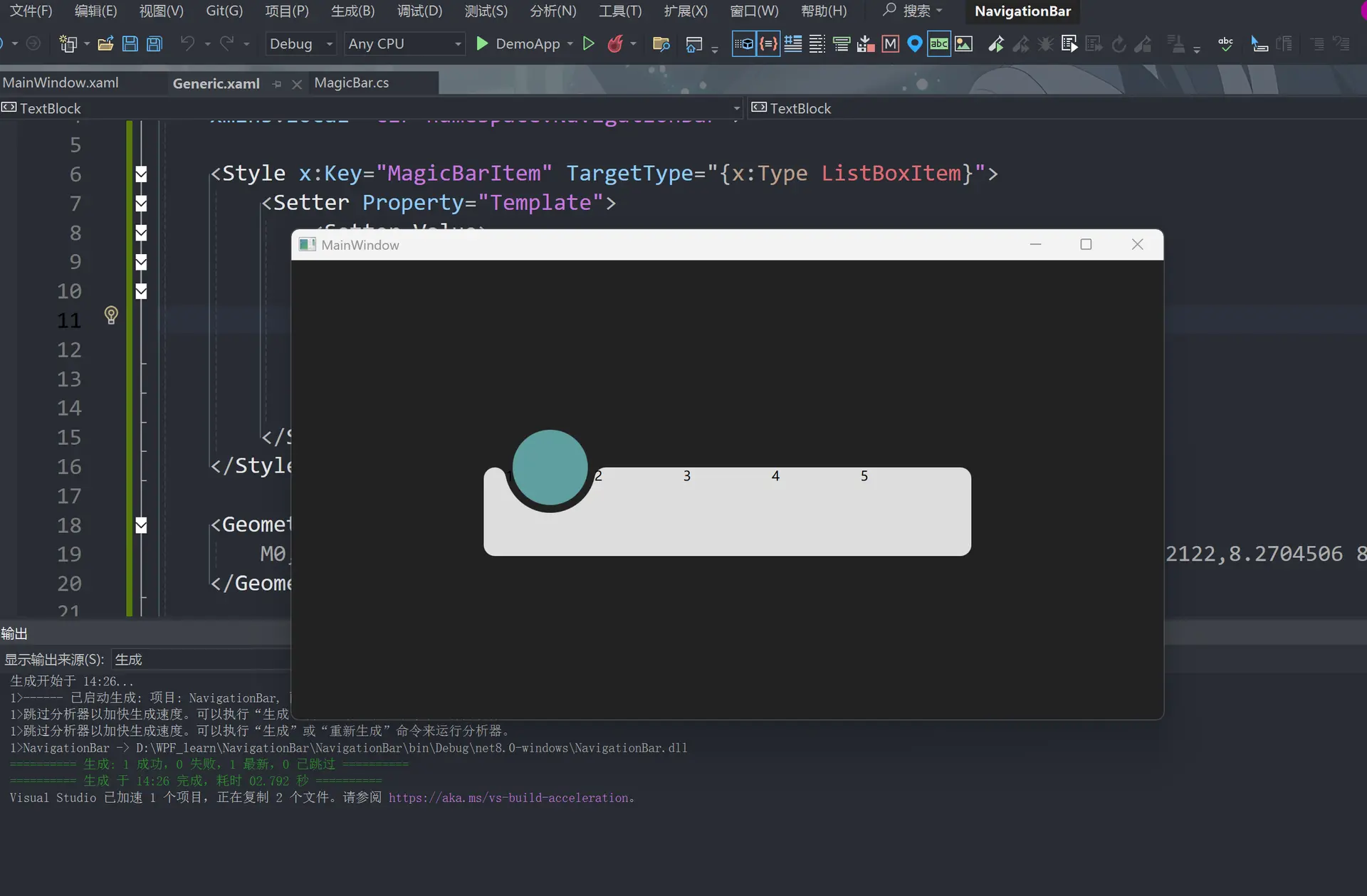
然后修改generic.xaml
<ResourceDictionary
    xmlns="http://schemas.microsoft.com/winfx/2006/xaml/presentation"
    xmlns:x="http://schemas.microsoft.com/winfx/2006/xaml"
    xmlns:local="clr-namespace:NavigationBar">

    <Style x:Key="MagicBarItem" TargetType="{x:Type ListBoxItem}">  <!--5个盒子的样式 -->
        <Setter Property="Template">
            <Setter.Value>
                <ControlTemplate TargetType="{x:Type ListBoxItem}">
                    <Grid>
                        <TextBlock Text="{TemplateBinding Content}" />
                    </Grid>
                </ControlTemplate>
            </Setter.Value>
        </Setter>
    </Style>

    <Geometry x:Key="ArcData">
        M0,0 L100,0 C95.167503,0 91.135628,3.4278221 90.203163,7.9846497 L90.152122,8.2704506 89.963921,9.1416779 C85.813438,27.384438 69.496498,41 50,41 30.5035,41 14.186564,27.384438 10.036079,9.1416779 L9.8478823,8.2704926 9.7968359,7.9846497 C8.8643732,3.4278221 4.8324914,0 0,0 z
    </Geometry>

    <Style x:Key="Arc" TargetType="{x:Type Path}">
        <Setter Property="Data" Value="{StaticResource ArcData}" />
        <Setter Property="Width" Value="100" />
        <Setter Property="Height" Value="100" />
        <Setter Property="Fill" Value="#222222" />
        <Setter Property="Margin" Value="-10,40,-10,-1" />
    </Style>

    <Style x:Key="Bar" TargetType="{x:Type Border}">
        <Setter Property="Background" Value="#DDDDDD" />
        <Setter Property="Margin" Value="0,40,0,0" />
        <Setter Property="CornerRadius" Value="10" />
    </Style>

    <Style x:Key="Circle" TargetType="{x:Type Grid}">
        <Setter Property="Width" Value="80" />
        <Setter Property="Height" Value="80" />
    </Style>

    <Style TargetType="{x:Type local:MagicBar}">
        <Setter Property="ItemContainerStyle" Value="{StaticResource MagicBarItem}" />
        <Setter Property="SnapsToDevicePixels" Value="True" />
        <Setter Property="UseLayoutRounding" Value="True" />
        <Setter Property="Background" Value="Transparent" />
        <Setter Property="Width" Value="440" />
        <Setter Property="Height" Value="120" />
        <Setter Property="Template">
            <Setter.Value>
                <ControlTemplate TargetType="{x:Type local:MagicBar}">
                    <Grid Background="{TemplateBinding Background}">
                        <Border Style="{StaticResource Bar}" />
                        <Canvas Margin="20,0,20,0">
                            <Grid Style="{StaticResource Circle}">
                                <Path Style="{StaticResource Arc}" />
                                <Ellipse Fill="#222222" />
                                <Ellipse Margin="6" Fill="CadetBlue" />
                            </Grid>
                        </Canvas>
                        <ItemsPresenter Margin="20,40,20,0" />
                    </Grid>
                </ControlTemplate>
            </Setter.Value>
        </Setter>
        <Setter Property="ItemsPanel">
            <Setter.Value>
                <ItemsPanelTemplate>
                    <UniformGrid Columns="5" />
                </ItemsPanelTemplate>
            </Setter.Value>
        </Setter>
    </Style>
</ResourceDictionary>
然后添加名字
<Window
    x:Class="DemoApp.MainWindow"
    xmlns="http://schemas.microsoft.com/winfx/2006/xaml/presentation"
    xmlns:x="http://schemas.microsoft.com/winfx/2006/xaml"
    xmlns:d="http://schemas.microsoft.com/expression/blend/2008"
    xmlns:local="clr-namespace:DemoApp"
    xmlns:mc="http://schemas.openxmlformats.org/markup-compatibility/2006"
    xmlns:navigation="clr-namespace:NavigationBar;assembly=NavigationBar"
    Title="MainWindow"
    Width="800"
    Height="450"
    Background="#222222"
    mc:Ignorable="d">
    <Grid>
        <navigation:MagicBar>
            <ListBoxItem Content="Microsoft" />  <!-- 更换数字为软件名字-->
            <ListBoxItem Content="Apple" />
            <ListBoxItem Content="Google" />
            <ListBoxItem Content="Facebook" />
            <ListBoxItem Content="Instagram" />

        </navigation:MagicBar>

        <!--<Grid
            Width="100"
            Height="100"
            Background="Silver">
            <Path
                Margin="0,50,0,9"
                Fill="Green"
                Stretch="Fill">
                <Path.Data>
                    <PathGeometry Figures="M0,0 L100,0 C95.167503,0 91.135628,3.4278221 90.203163,7.9846497 L90.152122,8.2704506 89.963921,9.1416779 C85.813438,27.384438 69.496498,41 50,41 30.5035,41 14.186564,27.384438 10.036079,9.1416779 L9.8478823,8.2704926 9.7968359,7.9846497 C8.8643732,3.4278221 4.8324914,0 0,0 z" />
                </Path.Data>
            </Path>
        </Grid>-->
    </Grid>
</Window>
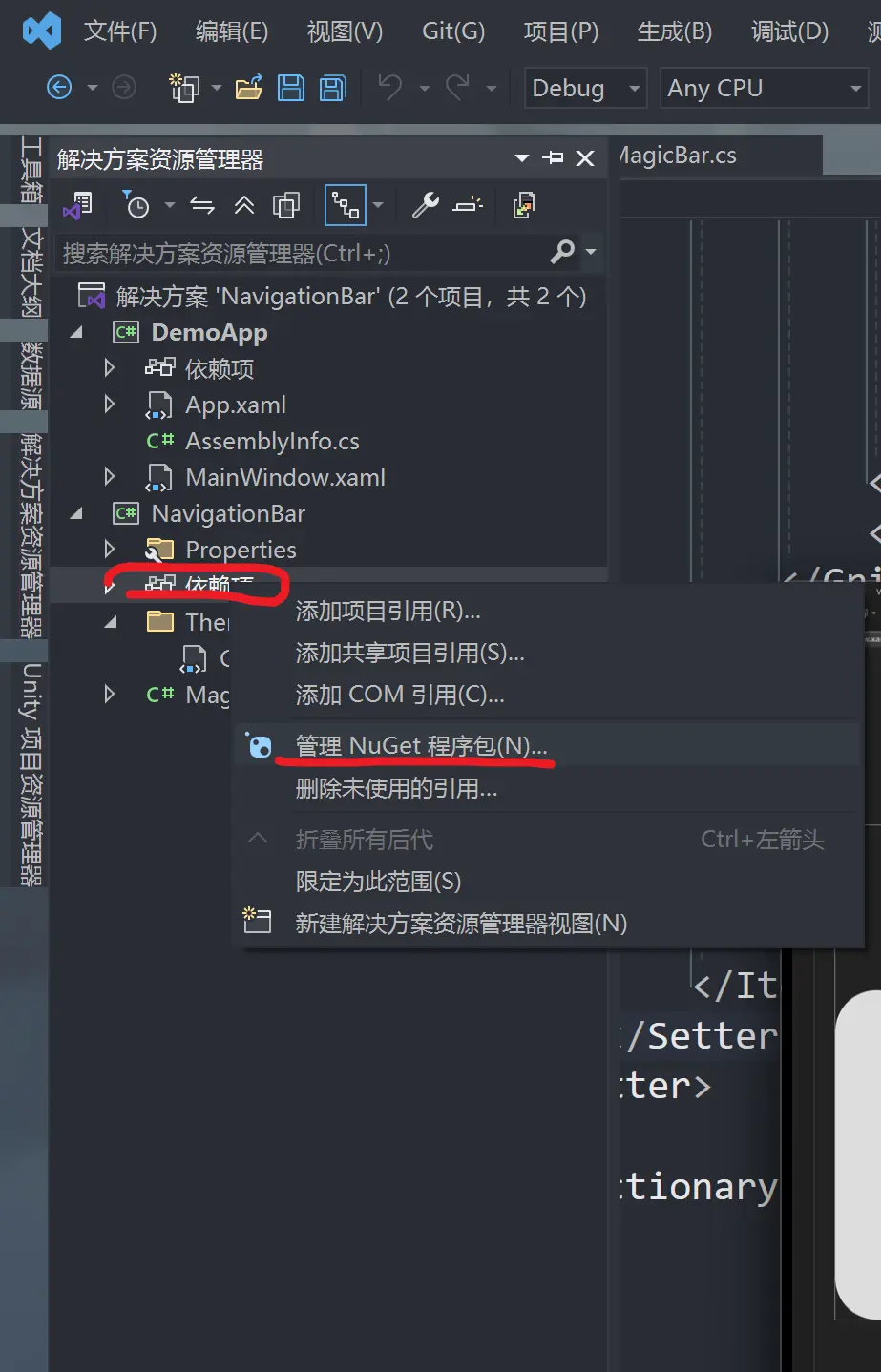
获取UI库
然后我们获取UI库——Jamesnet.Wpf NugetPackage
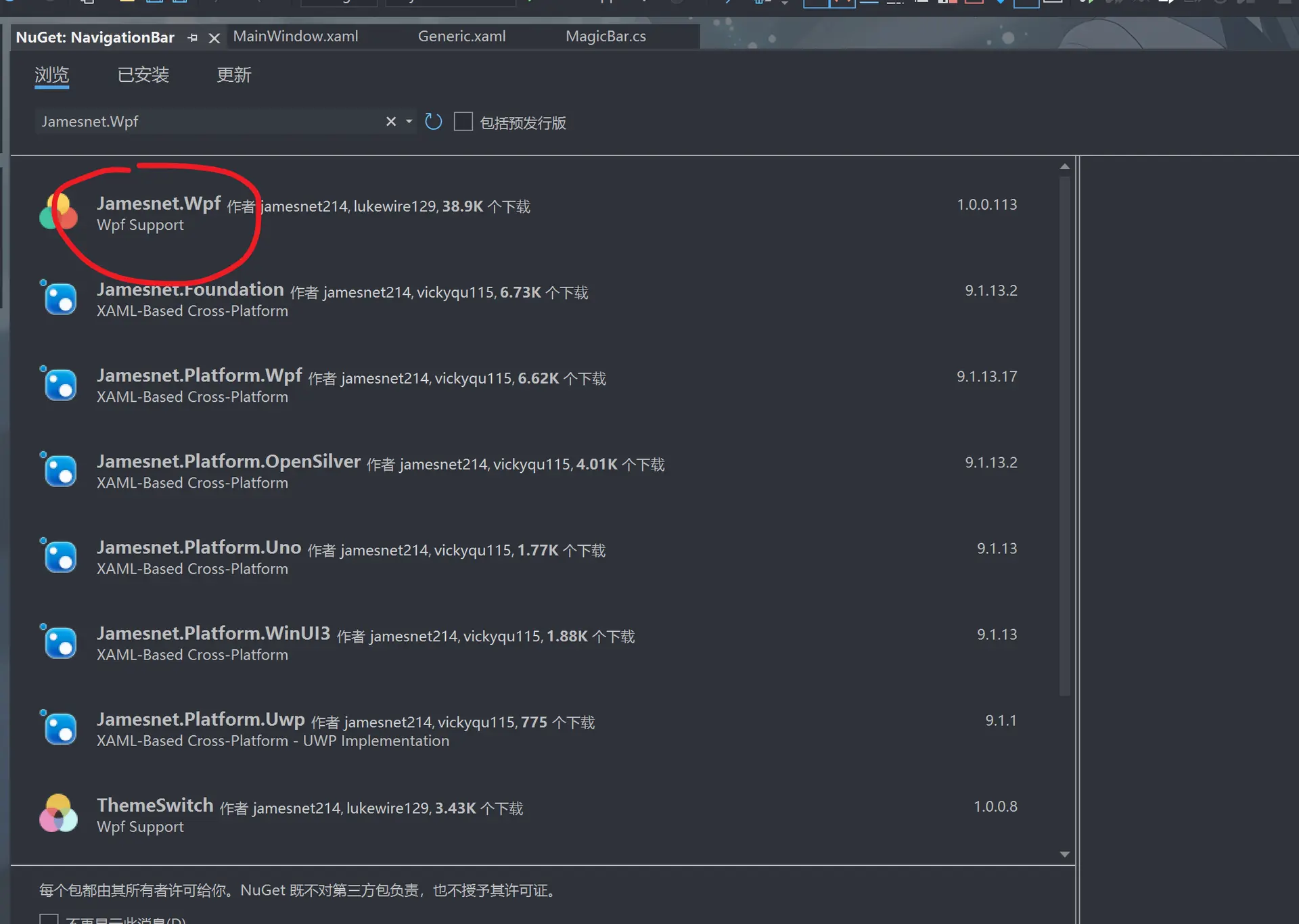
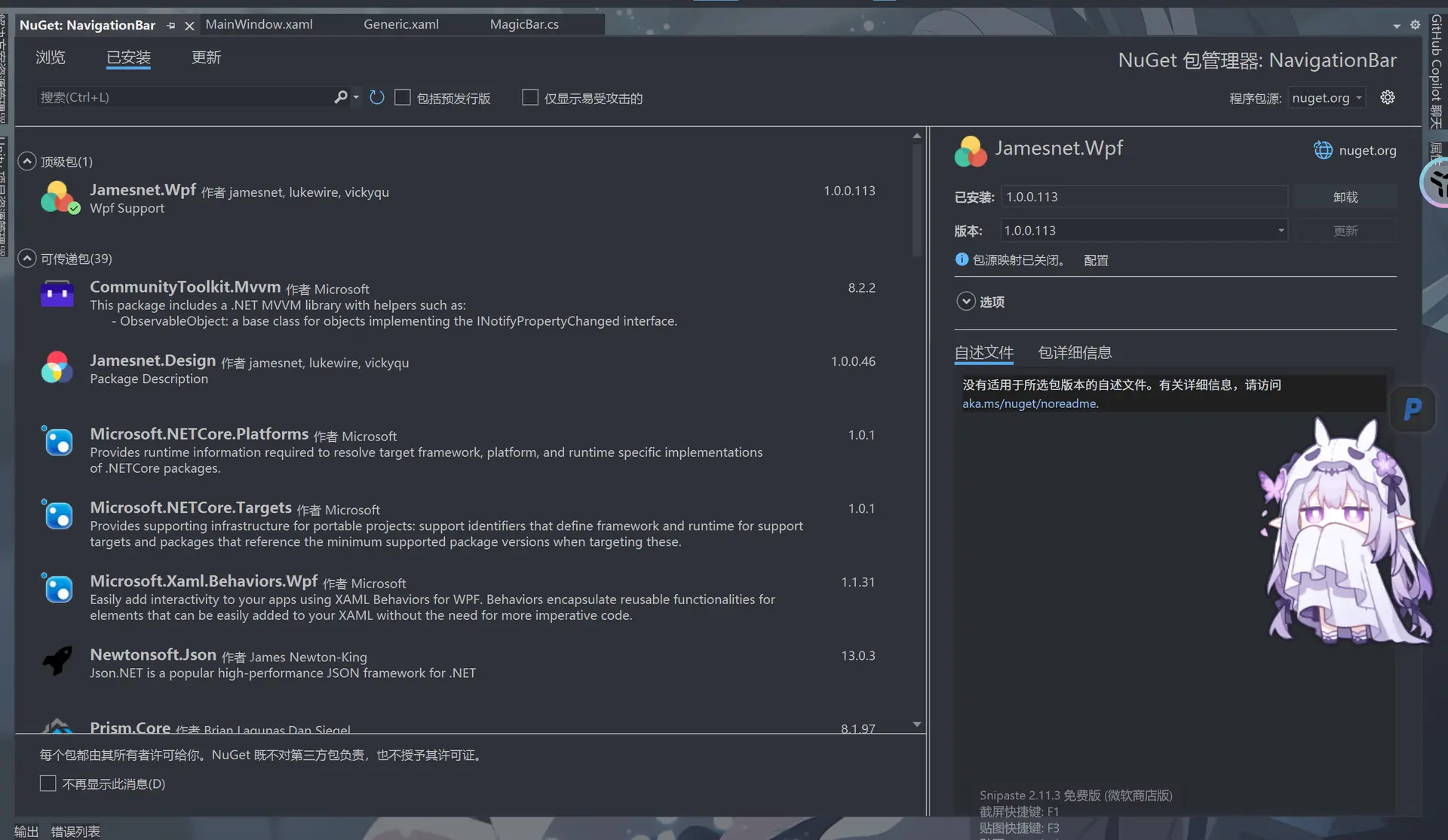
下载完成后我可以在这里找到
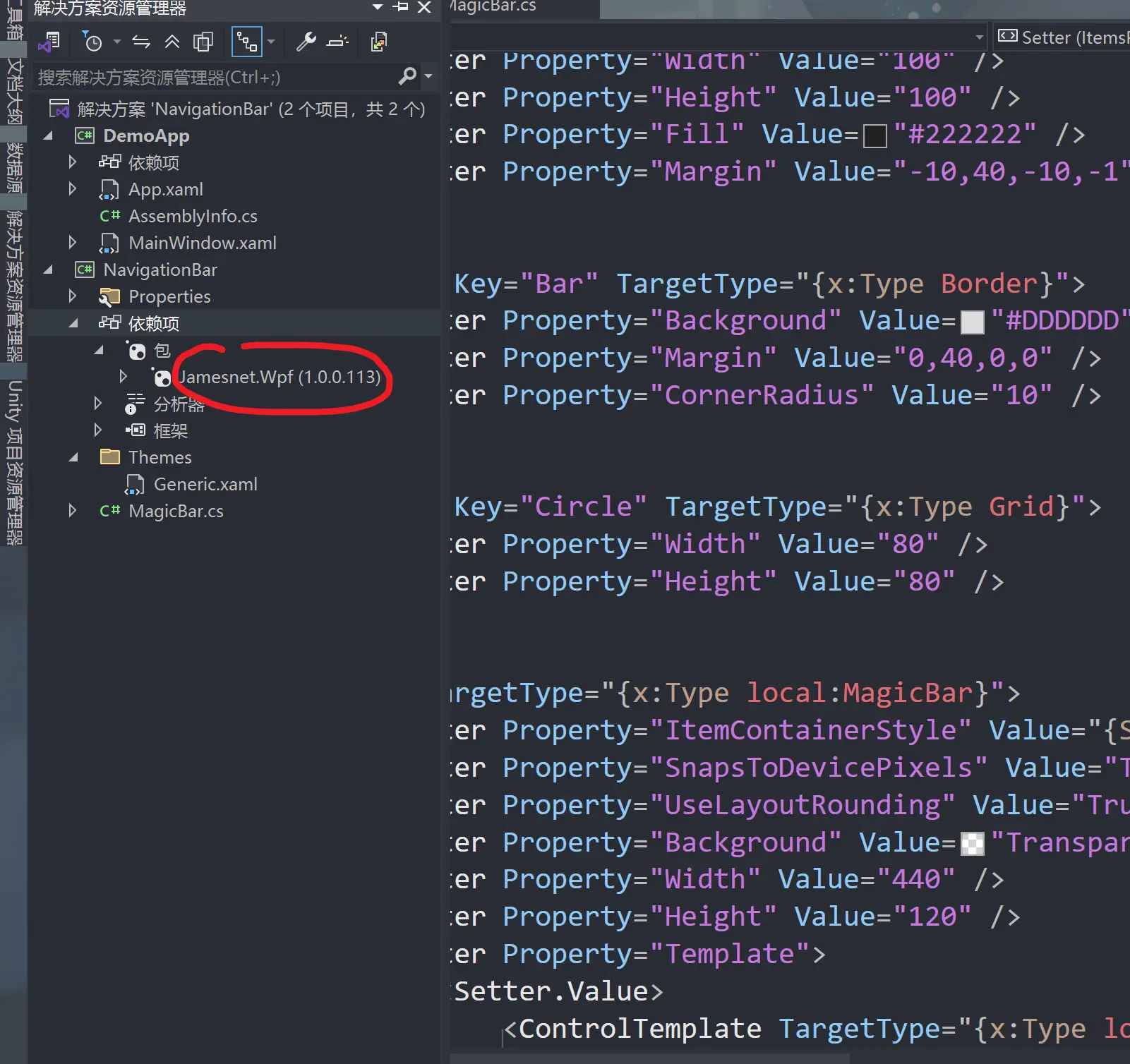
然后我们在开头引用链接地址,先用微软的logo试一下
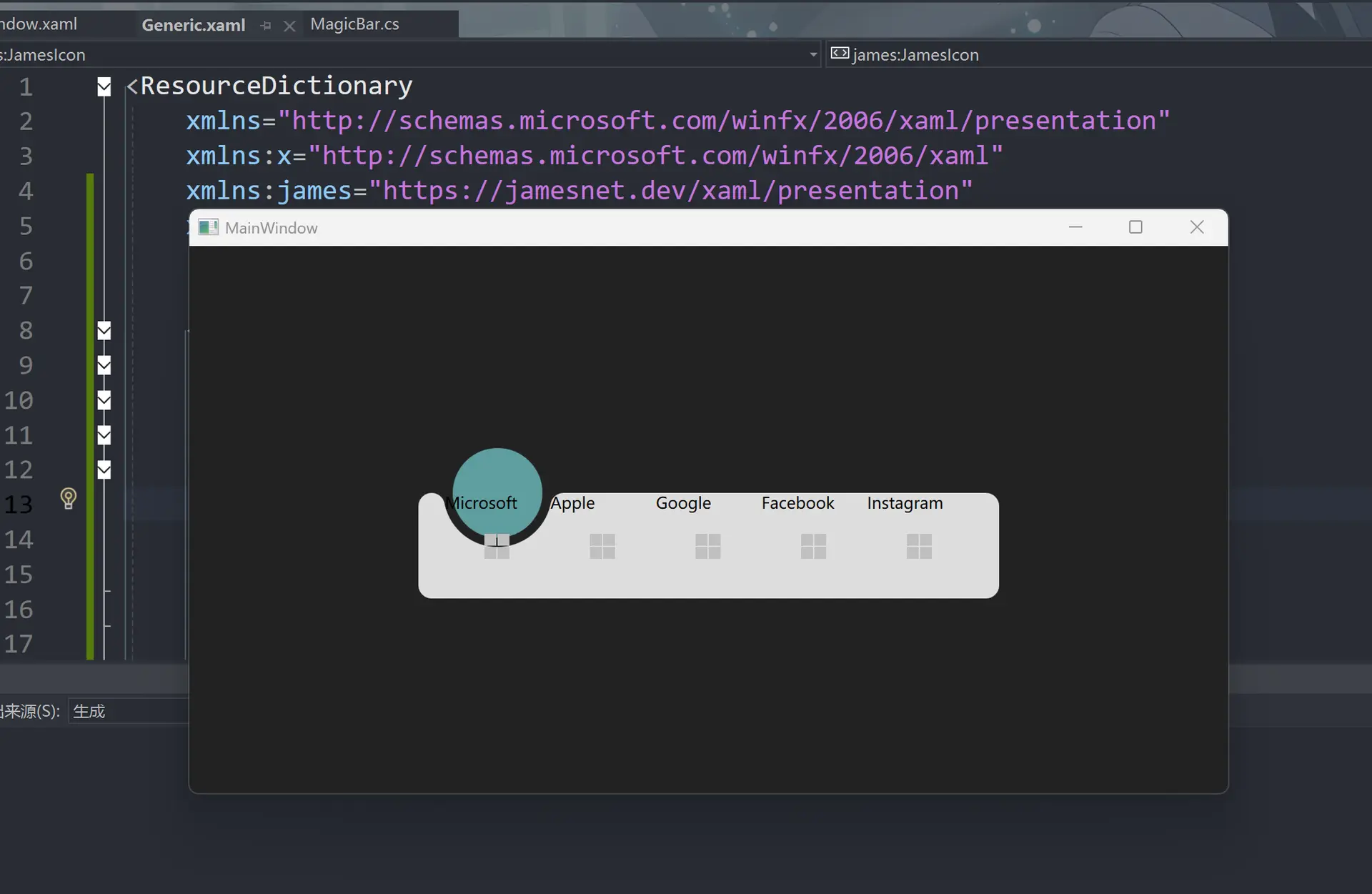
可以看到微软的方块已经出现了
此时我们把这个修改一下
<ResourceDictionary
    xmlns="http://schemas.microsoft.com/winfx/2006/xaml/presentation"
    xmlns:x="http://schemas.microsoft.com/winfx/2006/xaml"
    xmlns:james="https://jamesnet.dev/xaml/presentation"
    xmlns:local="clr-namespace:NavigationBar">


    <Style x:Key="MagicBarItem" TargetType="{x:Type ListBoxItem}">
        <Setter Property="Template">
            <Setter.Value>
                <ControlTemplate TargetType="{x:Type ListBoxItem}">
                    <Grid>
                        <james:JamesIcon Icon="{TemplateBinding Tag}" />   <!--这里我们把这个换成可替换的元素-->
                        <TextBlock Text="{TemplateBinding Content}" />
                    </Grid>
                </ControlTemplate>
            </Setter.Value>
        </Setter>
    </Style>

    <Geometry x:Key="ArcData">
        M0,0 L100,0 C95.167503,0 91.135628,3.4278221 90.203163,7.9846497 L90.152122,8.2704506 89.963921,9.1416779 C85.813438,27.384438 69.496498,41 50,41 30.5035,41 14.186564,27.384438 10.036079,9.1416779 L9.8478823,8.2704926 9.7968359,7.9846497 C8.8643732,3.4278221 4.8324914,0 0,0 z
    </Geometry>

    <Style x:Key="Arc" TargetType="{x:Type Path}">
        <Setter Property="Data" Value="{StaticResource ArcData}" />
        <Setter Property="Width" Value="100" />
        <Setter Property="Height" Value="100" />
        <Setter Property="Fill" Value="#222222" />
        <Setter Property="Margin" Value="-10,40,-10,-1" />
    </Style>

    <Style x:Key="Bar" TargetType="{x:Type Border}">
        <Setter Property="Background" Value="#DDDDDD" />
        <Setter Property="Margin" Value="0,40,0,0" />
        <Setter Property="CornerRadius" Value="10" />
    </Style>

    <Style x:Key="Circle" TargetType="{x:Type Grid}">
        <Setter Property="Width" Value="80" />
        <Setter Property="Height" Value="80" />
    </Style>

    <Style TargetType="{x:Type local:MagicBar}">
        <Setter Property="ItemContainerStyle" Value="{StaticResource MagicBarItem}" />
        <Setter Property="SnapsToDevicePixels" Value="True" />
        <Setter Property="UseLayoutRounding" Value="True" />
        <Setter Property="Background" Value="Transparent" />
        <Setter Property="Width" Value="440" />
        <Setter Property="Height" Value="120" />
        <Setter Property="Template">
            <Setter.Value>
                <ControlTemplate TargetType="{x:Type local:MagicBar}">
                    <Grid Background="{TemplateBinding Background}">
                        <Border Style="{StaticResource Bar}" />
                        <Canvas Margin="20,0,20,0">
                            <Grid Style="{StaticResource Circle}">
                                <Path Style="{StaticResource Arc}" />
                                <Ellipse Fill="#222222" />
                                <Ellipse Margin="6" Fill="CadetBlue" />
                            </Grid>
                        </Canvas>
                        <ItemsPresenter Margin="20,40,20,0" />
                    </Grid>
                </ControlTemplate>
            </Setter.Value>
        </Setter>
        <Setter Property="ItemsPanel">
            <Setter.Value>
                <ItemsPanelTemplate>
                    <UniformGrid Columns="5" />
                </ItemsPanelTemplate>
            </Setter.Value>
        </Setter>
    </Style>
</ResourceDictionary>
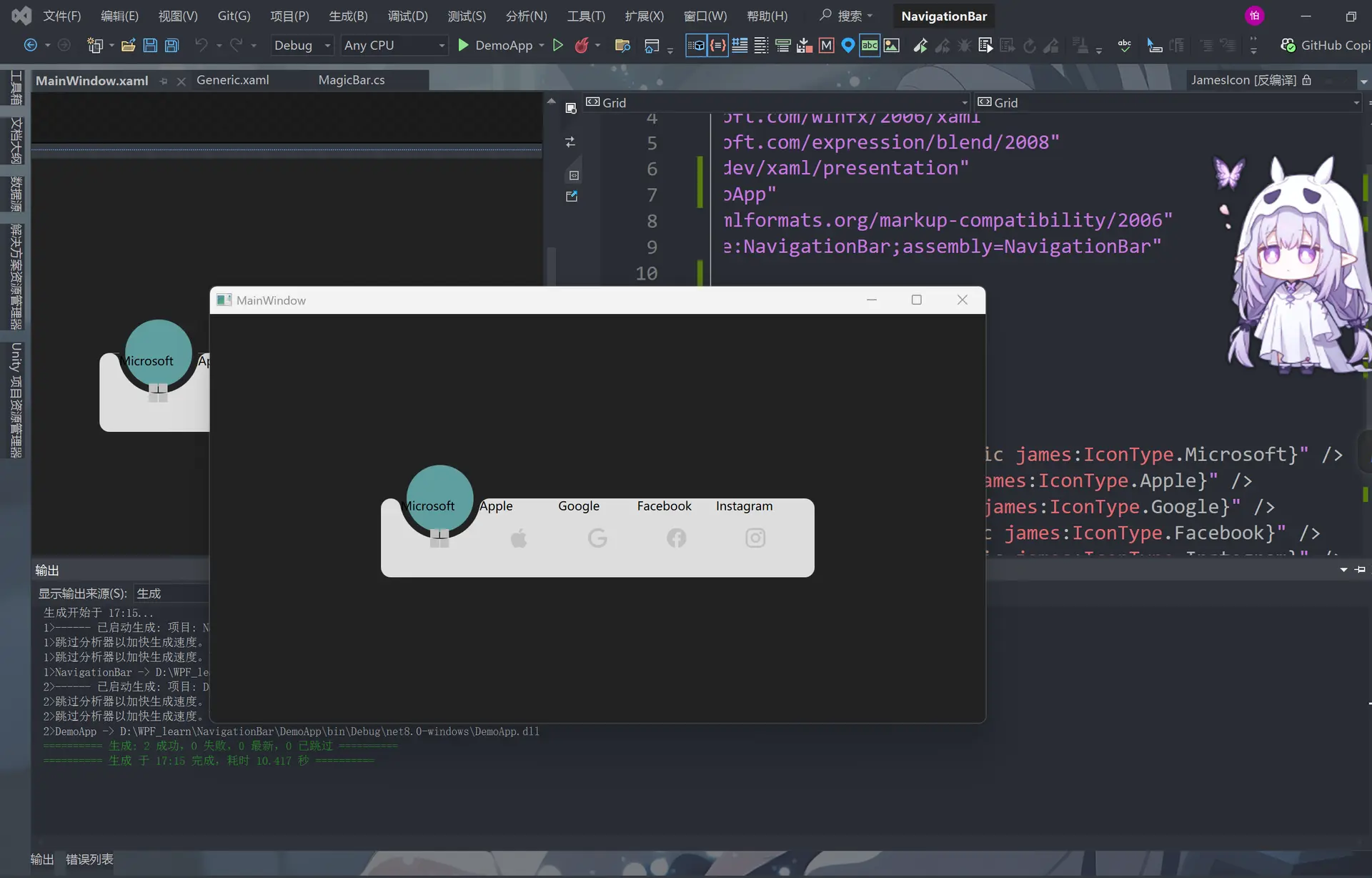
然后修改MainWindow.xaml里的代码,即在原有的软件的名称的位置加上logo
<Window
    x:Class="DemoApp.MainWindow"
    xmlns="http://schemas.microsoft.com/winfx/2006/xaml/presentation"
    xmlns:x="http://schemas.microsoft.com/winfx/2006/xaml"
    xmlns:d="http://schemas.microsoft.com/expression/blend/2008"
    xmlns:james="https://jamesnet.dev/xaml/presentation"   <!--和刚才一样先医用james的链接-->
    xmlns:local="clr-namespace:DemoApp"
    xmlns:mc="http://schemas.openxmlformats.org/markup-compatibility/2006"
    xmlns:navigation="clr-namespace:NavigationBar;assembly=NavigationBar"
    Title="MainWindow"
    Width="800"
    Height="450"
    Background="#222222"
    mc:Ignorable="d">
    <Grid>        <!--然后在对相应的软件的名字下放入对应的logo-->
        <navigation:MagicBar>
            <ListBoxItem Content="Microsoft" Tag="{x:Static james:IconType.Microsoft}" />
            <ListBoxItem Content="Apple" Tag="{x:Static james:IconType.Apple}" />
            <ListBoxItem Content="Google" Tag="{x:Static james:IconType.Google}" />
            <ListBoxItem Content="Facebook" Tag="{x:Static james:IconType.Facebook}" />
            <ListBoxItem Content="Instagram" Tag="{x:Static james:IconType.Instagram}" />
        </navigation:MagicBar>

        <!--<Grid
            Width="100"
            Height="100"
            Background="Silver">
            <Path
                Margin="0,50,0,9"
                Fill="Green"
                Stretch="Fill">
                <Path.Data>
                    <PathGeometry Figures="M0,0 L100,0 C95.167503,0 91.135628,3.4278221 90.203163,7.9846497 L90.152122,8.2704506 89.963921,9.1416779 C85.813438,27.384438 69.496498,41 50,41 30.5035,41 14.186564,27.384438 10.036079,9.1416779 L9.8478823,8.2704926 9.7968359,7.9846497 C8.8643732,3.4278221 4.8324914,0 0,0 z" />
                </Path.Data>
            </Path>
        </Grid>-->
    </Grid>
</Window>
然后我们把这个logo的颜色变淡一点
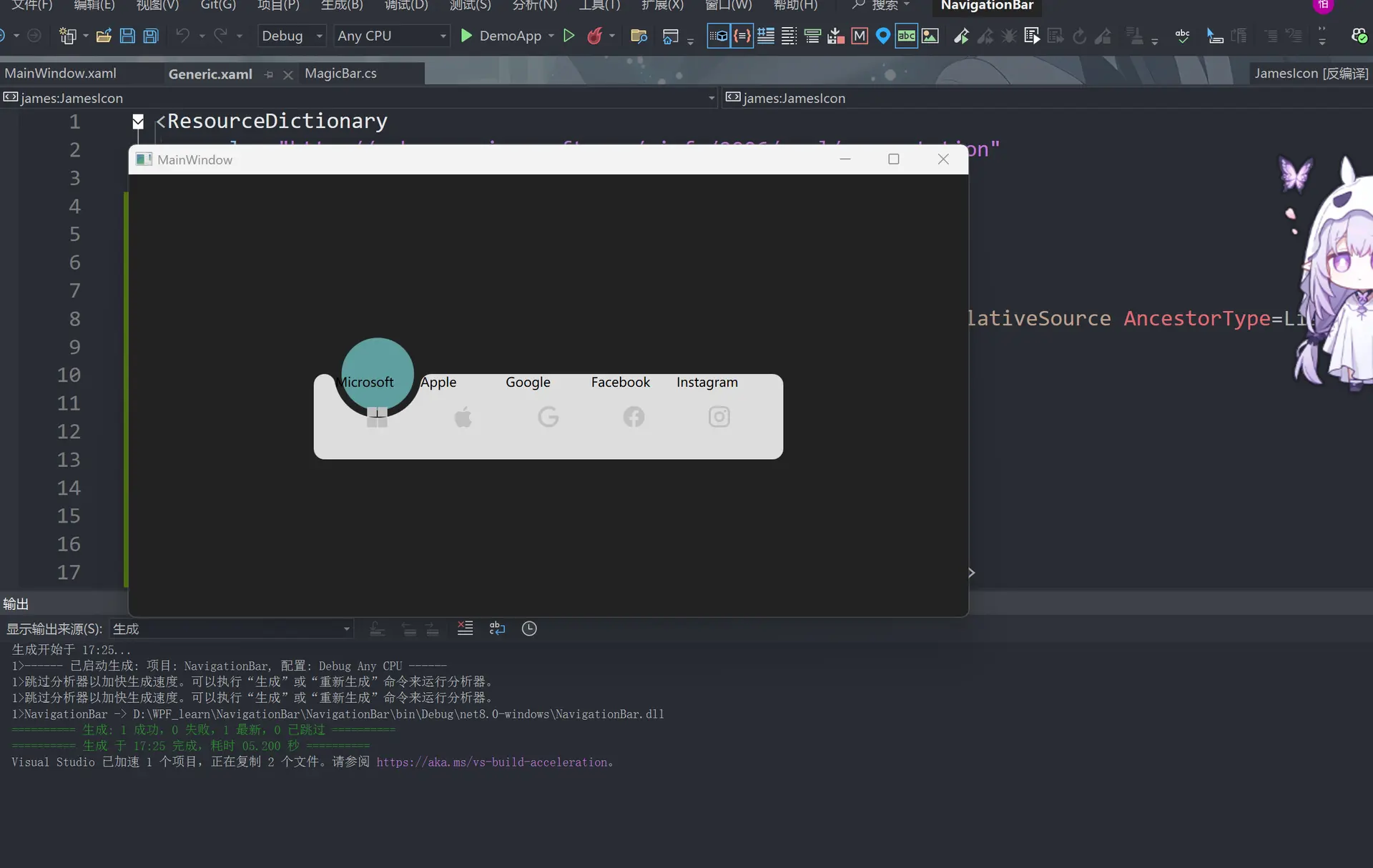
<ResourceDictionary
    xmlns="http://schemas.microsoft.com/winfx/2006/xaml/presentation"
    xmlns:x="http://schemas.microsoft.com/winfx/2006/xaml"
    xmlns:james="https://jamesnet.dev/xaml/presentation"
    xmlns:local="clr-namespace:NavigationBar">

    <Style x:Key="Icon" TargetType="{x:Type james:JamesIcon}">  <!--这里 -->
        <Setter Property="Icon" Value="{Binding RelativeSource={RelativeSource AncestorType=ListBoxItem}, Path=Tag}" />
        <Setter Property="Width" Value="40" />
        <Setter Property="Height" Value="40" />
        <Setter Property="Fill" Value="#44333333" />
    </Style>

    <Style x:Key="MagicBarItem" TargetType="{x:Type ListBoxItem}">
        <Setter Property="Template">
            <Setter.Value>
                <ControlTemplate TargetType="{x:Type ListBoxItem}">
                    <Grid>
                        <james:JamesIcon Icon="{TemplateBinding Tag}" /> <!--把刚才的部分去掉,放到style里面-->
                        <TextBlock Text="{TemplateBinding Content}" />
                    </Grid>
                </ControlTemplate>
            </Setter.Value>
        </Setter>
    </Style>

    <Geometry x:Key="ArcData">
        M0,0 L100,0 C95.167503,0 91.135628,3.4278221 90.203163,7.9846497 L90.152122,8.2704506 89.963921,9.1416779 C85.813438,27.384438 69.496498,41 50,41 30.5035,41 14.186564,27.384438 10.036079,9.1416779 L9.8478823,8.2704926 9.7968359,7.9846497 C8.8643732,3.4278221 4.8324914,0 0,0 z
    </Geometry>

    <Style x:Key="Arc" TargetType="{x:Type Path}">
        <Setter Property="Data" Value="{StaticResource ArcData}" />
        <Setter Property="Width" Value="100" />
        <Setter Property="Height" Value="100" />
        <Setter Property="Fill" Value="#222222" />
        <Setter Property="Margin" Value="-10,40,-10,-1" />
    </Style>

    <Style x:Key="Bar" TargetType="{x:Type Border}">
        <Setter Property="Background" Value="#DDDDDD" />
        <Setter Property="Margin" Value="0,40,0,0" />
        <Setter Property="CornerRadius" Value="10" />
    </Style>

    <Style x:Key="Circle" TargetType="{x:Type Grid}">
        <Setter Property="Width" Value="80" />
        <Setter Property="Height" Value="80" />
    </Style>

    <Style TargetType="{x:Type local:MagicBar}">
        <Setter Property="ItemContainerStyle" Value="{StaticResource MagicBarItem}" />
        <Setter Property="SnapsToDevicePixels" Value="True" />
        <Setter Property="UseLayoutRounding" Value="True" />
        <Setter Property="Background" Value="Transparent" />
        <Setter Property="Width" Value="440" />
        <Setter Property="Height" Value="120" />
        <Setter Property="Template">
            <Setter.Value>
                <ControlTemplate TargetType="{x:Type local:MagicBar}">
                    <Grid Background="{TemplateBinding Background}">
                        <Border Style="{StaticResource Bar}" />
                        <Canvas Margin="20,0,20,0">
                            <Grid Style="{StaticResource Circle}">
                                <Path Style="{StaticResource Arc}" />
                                <Ellipse Fill="#222222" />
                                <Ellipse Margin="6" Fill="CadetBlue" />
                            </Grid>
                        </Canvas>
                        <ItemsPresenter Margin="20,40,20,0" />
                    </Grid>
                </ControlTemplate>
            </Setter.Value>
        </Setter>
        <Setter Property="ItemsPanel">
            <Setter.Value>
                <ItemsPanelTemplate>
                    <UniformGrid Columns="5" />
                </ItemsPanelTemplate>
            </Setter.Value>
        </Setter>
    </Style>
</ResourceDictionary>
然后怎么再将文字字体加粗和居中
<ResourceDictionary
    xmlns="http://schemas.microsoft.com/winfx/2006/xaml/presentation"
    xmlns:x="http://schemas.microsoft.com/winfx/2006/xaml"
    xmlns:james="https://jamesnet.dev/xaml/presentation"
    xmlns:local="clr-namespace:NavigationBar">

    <Style x:Key="Icon" TargetType="{x:Type james:JamesIcon}">
        <Setter Property="Icon" Value="{Binding RelativeSource={RelativeSource AncestorType=ListBoxItem}, Path=Tag}" />
        <Setter Property="Width" Value="40" />
        <Setter Property="Height" Value="40" />
        <Setter Property="Fill" Value="#44333333" />
    </Style>

    <Style x:Key="Name" TargetType="{x:Type TextBlock}">  <!--这里设置字体的位置样式-->
        <Setter Property="HorizontalAlignment" Value="Center" />
        <Setter Property="FontWeight" Value="Bold" />
        <Setter Property="FontSize" Value="14" />
        <Setter Property="Margin" Value="0,60,0,0" />
    </Style>

    <Style x:Key="MagicBarItem" TargetType="{x:Type ListBoxItem}">
        <Setter Property="Template">
            <Setter.Value>
                <ControlTemplate TargetType="{x:Type ListBoxItem}">
                    <Grid>
                        <james:JamesIcon Icon="{TemplateBinding Tag}" />
                        <TextBlock Style="{StaticResource Name}" Text="{TemplateBinding Content}" /><!--包括这里的字体也增加一个style-->
                    </Grid>
                </ControlTemplate>
            </Setter.Value>
        </Setter>
    </Style>

    <Geometry x:Key="ArcData">
        M0,0 L100,0 C95.167503,0 91.135628,3.4278221 90.203163,7.9846497 L90.152122,8.2704506 89.963921,9.1416779 C85.813438,27.384438 69.496498,41 50,41 30.5035,41 14.186564,27.384438 10.036079,9.1416779 L9.8478823,8.2704926 9.7968359,7.9846497 C8.8643732,3.4278221 4.8324914,0 0,0 z
    </Geometry>

    <Style x:Key="Arc" TargetType="{x:Type Path}">
        <Setter Property="Data" Value="{StaticResource ArcData}" />
        <Setter Property="Width" Value="100" />
        <Setter Property="Height" Value="100" />
        <Setter Property="Fill" Value="#222222" />
        <Setter Property="Margin" Value="-10,40,-10,-1" />
    </Style>

    <Style x:Key="Bar" TargetType="{x:Type Border}">
        <Setter Property="Background" Value="#DDDDDD" />
        <Setter Property="Margin" Value="0,40,0,0" />
        <Setter Property="CornerRadius" Value="10" />
    </Style>

    <Style x:Key="Circle" TargetType="{x:Type Grid}">
        <Setter Property="Width" Value="80" />
        <Setter Property="Height" Value="80" />
    </Style>

    <Style TargetType="{x:Type local:MagicBar}">
        <Setter Property="ItemContainerStyle" Value="{StaticResource MagicBarItem}" />
        <Setter Property="SnapsToDevicePixels" Value="True" />
        <Setter Property="UseLayoutRounding" Value="True" />
        <Setter Property="Background" Value="Transparent" />
        <Setter Property="Width" Value="440" />
        <Setter Property="Height" Value="120" />
        <Setter Property="Template">
            <Setter.Value>
                <ControlTemplate TargetType="{x:Type local:MagicBar}">
                    <Grid Background="{TemplateBinding Background}">
                        <Border Style="{StaticResource Bar}" />
                        <Canvas Margin="20,0,20,0">
                            <Grid Style="{StaticResource Circle}">
                                <Path Style="{StaticResource Arc}" />
                                <Ellipse Fill="#222222" />
                                <Ellipse Margin="6" Fill="CadetBlue" />
                            </Grid>
                        </Canvas>
                        <ItemsPresenter Margin="20,40,20,0" />
                    </Grid>
                </ControlTemplate>
            </Setter.Value>
        </Setter>
        <Setter Property="ItemsPanel">
            <Setter.Value>
                <ItemsPanelTemplate>
                    <UniformGrid Columns="5" />
                </ItemsPanelTemplate>
            </Setter.Value>
        </Setter>
    </Style>
</ResourceDictionary>
同样的模仿刚才的Icon 这里name里的Text=”{TemplateBinding Content}” 也可以移动到style里
<ResourceDictionary
    xmlns="http://schemas.microsoft.com/winfx/2006/xaml/presentation"
    xmlns:x="http://schemas.microsoft.com/winfx/2006/xaml"
    xmlns:james="https://jamesnet.dev/xaml/presentation"
    xmlns:local="clr-namespace:NavigationBar">

    <Style x:Key="Icon" TargetType="{x:Type james:JamesIcon}">
        <Setter Property="Icon" Value="{Binding RelativeSource={RelativeSource AncestorType=ListBoxItem}, Path=Tag}" />
        <Setter Property="Width" Value="40" />
        <Setter Property="Height" Value="40" />
        <Setter Property="Fill" Value="#44333333" />
    </Style>

    <Style x:Key="Name" TargetType="{x:Type TextBlock}">  <!--和上面的保持一致-->
        <Setter Property="Text" Value="{Binding RelativeSource={RelativeSource AncestorType=ListBoxItem}, Path=Content}" />
        <Setter Property="HorizontalAlignment" Value="Center" />
        <Setter Property="FontWeight" Value="Bold" />
        <Setter Property="FontSize" Value="14" />
        <Setter Property="Margin" Value="0,60,0,0" />
    </Style>

    <Style x:Key="MagicBarItem" TargetType="{x:Type ListBoxItem}">
        <Setter Property="Template">
            <Setter.Value>
                <ControlTemplate TargetType="{x:Type ListBoxItem}">
                    <Grid>
                        <james:JamesIcon Icon="{TemplateBinding Tag}" />
                        <TextBlock Style="{StaticResource Name}" />
                    </Grid>
                </ControlTemplate>
            </Setter.Value>
        </Setter>
    </Style>

    <Geometry x:Key="ArcData">
        M0,0 L100,0 C95.167503,0 91.135628,3.4278221 90.203163,7.9846497 L90.152122,8.2704506 89.963921,9.1416779 C85.813438,27.384438 69.496498,41 50,41 30.5035,41 14.186564,27.384438 10.036079,9.1416779 L9.8478823,8.2704926 9.7968359,7.9846497 C8.8643732,3.4278221 4.8324914,0 0,0 z
    </Geometry>

    <Style x:Key="Arc" TargetType="{x:Type Path}">
        <Setter Property="Data" Value="{StaticResource ArcData}" />
        <Setter Property="Width" Value="100" />
        <Setter Property="Height" Value="100" />
        <Setter Property="Fill" Value="#222222" />
        <Setter Property="Margin" Value="-10,40,-10,-1" />
    </Style>

    <Style x:Key="Bar" TargetType="{x:Type Border}">
        <Setter Property="Background" Value="#DDDDDD" />
        <Setter Property="Margin" Value="0,40,0,0" />
        <Setter Property="CornerRadius" Value="10" />
    </Style>

    <Style x:Key="Circle" TargetType="{x:Type Grid}">
        <Setter Property="Width" Value="80" />
        <Setter Property="Height" Value="80" />
    </Style>

    <Style TargetType="{x:Type local:MagicBar}">
        <Setter Property="ItemContainerStyle" Value="{StaticResource MagicBarItem}" />
        <Setter Property="SnapsToDevicePixels" Value="True" />
        <Setter Property="UseLayoutRounding" Value="True" />
        <Setter Property="Background" Value="Transparent" />
        <Setter Property="Width" Value="440" />
        <Setter Property="Height" Value="120" />
        <Setter Property="Template">
            <Setter.Value>
                <ControlTemplate TargetType="{x:Type local:MagicBar}">
                    <Grid Background="{TemplateBinding Background}">
                        <Border Style="{StaticResource Bar}" />
                        <Canvas Margin="20,0,20,0">
                            <Grid Style="{StaticResource Circle}">
                                <Path Style="{StaticResource Arc}" />
                                <Ellipse Fill="#222222" />
                                <Ellipse Margin="6" Fill="CadetBlue" />
                            </Grid>
                        </Canvas>
                        <ItemsPresenter Margin="20,40,20,0" />
                    </Grid>
                </ControlTemplate>
            </Setter.Value>
        </Setter>
        <Setter Property="ItemsPanel">
            <Setter.Value>
                <ItemsPanelTemplate>
                    <UniformGrid Columns="5" />
                </ItemsPanelTemplate>
            </Setter.Value>
        </Setter>
    </Style>
</ResourceDictionary>
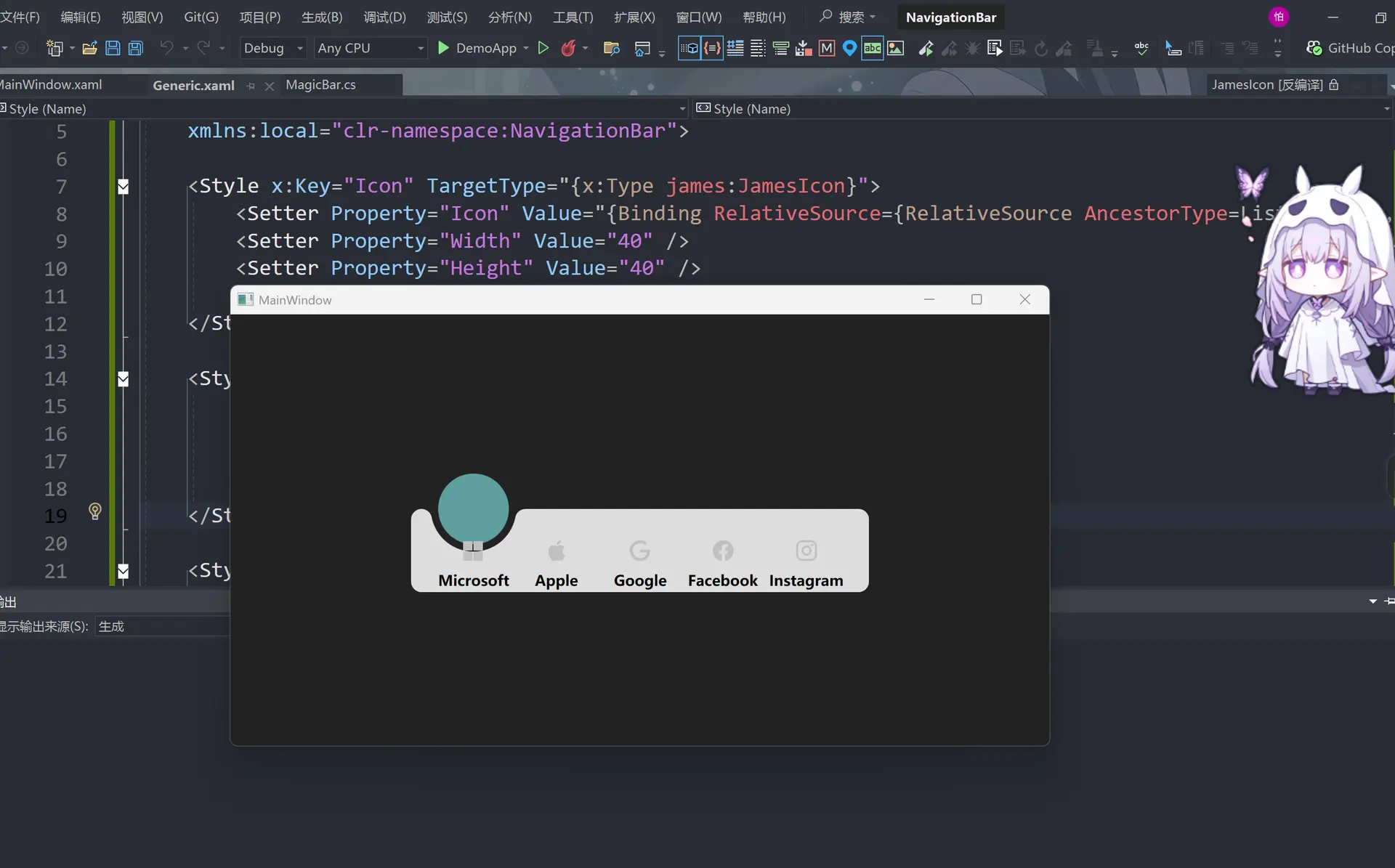
此时雏形已经出来了
动画部分
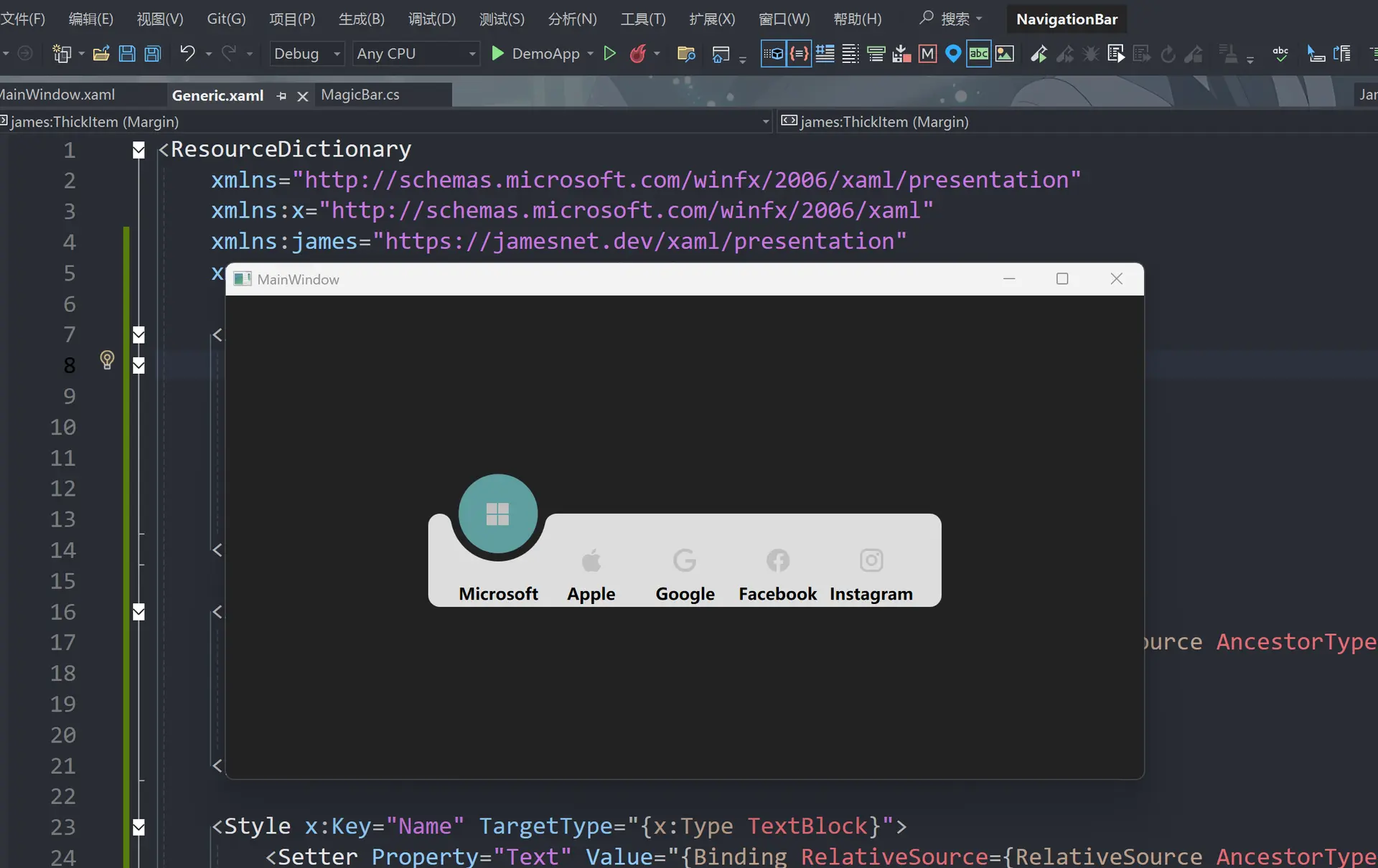
这里需要修改两个部分,修改完点击启动然后点击logo会看到logo往上飘
<ResourceDictionary
    xmlns="http://schemas.microsoft.com/winfx/2006/xaml/presentation"
    xmlns:x="http://schemas.microsoft.com/winfx/2006/xaml"
    xmlns:james="https://jamesnet.dev/xaml/presentation"
    xmlns:local="clr-namespace:NavigationBar">

    <Storyboard x:Key="Selected">   <!-- logo上移-->
        <james:ThickItem
            Mode="CubicEaseInOut"
            TargetName="icon"
            Property="Margin"
            To="0 -80 0 0"
            Duration="0:0:0.5" />
    </Storyboard>

    <Style x:Key="Icon" TargetType="{x:Type james:JamesIcon}">
        <Setter Property="Icon" Value="{Binding RelativeSource={RelativeSource AncestorType=ListBoxItem}, Path=Tag}" />
        <Setter Property="Width" Value="40" />
        <Setter Property="Height" Value="40" />
        <Setter Property="Fill" Value="#44333333" />
    </Style>

    <Style x:Key="Name" TargetType="{x:Type TextBlock}">
        <Setter Property="Text" Value="{Binding RelativeSource={RelativeSource AncestorType=ListBoxItem}, Path=Content}" />
        <Setter Property="HorizontalAlignment" Value="Center" />
        <Setter Property="FontWeight" Value="Bold" />
        <Setter Property="FontSize" Value="14" />
        <Setter Property="Margin" Value="0,60,0,0" />
    </Style>

    <Style x:Key="MagicBarItem" TargetType="{x:Type ListBoxItem}">
        <Setter Property="Template">
            <Setter.Value>
                <ControlTemplate TargetType="{x:Type ListBoxItem}">
                    <Grid>
                        <james:JamesIcon x:Name="icon" Icon="{TemplateBinding Tag}" />  <!-- 引入icon目标移动位置-->
                        <TextBlock Style="{StaticResource Name}" />
                    </Grid>
                    <ControlTemplate.Triggers>
                        <Trigger Property="IsSelected" Value="True">
                            <Trigger.EnterActions>
                                <BeginStoryboard Storyboard="{StaticResource Selected}" />
                            </Trigger.EnterActions>
                        </Trigger>
                    </ControlTemplate.Triggers>
                </ControlTemplate>
            </Setter.Value>
        </Setter>
    </Style>

    <Geometry x:Key="ArcData">
        M0,0 L100,0 C95.167503,0 91.135628,3.4278221 90.203163,7.9846497 L90.152122,8.2704506 89.963921,9.1416779 C85.813438,27.384438 69.496498,41 50,41 30.5035,41 14.186564,27.384438 10.036079,9.1416779 L9.8478823,8.2704926 9.7968359,7.9846497 C8.8643732,3.4278221 4.8324914,0 0,0 z
    </Geometry>

    <Style x:Key="Arc" TargetType="{x:Type Path}">
        <Setter Property="Data" Value="{StaticResource ArcData}" />
        <Setter Property="Width" Value="100" />
        <Setter Property="Height" Value="100" />
        <Setter Property="Fill" Value="#222222" />
        <Setter Property="Margin" Value="-10,40,-10,-1" />
    </Style>

    <Style x:Key="Bar" TargetType="{x:Type Border}">
        <Setter Property="Background" Value="#DDDDDD" />
        <Setter Property="Margin" Value="0,40,0,0" />
        <Setter Property="CornerRadius" Value="10" />
    </Style>

    <Style x:Key="Circle" TargetType="{x:Type Grid}">
        <Setter Property="Width" Value="80" />
        <Setter Property="Height" Value="80" />
    </Style>

    <Style TargetType="{x:Type local:MagicBar}">
        <Setter Property="ItemContainerStyle" Value="{StaticResource MagicBarItem}" />
        <Setter Property="SnapsToDevicePixels" Value="True" />
        <Setter Property="UseLayoutRounding" Value="True" />
        <Setter Property="Background" Value="Transparent" />
        <Setter Property="Width" Value="440" />
        <Setter Property="Height" Value="120" />
        <Setter Property="Template">
            <Setter.Value>
                <ControlTemplate TargetType="{x:Type local:MagicBar}">
                    <Grid Background="{TemplateBinding Background}">
                        <Border Style="{StaticResource Bar}" />
                        <Canvas Margin="20,0,20,0">
                            <Grid Style="{StaticResource Circle}">
                                <Path Style="{StaticResource Arc}" />
                                <Ellipse Fill="#222222" />
                                <Ellipse Margin="6" Fill="CadetBlue" />
                            </Grid>
                        </Canvas>
                        <ItemsPresenter Margin="20,40,20,0" />
                    </Grid>
                </ControlTemplate>
            </Setter.Value>
        </Setter>
        <Setter Property="ItemsPanel">
            <Setter.Value>
                <ItemsPanelTemplate>
                    <UniformGrid Columns="5" />
                </ItemsPanelTemplate>
            </Setter.Value>
        </Setter>
    </Style>
</ResourceDictionary>
此时我们还需要logo往下移动的动画
<ResourceDictionary
    xmlns="http://schemas.microsoft.com/winfx/2006/xaml/presentation"
    xmlns:x="http://schemas.microsoft.com/winfx/2006/xaml"
    xmlns:james="https://jamesnet.dev/xaml/presentation"
    xmlns:local="clr-namespace:NavigationBar">


    <Storyboard x:Key="Selected">
        <james:ThickItem
            Mode="CubicEaseInOut"
            TargetName="icon"
            Property="Margin"
            To="0 -80 0 0"
            Duration="0:0:0.5" />
    </Storyboard>

    <Storyboard x:Key="UnSelected">  <!--logo下移-->
        <james:ThickItem
            Mode="CubicEaseInOut"
            TargetName="icon"
            Property="Margin"
            To="0 0 0 0"
            Duration="0:0:0.5" />
    </Storyboard>

    <Style x:Key="Icon" TargetType="{x:Type james:JamesIcon}">
        <Setter Property="Icon" Value="{Binding RelativeSource={RelativeSource AncestorType=ListBoxItem}, Path=Tag}" />
        <Setter Property="Width" Value="40" />
        <Setter Property="Height" Value="40" />
        <Setter Property="Fill" Value="#44333333" />
    </Style>

    <Style x:Key="Name" TargetType="{x:Type TextBlock}">
        <Setter Property="Text" Value="{Binding RelativeSource={RelativeSource AncestorType=ListBoxItem}, Path=Content}" />
        <Setter Property="HorizontalAlignment" Value="Center" />
        <Setter Property="FontWeight" Value="Bold" />
        <Setter Property="FontSize" Value="14" />
        <Setter Property="Margin" Value="0,60,0,0" />
    </Style>

    <Style x:Key="MagicBarItem" TargetType="{x:Type ListBoxItem}">
        <Setter Property="Template">
            <Setter.Value>
                <ControlTemplate TargetType="{x:Type ListBoxItem}">
                    <Grid>
                        <james:JamesIcon x:Name="icon" Icon="{TemplateBinding Tag}" />
                        <TextBlock Style="{StaticResource Name}" />
                    </Grid>
                    <ControlTemplate.Triggers>
                        <Trigger Property="IsSelected" Value="True">
                            <Trigger.EnterActions>
                                <BeginStoryboard Storyboard="{StaticResource Selected}" />
                            </Trigger.EnterActions>
                            <Trigger.ExitActions>
                                <BeginStoryboard Storyboard="{StaticResource UnSelected}" />  <!--增加下移-->
                            </Trigger.ExitActions>
                        </Trigger>
                    </ControlTemplate.Triggers>
                </ControlTemplate>
            </Setter.Value>
        </Setter>
    </Style>

    <Geometry x:Key="ArcData">
        M0,0 L100,0 C95.167503,0 91.135628,3.4278221 90.203163,7.9846497 L90.152122,8.2704506 89.963921,9.1416779 C85.813438,27.384438 69.496498,41 50,41 30.5035,41 14.186564,27.384438 10.036079,9.1416779 L9.8478823,8.2704926 9.7968359,7.9846497 C8.8643732,3.4278221 4.8324914,0 0,0 z
    </Geometry>

    <Style x:Key="Arc" TargetType="{x:Type Path}">
        <Setter Property="Data" Value="{StaticResource ArcData}" />
        <Setter Property="Width" Value="100" />
        <Setter Property="Height" Value="100" />
        <Setter Property="Fill" Value="#222222" />
        <Setter Property="Margin" Value="-10,40,-10,-1" />
    </Style>

    <Style x:Key="Bar" TargetType="{x:Type Border}">
        <Setter Property="Background" Value="#DDDDDD" />
        <Setter Property="Margin" Value="0,40,0,0" />
        <Setter Property="CornerRadius" Value="10" />
    </Style>

    <Style x:Key="Circle" TargetType="{x:Type Grid}">
        <Setter Property="Width" Value="80" />
        <Setter Property="Height" Value="80" />
    </Style>

    <Style TargetType="{x:Type local:MagicBar}">
        <Setter Property="ItemContainerStyle" Value="{StaticResource MagicBarItem}" />
        <Setter Property="SnapsToDevicePixels" Value="True" />
        <Setter Property="UseLayoutRounding" Value="True" />
        <Setter Property="Background" Value="Transparent" />
        <Setter Property="Width" Value="440" />
        <Setter Property="Height" Value="120" />
        <Setter Property="Template">
            <Setter.Value>
                <ControlTemplate TargetType="{x:Type local:MagicBar}">
                    <Grid Background="{TemplateBinding Background}">
                        <Border Style="{StaticResource Bar}" />
                        <Canvas Margin="20,0,20,0">
                            <Grid Style="{StaticResource Circle}">
                                <Path Style="{StaticResource Arc}" />
                                <Ellipse Fill="#222222" />
                                <Ellipse Margin="6" Fill="CadetBlue" />
                            </Grid>
                        </Canvas>
                        <ItemsPresenter Margin="20,40,20,0" />
                    </Grid>
                </ControlTemplate>
            </Setter.Value>
        </Setter>
        <Setter Property="ItemsPanel">
            <Setter.Value>
                <ItemsPanelTemplate>
                    <UniformGrid Columns="5" />
                </ItemsPanelTemplate>
            </Setter.Value>
        </Setter>
    </Style>
</ResourceDictionary>
但是可以发现点击logo空白区域没有反应,所以还要更改一个地方
<ResourceDictionary
    xmlns="http://schemas.microsoft.com/winfx/2006/xaml/presentation"
    xmlns:x="http://schemas.microsoft.com/winfx/2006/xaml"
    xmlns:james="https://jamesnet.dev/xaml/presentation"
    xmlns:local="clr-namespace:NavigationBar">


    <Storyboard x:Key="Selected">
        <james:ThickItem
            Mode="CubicEaseInOut"
            TargetName="icon"
            Property="Margin"
            To="0 -80 0 0"
            Duration="0:0:0.5" />
    </Storyboard>

    <Storyboard x:Key="UnSelected">
        <james:ThickItem
            Mode="CubicEaseInOut"
            TargetName="icon"
            Property="Margin"
            To="0 0 0 0"
            Duration="0:0:0.5" />
    </Storyboard>

    <Style x:Key="Icon" TargetType="{x:Type james:JamesIcon}">
        <Setter Property="Icon" Value="{Binding RelativeSource={RelativeSource AncestorType=ListBoxItem}, Path=Tag}" />
        <Setter Property="Width" Value="40" />
        <Setter Property="Height" Value="40" />
        <Setter Property="Fill" Value="#44333333" />
    </Style>

    <Style x:Key="Name" TargetType="{x:Type TextBlock}">
        <Setter Property="Text" Value="{Binding RelativeSource={RelativeSource AncestorType=ListBoxItem}, Path=Content}" />
        <Setter Property="HorizontalAlignment" Value="Center" />
        <Setter Property="FontWeight" Value="Bold" />
        <Setter Property="FontSize" Value="14" />
        <Setter Property="Margin" Value="0,60,0,0" />
    </Style>

    <Style x:Key="MagicBarItem" TargetType="{x:Type ListBoxItem}">
        <Setter Property="Background" Value="Transparent" />   <!--盒子改透明-->
        <Setter Property="Template">
            <Setter.Value>
                <ControlTemplate TargetType="{x:Type ListBoxItem}">
                    <Grid Background="{TemplateBinding Background}">  <!--绑定背景盒子-->
                        <james:JamesIcon x:Name="icon" Icon="{TemplateBinding Tag}" />
                        <TextBlock Style="{StaticResource Name}" />
                    </Grid>
                    <ControlTemplate.Triggers>
                        <Trigger Property="IsSelected" Value="True">
                            <Trigger.EnterActions>
                                <BeginStoryboard Storyboard="{StaticResource Selected}" />
                            </Trigger.EnterActions>
                            <Trigger.ExitActions>
                                <BeginStoryboard Storyboard="{StaticResource UnSelected}" />
                            </Trigger.ExitActions>
                        </Trigger>
                    </ControlTemplate.Triggers>
                </ControlTemplate>
            </Setter.Value>
        </Setter>
    </Style>

    <Geometry x:Key="ArcData">
        M0,0 L100,0 C95.167503,0 91.135628,3.4278221 90.203163,7.9846497 L90.152122,8.2704506 89.963921,9.1416779 C85.813438,27.384438 69.496498,41 50,41 30.5035,41 14.186564,27.384438 10.036079,9.1416779 L9.8478823,8.2704926 9.7968359,7.9846497 C8.8643732,3.4278221 4.8324914,0 0,0 z
    </Geometry>

    <Style x:Key="Arc" TargetType="{x:Type Path}">
        <Setter Property="Data" Value="{StaticResource ArcData}" />
        <Setter Property="Width" Value="100" />
        <Setter Property="Height" Value="100" />
        <Setter Property="Fill" Value="#222222" />
        <Setter Property="Margin" Value="-10,40,-10,-1" />
    </Style>

    <Style x:Key="Bar" TargetType="{x:Type Border}">
        <Setter Property="Background" Value="#DDDDDD" />
        <Setter Property="Margin" Value="0,40,0,0" />
        <Setter Property="CornerRadius" Value="10" />
    </Style>

    <Style x:Key="Circle" TargetType="{x:Type Grid}">
        <Setter Property="Width" Value="80" />
        <Setter Property="Height" Value="80" />
    </Style>

    <Style TargetType="{x:Type local:MagicBar}">
        <Setter Property="ItemContainerStyle" Value="{StaticResource MagicBarItem}" />
        <Setter Property="SnapsToDevicePixels" Value="True" />
        <Setter Property="UseLayoutRounding" Value="True" />
        <Setter Property="Background" Value="Transparent" />
        <Setter Property="Width" Value="440" />
        <Setter Property="Height" Value="120" />
        <Setter Property="Template">
            <Setter.Value>
                <ControlTemplate TargetType="{x:Type local:MagicBar}">
                    <Grid Background="{TemplateBinding Background}">
                        <Border Style="{StaticResource Bar}" />
                        <Canvas Margin="20,0,20,0">
                            <Grid Style="{StaticResource Circle}">
                                <Path Style="{StaticResource Arc}" />
                                <Ellipse Fill="#222222" />
                                <Ellipse Margin="6" Fill="CadetBlue" />
                            </Grid>
                        </Canvas>
                        <ItemsPresenter Margin="20,40,20,0" />
                    </Grid>
                </ControlTemplate>
            </Setter.Value>
        </Setter>
        <Setter Property="ItemsPanel">
            <Setter.Value>
                <ItemsPanelTemplate>
                    <UniformGrid Columns="5" />
                </ItemsPanelTemplate>
            </Setter.Value>
        </Setter>
    </Style>
</ResourceDictionary>
这样无论点击盒子的哪个地方都会让logo动起来
然后实现隐藏文字效果和字体颜色渐变
<ResourceDictionary
    xmlns="http://schemas.microsoft.com/winfx/2006/xaml/presentation"
    xmlns:x="http://schemas.microsoft.com/winfx/2006/xaml"
    xmlns:james="https://jamesnet.dev/xaml/presentation"
    xmlns:local="clr-namespace:NavigationBar">


    <Storyboard x:Key="Selected">
        <james:ThickItem
            Mode="CubicEaseInOut"
            TargetName="icon"
            Property="Margin"
            To="0 -80 0 0"
            Duration="0:0:0.5" />     <!-- 增加文字的移动和颜色渐变-->
        <james:ThickItem
            Mode="CubicEaseInOut"
            TargetName="name"
            Property="Margin"
            To="0 45 0 0"
            Duration="0:0:0.5" />
        <james:ColorItem
            Mode="CubicEaseInOut"
            TargetName="icon"
            Property="Fill.Color"
            To="#333333"
            Duration="0:0:0.5" />
        <james:ColorItem
            Mode="CubicEaseInOut"
            TargetName="name"
            Property="Foreground.Color"
            To="#333333"
            Duration="0:0:0.5" />

    </Storyboard>

    <Storyboard x:Key="UnSelected">
        <james:ThickItem
            Mode="CubicEaseInOut"
            TargetName="icon"
            Property="Margin"
            To="0 0 0 0"
            Duration="0:0:0.5" />
        <james:ThickItem
            Mode="CubicEaseInOut"
            TargetName="name"
            Property="Margin"
            To="0 60 0 0"
            Duration="0:0:0.5" />    <!-- 增加文字的移动和颜色渐变-->
        <james:ColorItem
            Mode="CubicEaseInOut"
            TargetName="icon"
            Property="Fill.Color"
            To="#44333333"
            Duration="0:0:0.5" />
        <james:ColorItem
            Mode="CubicEaseInOut"
            TargetName="name"
            Property="Foreground.Color"
            To="#00000000"
            Duration="0:0:0.5" />

    </Storyboard>

    <Style x:Key="Icon" TargetType="{x:Type james:JamesIcon}">
        <Setter Property="Icon" Value="{Binding RelativeSource={RelativeSource AncestorType=ListBoxItem}, Path=Tag}" />
        <Setter Property="Width" Value="40" />
        <Setter Property="Height" Value="40" />
        <Setter Property="Fill" Value="#44333333" />
    </Style>

    <Style x:Key="Name" TargetType="{x:Type TextBlock}">
        <Setter Property="Text" Value="{Binding RelativeSource={RelativeSource AncestorType=ListBoxItem}, Path=Content}" />
        <Setter Property="HorizontalAlignment" Value="Center" />
        <Setter Property="FontWeight" Value="Bold" />
        <Setter Property="FontSize" Value="14" />
        <Setter Property="Margin" Value="0,60,0,0" />
        <Setter Property="Foreground" Value="#00000000" />   <!--颜色透明-->
    </Style>

    <Style x:Key="MagicBarItem" TargetType="{x:Type ListBoxItem}">
        <Setter Property="FocusVisualStyle" Value="{x:Null}" />  <!-- 去除虚线小方框-->
        <Setter Property="Background" Value="Transparent" />
        <Setter Property="Template">
            <Setter.Value>
                <ControlTemplate TargetType="{x:Type ListBoxItem}">
                    <Grid Background="{TemplateBinding Background}">
                        <james:JamesIcon x:Name="icon" Style="{StaticResource Icon}" /> <!--把logo变大-->
                        <TextBlock x:Name="name" Style="{StaticResource Name}" />
                    </Grid>
                    <ControlTemplate.Triggers>
                        <Trigger Property="IsSelected" Value="True">
                            <Trigger.EnterActions>
                                <BeginStoryboard Storyboard="{StaticResource Selected}" />
                            </Trigger.EnterActions>
                            <Trigger.ExitActions>
                                <BeginStoryboard Storyboard="{StaticResource UnSelected}" />
                            </Trigger.ExitActions>
                        </Trigger>
                    </ControlTemplate.Triggers>
                </ControlTemplate>
            </Setter.Value>
        </Setter>
    </Style>

    <Geometry x:Key="ArcData">
        M0,0 L100,0 C95.167503,0 91.135628,3.4278221 90.203163,7.9846497 L90.152122,8.2704506 89.963921,9.1416779 C85.813438,27.384438 69.496498,41 50,41 30.5035,41 14.186564,27.384438 10.036079,9.1416779 L9.8478823,8.2704926 9.7968359,7.9846497 C8.8643732,3.4278221 4.8324914,0 0,0 z
    </Geometry>

    <Style x:Key="Arc" TargetType="{x:Type Path}">
        <Setter Property="Data" Value="{StaticResource ArcData}" />
        <Setter Property="Width" Value="100" />
        <Setter Property="Height" Value="100" />
        <Setter Property="Fill" Value="#222222" />
        <Setter Property="Margin" Value="-10,40,-10,-1" />
    </Style>

    <Style x:Key="Bar" TargetType="{x:Type Border}">
        <Setter Property="Background" Value="#DDDDDD" />
        <Setter Property="Margin" Value="0,40,0,0" />
        <Setter Property="CornerRadius" Value="10" />
    </Style>

    <Style x:Key="Circle" TargetType="{x:Type Grid}">
        <Setter Property="Width" Value="80" />
        <Setter Property="Height" Value="80" />
    </Style>

    <Style TargetType="{x:Type local:MagicBar}">
        <Setter Property="ItemContainerStyle" Value="{StaticResource MagicBarItem}" />
        <Setter Property="SnapsToDevicePixels" Value="True" />
        <Setter Property="UseLayoutRounding" Value="True" />
        <Setter Property="Background" Value="Transparent" />
        <Setter Property="Width" Value="440" />
        <Setter Property="Height" Value="120" />
        <Setter Property="Template">
            <Setter.Value>
                <ControlTemplate TargetType="{x:Type local:MagicBar}">
                    <Grid Background="{TemplateBinding Background}">
                        <Border Style="{StaticResource Bar}" />
                        <Canvas Margin="20,0,20,0">
                            <Grid Style="{StaticResource Circle}">
                                <Path Style="{StaticResource Arc}" />
                                <Ellipse Fill="#222222" />
                                <Ellipse Margin="6" Fill="CadetBlue" />
                            </Grid>
                        </Canvas>
                        <ItemsPresenter Margin="20,40,20,0" />
                    </Grid>
                </ControlTemplate>
            </Setter.Value>
        </Setter>
        <Setter Property="ItemsPanel">
            <Setter.Value>
                <ItemsPanelTemplate>
                    <UniformGrid Columns="5" />
                </ItemsPanelTemplate>
            </Setter.Value>
        </Setter>
    </Style>
</ResourceDictionary>
最终结果
generic.xaml
<ResourceDictionary
    xmlns="http://schemas.microsoft.com/winfx/2006/xaml/presentation"
    xmlns:x="http://schemas.microsoft.com/winfx/2006/xaml"
    xmlns:james="https://jamesnet.dev/xaml/presentation"
    xmlns:local="clr-namespace:NavigationBar">


    <Storyboard x:Key="Selected">
        <james:ThickItem
            Mode="CubicEaseInOut"
            TargetName="icon"
            Property="Margin"
            To="0 -80 0 0"
            Duration="0:0:0.5" />
        <james:ThickItem
            Mode="CubicEaseInOut"
            TargetName="name"
            Property="Margin"
            To="0 45 0 0"
            Duration="0:0:0.5" />
        <james:ColorItem
            Mode="CubicEaseInOut"
            TargetName="icon"
            Property="Fill.Color"
            To="#333333"
            Duration="0:0:0.5" />
        <james:ColorItem
            Mode="CubicEaseInOut"
            TargetName="name"
            Property="Foreground.Color"
            To="#333333"
            Duration="0:0:0.5" />
    </Storyboard>

    <Storyboard x:Key="UnSelected">
        <james:ThickItem
            Mode="CubicEaseInOut"
            TargetName="icon"
            Property="Margin"
            To="0 0 0 0"
            Duration="0:0:0.5" />
        <james:ThickItem
            Mode="CubicEaseInOut"
            TargetName="name"
            Property="Margin"
            To="0 60 0 0"
            Duration="0:0:0.5" />
        <james:ColorItem
            Mode="CubicEaseInOut"
            TargetName="icon"
            Property="Fill.Color"
            To="#44333333"
            Duration="0:0:0.5" />
        <james:ColorItem
            Mode="CubicEaseInOut"
            TargetName="name"
            Property="Foreground.Color"
            To="#00000000"
            Duration="0:0:0.5" />
    </Storyboard>

    <Style x:Key="Icon" TargetType="{x:Type james:JamesIcon}">
        <Setter Property="Icon" Value="{Binding RelativeSource={RelativeSource AncestorType=ListBoxItem}, Path=Tag}" />
        <Setter Property="Width" Value="40" />
        <Setter Property="Height" Value="40" />
        <Setter Property="Fill" Value="#44333333" />
    </Style>

    <Style x:Key="Name" TargetType="{x:Type TextBlock}">
        <Setter Property="Text" Value="{Binding RelativeSource={RelativeSource AncestorType=ListBoxItem}, Path=Content}" />
        <Setter Property="HorizontalAlignment" Value="Center" />
        <Setter Property="FontWeight" Value="Bold" />
        <Setter Property="FontSize" Value="14" />
        <Setter Property="Margin" Value="0,60,0,0" />
        <Setter Property="Foreground" Value="#00000000" />
    </Style>

    <Style x:Key="MagicBarItem" TargetType="{x:Type ListBoxItem}">
        <Setter Property="FocusVisualStyle" Value="{x:Null}" />
        <Setter Property="Background" Value="Transparent" />
        <Setter Property="Template">
            <Setter.Value>
                <ControlTemplate TargetType="{x:Type ListBoxItem}">
                    <Grid Background="{TemplateBinding Background}">
                        <james:JamesIcon x:Name="icon" Style="{StaticResource Icon}" />
                        <TextBlock x:Name="name" Style="{StaticResource Name}" />
                    </Grid>
                    <ControlTemplate.Triggers>
                        <Trigger Property="IsSelected" Value="True">
                            <Trigger.EnterActions>
                                <BeginStoryboard Storyboard="{StaticResource Selected}" />
                            </Trigger.EnterActions>
                            <Trigger.ExitActions>
                                <BeginStoryboard Storyboard="{StaticResource UnSelected}" />
                            </Trigger.ExitActions>
                        </Trigger>
                    </ControlTemplate.Triggers>
                </ControlTemplate>
            </Setter.Value>
        </Setter>
    </Style>

    <Geometry x:Key="ArcData">
        M0,0 L100,0 C95.167503,0 91.135628,3.4278221 90.203163,7.9846497 L90.152122,8.2704506 89.963921,9.1416779 C85.813438,27.384438 69.496498,41 50,41 30.5035,41 14.186564,27.384438 10.036079,9.1416779 L9.8478823,8.2704926 9.7968359,7.9846497 C8.8643732,3.4278221 4.8324914,0 0,0 z
    </Geometry>

    <Style x:Key="Arc" TargetType="{x:Type Path}">
        <Setter Property="Data" Value="{StaticResource ArcData}" />
        <Setter Property="Width" Value="100" />
        <Setter Property="Height" Value="100" />
        <Setter Property="Fill" Value="#222222" />
        <Setter Property="Margin" Value="-10,40,-10,-1" />
    </Style>

    <Style x:Key="Bar" TargetType="{x:Type Border}">
        <Setter Property="Background" Value="#DDDDDD" />
        <Setter Property="Margin" Value="0,40,0,0" />
        <Setter Property="CornerRadius" Value="10" />
    </Style>

    <Style x:Key="Circle" TargetType="{x:Type Grid}">
        <Setter Property="Width" Value="80" />
        <Setter Property="Height" Value="80" />
        <Setter Property="Canvas.Left" Value="-100" />
    </Style>

    <Style TargetType="{x:Type local:MagicBar}">
        <Setter Property="ItemContainerStyle" Value="{StaticResource MagicBarItem}" />
        <Setter Property="SnapsToDevicePixels" Value="True" />
        <Setter Property="UseLayoutRounding" Value="True" />
        <Setter Property="Background" Value="Transparent" />
        <Setter Property="Width" Value="440" />
        <Setter Property="Height" Value="120" />
        <Setter Property="Template">
            <Setter.Value>
                <ControlTemplate TargetType="{x:Type local:MagicBar}">
                    <Grid Background="{TemplateBinding Background}">
                        <Grid.Clip>
                            <RectangleGeometry Rect="0 0 440 120" />
                        </Grid.Clip>
                        <Border Style="{StaticResource Bar}" />
                        <Canvas Margin="20,0,20,0">
                            <Grid x:Name="PART_Circle" Style="{StaticResource Circle}">
                                <Path Style="{StaticResource Arc}" />
                                <Ellipse Fill="#222222" />
                                <Ellipse Margin="6" Fill="CadetBlue" />
                            </Grid>
                        </Canvas>
                        <ItemsPresenter Margin="20,40,20,0" />
                    </Grid>
                </ControlTemplate>
            </Setter.Value>
        </Setter>
        <Setter Property="ItemsPanel">
            <Setter.Value>
                <ItemsPanelTemplate>
                    <UniformGrid Columns="5" />
                </ItemsPanelTemplate>
            </Setter.Value>
        </Setter>
    </Style>
</ResourceDictionary>
mainWindow.xaml
<Window
    x:Class="DemoApp.MainWindow"
    xmlns="http://schemas.microsoft.com/winfx/2006/xaml/presentation"
    xmlns:x="http://schemas.microsoft.com/winfx/2006/xaml"
    xmlns:d="http://schemas.microsoft.com/expression/blend/2008"
    xmlns:james="https://jamesnet.dev/xaml/presentation"
    xmlns:local="clr-namespace:DemoApp"
    xmlns:mc="http://schemas.openxmlformats.org/markup-compatibility/2006"
    xmlns:navigation="clr-namespace:NavigationBar;assembly=NavigationBar"
    Title="MainWindow"
    Width="800"
    Height="450"
    Background="#222222"
    mc:Ignorable="d">
    <Grid>
        <navigation:MagicBar x:Name="bar">
            <ListBoxItem Content="Microsoft" Tag="{x:Static james:IconType.Microsoft}" />
            <ListBoxItem Content="Apple" Tag="{x:Static james:IconType.Apple}" />
            <ListBoxItem Content="Google" Tag="{x:Static james:IconType.Google}" />
            <ListBoxItem Content="Facebook" Tag="{x:Static james:IconType.Facebook}" />
            <ListBoxItem Content="Instagram" Tag="{x:Static james:IconType.Instagram}" />
        </navigation:MagicBar>

        <!--<Grid
            Width="100"
            Height="100"
            Background="Silver">
            <Path
                Margin="0,50,0,9"
                Fill="Green"
                Stretch="Fill">
                <Path.Data>
                    <PathGeometry Figures="M0,0 L100,0 C95.167503,0 91.135628,3.4278221 90.203163,7.9846497 L90.152122,8.2704506 89.963921,9.1416779 C85.813438,27.384438 69.496498,41 50,41 30.5035,41 14.186564,27.384438 10.036079,9.1416779 L9.8478823,8.2704926 9.7968359,7.9846497 C8.8643732,3.4278221 4.8324914,0 0,0 z" />
                </Path.Data>
            </Path>
        </Grid>-->
    </Grid>
</Window>
mainWindow.xaml.cs
using System.Text;
using System.Windows;
using System.Windows.Controls;
using System.Windows.Data;
using System.Windows.Documents;
using System.Windows.Input;
using System.Windows.Media;
using System.Windows.Media.Imaging;
using System.Windows.Navigation;
using System.Windows.Shapes;

namespace DemoApp
{
    /// <summary>
    /// Interaction logic for MainWindow.xaml
    /// </summary>
    public partial class MainWindow : Window
    {
        public MainWindow()
        {
            InitializeComponent();

            Loaded += MainWindow_Loaded;
        }

        private void MainWindow_Loaded(object sender, RoutedEventArgs e)
        {
            bar.SelectedIndex = 0;
        }
    }
}
magicbar.cs
using Jamesnet.Wpf.Animation;
using Jamesnet.Wpf.Controls;
using System;
using System.Collections.Generic;
using System.Linq;
using System.Text;
using System.Threading.Tasks;
using System.Windows;
using System.Windows.Controls;
using System.Windows.Data;
using System.Windows.Documents;
using System.Windows.Input;
using System.Windows.Media;
using System.Windows.Media.Animation;
using System.Windows.Media.Imaging;
using System.Windows.Navigation;
using System.Windows.Shapes;

namespace NavigationBar
{

    public class MagicBar : ListBox //ListBox 是一个核心控件,用于显示可滚动的项目列表,并允许用户进行单选或多选
    {
        private ValueItem _vi;
        private Storyboard _sb ;
        static MagicBar()
        {
            DefaultStyleKeyProperty.OverrideMetadata(typeof(MagicBar), new FrameworkPropertyMetadata(typeof(MagicBar)));
        }

        public override void OnApplyTemplate()
        {
            base.OnApplyTemplate();
            Grid circle = (Grid)GetTemplateChild("PART_Circle");
            InitStoryboard(circle);
        }

        private void InitStoryboard(Grid circle)
        {
            _vi = new();
            _sb = new();
            _vi.Mode = EasingFunctionBaseMode.QuinticEaseInOut;
            _vi.Property = new PropertyPath(Canvas.LeftProperty);

            // 使用 TimeSpan.FromMilliseconds 修复动画时长为 500 毫秒
            _vi.Duration = new Duration(TimeSpan.FromMilliseconds(500));  //这个地方是之前写的一个bug,应该使用TimeSpan.FromMilliseconds()来计算

            Storyboard.SetTarget(_vi, circle);
            Storyboard.SetTargetProperty(_vi, _vi.Property);

            _sb.Children.Add(_vi);
        }

        protected override void OnSelectionChanged(SelectionChangedEventArgs e)
        {
            base.OnSelectionChanged(e);

            _vi.To = SelectedIndex * 80;
            _sb.Begin();
        }
    }
}

评论区