大家好呀
Utools插件版本
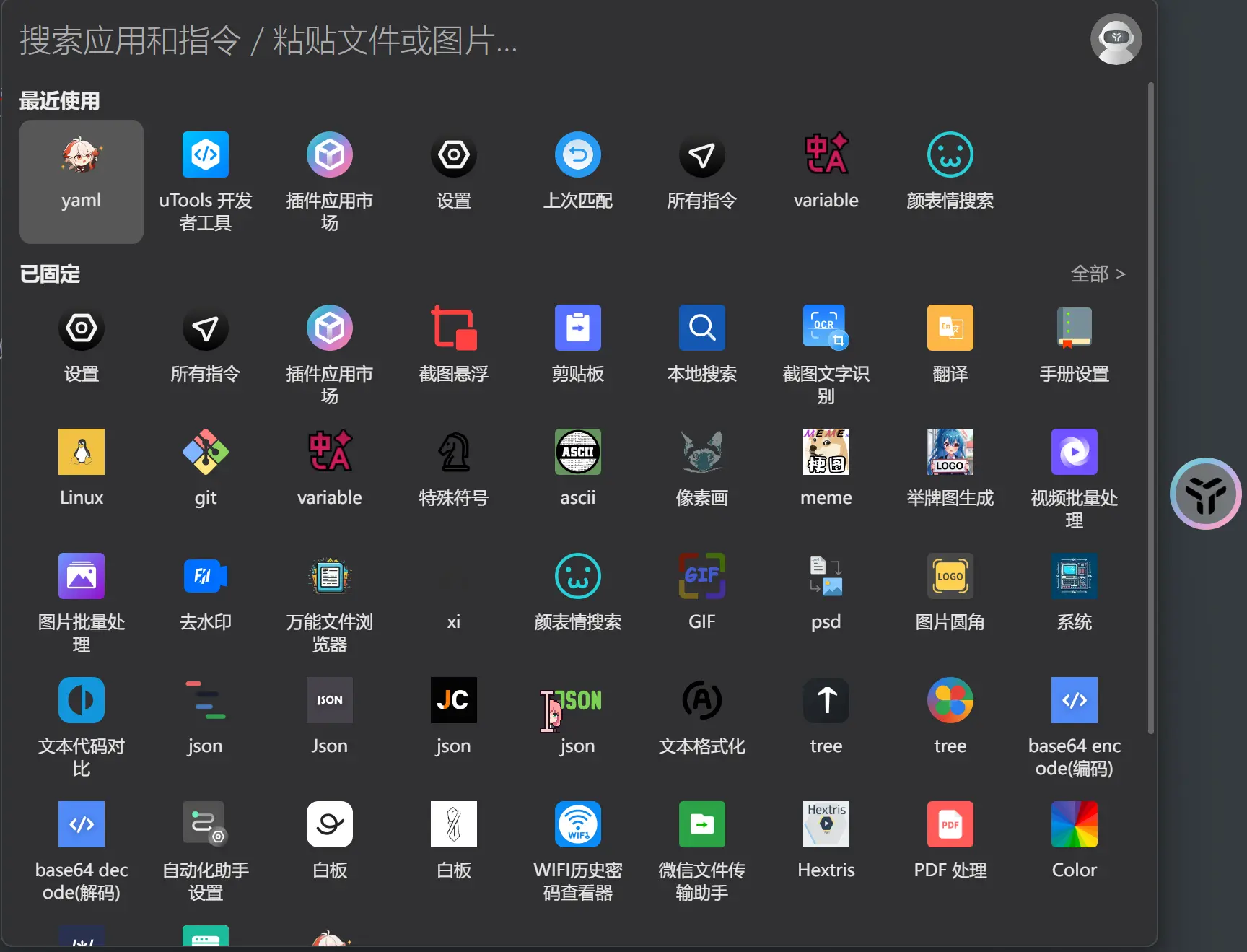
如标题所说,我把之前的小软件做成了utools的插件
为什么呢? 因为我觉得—–要是不宣传一波一辈子都没人发现我的仓库(T¬T)/~~
不废话了,先看看我的插件长什么样子吧
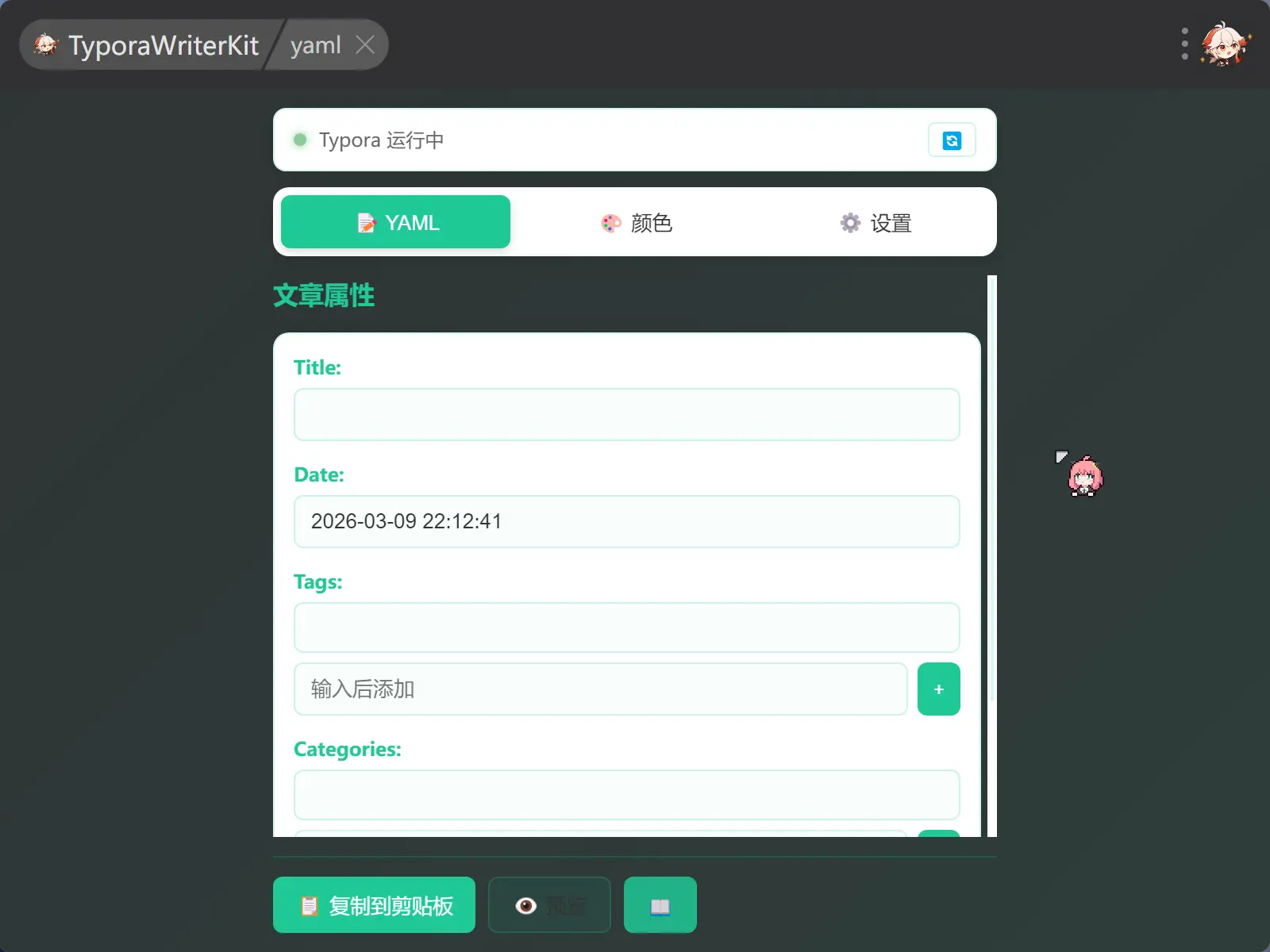
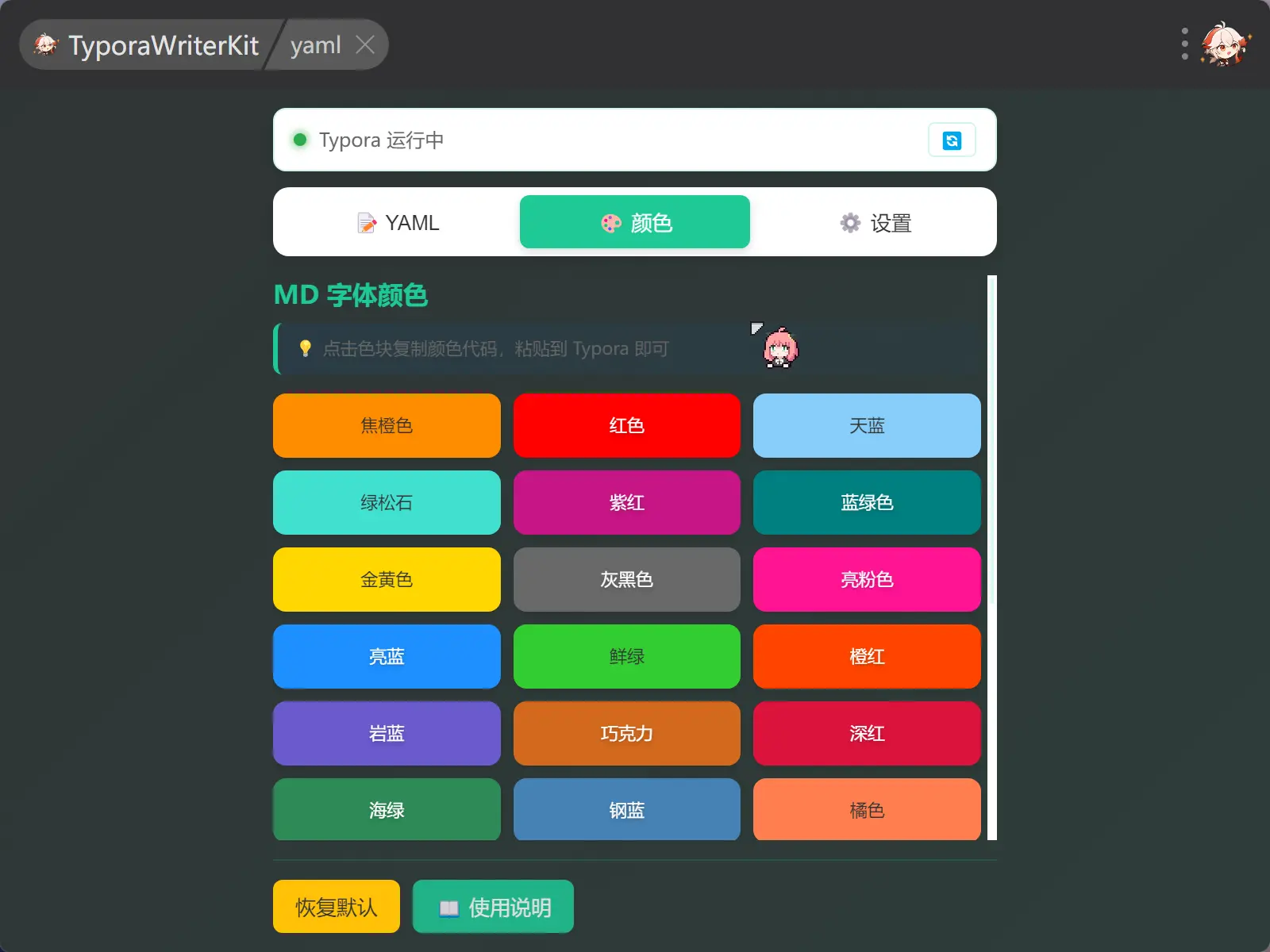
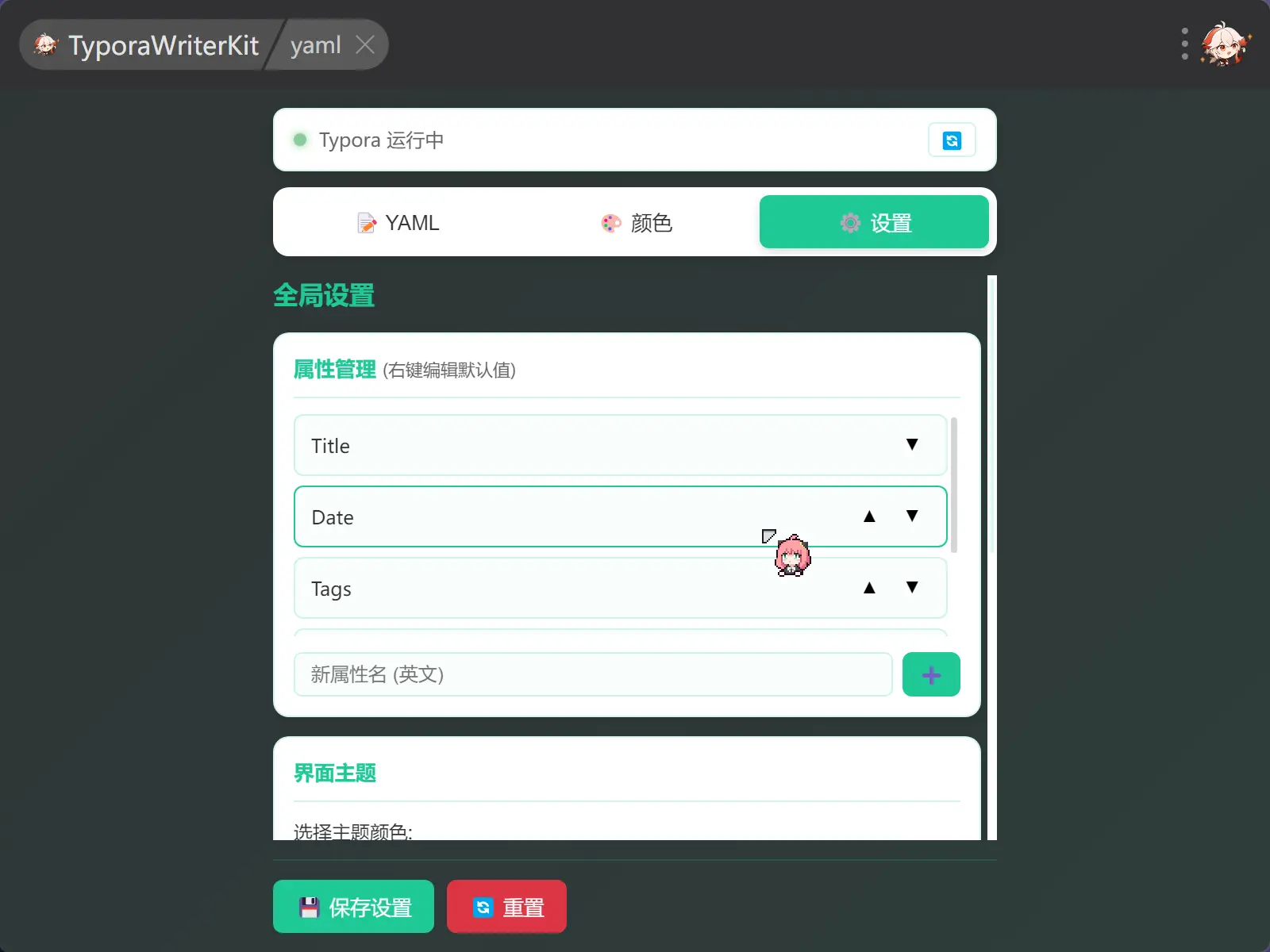
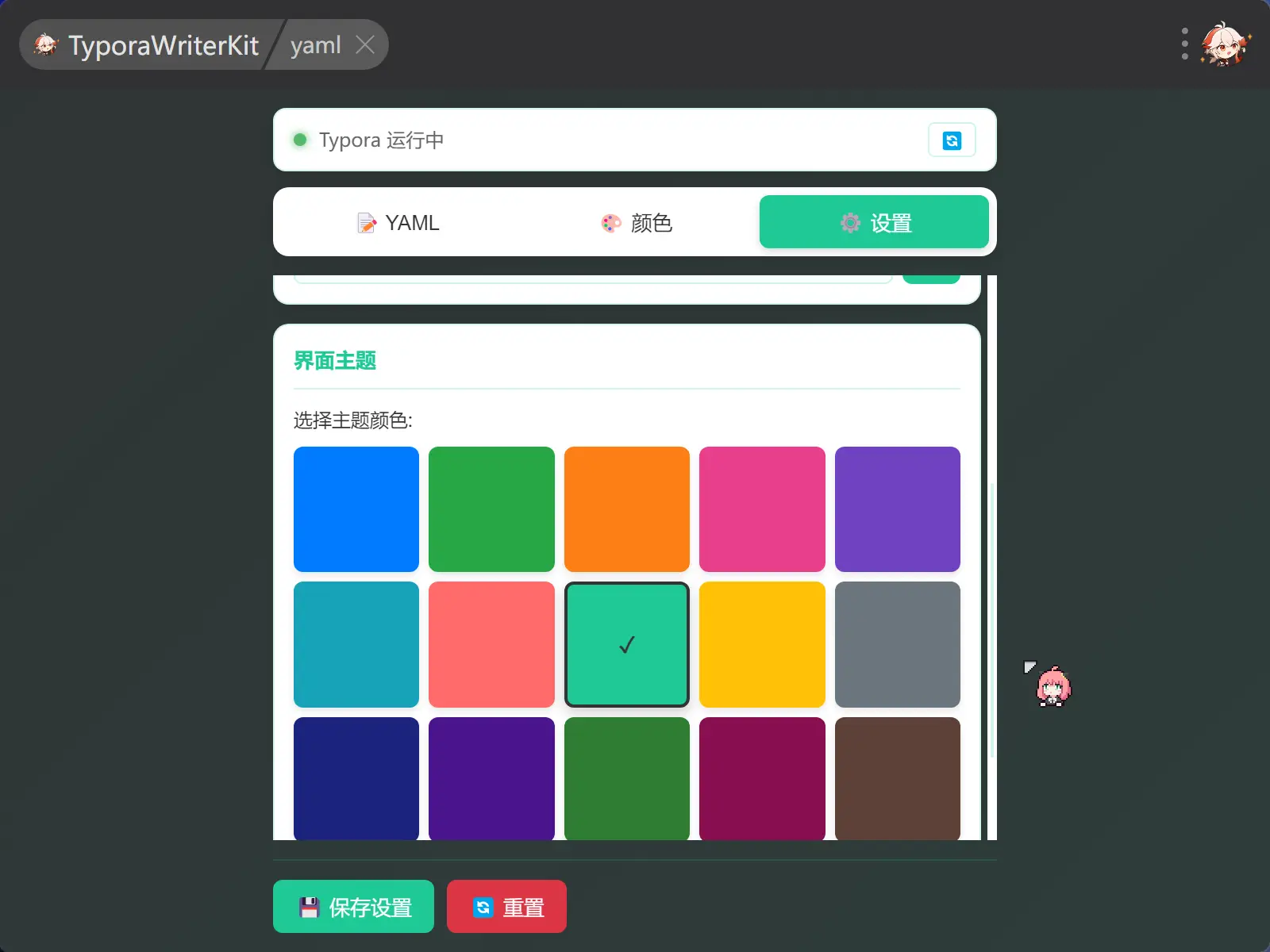
不得不说现在Claude是真的牛逼,完美复刻了我原先的软件还美化了许多
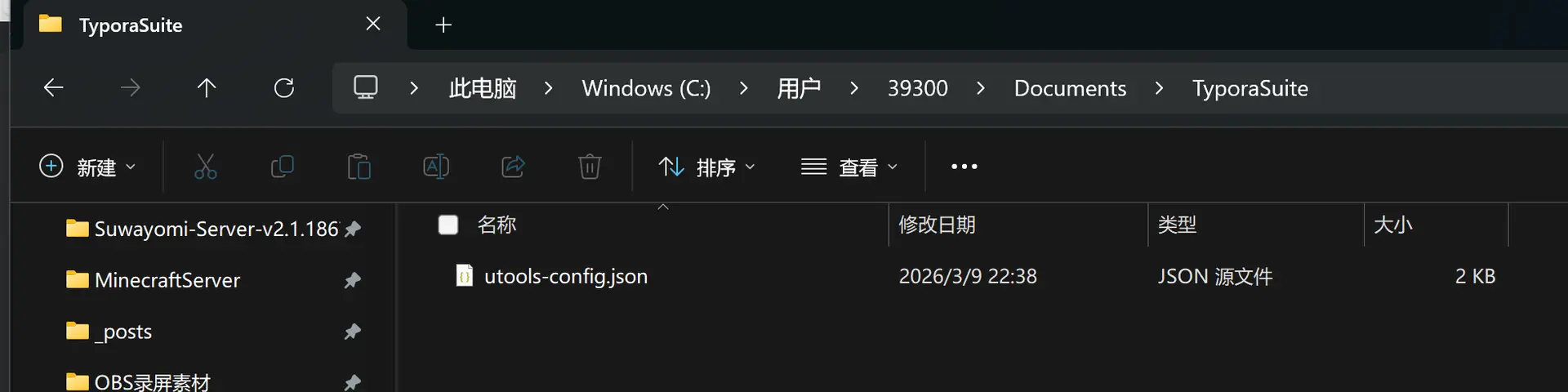
文件设置存储位置为
- Windows: C:\Users{用户名}\Documents\TyporaSuite\utools-config.json
- macOS: /Users/{用户名}/Documents/TyporaSuite/utools-config.json
- Linux: /home/{用户名}/Documents/TyporaSuite/utools-config.json
就是这里
exe版本
这是我原先的软件的样子,这个是我原先的版本,可以看到现在的utools插件基本上都是移植下面这个软件的功能
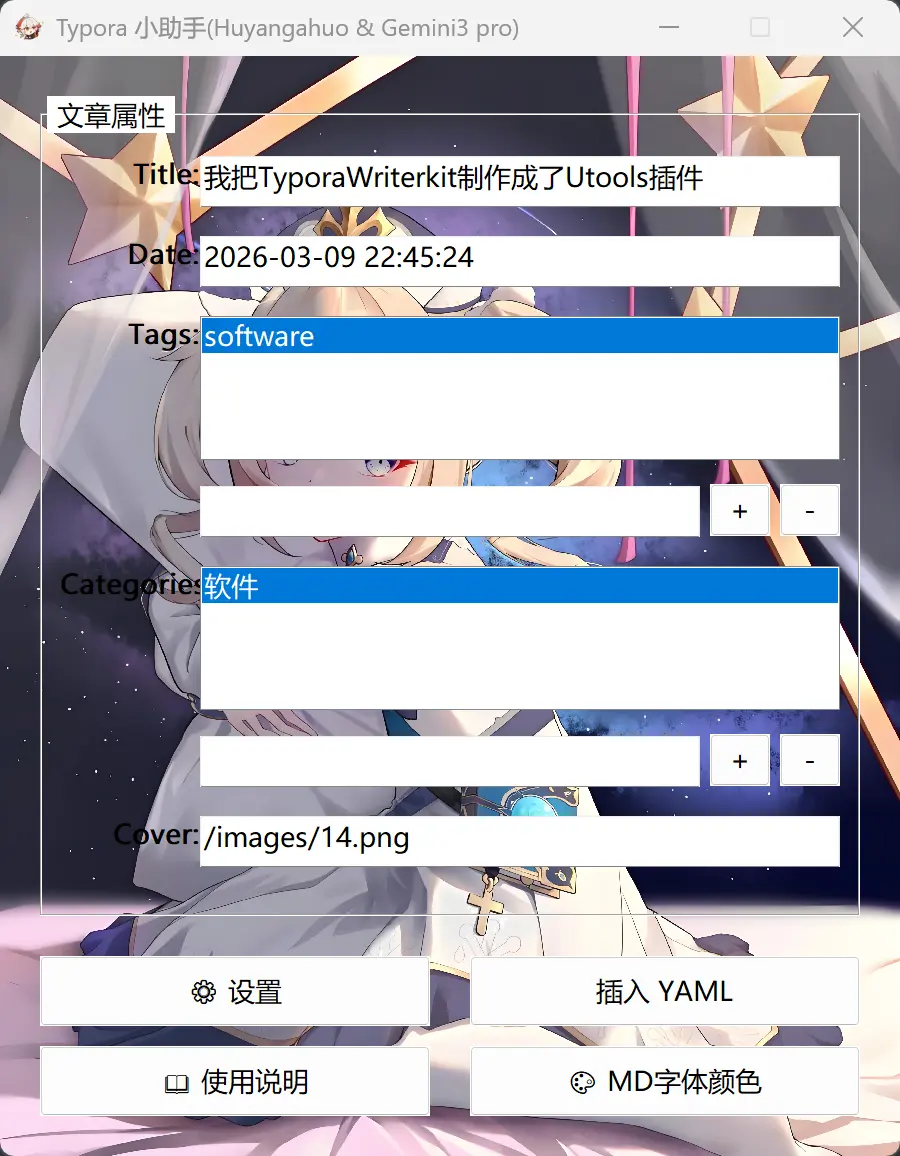
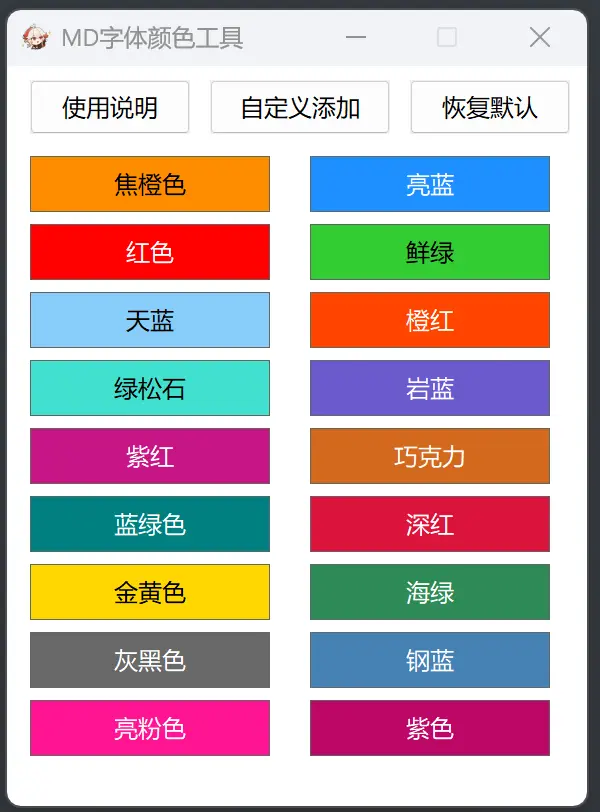
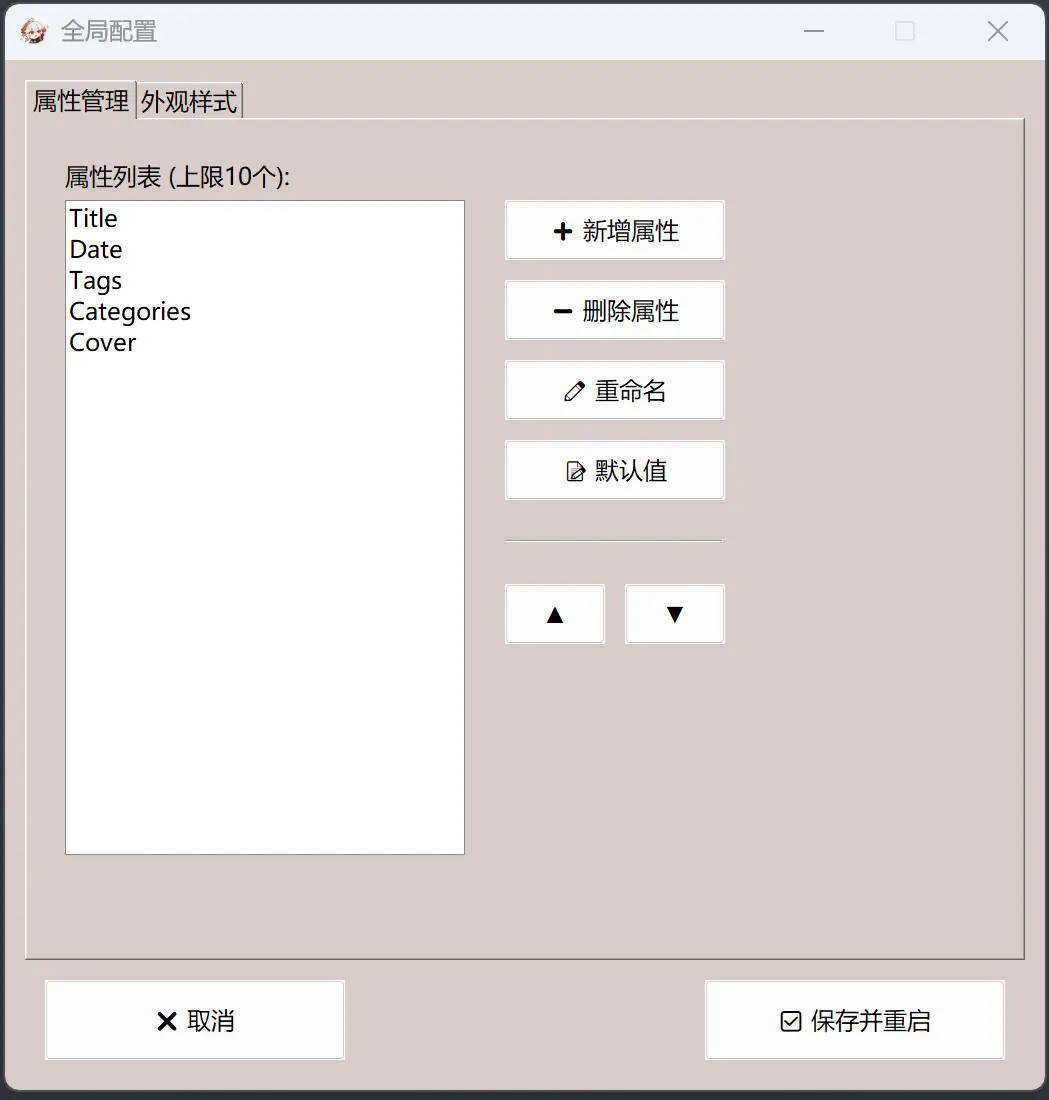
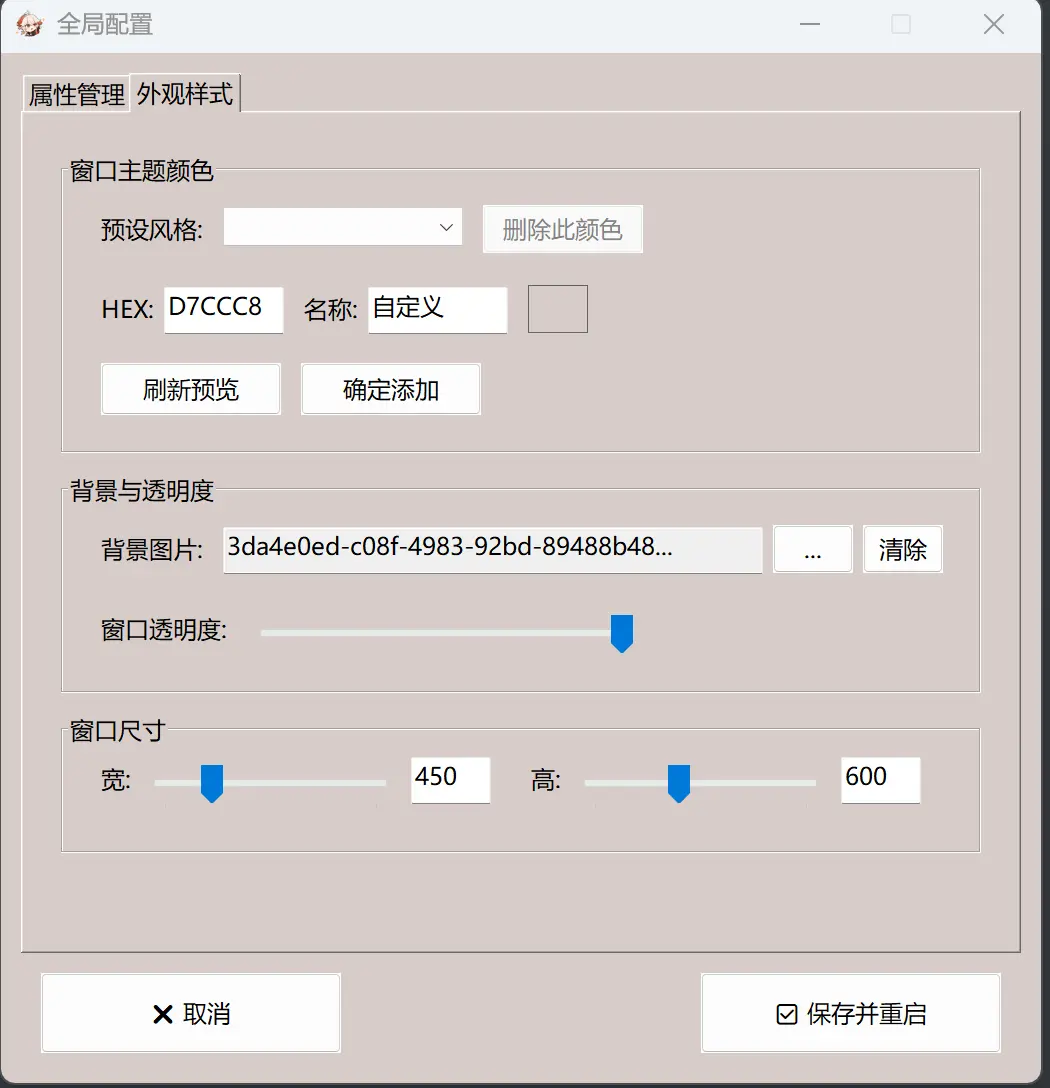
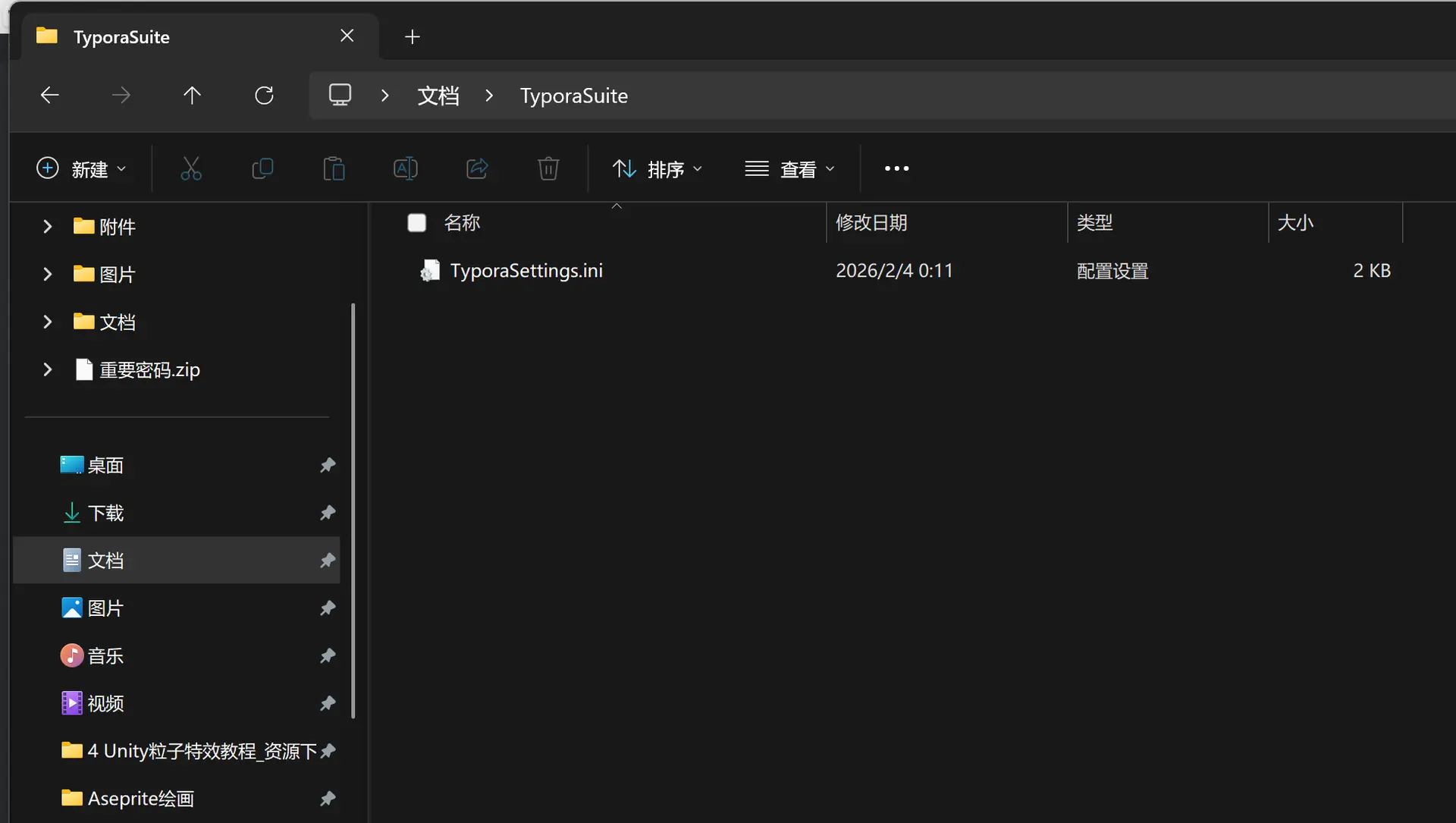
文件设置存储位置为 “ Documents\TyporaSuite\TyporaSettings.ini “
就是这里
你可以看看我原先制作这个软件的过程
源代码
(本质为Autohotkey v2脚本)
已复制
#Requires AutoHotkey v2.0
#SingleInstance Force
Persistent
SendMode "Input"
; ==============================================================================
; 全局变量声明 (YAML主程序) - 核心修复:配置路径持久化
; ==============================================================================
; 这里的逻辑修改为:不存放在脚本目录,而是存放在用户的【文档】目录
; 这样无论 exe 被打包在哪里运行,配置都会被保存在固定的位置,不会丢失。
global ConfigDir := A_MyDocuments "\TyporaSuite"
if !DirExist(ConfigDir)
{
try DirCreate(ConfigDir)
}
global IniFile := ConfigDir "\TyporaSettings.ini"
global MainGui := 0, SettingsGui := 0
global FieldControls := Map()
global ListFieldControls := Map()
; 核心受保护属性
global ProtectedFields := ["Title", "Date", "Tags", "Categories", "Cover"]
global FullBgPath := ""
; 设置界面变量
global LBFields := 0, DDLPreColors := 0, EdtHexInput := 0, EdtColorName := 0, ColorPreview := 0
global EdtBgPathDisp := 0, SliOp := 0, SliW := 0, EdtW := 0, SliH := 0, EdtH := 0
global BtnDelColor := 0
; 主界面预设颜色表
global DefaultPresets := Map(
"极简白", "FFFFFF", "夜间黑", "202020", "护眼绿", "C7EDCC", "少女粉", "FFF0F5",
"天空蓝", "E0F7FA", "高级灰", "F5F5F5", "深海蓝", "1A237E", "暗夜紫", "2D1B4E",
"薄荷绿", "E0F2F1", "柠檬黄", "FFFDE7", "日落橙", "FFCCBC", "樱花红", "FFCDD2",
"薰衣草", "E1BEE7", "极客黑", "121212", "深空灰", "37474F", "茶色", "D7CCC8",
"青柠", "F0F4C3", "琥珀", "FFECB3", "紫罗兰", "F3E5F5", "冰川蓝", "B3E5FC"
)
global RuntimeColors := DefaultPresets.Clone()
; =========================
; 全局变量声明 (颜色工具 & 帮助)
; =========================
global CT_Gui := 0 ; 颜色主窗口
global CT_CustomGui := 0 ; 自定义颜色窗口
global MainHelpGui := 0 ; YAML主说明书
global ColorHelpGui := 0 ; 颜色工具说明书
global CT_CustomHex := "FF0000"
global CT_ContextMenu := 0
; 颜色工具的默认 18 色 (中文名 + HEX)
global CT_DefaultColors := [
["焦橙色", "FF8C00"], ["红色", "FF0000"], ["天蓝", "87CEFA"],
["绿松石", "40E0D0"], ["紫红", "C71585"], ["蓝绿色", "008080"],
["金黄色", "FFD700"], ["灰黑色", "696969"], ["亮粉色", "FF1493"],
["亮蓝", "1E90FF"], ["鲜绿", "32CD32"], ["橙红", "FF4500"],
["岩蓝", "6A5ACD"], ["巧克力", "D2691E"], ["深红", "DC143C"],
["海绿", "2E8B57"], ["钢蓝", "4682B4"], ["纯黑", "000000"]
]
; 运行时颜色列表 (从INI加载)
global CT_RuntimeList := []
; 确保初始化配置
InitConfig()
LoadCustomColors()
LoadColorToolData()
; =========================
; 托盘菜单
; =========================
A_TrayMenu.Delete()
A_TrayMenu.Add("显示主窗口", (*) => ShowMainGui())
A_TrayMenu.Add("全局设置", (*) => ShowSettingsGui())
A_TrayMenu.Add("颜色工具", (*) => ShowColorTool())
A_TrayMenu.Add()
A_TrayMenu.Add("重启", (*) => Reload())
A_TrayMenu.Add("退出", (*) => ExitApp())
ShowMainGui()
; =========================
; 快捷键
; =========================
#HotIf WinActive("ahk_exe Typora.exe")
^!i:: ShowMainGui()
^!c:: ShowColorTool()
#HotIf
F4:: ShowMainGui()
; ==============================================================================
; PART 1: YAML 生成器主界面
; ==============================================================================
ShowMainGui()
{
global MainGui, IniFile, FieldControls, ListFieldControls
if IsObject(MainGui)
{
try
{
MainGui.Show()
return
}
catch
{
MainGui := 0
}
}
; === 读取配置 ===
bgColor := IniRead(IniFile, "Appearance", "BgColor", "FFFFFF")
bgPath := IniRead(IniFile, "Appearance", "Background", "")
opacity := IniRead(IniFile, "Appearance", "Opacity", 255)
winW := IniRead(IniFile, "Appearance", "WinWidth", 450)
winH_Config := IniRead(IniFile, "Appearance", "WinHeight", 650)
txtColor := "Black"
; 只要没有背景图,就应用背景色逻辑
if (bgPath == "")
{
txtColor := IsDarkColor(bgColor) ? "White" : "Black"
}
; === 创建窗口 ===
MainGui := Gui("+MinimizeBox -MaximizeBox -Resize", "Typora 小助手(Huyangahuo & Gemini3 pro)")
MainGui.SetFont("s10 c" txtColor, "Microsoft YaHei UI")
if (bgPath != "")
{
MainGui.BackColor := "White" ; 有图时底色设为白,防止边缘杂色
}
else
{
MainGui.BackColor := bgColor ; 无图时使用用户设定的背景色
}
MainGui.MarginX := 20, MainGui.MarginY := 20
; === 背景图 ===
if (bgPath != "" && FileExist(bgPath))
{
try
{
MainGui.Add("Picture", "x0 y0 w" winW " h" winH_Config " +0x4000000", bgPath)
}
}
; === 动态字段构建 ===
fieldListStr := IniRead(IniFile, "Structure", "Fields", "Title|Date|Tags|Categories|Cover")
fields := StrSplit(fieldListStr, "|")
FieldControls := Map()
ListFieldControls := Map()
; --- 布局核心参数 ---
topMargin := 20
sideMargin := 20
labelW := 70
gapX := 10
inputX := sideMargin + labelW + gapX
inputW := winW - inputX - sideMargin
if (inputW < 150)
{
inputW := 150
}
currentY := topMargin + 25
; GroupBox 容器
gbStart := MainGui.Add("GroupBox", "x" sideMargin " y" topMargin " w" (winW - sideMargin * 2) " h500", " 文章属性 ")
gbInnerY := topMargin + 30
for index, fieldName in fields
{
if (fieldName = "")
{
continue
}
; 1. 标签
MainGui.SetFont("s10 w600 c" txtColor)
MainGui.Add("Text", "x" (sideMargin + 10) " y" gbInnerY " w" labelW " Right +BackgroundTrans", fieldName . ":")
MainGui.SetFont("s10 w400 cBlack")
; 2. 输入控件
if (fieldName = "Tags" || fieldName = "Categories")
{
; --- 列表模式 ---
defValRaw := IniRead(IniFile, "DefaultValues", fieldName, "")
defArr := StrSplit(StrReplace(defValRaw, "`n", ","), ",")
; 列表框
lb := MainGui.Add("ListBox", "x" inputX " y" gbInnerY " w" (inputW - 10) " h80", defArr)
ListFieldControls[fieldName] := lb
; 操作行
opY := gbInnerY + 85
smallInputW := inputW - 80
addInput := MainGui.Add("Edit", "x" inputX " y" opY " w" smallInputW, "")
btnAddItem := MainGui.Add("Button", "x+5 yp-1 w30 h26", "+")
btnDelItem := MainGui.Add("Button", "x+5 yp w30 h26", "-")
btnAddItem.OnEvent("Click", AddToList.Bind(lb, addInput))
btnDelItem.OnEvent("Click", DelFromList.Bind(lb))
gbInnerY += 125
}
else
{
; --- 单行模式 ---
defVal := IniRead(IniFile, "DefaultValues", fieldName, "")
if (fieldName = "Date")
{
defVal := FormatTime(A_Now, "yyyy-MM-dd HH:mm:ss")
}
ctl := MainGui.Add("Edit", "x" inputX " y" gbInnerY " w" (inputW - 10) " v" fieldName, defVal)
FieldControls[fieldName] := ctl
gbInnerY += 40
}
}
; 调整 GroupBox 高度
gbHeight := gbInnerY - topMargin + 10
gbStart.Move(, , , gbHeight)
; === 底部按钮区域 ===
btnStartY := topMargin + gbHeight + 20
btnW := (winW - 60) / 2
MainGui.SetFont("s10 c" txtColor)
; 第一排按钮
btnSet := MainGui.Add("Button", "x20 y" btnStartY " w" btnW " h35", "⚙️ 设置")
btnIns := MainGui.Add("Button", "x+20 yp w" btnW " h35 Default", "插入 YAML")
; 第二排按钮
btnStartY += 45
btnHelp := MainGui.Add("Button", "x20 y" btnStartY " w" btnW " h35", "📖 使用说明")
btnColorTool := MainGui.Add("Button", "x+20 yp w" btnW " h35", "🎨 MD字体颜色")
; 计算最终窗口高度
finalWinH := btnStartY + 55
; === 事件绑定 ===
btnSet.OnEvent("Click", (*) => ShowSettingsGui())
btnIns.OnEvent("Click", (*) => DoInsert(fields))
btnHelp.OnEvent("Click", (*) => ShowMainHelpGui())
btnColorTool.OnEvent("Click", (*) => ShowColorTool())
MainGui.OnEvent("Close", (*) => ExitApp())
MainGui.Show("w" winW " h" finalWinH)
if (opacity < 255)
{
try WinSetTransparent(opacity, MainGui.Hwnd)
}
}
; ==============================================================================
; PART 2: 辅助功能 (列表, 颜色判断等)
; ==============================================================================
AddToList(lbObj, editObj, *)
{
txt := Trim(editObj.Value)
if (txt != "")
{
lbObj.Add([txt])
editObj.Value := ""
items := ControlGetItems(lbObj.Hwnd)
if (items.Length > 0)
{
lbObj.Choose(items.Length)
}
}
}
DelFromList(lbObj, *)
{
idx := lbObj.Value
if (idx > 0)
{
lbObj.Delete(idx)
}
}
IsDarkColor(hexColor)
{
ifStr := "0x" . hexColor
if !IsInteger(ifStr)
{
return false
}
r := (ifStr >> 16) & 0xFF
g := (ifStr >> 8) & 0xFF
b := ifStr & 0xFF
return (0.2126 * r + 0.7152 * g + 0.0722 * b) < 128
}
; ==============================================================================
; PART 3: 设置界面
; ==============================================================================
ShowSettingsGui()
{
global SettingsGui, MainGui, IniFile
global LBFields, DDLPreColors, EdtHexInput, EdtColorName, ColorPreview
global EdtBgPathDisp, FullBgPath, SliOp, SliW, EdtW, SliH, EdtH
global RuntimeColors, DefaultPresets, BtnDelColor
if IsObject(SettingsGui)
{
try
{
SettingsGui.Show()
return
}
catch
{
SettingsGui := 0
}
}
if IsObject(MainGui)
{
MainGui.Hide()
}
currBgColor := IniRead(IniFile, "Appearance", "BgColor", "FFFFFF")
currTxtColor := IsDarkColor(currBgColor) ? "White" : "Black"
; 禁止改变大小
SettingsGui := Gui("+AlwaysOnTop -MaximizeBox -Resize", "全局配置")
SettingsGui.SetFont("s9 c" currTxtColor, "Microsoft YaHei UI")
SettingsGui.BackColor := currBgColor
Tabs := SettingsGui.Add("Tab3", "x10 y10 w500 h440", ["属性管理", "外观样式"])
; Tab 1
Tabs.UseTab("属性管理")
SettingsGui.Add("Text", "x30 y50 w300", "属性列表 (上限10个):")
fieldListStr := IniRead(IniFile, "Structure", "Fields", "")
fieldArr := StrSplit(fieldListStr, "|")
SettingsGui.SetFont("cBlack")
LBFields := SettingsGui.Add("ListBox", "x30 y70 w200 h340", fieldArr)
SettingsGui.SetFont("c" currTxtColor)
btnAdd := SettingsGui.Add("Button", "x250 y70 w110 h30", "➕ 新增属性")
btnDel := SettingsGui.Add("Button", "xp y+10 w110 h30", "➖ 删除属性")
btnRen := SettingsGui.Add("Button", "xp y+10 w110 h30", "✏️ 重命名")
btnDef := SettingsGui.Add("Button", "xp y+10 w110 h30", "📝 默认值")
SettingsGui.Add("Text", "xp y+20 w110 h2 0x10")
btnUp := SettingsGui.Add("Button", "xp y+20 w50 h30", "▲")
btnDown := SettingsGui.Add("Button", "x+10 yp w50 h30", "▼")
; Tab 2
Tabs.UseTab("外观样式")
SettingsGui.Add("GroupBox", "x30 y50 w460 h150", "窗口主题颜色")
SettingsGui.Add("Text", "x50 y80", "预设风格:")
colorNames := []
for name, hex in RuntimeColors
{
colorNames.Push(name)
}
SettingsGui.SetFont("cBlack")
DDLPreColors := SettingsGui.Add("DropDownList", "x+10 yp-3 w120 Sort", colorNames)
SettingsGui.SetFont("c" currTxtColor)
BtnDelColor := SettingsGui.Add("Button", "x+10 yp-1 w80 h24 Disabled", "删除此颜色")
SettingsGui.Add("Text", "x50 y+20", "HEX:")
SettingsGui.SetFont("cBlack")
EdtHexInput := SettingsGui.Add("Edit", "x+5 yp-3 w60 Limit6", currBgColor)
SettingsGui.SetFont("c" currTxtColor)
SettingsGui.Add("Text", "x+10 yp+3", "名称:")
SettingsGui.SetFont("cBlack")
EdtColorName := SettingsGui.Add("Edit", "x+5 yp-3 w70 Limit6", "自定义")
SettingsGui.SetFont("c" currTxtColor)
ColorPreview := SettingsGui.Add("Text", "x+10 yp-1 w30 h24 +Border", "")
ColorPreview.Opt("+Background" currBgColor)
btnRefresh := SettingsGui.Add("Button", "x50 y+15 w90 h26", "刷新预览")
btnAddColor := SettingsGui.Add("Button", "x+10 yp w90 h26", "确定添加")
SettingsGui.Add("GroupBox", "x30 y210 w460 h110", "背景与透明度")
SettingsGui.Add("Text", "x50 y240", "背景图片:")
; 核心修复:每次打开设置时,从INI读取背景路径到全局变量
FullBgPath := IniRead(IniFile, "Appearance", "Background", "")
dispPath := ShortenPath(FullBgPath, 35)
SettingsGui.SetFont("cBlack")
EdtBgPathDisp := SettingsGui.Add("Edit", "x+10 yp-3 w270 ReadOnly", dispPath)
SettingsGui.SetFont("c" currTxtColor)
btnBrowse := SettingsGui.Add("Button", "x+5 yp-1 w40 h24", "...")
btnClearBg := SettingsGui.Add("Button", "x+5 yp w40 h24", "清除")
SettingsGui.Add("Text", "x50 y+20", "窗口透明度:")
SliOp := SettingsGui.Add("Slider", "x+10 yp w200 Range50-255 ToolTip", IniRead(IniFile, "Appearance", "Opacity", 255))
SettingsGui.Add("GroupBox", "x30 y330 w460 h70", "窗口尺寸")
currW := IniRead(IniFile, "Appearance", "WinWidth", 450)
currH := IniRead(IniFile, "Appearance", "WinHeight", 650)
SettingsGui.Add("Text", "x50 y355", "宽:")
SliW := SettingsGui.Add("Slider", "x+5 yp w130 Range350-800", currW)
EdtW := SettingsGui.Add("Edit", "x+5 yp-3 w40 Number", currW)
SettingsGui.Add("Text", "x+20 yp+3", "高:")
SliH := SettingsGui.Add("Slider", "x+5 yp w130 Range400-900", currH)
EdtH := SettingsGui.Add("Edit", "x+5 yp-3 w40 Number", currH)
Tabs.UseTab()
btnCancel := SettingsGui.Add("Button", "x20 y460 w150 h40", "❌ 取消")
btnSave := SettingsGui.Add("Button", "x350 yp w150 h40 Default", "✅ 保存并重启")
btnAdd.OnEvent("Click", (*) => CustomInputBox("新增属性", "请输入属性名(英文):", DoAddField))
btnDel.OnEvent("Click", DelField)
btnRen.OnEvent("Click", RenameField)
btnDef.OnEvent("Click", EditDefaultValue)
btnUp.OnEvent("Click", (*) => MoveField(-1))
btnDown.OnEvent("Click", (*) => MoveField(1))
DDLPreColors.OnEvent("Change", SelectPresetColor)
btnRefresh.OnEvent("Click", RefreshColorPreview)
btnAddColor.OnEvent("Click", AddCustomColor)
BtnDelColor.OnEvent("Click", DeleteCustomColor)
btnBrowse.OnEvent("Click", BrowseBg)
btnClearBg.OnEvent("Click", ClearBg)
SliW.OnEvent("Change", (*) => EdtW.Value := SliW.Value)
EdtW.OnEvent("Change", (*) => SliW.Value := EdtW.Value)
SliH.OnEvent("Change", (*) => EdtH.Value := SliH.Value)
EdtH.OnEvent("Change", (*) => SliH.Value := EdtH.Value)
btnSave.OnEvent("Click", SaveAllSettings)
btnCancel.OnEvent("Click", CancelSettings)
SettingsGui.OnEvent("Close", CancelSettings)
SettingsGui.Show("w520 h515")
}
; ==============================================================================
; PART 4: 逻辑处理
; ==============================================================================
LoadCustomColors()
{
global RuntimeColors, IniFile
customSection := IniRead(IniFile, "CustomColors", , "")
Loop Parse, customSection, "`n", "`r"
{
if (A_LoopField = "")
{
continue
}
parts := StrSplit(A_LoopField, "=")
if (parts.Length = 2)
{
RuntimeColors[parts[1]] := parts[2]
}
}
}
SelectPresetColor(*)
{
global DDLPreColors, EdtHexInput, RuntimeColors, BtnDelColor, DefaultPresets, EdtColorName
choice := DDLPreColors.Text
if (choice != "" && RuntimeColors.Has(choice))
{
hex := RuntimeColors[choice]
EdtHexInput.Value := hex
EdtColorName.Value := choice
RefreshColorPreview()
if (DefaultPresets.Has(choice))
{
BtnDelColor.Enabled := false
BtnDelColor.Text := "系统预设"
}
else
{
BtnDelColor.Enabled := true
BtnDelColor.Text := "删除此颜色"
}
}
}
RefreshColorPreview(*)
{
global EdtHexInput, ColorPreview
hex := EdtHexInput.Value
if RegExMatch(hex, "^[0-9A-Fa-f]{6}$")
{
ColorPreview.Opt("+Background" hex)
ColorPreview.Redraw()
}
}
AddCustomColor(*)
{
global EdtHexInput, EdtColorName, RuntimeColors, DDLPreColors, IniFile
hex := EdtHexInput.Value
name := Trim(EdtColorName.Value)
if !RegExMatch(hex, "^[0-9A-Fa-f]{6}$")
{
SafeMsgBox("HEX 代码必须是 6 位颜色代码 (例如 FFFFFF)")
return
}
if (StrLen(name) < 1 || StrLen(name) > 7)
{
SafeMsgBox("颜色名称长度必须在 1 到 7 个字之间。")
return
}
RuntimeColors[name] := hex
IniWrite(hex, IniFile, "CustomColors", name)
UpdateColorDDL(name)
SafeMsgBox("颜色 [" name "] 已保存!")
}
DeleteCustomColor(*)
{
global DDLPreColors, RuntimeColors, IniFile, DefaultPresets
choice := DDLPreColors.Text
if (DefaultPresets.Has(choice))
{
SafeMsgBox("不可删除预设颜色。")
return
}
if (choice != "")
{
RuntimeColors.Delete(choice)
IniDelete(IniFile, "CustomColors", choice)
UpdateColorDDL()
SafeMsgBox("已删除颜色 [" choice "]")
}
}
UpdateColorDDL(selectItem := "")
{
global DDLPreColors, RuntimeColors
items := []
for k, v in RuntimeColors
{
items.Push(k)
}
DDLPreColors.Delete()
DDLPreColors.Add(items)
if (selectItem != "")
{
try
{
DDLPreColors.Choose(selectItem)
}
}
else
{
DDLPreColors.Choose(1)
}
SelectPresetColor()
}
DoAddField(val)
{
global LBFields
items := ControlGetItems(LBFields.Hwnd)
if (items.Length >= 10)
{
SafeMsgBox("上限10个属性。", "提示", "Icon!")
return
}
if (val = "")
{
return
}
val := Trim(val)
for item in items
{
if (item = val)
{
SafeMsgBox("属性已存在")
return
}
}
LBFields.Add([val])
}
RenameField(*)
{
global LBFields, IniFile, ProtectedFields
if (!LBFields.Value)
{
SafeMsgBox("请先选中属性")
return
}
oldName := LBFields.Text
if HasValue(ProtectedFields, oldName)
{
SafeMsgBox("核心属性禁止重命名。", "禁止", "Icon!")
return
}
CustomInputBox("重命名", "重命名 [" oldName "] 为:", DoRename, oldName)
}
DoRename(newName)
{
global LBFields, IniFile
if (newName = "")
{
return
}
idx := LBFields.Value
oldName := LBFields.Text
LBFields.Delete(idx)
LBFields.Insert(idx, [newName])
LBFields.Choose(idx)
oldDef := IniRead(IniFile, "DefaultValues", oldName, "")
if (oldDef != "")
{
IniWrite(oldDef, IniFile, "DefaultValues", newName)
IniDelete(IniFile, "DefaultValues", oldName)
}
}
DelField(*)
{
global LBFields, ProtectedFields
if (!LBFields.Value)
{
return
}
fName := LBFields.Text
if HasValue(ProtectedFields, fName)
{
SafeMsgBox("核心属性禁止删除。", "禁止", "Icon!")
return
}
LBFields.Delete(LBFields.Value)
}
ShortenPath(path, maxLen)
{
if (StrLen(path) <= maxLen)
{
return path
}
SplitPath(path, &name, &dir)
if (StrLen(name) >= maxLen)
{
return SubStr(name, 1, maxLen - 3) "..."
}
drive := SubStr(path, 1, 3)
remain := maxLen - StrLen(drive) - StrLen(name) - 4
if (remain < 1)
{
return drive "..." name
}
return drive "..." SubStr(dir, -remain) "\" name
}
BrowseBg(*)
{
global EdtBgPathDisp, FullBgPath
s := FileSelect(3, , "选择背景图片", "Images (*.jpg; *.png)")
if s
{
FullBgPath := s
EdtBgPathDisp.Value := ShortenPath(s, 35)
}
}
ClearBg(*)
{
global EdtBgPathDisp, FullBgPath
FullBgPath := ""
EdtBgPathDisp.Value := ""
}
HasValue(arr, val)
{
for index, value in arr
{
if (value = val)
{
return true
}
}
return false
}
SafeMsgBox(text, title := "助手", options := "")
{
global SettingsGui
ownOpt := ""
if IsObject(SettingsGui)
{
ownOpt := "Owner" SettingsGui.Hwnd
}
; 262144 = MB_TOPMOST (强制置顶)
MsgBox(text, title, options " " ownOpt " 262144")
}
; === 核心修复: 智能判断父窗口的输入框 ===
CustomInputBox(title, prompt, callback, defaultVal := "")
{
global SettingsGui, CT_CustomGui, MainGui
ownerOpt := ""
; 优先级: 设置窗口 > 颜色自定义窗口 > 主窗口
if (IsObject(SettingsGui) && SettingsGui != 0)
{
ownerOpt := "+Owner" SettingsGui.Hwnd
}
else if (IsObject(CT_CustomGui) && CT_CustomGui != 0)
{
ownerOpt := "+Owner" CT_CustomGui.Hwnd
}
else if (IsObject(MainGui) && MainGui != 0)
{
ownerOpt := "+Owner" MainGui.Hwnd
}
; 无论父窗口是谁,都加上置顶属性
InputGui := Gui(ownerOpt " +AlwaysOnTop -MaximizeBox -Resize", title)
InputGui.SetFont("s9", "Microsoft YaHei UI")
InputGui.Add("Text", "xm w280", prompt)
edt := InputGui.Add("Edit", "xm y+10 w280", defaultVal)
btnOk := InputGui.Add("Button", "xm y+10 w80 Default", "确定")
btnCancel := InputGui.Add("Button", "x+10 yp w80", "取消")
btnOk.OnEvent("Click", (*) => (callback(edt.Value), InputGui.Destroy()))
btnCancel.OnEvent("Click", (*) => InputGui.Destroy())
InputGui.Show()
}
MoveField(offset)
{
global LBFields
idx := LBFields.Value
if (idx = 0)
{
return
}
items := ControlGetItems(LBFields.Hwnd)
count := items.Length
newIdx := idx + offset
if (newIdx < 1 || newIdx > count)
{
return
}
temp := items[idx]
items[idx] := items[newIdx]
items[newIdx] := temp
LBFields.Delete()
LBFields.Add(items)
LBFields.Choose(newIdx)
}
EditDefaultValue(*)
{
global LBFields, IniFile
if (!LBFields.Value)
{
SafeMsgBox("请先选中属性")
return
}
fName := LBFields.Text
currDef := IniRead(IniFile, "DefaultValues", fName, "")
CustomInputBox("默认值", "编辑 [" fName "] 默认值:", FinishEditDefault, currDef)
}
FinishEditDefault(val)
{
global LBFields, IniFile
fName := LBFields.Text
IniWrite(val, IniFile, "DefaultValues", fName)
}
CancelSettings(*)
{
global SettingsGui, MainGui
SettingsGui.Destroy()
SettingsGui := 0
if IsObject(MainGui)
{
if (MainGui != 0)
MainGui.Destroy()
MainGui := 0
}
ShowMainGui()
}
; === 核心修复:更健壮的保存逻辑 ===
SaveAllSettings(*)
{
global SettingsGui, MainGui, IniFile
global LBFields, FullBgPath, SliOp, EdtHexInput, SliW, SliH
items := ControlGetItems(LBFields.Hwnd)
s := ""
for i in items
{
s .= i "|"
}
IniWrite(RTrim(s, "|"), IniFile, "Structure", "Fields")
; 确保写入背景路径
IniWrite(FullBgPath, IniFile, "Appearance", "Background")
IniWrite(SliOp.Value, IniFile, "Appearance", "Opacity")
; 确保写入背景色 (如果为空,默认为白色)
valBgColor := EdtHexInput.Value
if (valBgColor = "")
valBgColor := "FFFFFF"
IniWrite(valBgColor, IniFile, "Appearance", "BgColor")
IniWrite(SliW.Value, IniFile, "Appearance", "WinWidth")
IniWrite(SliH.Value, IniFile, "Appearance", "WinHeight")
SettingsGui.Destroy()
SettingsGui := 0
if IsObject(MainGui)
{
if (MainGui != 0)
MainGui.Destroy()
MainGui := 0
}
ShowMainGui()
}
DoInsert(fieldsOrder)
{
global FieldControls, ListFieldControls
finalStr := "---`n"
for idx, fName in fieldsOrder
{
if (fName = "")
{
continue
}
if (ListFieldControls.Has(fName))
{
lb := ListFieldControls[fName]
items := ControlGetItems(lb.Hwnd)
if (items.Length > 0)
{
finalStr .= StrLower(fName) . ":`n"
for item in items
{
finalStr .= " - " item "`n"
}
}
else
{
finalStr .= StrLower(fName) . ": []`n"
}
}
else if (FieldControls.Has(fName))
{
val := FieldControls[fName].Value
finalStr .= StrLower(fName) . ": " . val . "`n"
}
}
finalStr .= "---`n"
A_Clipboard := finalStr
SafeMsgBox("已生成并复制到剪贴板!", "成功")
if WinExist("ahk_exe Typora.exe")
{
WinActivate "ahk_exe Typora.exe"
if WinWaitActive("ahk_exe Typora.exe", , 1)
{
Send "^v"
}
}
}
InitConfig()
{
if !FileExist(IniFile)
{
IniWrite("Title|Date|Tags|Categories|Cover", IniFile, "Structure", "Fields")
IniWrite("My Title", IniFile, "DefaultValues", "Title")
IniWrite("AHK,Demo", IniFile, "DefaultValues", "Tags")
IniWrite("450", IniFile, "Appearance", "WinWidth")
IniWrite("650", IniFile, "Appearance", "WinHeight")
IniWrite("FFFFFF", IniFile, "Appearance", "BgColor")
IniWrite("255", IniFile, "Appearance", "Opacity")
}
}
; ==============================================================================
; PART 5: 帮助 & 颜色工具 (增强版:修复报错+滚动条)
; ==============================================================================
ShowMainHelpGui()
{
global MainHelpGui, MainGui
if IsObject(MainHelpGui)
{
try
{
MainHelpGui.Show()
return
}
catch
{
MainHelpGui := 0
}
}
; 禁止改变大小
MainHelpGui := Gui("+AlwaysOnTop +Owner" MainGui.Hwnd " -MaximizeBox -Resize", "YAML 生成器说明")
MainHelpGui.SetFont("s10", "Microsoft YaHei UI")
MainHelpGui.BackColor := "White"
; +VScroll 允许垂直滚动
MainHelpGui.AddEdit(
"xm ym w400 h260 ReadOnly +VScroll +Wrap",
"【YAML 生成器使用指南】`n`n"
"1. 在下方输入框填写文章信息。`n"
"2. Tags 和 Categories 支持添加多个,点击 + 号添加或点击 - 号删除。`n"
"3. 点击【插入 YAML】自动生成并粘贴到 Typora。`n"
"4. 点击【设置】可以自定义背景图、主题颜色、窗口大小和字段顺序。`n"
"5. 快捷键:在typora中 使用 Ctrl+Alt+I 快速呼出或按 F4 快速打开。`n"
"6. 存储的设置文件可以在这个Documents(文档)\TyporaSuite\TyporaSettings.ini 路径找到"
)
MainHelpGui.Show("w420 h280")
}
ShowColorHelpGui()
{
global ColorHelpGui, CT_Gui
if IsObject(ColorHelpGui)
{
try
{
ColorHelpGui.Show()
return
}
catch
{
ColorHelpGui := 0
}
}
; 禁止改变大小
ColorHelpGui := Gui("+AlwaysOnTop +Owner" CT_Gui.Hwnd " -MaximizeBox -Resize", "颜色工具说明")
ColorHelpGui.SetFont("s10", "Microsoft YaHei UI")
ColorHelpGui.BackColor := "White"
; +VScroll 允许垂直滚动
ColorHelpGui.AddEdit(
"xm ym w400 h260 ReadOnly +VScroll +Wrap",
"【MD 字体颜色工具使用说明】`n`n"
"1. 基本使用:`n"
" - 在 Typora 中选中文字。`n"
" - 点击色块即可应用颜色。`n"
" - 若未选中文字,将只会插入带颜色的空标签。`n`n"
"2. 自定义颜色:`n"
" - 点击【自定义添加】可输入任意 HEX 颜色,程序会把 RGB 值自动转换为 Hex 值`n"
" - 支持保存到色板,最大支持 18 个颜色。`n`n"
"3. 更多功能:`n"
" - 在任意色块上可以右键点击选择删除该颜色。`n"
" - 可以使用快捷键Ctrl + Alt + C快速打开最小化窗口`n`n"
"4. 故障排除:`n"
" - 如果文字意外消失,请按 Ctrl+Z 撤销。`n"
" - 若要在已添加颜色字体上换颜色,只有先删除已有颜色代码,才能腾出位置添加新颜色。"
)
ColorHelpGui.Show("w420 h280")
}
; === 颜色工具数据处理 (核心新增逻辑) ===
LoadColorToolData()
{
global CT_RuntimeList, IniFile, CT_DefaultColors
; 从 INI 读取
rawStr := IniRead(IniFile, "ColorTool", "UserColors", "")
CT_RuntimeList := []
if (rawStr = "")
{
; 首次运行或被清空,使用默认值
CT_RuntimeList := CT_DefaultColors.Clone()
SaveColorToolData() ; 回写默认值
}
else
{
; 解析字符串 "Name:Hex|Name:Hex"
Loop Parse, rawStr, "|"
{
if (A_LoopField == "")
continue
parts := StrSplit(A_LoopField, ":")
if (parts.Length = 2)
CT_RuntimeList.Push([parts[1], parts[2]])
}
; 双重保险:如果读取为空数组(比如格式坏了),恢复默认
if (CT_RuntimeList.Length == 0)
{
CT_RuntimeList := CT_DefaultColors.Clone()
SaveColorToolData()
}
}
}
SaveColorToolData()
{
global CT_RuntimeList, IniFile
saveStr := ""
for item in CT_RuntimeList
{
saveStr .= item[1] . ":" . item[2] . "|"
}
IniWrite(RTrim(saveStr, "|"), IniFile, "ColorTool", "UserColors")
}
RestoreDefaultColors(*)
{
global CT_RuntimeList, CT_DefaultColors, CT_Gui
; 这里的 MsgBox 强制置顶
result := MsgBox("确定要恢复默认的 18 种颜色吗?`n自定义的颜色将会丢失。", "恢复默认", "YesNo Icon? 262144")
if (result == "Yes")
{
CT_RuntimeList := CT_DefaultColors.Clone()
SaveColorToolData()
if IsObject(CT_Gui)
{
CT_Gui.Destroy()
CT_Gui := 0
}
ShowColorTool()
}
}
; === 颜色工具主窗口 ===
ShowColorTool()
{
global CT_Gui, MainGui, CT_RuntimeList
if IsObject(CT_Gui)
{
try
{
CT_Gui.Show()
return
}
catch
{
CT_Gui := 0
}
}
; 禁止改变大小
CT_Gui := Gui("+AlwaysOnTop -MaximizeBox -Resize", "MD字体颜色工具")
CT_Gui.SetFont("s9", "Microsoft YaHei UI")
CT_Gui.BackColor := "White"
; 顶部功能区
infoBtn := CT_Gui.AddButton("xm w80", "使用说明")
customBtn := CT_Gui.AddButton("x+10 yp w90", "自定义添加")
resetBtn := CT_Gui.AddButton("x+10 yp w80", "恢复默认")
infoBtn.OnEvent("Click", (*) => ShowColorHelpGui())
customBtn.OnEvent("Click", (*) => ShowCustomColorGui())
resetBtn.OnEvent("Click", RestoreDefaultColors)
colW := 120
rowH := 28
gapY := 6
startY := 45
; 动态渲染色块
Loop CT_RuntimeList.Length
{
if (A_Index > 18) ; 最多显示18个
break
cName := CT_RuntimeList[A_Index][1]
cHex := CT_RuntimeList[A_Index][2]
; 0为左列, 1为右列
col := (A_Index <= 9) ? 0 : 1
row := Mod(A_Index - 1, 9)
; 左边是 xm,右边是 xm+140
xPosStr := (col == 0) ? "xm" : "xm+140"
yPos := startY + row * (rowH + gapY)
; 绘制色块
t := CT_Gui.AddText(
xPosStr " y" yPos " w" colW " h" rowH
" 0x200 Center Border Background" cHex,
cName
)
; 文字颜色适配
if IsDarkColor(cHex)
t.SetFont("cWhite")
else
t.SetFont("cBlack")
t.Tag := cHex
t.OnEvent("Click", ApplyColorFromText)
; === 核心修复:直接绑定事件处理,不在这里 Bind 数据 ===
; 将具体的 HEX 和 Name 存入控件属性,点击时再提取
t.ColorName := cName
t.ColorHex := cHex
t.OnEvent("ContextMenu", ShowColorContextMenu)
}
CT_Gui.Show("w290 h370")
}
; 核心修复:动态右键菜单
ShowColorContextMenu(ctrl, *)
{
; 动态创建一个菜单
tempMenu := Menu()
; 绑定删除函数,传入该控件的 Hex 和 Name
tempMenu.Add("删除 [" ctrl.ColorName "]", (*) => DeleteColorByHex(ctrl.ColorHex, ctrl.ColorName))
tempMenu.Show()
}
DeleteColorByHex(targetHex, targetName)
{
global CT_RuntimeList, CT_Gui
foundIndex := 0
for idx, item in CT_RuntimeList
{
if (item[2] == targetHex)
{
foundIndex := idx
break
}
}
if (foundIndex > 0)
{
CT_RuntimeList.RemoveAt(foundIndex)
SaveColorToolData()
SafeMsgBox("已删除颜色: " targetName)
; 刷新界面
CT_Gui.Destroy()
CT_Gui := 0
ShowColorTool()
}
else
{
SafeMsgBox("删除失败:颜色未找到 (可能已更改)")
}
}
ApplyColorFromText(ctrl, *)
{
if WinExist("ahk_exe Typora.exe")
{
WinActivate "ahk_exe Typora.exe"
WinWaitActive "ahk_exe Typora.exe", , 1
AddFontColor("#" ctrl.Tag)
}
}
; === 自定义颜色窗口 ===
ShowCustomColorGui()
{
global CT_CustomGui, CT_CustomHex, CT_Gui
if IsObject(CT_CustomGui)
{
try
{
CT_CustomGui.Show()
return
}
catch
{
CT_CustomGui := 0
}
}
CT_CustomGui := Gui("+AlwaysOnTop -MaximizeBox -Resize +Owner" CT_Gui.Hwnd, "自定义颜色")
CT_CustomGui.SetFont("s9", "Microsoft YaHei UI")
CT_CustomGui.BackColor := "White"
CT_CustomGui.AddText("xm", "HEX (不带 #):")
HexEdit := CT_CustomGui.AddEdit("xm w260", CT_CustomHex)
CT_CustomGui.AddText("xm y+10", "RGB:")
R := CT_CustomGui.AddEdit("xm w80", "255")
G := CT_CustomGui.AddEdit("x+10 yp w80", "0")
B := CT_CustomGui.AddEdit("x+10 yp w80", "0")
Preview := CT_CustomGui.AddText(
"xm y+10 w260 h40 0x200 Center Border Background" CT_CustomHex,
"预览"
)
R.OnEvent("Change", (*) => UpdateFromRGB(R, G, B, HexEdit, Preview))
G.OnEvent("Change", (*) => UpdateFromRGB(R, G, B, HexEdit, Preview))
B.OnEvent("Change", (*) => UpdateFromRGB(R, G, B, HexEdit, Preview))
HexEdit.OnEvent("Change", (*) => UpdateFromHex(HexEdit, Preview))
refresh := CT_CustomGui.AddButton("xm y+10 w260", "刷新预览")
refresh.OnEvent("Click", (*) => RefreshCustomPreview(R, G, B, HexEdit, Preview))
; 新增:添加到列表
addBtn := CT_CustomGui.AddButton("xm y+6 w260", "添加到列表 (并保存)")
addBtn.OnEvent("Click", (*) => AddColorToTool(HexEdit.Value))
apply := CT_CustomGui.AddButton("xm y+6 w260", "仅使用该颜色")
apply.OnEvent("Click", (*) => ApplyCustomColor(HexEdit.Value))
; 这里的 Back 按钮逻辑修改为销毁窗口,避免僵尸对象
back := CT_CustomGui.AddButton("xm y+6 w260", "返回")
back.OnEvent("Click", (*) => (CT_CustomGui.Destroy(), CT_CustomGui := 0))
CT_CustomGui.Show("w300 h400")
}
; 核心新增:添加到色板逻辑
AddColorToTool(hex)
{
global CT_RuntimeList, CT_Gui, CT_CustomGui
if !RegExMatch(hex, "^[0-9A-Fa-f]{6}$")
{
SafeMsgBox("HEX 代码无效,无法添加。")
return
}
if (CT_RuntimeList.Length >= 18)
{
SafeMsgBox("颜色数量已达上限 (18个)。`n请先右键删除一些现有颜色。")
return
}
; 查重
for item in CT_RuntimeList
{
if (item[2] = hex)
{
SafeMsgBox("该颜色已存在!")
return
}
}
; 弹出名称输入框 (置顶)
CustomInputBox("颜色名称", "请为颜色命名 (建议4字以内):", DoAddColorConfirm, hex)
}
DoAddColorConfirm(name)
{
global CT_RuntimeList, CT_CustomHex, CT_Gui
if (name == "")
name := "自定义"
CT_RuntimeList.Push([name, CT_CustomHex])
SaveColorToolData()
SafeMsgBox("颜色 [" name "] 已添加!")
; 刷新主界面
if IsObject(CT_Gui)
{
CT_Gui.Destroy()
CT_Gui := 0
}
ShowColorTool()
}
UpdateFromRGB(R, G, B, HexEdit, Preview)
{
global CT_CustomHex
CT_CustomHex := Format("{:02X}{:02X}{:02X}", Clamp(R.Value), Clamp(G.Value), Clamp(B.Value))
HexEdit.Value := CT_CustomHex
try
{
Preview.Opt("+Background" CT_CustomHex)
}
}
UpdateFromHex(HexEdit, Preview)
{
global CT_CustomHex
if RegExMatch(HexEdit.Value, "^[0-9A-Fa-f]{6}$")
{
CT_CustomHex := HexEdit.Value
try
{
Preview.Opt("+Background" CT_CustomHex)
}
}
}
RefreshCustomPreview(R, G, B, HexEdit, Preview)
{
global CT_CustomHex, CT_CustomGui
if RegExMatch(HexEdit.Value, "^[0-9A-Fa-f]{6}$")
{
CT_CustomHex := HexEdit.Value
}
else
{
CT_CustomHex := Format("{:02X}{:02X}{:02X}", Clamp(R.Value), Clamp(G.Value), Clamp(B.Value))
}
CT_CustomGui.Hide()
try
{
Preview.Opt("+Background" CT_CustomHex)
}
CT_CustomGui.Show()
}
ApplyCustomColor(hex)
{
if WinExist("ahk_exe Typora.exe")
{
WinActivate "ahk_exe Typora.exe"
WinWaitActive "ahk_exe Typora.exe", , 1
AddFontColor("#" hex)
}
}
Clamp(v)
{
if (v = "" || !IsNumber(v))
{
return 0
}
v := Integer(v)
return v < 0 ? 0 : v > 255 ? 255 : v
}
AddFontColor(colorStr)
{
ClipSaved := ClipboardAll()
A_Clipboard := ""
Send "^c"
if !ClipWait(0.5)
{
A_Clipboard := "<font color='" colorStr "'></font>"
Send "^v"
Send "{Left 7}"
Sleep 300
A_Clipboard := ClipSaved
return
}
if (A_Clipboard != "")
{
A_Clipboard := "<font color='" colorStr "'>" A_Clipboard "</font>"
Send "^v"
Sleep 300
}
A_Clipboard := ClipSaved
}
utools版本的源码
已复制
TyporaWriterKit
├─ index.html
├─ logo.png
├─ plugin.json
├─ preload.js
├─ js
│  └─ app.js
└─ css
   └─ style.css
① logo.png
首先确保你有这些文件,logo自己选一张尺寸120×120大小以上的图片 例如这样的

② index.html
HTML已复制
<html lang="zh-CN">
<head>
<meta charset="UTF-8">
<meta name="viewport" content="width=device-width, initial-scale=1.0">
<title>Typora 小助手</title>
<link rel="stylesheet" href="css/style.css">
</head>
<body>
<div id="app">
<div class="typora-status" id="typora-status">
<span class="status-dot" id="status-dot"></span>
<span class="status-text" id="status-text">检测中...</span>
<button class="refresh-btn" id="refresh-status" title="刷新">🔄</button>
</div>
<nav class="nav-tabs">
<button class="tab-btn active" data-tab="yaml">📝 YAML</button>
<button class="tab-btn" data-tab="color">🎨 颜色</button>
<button class="tab-btn" data-tab="settings">⚙️ 设置</button>
</nav>
<div id="yaml-panel" class="panel active">
<div class="panel-content">
<div class="panel-header">
<h2>文章属性</h2>
</div>
<div class="form-container" id="yaml-form"></div>
</div>
<div class="panel-footer">
<div class="btn-group">
<button id="btn-copy" class="btn btn-primary">📋 复制到剪贴板</button>
<button id="btn-preview" class="btn btn-secondary">👁️ 预览</button>
<button id="btn-yaml-help" class="btn btn-info">📖</button>
</div>
<div id="yaml-preview" class="preview-box hidden">
<pre id="yaml-output"></pre>
</div>
</div>
</div>
<div id="color-panel" class="panel">
<div class="panel-content">
<div class="panel-header">
<h2>MD 字体颜色</h2>
<p class="hint">💡 点击色块复制颜色代码,粘贴到 Typora 即可</p>
</div>
<div class="color-grid" id="color-grid"></div>
<div class="custom-color-section">
<h3>自定义颜色</h3>
<div class="custom-color-form">
<div class="input-group">
<label>HEX:</label>
<input type="text" id="custom-hex" placeholder="FF0000" maxlength="6">
</div>
<div class="input-group">
<label>RGB:</label>
<input type="number" id="custom-r" placeholder="R" min="0" max="255">
<input type="number" id="custom-g" placeholder="G" min="0" max="255">
<input type="number" id="custom-b" placeholder="B" min="0" max="255">
</div>
<div class="input-group">
<label>名称:</label>
<input type="text" id="custom-name" placeholder="自定义" maxlength="7">
</div>
<div class="color-preview-box">
<div id="color-preview"></div>
</div>
</div>
<div class="btn-group">
<button id="btn-refresh-preview" class="btn btn-secondary btn-small">刷新</button>
<button id="btn-add-color" class="btn btn-primary btn-small">添加</button>
<button id="btn-use-color" class="btn btn-success btn-small">复制</button>
</div>
</div>
</div>
<div class="panel-footer">
<div class="btn-group">
<button id="btn-restore-colors" class="btn btn-warning">恢复默认</button>
<button id="btn-color-help" class="btn btn-info">📖 使用说明</button>
</div>
</div>
</div>
<div id="settings-panel" class="panel">
<div class="panel-content">
<div class="panel-header">
<h2>全局设置</h2>
</div>
<div class="settings-section">
<h3>属性管理 <span class="hint-inline">(右键编辑默认值)</span></h3>
<div class="field-manager">
<div class="field-list" id="field-list"></div>
<div class="field-controls">
<input type="text" id="new-field-name" placeholder="新属性名 (英文)">
<button id="btn-add-field" class="btn btn-small btn-primary">➕</button>
</div>
</div>
</div>
<div class="settings-section">
<h3>界面主题</h3>
<div class="theme-color-section">
<label>选择主题颜色:</label>
<div class="theme-color-grid" id="theme-color-grid"></div>
</div>
</div>
</div>
<div class="panel-footer">
<div class="btn-group">
<button id="btn-save-settings" class="btn btn-primary">💾 保存设置</button>
<button id="btn-reset-settings" class="btn btn-danger">🔄 重置</button>
</div>
</div>
</div>
</div>
<div id="toast" class="toast hidden"></div>
<div id="modal-overlay" class="modal-overlay hidden">
<div class="modal">
<div class="modal-header">
<h3 id="modal-title">编辑默认值</h3>
<button class="modal-close" id="modal-close" type="button">×</button>
</div>
<div class="modal-body">
<p id="modal-field-name"></p>
<div class="modal-input-group">
<label for="modal-default-input">默认值:</label>
<textarea id="modal-default-input" rows="3" placeholder="输入默认值"></textarea>
</div>
<p class="hint">💡 Tags/Categories 用逗号分隔多个值</p>
</div>
<div class="modal-footer">
<button id="modal-cancel" class="btn btn-secondary" type="button">取消</button>
<button id="modal-save" class="btn btn-primary" type="button">保存</button>
</div>
</div>
</div>
<div id="help-modal-overlay" class="modal-overlay hidden">
<div class="modal modal-help">
<div class="modal-header">
<h3 id="help-modal-title">使用说明</h3>
<button class="modal-close" id="help-modal-close" type="button">×</button>
</div>
<div class="modal-body modal-body-scroll">
<div id="help-content"></div>
</div>
<div class="modal-footer">
<button id="help-modal-ok" class="btn btn-primary" type="button">我知道了</button>
</div>
</div>
</div>
<script src="js/app.js"></script>
</body>
</html>
③ plugin.json
JSON已复制
{
  "pluginName": "Typora 小助手",
  "description": "YAML 生成器 & MD 字体颜色工具",
  "main": "index.html",
  "preload": "preload.js",
  "logo": "logo.png",
  "version": "1.0.0",
  "author": "funingna-wakawaka",
  "homepage": "",
  "features": [
    {
      "code": "yaml",
      "explain": "生成 Typora YAML 头部",
      "cmds": [
        "yaml",
        "YAML生成器",
        "typora",
        "文章"
      ]
    },
    {
      "code": "color",
      "explain": "MD 字体颜色工具",
      "cmds": [
        "字体颜色",
        "color",
        "颜色",
        "font"
      ]
    }
  ]
}
④ preload.js
JS已复制
const { clipboard } = require("electron");
const { exec } = require("child_process");
const fs = require("fs");
const path = require("path");

var configDir = path.join(require("os").homedir(), "Documents", "TyporaSuite");
var configFile = path.join(configDir, "utools-config.json");

if (!fs.existsSync(configDir)) {
  fs.mkdirSync(configDir, { recursive: true });
}

function loadConfig() {
  try {
    if (fs.existsSync(configFile)) {
      return JSON.parse(fs.readFileSync(configFile, "utf-8"));
    }
  } catch (e) {}
  return null;
}

function saveConfig(config) {
  try {
    fs.writeFileSync(configFile, JSON.stringify(config, null, 2), "utf-8");
    return true;
  } catch (e) {
    return false;
  }
}

function getCurrentDateTime() {
  var now = new Date();
  var y = now.getFullYear();
  var m = String(now.getMonth() + 1).padStart(2, "0");
  var d = String(now.getDate()).padStart(2, "0");
  var h = String(now.getHours()).padStart(2, "0");
  var min = String(now.getMinutes()).padStart(2, "0");
  var s = String(now.getSeconds()).padStart(2, "0");
  return y + "-" + m + "-" + d + " " + h + ":" + min + ":" + s;
}

function isTyporaRunning() {
  return new Promise(function (resolve) {
    var platform = process.platform;
    var cmd;
    if (platform === "win32") {
      cmd = 'tasklist /FI "IMAGENAME eq Typora.exe" /NH';
    } else if (platform === "darwin") {
      cmd = "pgrep -x Typora";
    } else {
      cmd = "pgrep -x typora";
    }
    exec(cmd, function (error, stdout) {
      if (platform === "win32") {
        resolve(stdout.toLowerCase().indexOf("typora.exe") !== -1);
      } else {
        resolve(!error && stdout.trim().length > 0);
      }
    });
  });
}

window.services = {
  copyToClipboard: function (text) {
    clipboard.writeText(text);
  },
  readClipboard: function () {
    return clipboard.readText();
  },
  loadConfig: loadConfig,
  saveConfig: saveConfig,
  getCurrentDateTime: getCurrentDateTime,
  isTyporaRunning: isTyporaRunning,
};
⑤ app.js
JS已复制
(function () {
"use strict";
var config = null;
var currentEditingField = null;
var typoraOnline = false;
var defaultColors = [
{ name: "焦橙色", hex: "FF8C00" },
{ name: "红色", hex: "FF0000" },
{ name: "天蓝", hex: "87CEFA" },
{ name: "绿松石", hex: "40E0D0" },
{ name: "紫红", hex: "C71585" },
{ name: "蓝绿色", hex: "008080" },
{ name: "金黄色", hex: "FFD700" },
{ name: "灰黑色", hex: "696969" },
{ name: "亮粉色", hex: "FF1493" },
{ name: "亮蓝", hex: "1E90FF" },
{ name: "鲜绿", hex: "32CD32" },
{ name: "橙红", hex: "FF4500" },
{ name: "岩蓝", hex: "6A5ACD" },
{ name: "巧克力", hex: "D2691E" },
{ name: "深红", hex: "DC143C" },
{ name: "海绿", hex: "2E8B57" },
{ name: "钢蓝", hex: "4682B4" },
{ name: "纯黑", hex: "000000" },
];
var themeColors = [
{ name: "经典蓝", hex: "007bff" },
{ name: "翠绿", hex: "28a745" },
{ name: "活力橙", hex: "fd7e14" },
{ name: "玫瑰红", hex: "e83e8c" },
{ name: "深紫", hex: "6f42c1" },
{ name: "青色", hex: "17a2b8" },
{ name: "珊瑚", hex: "ff6b6b" },
{ name: "薄荷绿", hex: "20c997" },
{ name: "琥珀", hex: "ffc107" },
{ name: "石板蓝", hex: "6c757d" },
{ name: "深海蓝", hex: "1A237E" },
{ name: "暗夜紫", hex: "4a148c" },
{ name: "森林绿", hex: "2E7D32" },
{ name: "酒红", hex: "880E4F" },
{ name: "巧克力", hex: "5D4037" },
{ name: "钢铁灰", hex: "455a64" },
{ name: "天际蓝", hex: "0288D1" },
{ name: "落日橙", hex: "EF6C00" },
{ name: "樱花粉", hex: "EC407A" },
{ name: "极客黑", hex: "263238" },
];
var protectedFields = ["Title", "Date", "Tags", "Categories", "Cover"];
document.addEventListener("DOMContentLoaded", init);
function init() {
loadConfig();
setupTabs();
renderYAMLForm();
renderColorGrid();
renderFieldList();
renderThemeColorGrid();
setupEventListeners();
applyTheme();
checkTyporaStatus();
setInterval(checkTyporaStatus, 5000);
}
function checkTyporaStatus() {
var dot = document.getElementById("status-dot");
var text = document.getElementById("status-text");
if (!dot || !text) return;
if (window.services && window.services.isTyporaRunning) {
window.services
.isTyporaRunning()
.then(function (running) {
typoraOnline = running;
if (running) {
dot.classList.add("online");
text.textContent = "Typora 运行中";
} else {
dot.classList.remove("online");
text.textContent = "Typora 未运行";
}
})
.catch(function () {
dot.classList.remove("online");
text.textContent = "检测失败";
});
} else {
text.textContent = "测试模式";
}
}
function loadConfig() {
var loaded = null;
if (window.services && window.services.loadConfig) {
loaded = window.services.loadConfig();
}
if (!loaded) {
var saved = localStorage.getItem("typora-suite-config");
if (saved) {
try {
loaded = JSON.parse(saved);
} catch (e) {}
}
}
config = loaded || getDefaultConfig();
if (!config.defaultValues) config.defaultValues = {};
if (!config.appearance) config.appearance = { themeColor: "007bff" };
if (!config.colors)
config.colors = JSON.parse(JSON.stringify(defaultColors));
if (!config.fields)
config.fields = ["Title", "Date", "Tags", "Categories", "Cover"];
}
function saveConfig() {
if (window.services && window.services.saveConfig) {
window.services.saveConfig(config);
}
localStorage.setItem("typora-suite-config", JSON.stringify(config));
}
function getDefaultConfig() {
return {
fields: ["Title", "Date", "Tags", "Categories", "Cover"],
defaultValues: { Title: "", Tags: [], Categories: [], Cover: "" },
colors: JSON.parse(JSON.stringify(defaultColors)),
appearance: { themeColor: "007bff" },
};
}
function setupTabs() {
var tabs = document.querySelectorAll(".tab-btn");
for (var i = 0; i < tabs.length; i++) {
tabs[i].addEventListener("click", function () {
var allTabs = document.querySelectorAll(".tab-btn");
var allPanels = document.querySelectorAll(".panel");
for (var j = 0; j < allTabs.length; j++)
allTabs[j].classList.remove("active");
for (var k = 0; k < allPanels.length; k++)
allPanels[k].classList.remove("active");
this.classList.add("active");
document
.getElementById(this.dataset.tab + "-panel")
.classList.add("active");
});
}
}
function renderYAMLForm() {
var container = document.getElementById("yaml-form");
if (!container) return;
container.innerHTML = "";
for (var i = 0; i < config.fields.length; i++) {
var fieldName = config.fields[i];
var group = document.createElement("div");
group.className = "form-group";
var label = document.createElement("label");
label.textContent = fieldName + ":";
group.appendChild(label);
if (fieldName === "Tags" || fieldName === "Categories") {
group.appendChild(createListField(fieldName));
} else {
var input = document.createElement("input");
input.type = "text";
input.id = "field-" + fieldName;
if (fieldName === "Date") {
input.value = getCurrentDateTime();
} else {
input.value = config.defaultValues[fieldName] || "";
}
group.appendChild(input);
}
container.appendChild(group);
}
}
function createListField(fieldName) {
var wrapper = document.createElement("div");
wrapper.className = "list-field";
var itemsEl = document.createElement("div");
itemsEl.className = "list-items";
itemsEl.id = "list-" + fieldName;
var items = config.defaultValues[fieldName] || [];
if (typeof items === "string") {
var temp = [];
var parts = items.split(",");
for (var x = 0; x < parts.length; x++) {
var s = parts[x].trim();
if (s) temp.push(s);
}
items = temp;
}
for (var j = 0; j < items.length; j++) {
addListItem(itemsEl, items[j]);
}
var inputRow = document.createElement("div");
inputRow.className = "list-input-row";
var input = document.createElement("input");
input.type = "text";
input.placeholder = "输入后添加";
var btn = document.createElement("button");
btn.className = "btn btn-primary btn-small";
btn.textContent = "+";
btn.addEventListener("click", function () {
var v = input.value.trim();
if (v) {
addListItem(itemsEl, v);
input.value = "";
}
});
input.addEventListener("keypress", function (e) {
if (e.key === "Enter") {
var v = input.value.trim();
if (v) {
addListItem(itemsEl, v);
input.value = "";
}
}
});
inputRow.appendChild(input);
inputRow.appendChild(btn);
wrapper.appendChild(itemsEl);
wrapper.appendChild(inputRow);
return wrapper;
}
function addListItem(container, text) {
var item = document.createElement("span");
item.className = "list-item";
item.innerHTML = escapeHtml(text) + '<span class="remove-btn">×</span>';
item.querySelector(".remove-btn").addEventListener("click", function () {
item.remove();
});
container.appendChild(item);
}
function generateYAML() {
var yaml = "---\n";
for (var i = 0; i < config.fields.length; i++) {
var field = config.fields[i];
var key = field.toLowerCase();
if (field === "Tags" || field === "Categories") {
var container = document.getElementById("list-" + field);
var items = container ? container.querySelectorAll(".list-item") : [];
if (items.length > 0) {
yaml += key + ":\n";
for (var j = 0; j < items.length; j++) {
var txt = items[j].textContent.replace("×", "").trim();
yaml += " - " + txt + "\n";
}
} else {
yaml += key + ": []\n";
}
} else {
var input = document.getElementById("field-" + field);
var val = input ? input.value : "";
yaml += key + ": " + val + "\n";
}
}
yaml += "---\n";
return yaml;
}
function copyYAML() {
var yaml = generateYAML();
copyToClipboard(yaml);
showToast("📋 已复制到剪贴板", "success");
}
function renderColorGrid() {
var grid = document.getElementById("color-grid");
if (!grid) return;
grid.innerHTML = "";
for (var i = 0; i < config.colors.length; i++) {
var color = config.colors[i];
var block = document.createElement("div");
block.className = "color-block";
if (isDarkColor(color.hex)) {
block.classList.add("light-text");
} else {
block.classList.add("dark-text");
}
block.style.backgroundColor = "#" + color.hex;
block.textContent = color.name;
block.setAttribute("data-hex", color.hex);
block.setAttribute("data-index", i);
block.addEventListener("click", function () {
var hex = this.getAttribute("data-hex");
var name = this.textContent;
copyColorCode(hex, name);
});
block.addEventListener("contextmenu", function (e) {
e.preventDefault();
var hex = this.getAttribute("data-hex");
var idx = parseInt(this.getAttribute("data-index"));
var name = this.textContent;
showColorMenu(e.pageX, e.pageY, { hex: hex, name: name }, idx);
});
grid.appendChild(block);
}
}
function copyColorCode(hex, name) {
var code = "<font color='#" + hex + "'></font>";
copyToClipboard(code);
showToast("📋 " + name + " 已复制", "success");
}
function showColorMenu(x, y, color, index) {
removeContextMenu();
var menu = document.createElement("div");
menu.className = "context-menu";
menu.style.left = Math.min(x, window.innerWidth - 140) + "px";
menu.style.top = Math.min(y, window.innerHeight - 90) + "px";
var copyItem = document.createElement("div");
copyItem.className = "context-menu-item";
copyItem.textContent = "📋 复制 #" + color.hex;
copyItem.addEventListener("click", function () {
copyToClipboard("#" + color.hex);
showToast("已复制");
menu.remove();
});
var divider = document.createElement("div");
divider.className = "context-menu-divider";
var deleteItem = document.createElement("div");
deleteItem.className = "context-menu-item danger";
deleteItem.textContent = "🗑️ 删除";
deleteItem.addEventListener("click", function () {
config.colors.splice(index, 1);
saveConfig();
renderColorGrid();
showToast("已删除");
menu.remove();
});
menu.appendChild(copyItem);
menu.appendChild(divider);
menu.appendChild(deleteItem);
document.body.appendChild(menu);
setTimeout(function () {
document.addEventListener("click", function handler() {
if (menu.parentNode) menu.remove();
document.removeEventListener("click", handler);
});
}, 10);
}
function updateColorPreview() {
var hexInput = document.getElementById("custom-hex");
var preview = document.getElementById("color-preview");
if (!hexInput || !preview) return;
var hex = hexInput.value.replace("#", "");
if (/^[0-9A-Fa-f]{6}$/.test(hex)) {
preview.style.backgroundColor = "#" + hex;
}
}
function updateHexFromRGB() {
var rEl = document.getElementById("custom-r");
var gEl = document.getElementById("custom-g");
var bEl = document.getElementById("custom-b");
var hexEl = document.getElementById("custom-hex");
if (!rEl || !gEl || !bEl || !hexEl) return;
var r = Math.min(255, Math.max(0, parseInt(rEl.value) || 0));
var g = Math.min(255, Math.max(0, parseInt(gEl.value) || 0));
var b = Math.min(255, Math.max(0, parseInt(bEl.value) || 0));
var rH = r.toString(16);
if (rH.length === 1) rH = "0" + rH;
var gH = g.toString(16);
if (gH.length === 1) gH = "0" + gH;
var bH = b.toString(16);
if (bH.length === 1) bH = "0" + bH;
hexEl.value = (rH + gH + bH).toUpperCase();
updateColorPreview();
}
function addCustomColor() {
var hexEl = document.getElementById("custom-hex");
var nameEl = document.getElementById("custom-name");
if (!hexEl || !nameEl) return;
var hex = hexEl.value.replace("#", "").toUpperCase();
var name = nameEl.value.trim() || "自定义";
if (!/^[0-9A-Fa-f]{6}$/.test(hex)) {
showToast("HEX 无效", "error");
return;
}
if (config.colors.length >= 18) {
showToast("已达上限", "error");
return;
}
for (var i = 0; i < config.colors.length; i++) {
if (config.colors[i].hex.toUpperCase() === hex) {
showToast("已存在", "error");
return;
}
}
config.colors.push({ name: name, hex: hex });
saveConfig();
renderColorGrid();
showToast("已添加 " + name, "success");
}
function useCustomColor() {
var hexEl = document.getElementById("custom-hex");
if (!hexEl) return;
var hex = hexEl.value.replace("#", "").toUpperCase();
if (/^[0-9A-Fa-f]{6}$/.test(hex)) {
copyColorCode(hex, "自定义");
} else {
showToast("HEX 无效", "error");
}
}
function restoreDefaultColors() {
if (confirm("恢复默认颜色?")) {
config.colors = JSON.parse(JSON.stringify(defaultColors));
saveConfig();
renderColorGrid();
showToast("已恢复", "success");
}
}
function renderFieldList() {
var container = document.getElementById("field-list");
if (!container) return;
container.innerHTML = "";
for (var i = 0; i < config.fields.length; i++) {
var field = config.fields[i];
var item = document.createElement("div");
item.className = "field-item";
item.setAttribute("data-field", field);
item.setAttribute("data-index", i);
var nameWrapper = document.createElement("div");
var nameSpan = document.createElement("span");
nameSpan.className = "field-name";
nameSpan.textContent = field;
nameWrapper.appendChild(nameSpan);
var defaultVal = config.defaultValues[field];
if (
defaultVal &&
(Array.isArray(defaultVal) ? defaultVal.length : defaultVal)
) {
var defaultSpan = document.createElement("span");
defaultSpan.className = "field-default";
var preview = "";
if (Array.isArray(defaultVal)) {
preview = defaultVal.slice(0, 2).join(", ");
if (defaultVal.length > 2) preview += "...";
} else {
preview = String(defaultVal).substring(0, 10);
if (String(defaultVal).length > 10) preview += "...";
}
defaultSpan.textContent = "(" + preview + ")";
nameWrapper.appendChild(defaultSpan);
}
var actions = document.createElement("div");
actions.className = "field-actions";
if (i > 0) {
var upBtn = document.createElement("button");
upBtn.textContent = "▲";
upBtn.setAttribute("data-index", i);
upBtn.addEventListener("click", function (e) {
e.stopPropagation();
moveField(parseInt(this.getAttribute("data-index")), -1);
});
actions.appendChild(upBtn);
}
if (i < config.fields.length - 1) {
var downBtn = document.createElement("button");
downBtn.textContent = "▼";
downBtn.setAttribute("data-index", i);
downBtn.addEventListener("click", function (e) {
e.stopPropagation();
moveField(parseInt(this.getAttribute("data-index")), 1);
});
actions.appendChild(downBtn);
}
if (protectedFields.indexOf(field) === -1) {
var delBtn = document.createElement("button");
delBtn.textContent = "🗑️";
delBtn.style.color = "var(--danger-color)";
delBtn.setAttribute("data-field", field);
delBtn.setAttribute("data-index", i);
delBtn.addEventListener("click", function (e) {
e.stopPropagation();
var f = this.getAttribute("data-field");
var idx = parseInt(this.getAttribute("data-index"));
if (confirm('删除 "' + f + '"?')) {
config.fields.splice(idx, 1);
delete config.defaultValues[f];
saveConfig();
renderFieldList();
renderYAMLForm();
}
});
actions.appendChild(delBtn);
}
item.appendChild(nameWrapper);
item.appendChild(actions);
item.addEventListener("contextmenu", function (e) {
e.preventDefault();
var f = this.getAttribute("data-field");
var idx = parseInt(this.getAttribute("data-index"));
showFieldMenu(e.pageX, e.pageY, f, idx);
});
container.appendChild(item);
}
}
function showFieldMenu(x, y, field, index) {
removeContextMenu();
var menu = document.createElement("div");
menu.className = "context-menu";
menu.style.left = Math.min(x, window.innerWidth - 140) + "px";
menu.style.top = Math.min(y, window.innerHeight - 100) + "px";
var editItem = document.createElement("div");
editItem.className = "context-menu-item";
editItem.textContent = "✏️ 编辑默认值";
editItem.addEventListener("click", function () {
menu.remove();
showDefaultValueModal(field);
});
menu.appendChild(editItem);
if (protectedFields.indexOf(field) === -1) {
var divider = document.createElement("div");
divider.className = "context-menu-divider";
menu.appendChild(divider);
var deleteItem = document.createElement("div");
deleteItem.className = "context-menu-item danger";
deleteItem.textContent = "🗑️ 删除";
deleteItem.addEventListener("click", function () {
menu.remove();
if (confirm('删除 "' + field + '"?')) {
config.fields.splice(index, 1);
delete config.defaultValues[field];
saveConfig();
renderFieldList();
renderYAMLForm();
}
});
menu.appendChild(deleteItem);
}
document.body.appendChild(menu);
setTimeout(function () {
document.addEventListener("click", function handler() {
if (menu.parentNode) menu.remove();
document.removeEventListener("click", handler);
});
}, 10);
}
function showDefaultValueModal(field) {
currentEditingField = field;
var overlay = document.getElementById("modal-overlay");
var fieldNameEl = document.getElementById("modal-field-name");
var inputEl = document.getElementById("modal-default-input");
if (!overlay || !fieldNameEl || !inputEl) return;
fieldNameEl.innerHTML = "属性: <strong>" + field + "</strong>";
var val = config.defaultValues[field];
if (val === undefined || val === null) val = "";
if (Array.isArray(val)) {
inputEl.value = val.join(", ");
} else {
inputEl.value = String(val);
}
overlay.classList.remove("hidden");
overlay.style.display = "flex";
setTimeout(function () {
inputEl.focus();
}, 100);
}
function saveDefaultValue() {
if (!currentEditingField) return;
var inputEl = document.getElementById("modal-default-input");
if (!inputEl) return;
var value = inputEl.value.trim();
if (
currentEditingField === "Tags" ||
currentEditingField === "Categories"
) {
if (value === "") {
value = [];
} else {
var arr = value.split(",");
var result = [];
for (var i = 0; i < arr.length; i++) {
var s = arr[i].trim();
if (s) result.push(s);
}
value = result;
}
}
config.defaultValues[currentEditingField] = value;
saveConfig();
closeModal();
renderFieldList();
renderYAMLForm();
showToast("已保存", "success");
currentEditingField = null;
}
function closeModal() {
var overlay = document.getElementById("modal-overlay");
if (overlay) {
overlay.classList.add("hidden");
overlay.style.display = "none";
}
currentEditingField = null;
}
function closeHelpModal() {
var overlay = document.getElementById("help-modal-overlay");
if (overlay) {
overlay.classList.add("hidden");
overlay.style.display = "none";
}
}
function moveField(index, direction) {
var newIndex = index + direction;
if (newIndex >= 0 && newIndex < config.fields.length) {
var temp = config.fields[index];
config.fields[index] = config.fields[newIndex];
config.fields[newIndex] = temp;
saveConfig();
renderFieldList();
}
}
function addField() {
var input = document.getElementById("new-field-name");
if (!input) return;
var name = input.value.trim();
if (!name) {
showToast("请输入名称", "error");
return;
}
if (config.fields.length >= 10) {
showToast("已达上限", "error");
return;
}
if (config.fields.indexOf(name) !== -1) {
showToast("已存在", "error");
return;
}
config.fields.push(name);
config.defaultValues[name] = "";
input.value = "";
saveConfig();
renderFieldList();
renderYAMLForm();
showToast("已添加", "success");
}
function renderThemeColorGrid() {
var grid = document.getElementById("theme-color-grid");
if (!grid) return;
grid.innerHTML = "";
for (var i = 0; i < themeColors.length; i++) {
var color = themeColors[i];
var item = document.createElement("div");
item.className = "theme-color-item";
if (isDarkColor(color.hex)) {
item.classList.add("light-check");
} else {
item.classList.add("dark-check");
}
item.style.backgroundColor = "#" + color.hex;
item.title = color.name;
item.setAttribute("data-hex", color.hex);
if (config.appearance.themeColor === color.hex) {
item.classList.add("active");
}
item.addEventListener("click", function () {
var all = document.querySelectorAll(".theme-color-item");
for (var j = 0; j < all.length; j++) all[j].classList.remove("active");
this.classList.add("active");
config.appearance.themeColor = this.getAttribute("data-hex");
});
grid.appendChild(item);
}
}
function saveSettings() {
saveConfig();
applyTheme();
showToast("已保存", "success");
}
function resetSettings() {
if (confirm("重置所有设置?")) {
config = getDefaultConfig();
saveConfig();
renderYAMLForm();
renderColorGrid();
renderFieldList();
renderThemeColorGrid();
applyTheme();
showToast("已重置", "success");
}
}
function showYAMLHelp() {
var content = '<div class="help-content">';
content += "<h4>📝 基本使用</h4>";
content += "<ul>";
content += "<li>填写文章属性(标题、标签等)</li>";
content += "<li>Tags 和 Categories 点击 <code>+</code> 添加多个</li>";
content += "<li>点击【复制到剪贴板】</li>";
content += "<li>在 Typora 中 <code>Ctrl+V</code> 粘贴</li>";
content += "</ul>";
content += "<h4>⚙️ 自定义属性</h4>";
content += "<ul>";
content += "<li>在【设置】中添加/删除/排序属性</li>";
content += "<li><strong>右键属性</strong> 可编辑默认值</li>";
content += "<li>Date 字段自动填充当前时间</li>";
content += "<li>最多支持 10 个属性</li>";
content += "</ul>";
content += '<div class="tip">💡 设置默认值后,每次打开自动填充</div>';
content += "<h4>📋 生成示例</h4>";
content +=
"<pre>---\ntitle: 文章标题\ndate: 2024-03-09 12:00:00\ntags:\n - 标签1\n - 标签2\ncategories:\n - 分类1\ncover: /img/cover.jpg\n---</pre>";
content += "<h4>🔒 受保护属性</h4>";
content +=
"<p>Title、Date、Tags、Categories、Cover 为核心属性,不可删除。</p>";
content += "</div>";
showHelpModal("YAML 生成器说明", content);
}
function showColorHelp() {
var content = '<div class="help-content">';
content += "<h4>🎨 基本使用</h4>";
content += "<ul>";
content += "<li>点击色块,复制颜色代码到剪贴板</li>";
content += "<li>在 Typora 中将文字放入标签内</li>";
content +=
"<li>示例:<code><font color='#FF0000'>红色文字</font></code></li>";
content += "</ul>";
content += "<h4>📝 使用步骤</h4>";
content += "<ol>";
content += "<li>点击想要的颜色</li>";
content += "<li>在 Typora 中 <code>Ctrl+V</code> 粘贴</li>";
content += "<li>在标签中间输入文字</li>";
content += "</ol>";
content += "<h4>🎯 自定义颜色</h4>";
content += "<ul>";
content += "<li>输入 HEX 值(如 FF5500)</li>";
content += "<li>或输入 RGB 值(0-255)自动转换</li>";
content += "<li>填写颜色名称(可选)</li>";
content += "<li>点击【添加】保存到色板</li>";
content += "<li>点击【复制】直接使用</li>";
content += "</ul>";
content += '<div class="tip">💡 最多保存 18 个颜色</div>';
content += "<h4>🗑️ 管理颜色</h4>";
content += "<ul>";
content += "<li><strong>右键色块</strong> 可删除颜色或复制 HEX</li>";
content += "<li>点击【恢复默认】重置为默认 18 色</li>";
content += "</ul>";
content += "<h4>💡 小技巧</h4>";
content += "<ul>";
content += "<li>深色背景用浅色文字</li>";
content += "<li>浅色背景用深色文字</li>";
content += "<li>常用颜色建议添加到色板</li>";
content += "</ul>";
content += "</div>";
showHelpModal("字体颜色说明", content);
}
function showHelpModal(title, content) {
var overlay = document.getElementById("help-modal-overlay");
var titleEl = document.getElementById("help-modal-title");
var contentEl = document.getElementById("help-content");
if (!overlay || !titleEl || !contentEl) return;
titleEl.textContent = title;
contentEl.innerHTML = content;
overlay.classList.remove("hidden");
overlay.style.display = "flex";
}
function setupEventListeners() {
var btnCopy = document.getElementById("btn-copy");
if (btnCopy) btnCopy.addEventListener("click", copyYAML);
var btnPreview = document.getElementById("btn-preview");
if (btnPreview) {
btnPreview.addEventListener("click", function () {
var box = document.getElementById("yaml-preview");
var output = document.getElementById("yaml-output");
if (box && output) {
output.textContent = generateYAML();
box.classList.toggle("hidden");
}
});
}
var btnYamlHelp = document.getElementById("btn-yaml-help");
if (btnYamlHelp) btnYamlHelp.addEventListener("click", showYAMLHelp);
var btnRefreshPreview = document.getElementById("btn-refresh-preview");
if (btnRefreshPreview)
btnRefreshPreview.addEventListener("click", updateColorPreview);
var btnAddColor = document.getElementById("btn-add-color");
if (btnAddColor) btnAddColor.addEventListener("click", addCustomColor);
var btnUseColor = document.getElementById("btn-use-color");
if (btnUseColor) btnUseColor.addEventListener("click", useCustomColor);
var btnRestoreColors = document.getElementById("btn-restore-colors");
if (btnRestoreColors)
btnRestoreColors.addEventListener("click", restoreDefaultColors);
var btnColorHelp = document.getElementById("btn-color-help");
if (btnColorHelp) btnColorHelp.addEventListener("click", showColorHelp);
var rgbIds = ["custom-r", "custom-g", "custom-b"];
for (var i = 0; i < rgbIds.length; i++) {
var el = document.getElementById(rgbIds[i]);
if (el) el.addEventListener("input", updateHexFromRGB);
}
var customHex = document.getElementById("custom-hex");
if (customHex) customHex.addEventListener("input", updateColorPreview);
var btnAddField = document.getElementById("btn-add-field");
if (btnAddField) btnAddField.addEventListener("click", addField);
var newFieldName = document.getElementById("new-field-name");
if (newFieldName) {
newFieldName.addEventListener("keypress", function (e) {
if (e.key === "Enter") addField();
});
}
var btnSaveSettings = document.getElementById("btn-save-settings");
if (btnSaveSettings)
btnSaveSettings.addEventListener("click", saveSettings);
var btnResetSettings = document.getElementById("btn-reset-settings");
if (btnResetSettings)
btnResetSettings.addEventListener("click", resetSettings);
var refreshStatus = document.getElementById("refresh-status");
if (refreshStatus)
refreshStatus.addEventListener("click", checkTyporaStatus);
var modalClose = document.getElementById("modal-close");
if (modalClose) modalClose.addEventListener("click", closeModal);
var modalCancel = document.getElementById("modal-cancel");
if (modalCancel) modalCancel.addEventListener("click", closeModal);
var modalSave = document.getElementById("modal-save");
if (modalSave) modalSave.addEventListener("click", saveDefaultValue);
var modalOverlay = document.getElementById("modal-overlay");
if (modalOverlay) {
modalOverlay.addEventListener("click", function (e) {
if (e.target === modalOverlay) closeModal();
});
}
var helpModalClose = document.getElementById("help-modal-close");
if (helpModalClose)
helpModalClose.addEventListener("click", closeHelpModal);
var helpModalOk = document.getElementById("help-modal-ok");
if (helpModalOk) helpModalOk.addEventListener("click", closeHelpModal);
var helpModalOverlay = document.getElementById("help-modal-overlay");
if (helpModalOverlay) {
helpModalOverlay.addEventListener("click", function (e) {
if (e.target === helpModalOverlay) closeHelpModal();
});
}
document.addEventListener("keydown", function (e) {
if (e.key === "Escape") {
closeModal();
closeHelpModal();
removeContextMenu();
}
});
}
function isDarkColor(hex) {
hex = hex.replace("#", "");
var r = parseInt(hex.substr(0, 2), 16);
var g = parseInt(hex.substr(2, 2), 16);
var b = parseInt(hex.substr(4, 2), 16);
return 0.2126 * r + 0.7152 * g + 0.0722 * b < 128;
}
function getCurrentDateTime() {
if (window.services && window.services.getCurrentDateTime) {
return window.services.getCurrentDateTime();
}
var now = new Date();
var y = now.getFullYear();
var m = String(now.getMonth() + 1).padStart(2, "0");
var d = String(now.getDate()).padStart(2, "0");
var h = String(now.getHours()).padStart(2, "0");
var min = String(now.getMinutes()).padStart(2, "0");
var s = String(now.getSeconds()).padStart(2, "0");
return y + "-" + m + "-" + d + " " + h + ":" + min + ":" + s;
}
function copyToClipboard(text) {
if (window.services && window.services.copyToClipboard) {
window.services.copyToClipboard(text);
return;
}
if (navigator.clipboard && navigator.clipboard.writeText) {
navigator.clipboard.writeText(text);
return;
}
var textarea = document.createElement("textarea");
textarea.value = text;
textarea.style.position = "fixed";
textarea.style.left = "-9999px";
document.body.appendChild(textarea);
textarea.select();
document.execCommand("copy");
document.body.removeChild(textarea);
}
function escapeHtml(text) {
var div = document.createElement("div");
div.textContent = text;
return div.innerHTML;
}
function showToast(message, type) {
var toast = document.getElementById("toast");
if (!toast) return;
toast.textContent = message;
toast.className = "toast";
if (type) toast.classList.add(type);
setTimeout(function () {
toast.classList.add("hidden");
}, 2000);
}
function removeContextMenu() {
var existing = document.querySelector(".context-menu");
if (existing && existing.parentNode) existing.remove();
}
function applyTheme() {
var themeColor = config.appearance.themeColor || "007bff";
document.documentElement.style.setProperty(
"--theme-accent",
"#" + themeColor,
);
var r = parseInt(themeColor.substr(0, 2), 16);
var g = parseInt(themeColor.substr(2, 2), 16);
var b = parseInt(themeColor.substr(4, 2), 16);
document.documentElement.style.setProperty(
"--theme-bg",
"rgba(" + r + "," + g + "," + b + ",0.03)",
);
document.documentElement.style.setProperty(
"--theme-bg-light",
"rgba(" + r + "," + g + "," + b + ",0.08)",
);
document.documentElement.style.setProperty(
"--theme-border",
"rgba(" + r + "," + g + "," + b + ",0.2)",
);
}
})();
⑥ style.css
CSS已复制
:root {
--theme-accent: #007bff;
--theme-bg: #ffffff;
--theme-bg-light: #f8f9fa;
--theme-bg-lighter: #ffffff;
--theme-text: #333333;
--theme-text-light: #666666;
--theme-border: #e0e0e0;
--success-color: #28a745;
--warning-color: #ffc107;
--danger-color: #dc3545;
--shadow: 0 2px 8px rgba(0, 0, 0, 0.1);
}
* {
box-sizing: border-box;
margin: 0;
padding: 0;
}
html,
body {
height: 100%;
overflow: hidden;
}
body {
font-family: 'Microsoft YaHei UI', 'Segoe UI', sans-serif;
background: linear-gradient(135deg, var(--theme-bg) 0%, var(--theme-bg-light) 100%);
color: var(--theme-text);
font-size: 14px;
line-height: 1.5;
}
#app {
width: 100%;
height: 100%;
max-width: 480px;
max-height: 580px;
margin: 0 auto;
padding: 12px;
display: flex;
flex-direction: column;
overflow: hidden;
}
.typora-status {
display: flex;
align-items: center;
gap: 8px;
padding: 8px 12px;
margin-bottom: 10px;
background: var(--theme-bg-lighter);
border-radius: 8px;
font-size: 12px;
border: 1px solid var(--theme-border);
box-shadow: var(--shadow);
flex-shrink: 0;
}
.typora-status .status-dot {
width: 8px;
height: 8px;
border-radius: 50%;
background: #dc3545;
flex-shrink: 0;
}
.typora-status .status-dot.online {
background: #28a745;
box-shadow: 0 0 6px #28a745;
animation: pulse 2s infinite;
}
@keyframes pulse {
0%,
100% {
opacity: 1;
}
50% {
opacity: 0.5;
}
}
.typora-status .status-text {
flex: 1;
color: var(--theme-text-light);
}
.typora-status .refresh-btn {
padding: 2px 6px;
font-size: 12px;
background: transparent;
border: 1px solid var(--theme-border);
border-radius: 4px;
cursor: pointer;
}
.typora-status .refresh-btn:hover {
background: var(--theme-accent);
color: white;
border-color: var(--theme-accent);
}
.nav-tabs {
display: flex;
gap: 6px;
margin-bottom: 12px;
background: var(--theme-bg-lighter);
padding: 5px;
border-radius: 10px;
box-shadow: var(--shadow);
flex-shrink: 0;
}
.tab-btn {
flex: 1;
padding: 8px 12px;
border: none;
background: transparent;
color: var(--theme-text);
font-size: 13px;
cursor: pointer;
border-radius: 6px;
transition: all 0.2s;
font-weight: 500;
}
.tab-btn:hover {
background: var(--theme-bg-light);
}
.tab-btn.active {
background: var(--theme-accent);
color: white;
box-shadow: 0 2px 6px rgba(0, 0, 0, 0.15);
}
.panel {
display: none;
flex-direction: column;
flex: 1;
min-height: 0;
animation: fadeIn 0.2s ease;
}
.panel.active {
display: flex;
}
@keyframes fadeIn {
from {
opacity: 0;
}
to {
opacity: 1;
}
}
.panel-content {
flex: 1;
overflow-y: auto;
overflow-x: hidden;
padding-right: 4px;
}
.panel-content::-webkit-scrollbar {
width: 6px;
}
.panel-content::-webkit-scrollbar-track {
background: transparent;
}
.panel-content::-webkit-scrollbar-thumb {
background: var(--theme-border);
border-radius: 3px;
}
.panel-content::-webkit-scrollbar-thumb:hover {
background: var(--theme-accent);
}
.panel-footer {
flex-shrink: 0;
padding-top: 12px;
border-top: 1px solid var(--theme-border);
margin-top: 12px;
}
.panel-header {
margin-bottom: 12px;
}
.panel-header h2 {
font-size: 16px;
font-weight: 600;
color: var(--theme-accent);
margin-bottom: 4px;
}
.panel-header .hint {
font-size: 11px;
color: var(--theme-text-light);
padding: 8px 10px;
background: linear-gradient(135deg, rgba(0, 123, 255, 0.08), rgba(0, 123, 255, 0.03));
border-radius: 6px;
border-left: 3px solid var(--theme-accent);
margin-top: 6px;
}
.hint-inline {
font-size: 11px;
color: var(--theme-text-light);
font-weight: normal;
}
.form-container {
background: var(--theme-bg-lighter);
border-radius: 10px;
padding: 12px;
border: 1px solid var(--theme-border);
box-shadow: var(--shadow);
}
.form-group {
margin-bottom: 12px;
}
.form-group:last-child {
margin-bottom: 0;
}
.form-group label {
display: block;
font-weight: 600;
margin-bottom: 4px;
font-size: 12px;
color: var(--theme-accent);
}
.form-group input[type="text"] {
width: 100%;
padding: 8px 10px;
border: 1px solid var(--theme-border);
border-radius: 6px;
font-size: 13px;
background: var(--theme-bg);
color: var(--theme-text);
transition: all 0.2s;
}
.form-group input:focus {
outline: none;
border-color: var(--theme-accent);
box-shadow: 0 0 0 2px rgba(0, 123, 255, 0.1);
}
.list-field {
display: flex;
flex-direction: column;
gap: 6px;
}
.list-items {
display: flex;
flex-wrap: wrap;
gap: 4px;
min-height: 32px;
padding: 6px;
background: var(--theme-bg);
border: 1px solid var(--theme-border);
border-radius: 6px;
}
.list-item {
display: inline-flex;
align-items: center;
gap: 4px;
padding: 3px 8px;
background: var(--theme-accent);
color: white;
border-radius: 12px;
font-size: 11px;
font-weight: 500;
}
.list-item .remove-btn {
cursor: pointer;
font-size: 12px;
line-height: 1;
opacity: 0.8;
}
.list-item .remove-btn:hover {
opacity: 1;
}
.list-input-row {
display: flex;
gap: 6px;
}
.list-input-row input {
flex: 1;
padding: 6px 10px;
border: 1px solid var(--theme-border);
border-radius: 6px;
background: var(--theme-bg);
color: var(--theme-text);
font-size: 12px;
}
.list-input-row input:focus {
outline: none;
border-color: var(--theme-accent);
}
.btn {
padding: 8px 14px;
border: none;
border-radius: 6px;
font-size: 13px;
cursor: pointer;
transition: all 0.2s;
font-weight: 500;
display: inline-flex;
align-items: center;
justify-content: center;
gap: 4px;
}
.btn:hover {
transform: translateY(-1px);
box-shadow: 0 3px 8px rgba(0, 0, 0, 0.15);
}
.btn:active {
transform: translateY(0);
}
.btn-primary {
background: var(--theme-accent);
color: white;
}
.btn-secondary {
background: var(--theme-bg-light);
color: var(--theme-text);
border: 1px solid var(--theme-border);
}
.btn-secondary:hover {
background: var(--theme-border);
}
.btn-success {
background: var(--success-color);
color: white;
}
.btn-warning {
background: var(--warning-color);
color: #333;
}
.btn-danger {
background: var(--danger-color);
color: white;
}
.btn-info {
background: var(--theme-accent);
color: white;
opacity: 0.85;
}
.btn-info:hover {
opacity: 1;
}
.btn-small {
padding: 5px 10px;
font-size: 12px;
}
.btn-group {
display: flex;
gap: 8px;
flex-wrap: wrap;
}
.preview-box {
margin-top: 10px;
background: #1e1e1e;
border-radius: 8px;
padding: 12px;
max-height: 120px;
overflow-y: auto;
}
.preview-box pre {
color: #d4d4d4;
font-family: 'Consolas', 'Monaco', monospace;
font-size: 11px;
white-space: pre-wrap;
margin: 0;
}
.hidden {
display: none ;
}
.color-grid {
display: grid;
grid-template-columns: repeat(3, 1fr);
gap: 8px;
margin-bottom: 14px;
}
.color-block {
padding: 10px 6px;
border-radius: 8px;
text-align: center;
cursor: pointer;
font-size: 11px;
font-weight: 500;
transition: all 0.2s;
border: 2px solid transparent;
box-shadow: 0 2px 4px rgba(0, 0, 0, 0.1);
}
.color-block:hover {
transform: scale(1.05);
border-color: var(--theme-accent);
box-shadow: 0 4px 10px rgba(0, 0, 0, 0.2);
}
.color-block:active {
transform: scale(0.98);
}
.color-block.light-text {
color: white;
text-shadow: 0 1px 2px rgba(0, 0, 0, 0.3);
}
.color-block.dark-text {
color: #333;
}
.custom-color-section {
background: var(--theme-bg-lighter);
border-radius: 10px;
padding: 12px;
border: 1px solid var(--theme-border);
box-shadow: var(--shadow);
}
.custom-color-section h3 {
font-size: 13px;
margin-bottom: 10px;
color: var(--theme-accent);
font-weight: 600;
}
.custom-color-form {
display: flex;
flex-direction: column;
gap: 8px;
margin-bottom: 10px;
}
.input-group {
display: flex;
align-items: center;
gap: 6px;
}
.input-group label {
min-width: 45px;
font-size: 12px;
color: var(--theme-text-light);
}
.input-group input {
flex: 1;
padding: 6px 8px;
border: 1px solid var(--theme-border);
border-radius: 5px;
font-size: 12px;
background: var(--theme-bg);
color: var(--theme-text);
}
.input-group input:focus {
outline: none;
border-color: var(--theme-accent);
}
.input-group input[type="number"] {
width: 50px;
flex: none;
text-align: center;
}
.color-preview-box {
margin-top: 4px;
}
#color-preview {
width: 100%;
height: 30px;
border-radius: 6px;
border: 2px solid var(--theme-border);
background-color: #FF0000;
}
.settings-section {
background: var(--theme-bg-lighter);
border-radius: 10px;
padding: 12px;
margin-bottom: 12px;
border: 1px solid var(--theme-border);
box-shadow: var(--shadow);
}
.settings-section:last-child {
margin-bottom: 0;
}
.settings-section h3 {
font-size: 13px;
margin-bottom: 10px;
padding-bottom: 8px;
border-bottom: 1px solid var(--theme-border);
color: var(--theme-accent);
font-weight: 600;
}
.field-list {
display: flex;
flex-direction: column;
gap: 6px;
margin-bottom: 10px;
max-height: 140px;
overflow-y: auto;
}
.field-item {
display: flex;
align-items: center;
justify-content: space-between;
padding: 8px 10px;
background: var(--theme-bg);
border-radius: 6px;
border: 1px solid var(--theme-border);
cursor: context-menu;
transition: all 0.2s;
}
.field-item:hover {
border-color: var(--theme-accent);
}
.field-item .field-name {
font-weight: 500;
font-size: 12px;
}
.field-item .field-default {
font-size: 10px;
color: var(--theme-text-light);
margin-left: 6px;
}
.field-item .field-actions {
display: flex;
gap: 4px;
}
.field-item .field-actions button {
padding: 2px 6px;
font-size: 11px;
border: none;
background: transparent;
cursor: pointer;
border-radius: 3px;
}
.field-item .field-actions button:hover {
background: var(--theme-bg-light);
}
.field-controls {
display: flex;
gap: 6px;
}
.field-controls input {
flex: 1;
padding: 6px 10px;
border: 1px solid var(--theme-border);
border-radius: 5px;
background: var(--theme-bg);
color: var(--theme-text);
font-size: 12px;
}
.field-controls input:focus {
outline: none;
border-color: var(--theme-accent);
}
.theme-color-section {
margin-top: 8px;
}
.theme-color-section>label {
display: block;
font-size: 12px;
margin-bottom: 8px;
font-weight: 500;
color: var(--theme-text);
}
.theme-color-grid {
display: grid;
grid-template-columns: repeat(5, 1fr);
gap: 6px;
}
.theme-color-item {
width: 100%;
aspect-ratio: 1;
border-radius: 6px;
cursor: pointer;
border: 2px solid transparent;
transition: all 0.2s;
position: relative;
box-shadow: 0 2px 4px rgba(0, 0, 0, 0.1);
}
.theme-color-item:hover {
transform: scale(1.1);
z-index: 1;
}
.theme-color-item.active {
border-color: var(--theme-text);
box-shadow: 0 3px 8px rgba(0, 0, 0, 0.2);
}
.theme-color-item.active::after {
content: '✓';
position: absolute;
top: 50%;
left: 50%;
transform: translate(-50%, -50%);
font-size: 14px;
font-weight: bold;
}
.theme-color-item.light-check::after {
color: white;
text-shadow: 0 1px 2px rgba(0, 0, 0, 0.5);
}
.theme-color-item.dark-check::after {
color: #333;
}
.toast {
position: fixed;
bottom: 20px;
left: 50%;
transform: translateX(-50%);
padding: 10px 20px;
background: var(--theme-text);
color: white;
border-radius: 8px;
font-size: 13px;
z-index: 99999;
animation: toastIn 0.3s ease;
max-width: 85%;
text-align: center;
box-shadow: 0 4px 15px rgba(0, 0, 0, 0.3);
}
.toast.success {
background: var(--success-color);
}
.toast.error {
background: var(--danger-color);
}
.toast.warning {
background: var(--warning-color);
color: #333;
}
@keyframes toastIn {
from {
opacity: 0;
transform: translateX(-50%) translateY(15px);
}
to {
opacity: 1;
transform: translateX(-50%) translateY(0);
}
}
.context-menu {
position: fixed;
background: #fff;
border: 1px solid #ddd;
border-radius: 8px;
box-shadow: 0 4px 15px rgba(0, 0, 0, 0.2);
z-index: 99998;
overflow: hidden;
min-width: 130px;
}
.context-menu-item {
padding: 8px 14px;
cursor: pointer;
font-size: 12px;
display: flex;
align-items: center;
gap: 6px;
color: #333;
background: #fff;
}
.context-menu-item:hover {
background: #f5f5f5;
}
.context-menu-item.danger {
color: var(--danger-color);
}
.context-menu-divider {
height: 1px;
background: #eee;
margin: 3px 0;
}
.modal-overlay {
position: fixed;
top: 0;
left: 0;
right: 0;
bottom: 0;
background: rgba(0, 0, 0, 0.5);
display: flex;
align-items: center;
justify-content: center;
z-index: 99999;
}
.modal-overlay.hidden {
display: none;
}
.modal {
background: #fff;
border-radius: 12px;
width: 90%;
max-width: 360px;
box-shadow: 0 8px 25px rgba(0, 0, 0, 0.3);
animation: modalIn 0.25s ease;
overflow: hidden;
}
.modal-help {
max-width: 420px;
max-height: 80vh;
display: flex;
flex-direction: column;
}
@keyframes modalIn {
from {
opacity: 0;
transform: scale(0.9);
}
to {
opacity: 1;
transform: scale(1);
}
}
.modal-header {
display: flex;
align-items: center;
justify-content: space-between;
padding: 12px 16px;
background: var(--theme-accent);
color: white;
flex-shrink: 0;
}
.modal-header h3 {
font-size: 14px;
margin: 0;
font-weight: 600;
}
.modal-close {
background: none;
border: none;
font-size: 20px;
cursor: pointer;
color: white;
opacity: 0.8;
line-height: 1;
padding: 0;
width: 24px;
height: 24px;
}
.modal-close:hover {
opacity: 1;
}
.modal-body {
padding: 16px;
background: #fff;
color: #333;
font-size: 13px;
}
.modal-body-scroll {
overflow-y: auto;
max-height: 400px;
}
.modal-body-scroll::-webkit-scrollbar {
width: 6px;
}
.modal-body-scroll::-webkit-scrollbar-track {
background: #f0f0f0;
border-radius: 3px;
}
.modal-body-scroll::-webkit-scrollbar-thumb {
background: #ccc;
border-radius: 3px;
}
.modal-body-scroll::-webkit-scrollbar-thumb:hover {
background: var(--theme-accent);
}
.modal-body p {
margin-bottom: 12px;
color: #333;
}
.modal-body .hint {
font-size: 11px;
color: #666;
margin-top: 10px;
padding: 8px 10px;
background: #f5f5f5;
border-radius: 6px;
border-left: 3px solid var(--theme-accent);
}
.modal-input-group {
margin-bottom: 10px;
}
.modal-input-group label {
display: block;
font-size: 12px;
margin-bottom: 5px;
font-weight: 500;
color: #333;
}
.modal-input-group textarea,
.modal-input-group input {
width: 100%;
padding: 10px 12px;
border: 1px solid #ddd;
border-radius: 6px;
font-size: 14px;
background: #fff;
color: #333;
resize: vertical;
font-family: inherit;
line-height: 1.5;
}
.modal-input-group textarea {
min-height: 80px;
}
.modal-input-group textarea:focus,
.modal-input-group input:focus {
outline: none;
border-color: var(--theme-accent);
box-shadow: 0 0 0 2px rgba(0, 123, 255, 0.15);
}
.modal-footer {
display: flex;
justify-content: flex-end;
gap: 10px;
padding: 12px 16px;
border-top: 1px solid #eee;
background: #fafafa;
flex-shrink: 0;
}
.help-content {
line-height: 1.7;
font-size: 13px;
}
.help-content h4 {
margin: 14px 0 8px;
color: var(--theme-accent);
font-size: 13px;
font-weight: 600;
}
.help-content h4:first-child {
margin-top: 0;
}
.help-content ul {
padding-left: 18px;
margin: 6px 0;
}
.help-content li {
margin: 4px 0;
}
.help-content code {
background: #f0f0f0;
padding: 1px 5px;
border-radius: 3px;
font-family: 'Consolas', monospace;
font-size: 12px;
color: var(--theme-accent);
}
.help-content .tip {
background: rgba(40, 167, 69, 0.1);
border-left: 3px solid var(--success-color);
padding: 8px 10px;
margin: 10px 0;
border-radius: 0 6px 6px 0;
font-size: 12px;
}
.help-content pre {
background: #1e1e1e;
color: #d4d4d4;
padding: 10px;
border-radius: 6px;
font-size: 11px;
overflow-x: auto;
margin: 8px 0;
}
打包成upxs插件自用
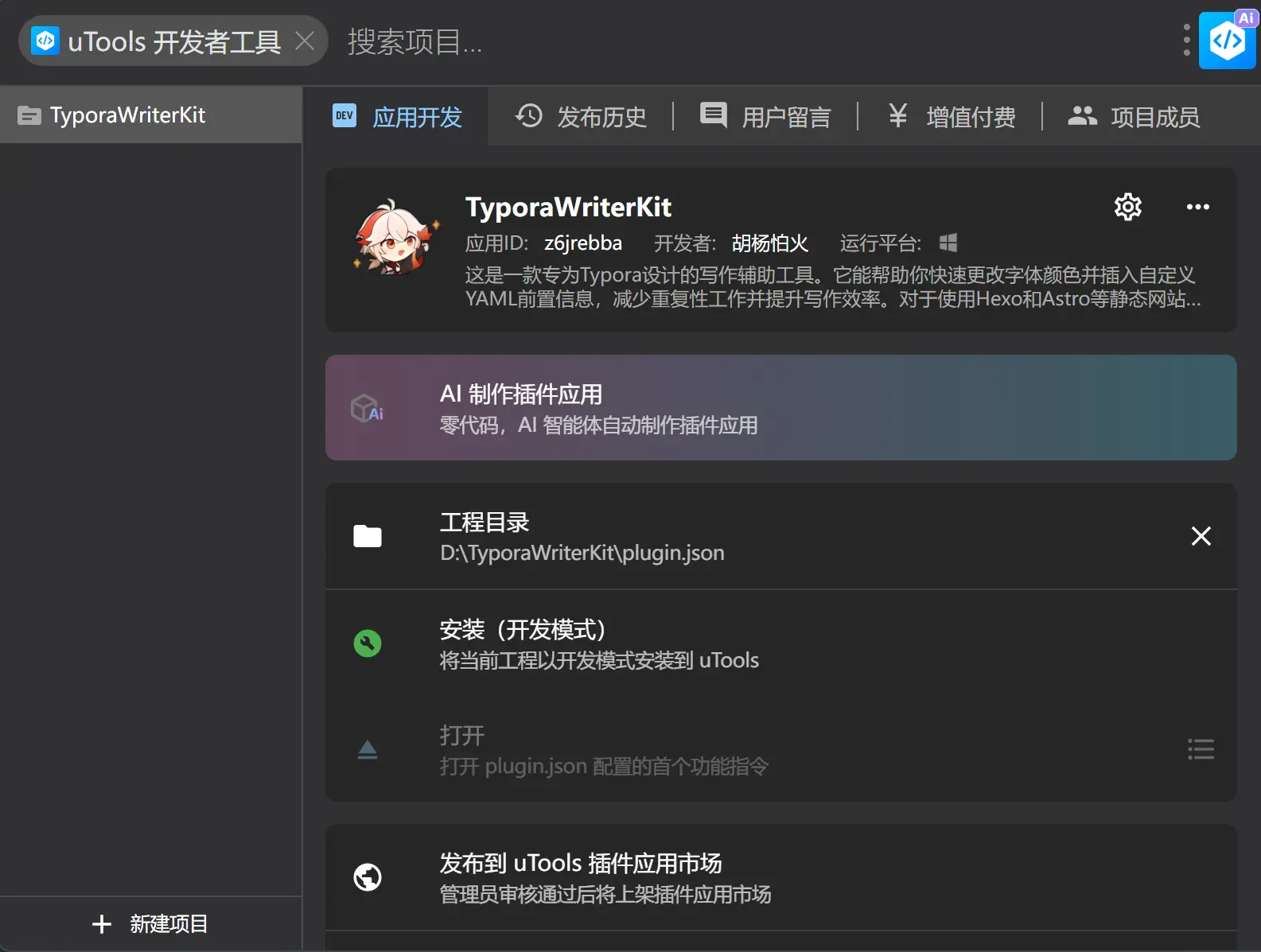
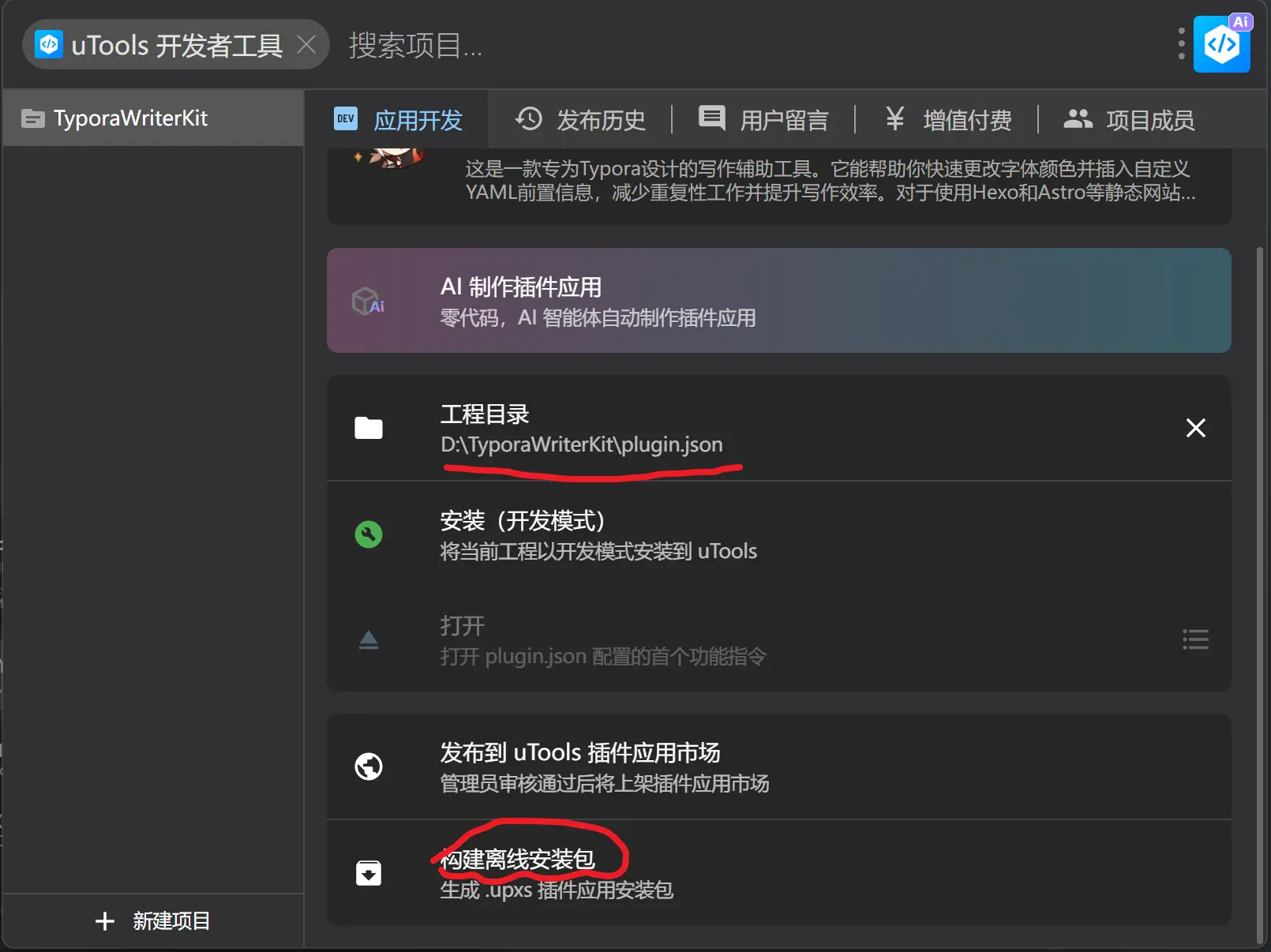
之前第一次不会用这个直接上传了结果没发现居然不能用没通过审核,现在使用前端重新写了这个软件这次应该能过…..把?
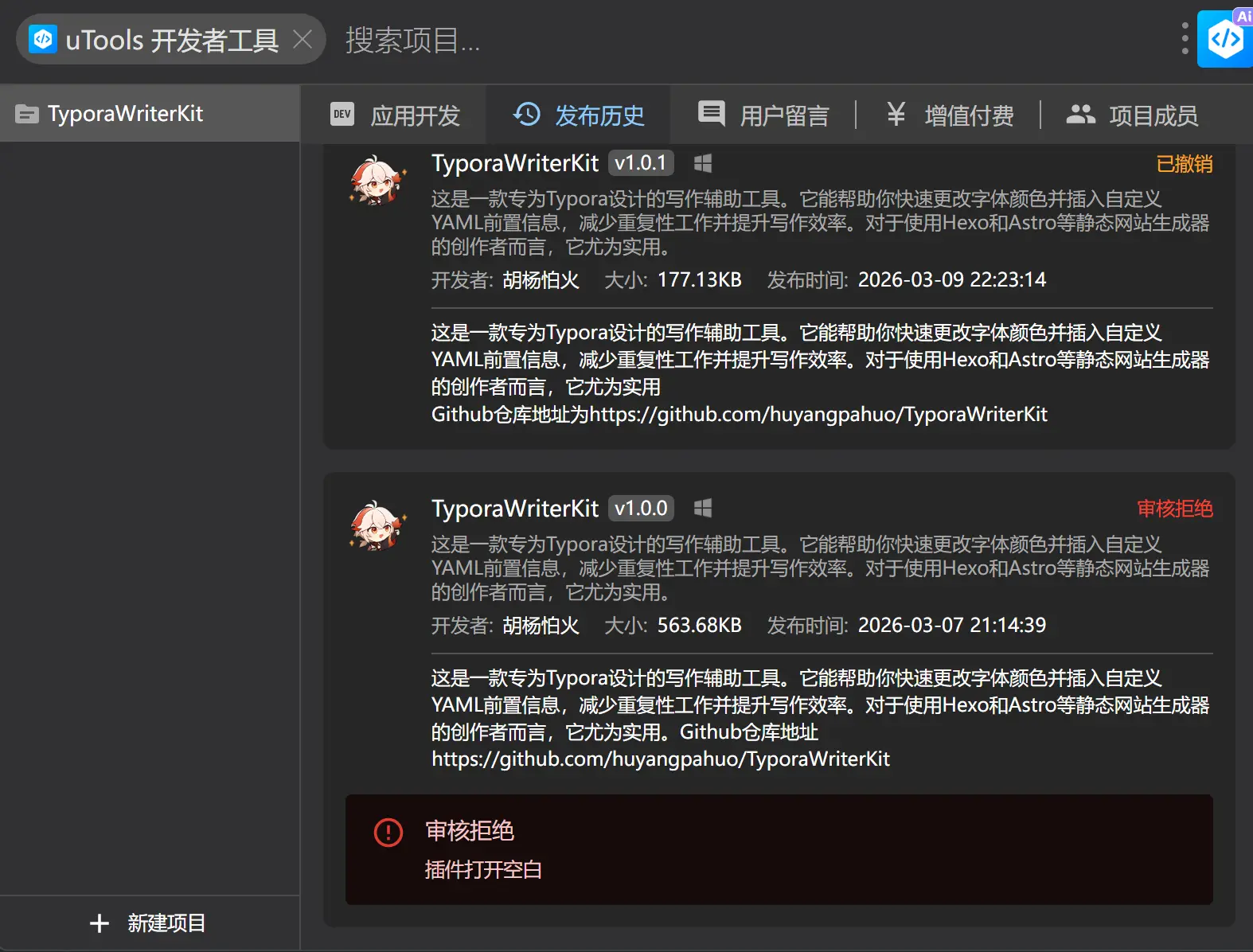
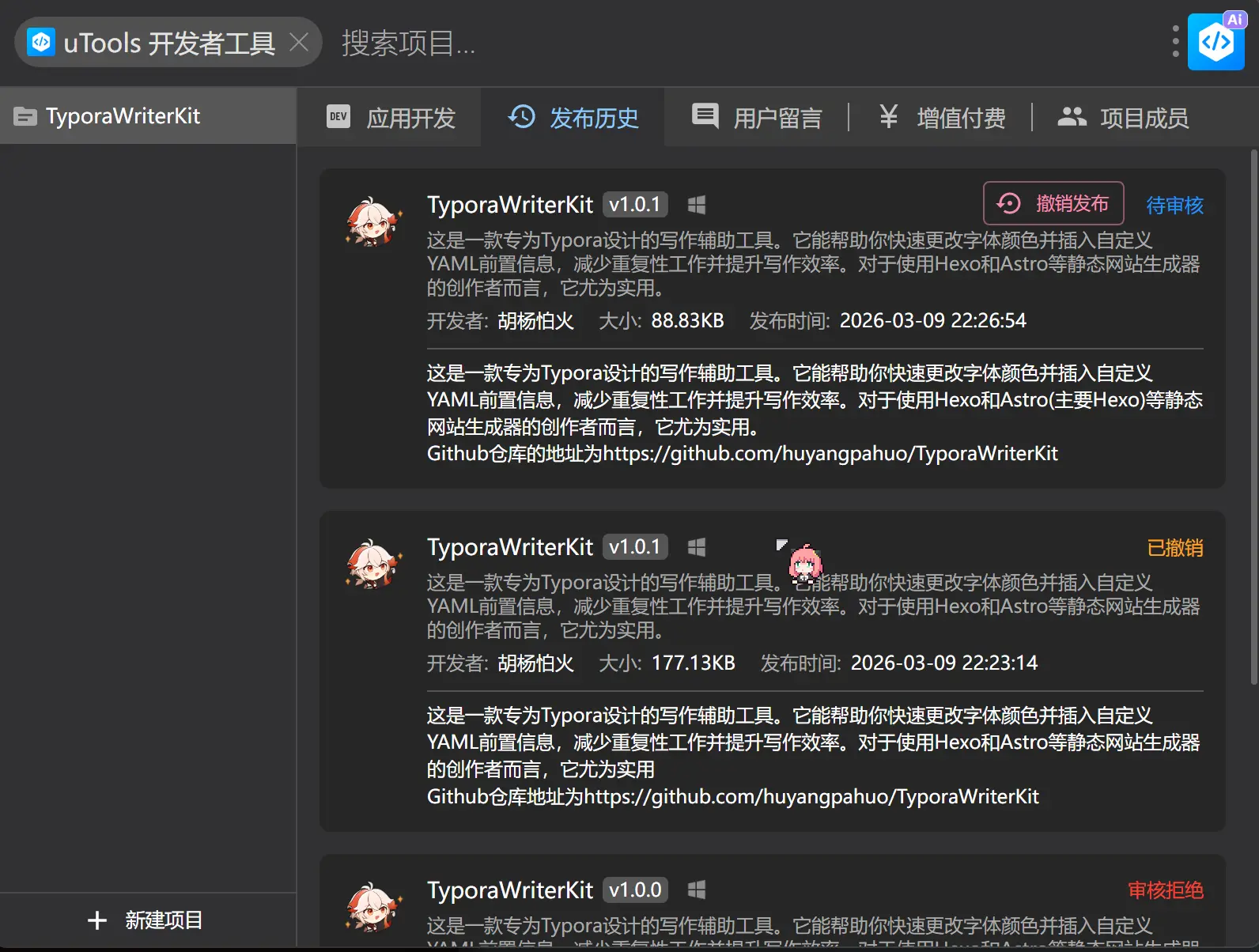
估计过两天应该就通过了
最后
已经有四十余位用户,感谢你们的支持!
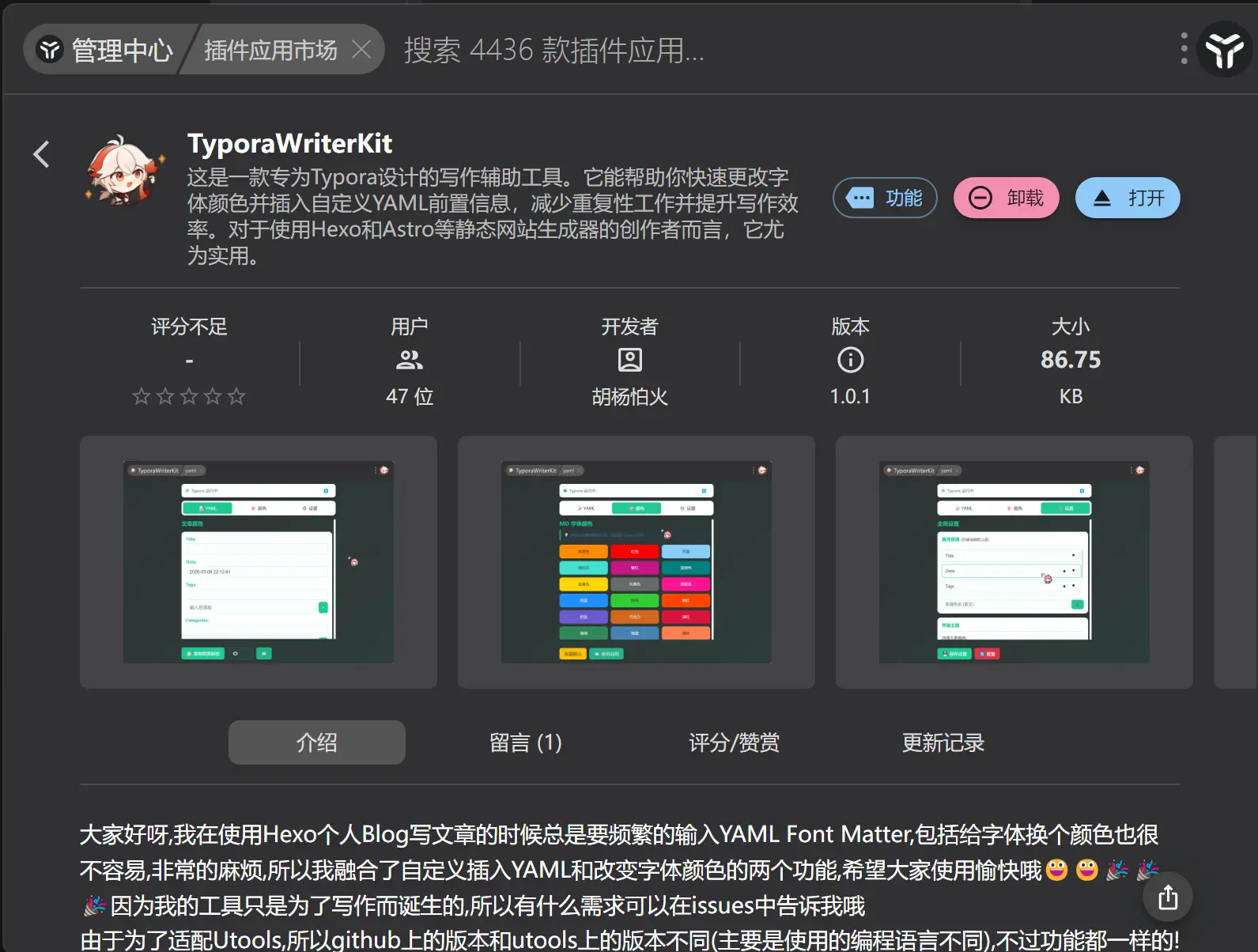

评论区